Solved Shrink OS Volume

CBM

New member
Power User
Local time
4:40 PM
Messages
104
Location
Ohio
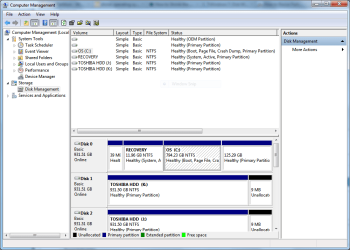
I want to shrink the OS partition on my internal drive. I'm getting tired of my Acronis backups taking two hours to complete. The size of the drive is 1TB, formatted NTFS. The first partition on the C Drive is labeled OEM (39MB) and I have no idea what it contains. The second partition is labeled Recovery(11.96GB) (System, Active, Primary). The third partition is labeled OS (794.23GB)(Boot, Page File, Crash Dump, Primary). The fourth and final partition is my Acronis Secure Zone (125.29GB) (Primary). I don't back up either of my external drives, as both of them contain the same information so that if one of them takes a crap on me I have an exact duplicate on the other one.

I would like to reduce the OS partition to 150GB, allowing 50GB for the Shadow Copies. All my Windows Backups (full backup only, overwritten) go to one of my external drives. All my Acronis backups (full backup only, overwritten) go to each of the external drives and the Acronis Secure Zone. All my files (pictures, videos, music and copies of downloaded software) are stored on the external drives.

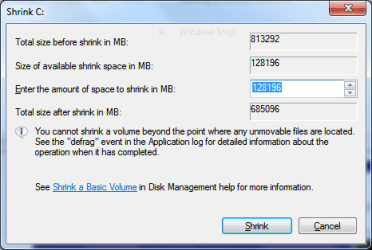
I attempted to shrink the OS partition (794.23GB). Once the drive was analyzed it showed:

Total size in shrink in MB: 813,292
Size of available shrink space in MB: 128,196
Total size after shrink in MB: 685,096

I don't understand why I cannot substantially shrink the OS volume beyond 128,196MB. I don't understand what type of immovable file(s) would prevent me from doing so but then again, I can't understand how to shave without cutting my face. I have defragged the OS partition using PerfectDisk 11 Professional, using defrag only (not SmartPlacement) and consolidated free space using the same application prior to attempting to shrink the OS partition and I'm still offered no more than a 128,196MB shrink.

Also, I've read somewhere that it could be advantageous to move the page file to a partition other than the OS partition. If that's true, I have no idea how to do it.

Thank you in advance for your time and any assistance provided and please excuse my ignorance.

I have provided two screen shots.

C.B.
 

Attachments
  • Computer Management.PNG
    Computer Management.PNG
    34 KB · Views: 178
  • Shrink C.PNG
    Shrink C.PNG
    11.8 KB · Views: 88

My Computer

Computer Manufacturer/Model Number
1.Dell Studio XPS 7100 Desktop; 2.Dell XPS 17 Laptop
OS
1.Windows 7 Ultimate x64; 2.Windows 7 Ultimate x64
CPU
1.AMD Phenom II X6 1075T; 2.Intel Core i7-2720QM 2.20 GHz
Memory
1.8GB DDR3; 2.8GB DDR3
Graphics Card(s)
1.AMD HD 5670 1GB; 2.NVIDIA GeForce GT 555M 3GB
Monitor(s) Displays
1.Samsung SyncMaster; 2.17.3in FHD
Screen Resolution
1.1600X900; 2.1920X1080
Hard Drives
1.1TB; 2.1TB 500GB X2
Keyboard
1.Microsoft Wireless; 2.Backlit
Mouse
Microsoft Wireless; 2.Microsoft Wireless Mobile 3500
Internet Speed
10.0 Mbps

My Computer

Computer type
PC/Desktop
Computer Manufacturer/Model Number
Ignatz Special; 4 speed manual gearbox; factory air conditioning; one of one
OS
Windows 7 Home Premium SP1, 64-bit
CPU
Intel Skylake i5-6600K, not overclocked
Motherboard
AsRock Z170M Extreme 4, micro ATX
Memory
8 GB HyperX DDR4-2666 (2 x 4 GB)
Graphics Card(s)
none; graphics are integrated on CPU
Sound Card
onboard: Realtek ALC1150; external: USB Behringer UF0-202
Monitor(s) Displays
Dell S2340M 23 inch IPS
Screen Resolution
1600 x 900
Hard Drives
System: Crucial MX100 series SSD, 128 GB;
Data: Samsung Spinpoint 103SJ, 1 TB;
Backup: WD Caviar Green WD30EZRX-00D8PB0, 3 TB
PSU
Rosewill SilentNight 500 watt fanless, semi-modular
Case
Antec Solo II
Cooling
Noctua NH-U12S; Noctua F12 intake, Noctua S12A exhaust
Keyboard
Microsoft 200 6JH-00001 USB
Mouse
Dell or Microsoft optical wired; USB
Antivirus
Microsoft Security Essentials and Malwarebytes Premium
Browser
Pale Moon
Other Info
All fans PWM; speeds at idle: CPU circa 500 rpm; intake circa 600 rpm; exhaust circa 600 rpm; CPU temps 27 idle and 47 C load in a warm room (27 C/81 F) when running Intel Extreme Tuning Utility stress test.
Partition Wizard CD will do the job, never fails.

Do you know if that Recovery partition still works? Be sure to make the disks off of it if you want a path back to factory condition.

I´d use PW CD to Explore the OEM and Recovery and post back a screenshot of the contents for analysis.
 
DANGER - do not attempt to create an additional partition on Disk0. You have 4 primaries already and no possibility to create anything that would not get you into big trouble called "dynamics".


You have to first convert one of your current primaries to logical. The best tool for that is the bootable CD that ignatzagsonic has linked above. The controls for that are in the Partition tab > Modify.

The best candidate for conversion is your C partition.
 

My Computer

Computer Manufacturer/Model Number
HP, Dell, Gateway, Toshiba - 4 laptops and 2 desktops
OS
Vista, Windows7, Mint Mate, Zorin, Windows 8
CPU
from 1.6GHz Duo to i7
Monitor(s) Displays
2x HP w2207
Hard Drives
5x HDD, 7x SSD, 12x Externals
Keyboard
with trackball - no mices
Mouse
Trackball mice
Internet Speed
DSL 6000
Hello whs,

I have downloaded the ISO mentioned by ignatzatsonic. However, I haven't as of yet burned it. I know absolutely nothing about logical versus primary, the purpose of either type or why one type is suitable for one thing and not another. I simply want to reduce the size of the partition my OS is located on and I realize that doing so would in effect create another partition. Perhaps I should eliminate the Acronis Secure Zone and return its space to the OS partition before moving on. I could also eliminate the Recovery partition since it probably contains all the bloatware supplied with the computer. I have the reinstallation DVDs for both computers in addition to the system repair discs I burned. I don't really care about losing any personal data because, as I mentioned before, it is stored on my external drives.

The screen shots I attached are from the desktop computer I am using at this time, a Dell Studio XPS 7100 I purchased a few months ago. I will also want to reduce the size of the OS partition on a Dell XPS 17 (Win 7 Ultimate x64) I purchased a few weeks ago. It contains two 500GB internal drives with the OS on C Drive and a separate D Drive. I use Paragon and the native Windows Backup and Restore on the laptop to create backups on the D Drive because, quite frankly, I've had trouble with each version of Acronis TIH I've purchased over the years. I will reduce the OS partition on the laptop after I've learned how to successfully do it on the desktop.

Let's face the facts; I'm stupid and I need time to research all this information. I'll return to this discussion after I know enough to understand what you guys are talking about and once I learn how to use Partition Wizard. It may take some time. I sincerely appreciate the assistance from all of you and I don't want to waste your time asking ignorant questions when your time could be better used helping others who also need assistance.
 

My Computer

Computer Manufacturer/Model Number
1.Dell Studio XPS 7100 Desktop; 2.Dell XPS 17 Laptop
OS
1.Windows 7 Ultimate x64; 2.Windows 7 Ultimate x64
CPU
1.AMD Phenom II X6 1075T; 2.Intel Core i7-2720QM 2.20 GHz
Memory
1.8GB DDR3; 2.8GB DDR3
Graphics Card(s)
1.AMD HD 5670 1GB; 2.NVIDIA GeForce GT 555M 3GB
Monitor(s) Displays
1.Samsung SyncMaster; 2.17.3in FHD
Screen Resolution
1.1600X900; 2.1920X1080
Hard Drives
1.1TB; 2.1TB 500GB X2
Keyboard
1.Microsoft Wireless; 2.Backlit
Mouse
Microsoft Wireless; 2.Microsoft Wireless Mobile 3500
Internet Speed
10.0 Mbps
I am not sure how that Acronis Secure Zone came about. But if that is the 4th primary partition on Disk0, it is certainly a candidate for elimination. You can then shrink C and the unallocated spaces of the secure zone and the shrunk C space will be one blob into which you can make a simple logical partition (it is really an extended partition because it is the first logical, but I do not want to confuse you any further).

Here are some extra short definitions:

Primary - is required for active partitions - and only for those. In the NTFS file system, a maximum of 4 is allowed.

Active - is the partition that contains the bootmanager

Extended - is the first logical partition you create on a disk. It allows to create many more logical partitions under its umbrella.

Logical - that should be the normal case and suffices for everything from which you do not want to boot

Dynamic - is a partition that spans multiple physical drives. It can also happen if you create a new partition when you already have 4 primaries. Those are to be avoided like the plague because they create a lot of problems.

Simple - means nothing special. It is just to confuse us.

PS: I will only be back tomorrow because it is midnight in my neck of the woods.
 

My Computer

Computer Manufacturer/Model Number
HP, Dell, Gateway, Toshiba - 4 laptops and 2 desktops
OS
Vista, Windows7, Mint Mate, Zorin, Windows 8
CPU
from 1.6GHz Duo to i7
Monitor(s) Displays
2x HP w2207
Hard Drives
5x HDD, 7x SSD, 12x Externals
Keyboard
with trackball - no mices
Mouse
Trackball mice
Internet Speed
DSL 6000
It's been quite a while since I used Acronis, but as I recall, the "Secure Zone" is optional---you don't have to use it. I do recall that I did not use it years ago when I did use Acronis.

In fact, I think this thread is the first mention of Secure Zone that I have heard on these forums. So, I think many users don't use it. I can't even recall its exact purpose. But you can certainly make Acronis images without it and store them directly on another drive.

That partition would definitely be a candidate for elimination as WHS says.

Partition Wizard has a pretty good interface and is quite intuitive. Users on this forum have very few problems with it.

Try to end up with no more than 3 partitions---many of us have only 1.
 

My Computer

Computer type
PC/Desktop
Computer Manufacturer/Model Number
Ignatz Special; 4 speed manual gearbox; factory air conditioning; one of one
OS
Windows 7 Home Premium SP1, 64-bit
CPU
Intel Skylake i5-6600K, not overclocked
Motherboard
AsRock Z170M Extreme 4, micro ATX
Memory
8 GB HyperX DDR4-2666 (2 x 4 GB)
Graphics Card(s)
none; graphics are integrated on CPU
Sound Card
onboard: Realtek ALC1150; external: USB Behringer UF0-202
Monitor(s) Displays
Dell S2340M 23 inch IPS
Screen Resolution
1600 x 900
Hard Drives
System: Crucial MX100 series SSD, 128 GB;
Data: Samsung Spinpoint 103SJ, 1 TB;
Backup: WD Caviar Green WD30EZRX-00D8PB0, 3 TB
PSU
Rosewill SilentNight 500 watt fanless, semi-modular
Case
Antec Solo II
Cooling
Noctua NH-U12S; Noctua F12 intake, Noctua S12A exhaust
Keyboard
Microsoft 200 6JH-00001 USB
Mouse
Dell or Microsoft optical wired; USB
Antivirus
Microsoft Security Essentials and Malwarebytes Premium
Browser
Pale Moon
Other Info
All fans PWM; speeds at idle: CPU circa 500 rpm; intake circa 600 rpm; exhaust circa 600 rpm; CPU temps 27 idle and 47 C load in a warm room (27 C/81 F) when running Intel Extreme Tuning Utility stress test.
Partition Wizard CD will do the job, never fails.

Do you know if that Recovery partition still works? Be sure to make the disks off of it if you want a path back to factory condition.

I´d use PW CD to Explore the OEM and Recovery and post back a screenshot of the contents for analysis.

Thank you for your reply, gregrocker. I've burned the ISO file to a DVD so I'll boot with it and see what I get. Do I use the PrintScreen key on my keyboard while examining the contents of Dell's recovery and ulility partitions and then paste it into Paint after I reboot or is that even possible? Does the Partition Wizard itself have the capability of capturing a screenshot and if so how do I retain the screenshot so as to save it and then paste it after I reboot?

I'll create an Acronis backup and a Windows Backup and Restore backup and save them to one of my external drives before attempting any drive changes with Partition Wizard. I assume a backup would restore the drive to its original configuration but I'm not sure.

C.B.
 
Last edited:

My Computer

Computer Manufacturer/Model Number
1.Dell Studio XPS 7100 Desktop; 2.Dell XPS 17 Laptop
OS
1.Windows 7 Ultimate x64; 2.Windows 7 Ultimate x64
CPU
1.AMD Phenom II X6 1075T; 2.Intel Core i7-2720QM 2.20 GHz
Memory
1.8GB DDR3; 2.8GB DDR3
Graphics Card(s)
1.AMD HD 5670 1GB; 2.NVIDIA GeForce GT 555M 3GB
Monitor(s) Displays
1.Samsung SyncMaster; 2.17.3in FHD
Screen Resolution
1.1600X900; 2.1920X1080
Hard Drives
1.1TB; 2.1TB 500GB X2
Keyboard
1.Microsoft Wireless; 2.Backlit
Mouse
Microsoft Wireless; 2.Microsoft Wireless Mobile 3500
Internet Speed
10.0 Mbps
It's been quite a while since I used Acronis, but as I recall, the "Secure Zone" is optional---you don't have to use it. I do recall that I did not use it years ago when I did use Acronis.

In fact, I think this thread is the first mention of Secure Zone that I have heard on these forums. So, I think many users don't use it. I can't even recall its exact purpose. But you can certainly make Acronis images without it and store them directly on another drive.

That partition would definitely be a candidate for elimination as WHS says.

Partition Wizard has a pretty good interface and is quite intuitive. Users on this forum have very few problems with it.

Try to end up with no more than 3 partitions---many of us have only 1.

Thank you for your assistance, ignatzatsonic. I created the ASZ myself but I removed it a few minutes ago and returned the unallocated space to my OS partition. I now have only three partitions on the drive. I'll leave the Recovery partition on the drive, regardless of what I attempt to do, since it's such a small amount of space on the 1TB drive. If I delete it I'm not so sure that I would be able to boot into Windows. I don't worry about losing the third party software that came with the computer as I can simply go to Dell's website, enter my service tag number and download it. I assume the Dell utility partition is the first one on the drive, with 39MB. I'll leave it as is.

I did come up with this while researching partitions:

http://en.community.dell.com/support-forums/software-os/f/3524/t/19370891.aspx

And this:

http://www.goodells.net/dellutility/

And this:

http://jgkhome.name/PC_Info/BING_WIN7_Dell.htm
 

My Computer

Computer Manufacturer/Model Number
1.Dell Studio XPS 7100 Desktop; 2.Dell XPS 17 Laptop
OS
1.Windows 7 Ultimate x64; 2.Windows 7 Ultimate x64
CPU
1.AMD Phenom II X6 1075T; 2.Intel Core i7-2720QM 2.20 GHz
Memory
1.8GB DDR3; 2.8GB DDR3
Graphics Card(s)
1.AMD HD 5670 1GB; 2.NVIDIA GeForce GT 555M 3GB
Monitor(s) Displays
1.Samsung SyncMaster; 2.17.3in FHD
Screen Resolution
1.1600X900; 2.1920X1080
Hard Drives
1.1TB; 2.1TB 500GB X2
Keyboard
1.Microsoft Wireless; 2.Backlit
Mouse
Microsoft Wireless; 2.Microsoft Wireless Mobile 3500
Internet Speed
10.0 Mbps
Post another screenshot of Disk Management as it is right now.

Depending on what it looks like, you may not need to use the Partition Wizard disc that you burned.
 

My Computer

Computer type
PC/Desktop
Computer Manufacturer/Model Number
Ignatz Special; 4 speed manual gearbox; factory air conditioning; one of one
OS
Windows 7 Home Premium SP1, 64-bit
CPU
Intel Skylake i5-6600K, not overclocked
Motherboard
AsRock Z170M Extreme 4, micro ATX
Memory
8 GB HyperX DDR4-2666 (2 x 4 GB)
Graphics Card(s)
none; graphics are integrated on CPU
Sound Card
onboard: Realtek ALC1150; external: USB Behringer UF0-202
Monitor(s) Displays
Dell S2340M 23 inch IPS
Screen Resolution
1600 x 900
Hard Drives
System: Crucial MX100 series SSD, 128 GB;
Data: Samsung Spinpoint 103SJ, 1 TB;
Backup: WD Caviar Green WD30EZRX-00D8PB0, 3 TB
PSU
Rosewill SilentNight 500 watt fanless, semi-modular
Case
Antec Solo II
Cooling
Noctua NH-U12S; Noctua F12 intake, Noctua S12A exhaust
Keyboard
Microsoft 200 6JH-00001 USB
Mouse
Dell or Microsoft optical wired; USB
Antivirus
Microsoft Security Essentials and Malwarebytes Premium
Browser
Pale Moon
Other Info
All fans PWM; speeds at idle: CPU circa 500 rpm; intake circa 600 rpm; exhaust circa 600 rpm; CPU temps 27 idle and 47 C load in a warm room (27 C/81 F) when running Intel Extreme Tuning Utility stress test.
Post another screenshot of Disk Management as it is right now.

Depending on what it looks like, you may not need to use the Partition Wizard disc that you burned.


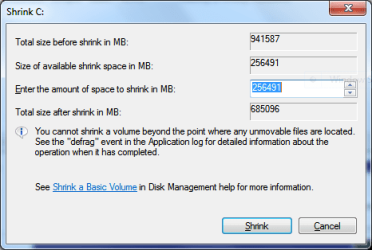
Ok, here it is, along with a screenshot of the shrink attempt after restoring the Acronis Secure Zone space to the OS partition. As you can see, I'm still being restricted as to how much I can shrink the partition. There must be some immovable file(s) involved.
 

Attachments

  • Disk Management.PNG
    Disk Management.PNG
    36.6 KB · Views: 35
  • Shrink attempt.PNG
    Shrink attempt.PNG
    11.5 KB · Views: 16

My Computer

Computer Manufacturer/Model Number
1.Dell Studio XPS 7100 Desktop; 2.Dell XPS 17 Laptop
OS
1.Windows 7 Ultimate x64; 2.Windows 7 Ultimate x64
CPU
1.AMD Phenom II X6 1075T; 2.Intel Core i7-2720QM 2.20 GHz
Memory
1.8GB DDR3; 2.8GB DDR3
Graphics Card(s)
1.AMD HD 5670 1GB; 2.NVIDIA GeForce GT 555M 3GB
Monitor(s) Displays
1.Samsung SyncMaster; 2.17.3in FHD
Screen Resolution
1.1600X900; 2.1920X1080
Hard Drives
1.1TB; 2.1TB 500GB X2
Keyboard
1.Microsoft Wireless; 2.Backlit
Mouse
Microsoft Wireless; 2.Microsoft Wireless Mobile 3500
Internet Speed
10.0 Mbps
OK; Windows Disk Management is over-matched for your situation. It can't deal with those "unmovable" files very well.

Go with Partition Wizard boot disc.
 

My Computer

Computer type
PC/Desktop
Computer Manufacturer/Model Number
Ignatz Special; 4 speed manual gearbox; factory air conditioning; one of one
OS
Windows 7 Home Premium SP1, 64-bit
CPU
Intel Skylake i5-6600K, not overclocked
Motherboard
AsRock Z170M Extreme 4, micro ATX
Memory
8 GB HyperX DDR4-2666 (2 x 4 GB)
Graphics Card(s)
none; graphics are integrated on CPU
Sound Card
onboard: Realtek ALC1150; external: USB Behringer UF0-202
Monitor(s) Displays
Dell S2340M 23 inch IPS
Screen Resolution
1600 x 900
Hard Drives
System: Crucial MX100 series SSD, 128 GB;
Data: Samsung Spinpoint 103SJ, 1 TB;
Backup: WD Caviar Green WD30EZRX-00D8PB0, 3 TB
PSU
Rosewill SilentNight 500 watt fanless, semi-modular
Case
Antec Solo II
Cooling
Noctua NH-U12S; Noctua F12 intake, Noctua S12A exhaust
Keyboard
Microsoft 200 6JH-00001 USB
Mouse
Dell or Microsoft optical wired; USB
Antivirus
Microsoft Security Essentials and Malwarebytes Premium
Browser
Pale Moon
Other Info
All fans PWM; speeds at idle: CPU circa 500 rpm; intake circa 600 rpm; exhaust circa 600 rpm; CPU temps 27 idle and 47 C load in a warm room (27 C/81 F) when running Intel Extreme Tuning Utility stress test.
One question; If I use Partition Wizard to shrink the OS partition to say, 150GB, will Partition Wizard move these unmovable files to where they belong? Will I still retain the unmovable files. They could be MBR files or system files for all I know, which isn't much.
 

My Computer

Computer Manufacturer/Model Number
1.Dell Studio XPS 7100 Desktop; 2.Dell XPS 17 Laptop
OS
1.Windows 7 Ultimate x64; 2.Windows 7 Ultimate x64
CPU
1.AMD Phenom II X6 1075T; 2.Intel Core i7-2720QM 2.20 GHz
Memory
1.8GB DDR3; 2.8GB DDR3
Graphics Card(s)
1.AMD HD 5670 1GB; 2.NVIDIA GeForce GT 555M 3GB
Monitor(s) Displays
1.Samsung SyncMaster; 2.17.3in FHD
Screen Resolution
1.1600X900; 2.1920X1080
Hard Drives
1.1TB; 2.1TB 500GB X2
Keyboard
1.Microsoft Wireless; 2.Backlit
Mouse
Microsoft Wireless; 2.Microsoft Wireless Mobile 3500
Internet Speed
10.0 Mbps
Yes. It will move them as needed to allow you to shrink.

Back up all of your data before you begin.

It is a very high quality tool that has very few reported issues, but anything can happen. So you should be prepared.
 

My Computer

Computer type
PC/Desktop
Computer Manufacturer/Model Number
Ignatz Special; 4 speed manual gearbox; factory air conditioning; one of one
OS
Windows 7 Home Premium SP1, 64-bit
CPU
Intel Skylake i5-6600K, not overclocked
Motherboard
AsRock Z170M Extreme 4, micro ATX
Memory
8 GB HyperX DDR4-2666 (2 x 4 GB)
Graphics Card(s)
none; graphics are integrated on CPU
Sound Card
onboard: Realtek ALC1150; external: USB Behringer UF0-202
Monitor(s) Displays
Dell S2340M 23 inch IPS
Screen Resolution
1600 x 900
Hard Drives
System: Crucial MX100 series SSD, 128 GB;
Data: Samsung Spinpoint 103SJ, 1 TB;
Backup: WD Caviar Green WD30EZRX-00D8PB0, 3 TB
PSU
Rosewill SilentNight 500 watt fanless, semi-modular
Case
Antec Solo II
Cooling
Noctua NH-U12S; Noctua F12 intake, Noctua S12A exhaust
Keyboard
Microsoft 200 6JH-00001 USB
Mouse
Dell or Microsoft optical wired; USB
Antivirus
Microsoft Security Essentials and Malwarebytes Premium
Browser
Pale Moon
Other Info
All fans PWM; speeds at idle: CPU circa 500 rpm; intake circa 600 rpm; exhaust circa 600 rpm; CPU temps 27 idle and 47 C load in a warm room (27 C/81 F) when running Intel Extreme Tuning Utility stress test.
Yes. It will move them as needed to allow you to shrink.

Back up all of your data before you begin.

It is a very high quality tool that has very few reported issues, but anything can happen. So you should be prepared.

I'm almost ready to attempt to shrink the OS partition. The OS partition has always been and currently is a primary partition. In a previous post presented by whs, he states that before shrinking the OS partition I will first have to convert it to a logical partition, which is something I don't understand. Will changing it to a logical partition affect the ability of my computer to boot after after I shrink the OS partition? I certainly don't doubt what whs has said but why would I have to change from a primary to a logical when I'm simply shrinking the partition? Perhaps he was assuming that I would leave the Acronis Secure Zone in place, which would give me more than four partitions after shrinking the OS partition.

I'm going to back up my system now to an external drive before I attempt to do any shrinking using Partition Wizard.
 

My Computer

Computer Manufacturer/Model Number
1.Dell Studio XPS 7100 Desktop; 2.Dell XPS 17 Laptop
OS
1.Windows 7 Ultimate x64; 2.Windows 7 Ultimate x64
CPU
1.AMD Phenom II X6 1075T; 2.Intel Core i7-2720QM 2.20 GHz
Memory
1.8GB DDR3; 2.8GB DDR3
Graphics Card(s)
1.AMD HD 5670 1GB; 2.NVIDIA GeForce GT 555M 3GB
Monitor(s) Displays
1.Samsung SyncMaster; 2.17.3in FHD
Screen Resolution
1.1600X900; 2.1920X1080
Hard Drives
1.1TB; 2.1TB 500GB X2
Keyboard
1.Microsoft Wireless; 2.Backlit
Mouse
Microsoft Wireless; 2.Microsoft Wireless Mobile 3500
Internet Speed
10.0 Mbps
In a previous post presented by whs, he states that before shrinking the OS partition I will first have to convert it to a logical partition, which is something I don't understand. ........... Perhaps he was assuming that I would leave the Acronis Secure Zone in place, which would give me more than four partitions after shrinking the OS partition.

I think you are right. He was just figuring you might otherwise end up with more than 4 partitions, which would suggest using extended/logical partitions.

The partition does not have to be logical in order to be shrunk.

When you boot to the Partition Wizard disk, make sure you can see and properly identify all partitions and space on the drive. Your drive letters may have changed, so you might have to ID each component based on its size, rather than drive letter.
 

My Computer

Computer type
PC/Desktop
Computer Manufacturer/Model Number
Ignatz Special; 4 speed manual gearbox; factory air conditioning; one of one
OS
Windows 7 Home Premium SP1, 64-bit
CPU
Intel Skylake i5-6600K, not overclocked
Motherboard
AsRock Z170M Extreme 4, micro ATX
Memory
8 GB HyperX DDR4-2666 (2 x 4 GB)
Graphics Card(s)
none; graphics are integrated on CPU
Sound Card
onboard: Realtek ALC1150; external: USB Behringer UF0-202
Monitor(s) Displays
Dell S2340M 23 inch IPS
Screen Resolution
1600 x 900
Hard Drives
System: Crucial MX100 series SSD, 128 GB;
Data: Samsung Spinpoint 103SJ, 1 TB;
Backup: WD Caviar Green WD30EZRX-00D8PB0, 3 TB
PSU
Rosewill SilentNight 500 watt fanless, semi-modular
Case
Antec Solo II
Cooling
Noctua NH-U12S; Noctua F12 intake, Noctua S12A exhaust
Keyboard
Microsoft 200 6JH-00001 USB
Mouse
Dell or Microsoft optical wired; USB
Antivirus
Microsoft Security Essentials and Malwarebytes Premium
Browser
Pale Moon
Other Info
All fans PWM; speeds at idle: CPU circa 500 rpm; intake circa 600 rpm; exhaust circa 600 rpm; CPU temps 27 idle and 47 C load in a warm room (27 C/81 F) when running Intel Extreme Tuning Utility stress test.
Thank you, ignatzatsonic. I'll wait for the backup to complete and then I'll also create a restore point with System Restore. I'm aware that the drive letters may change but that's no problem. The Dell utility and Dell recovery partitions don't have drive letters and that leaves only the OS partition.

By the way, do you know whether or not a System Restore or restoring from a backup will change my drive also, putting it back into the configuration prior to the shrinking? I'm really clueless about all of this.
 

My Computer

Computer Manufacturer/Model Number
1.Dell Studio XPS 7100 Desktop; 2.Dell XPS 17 Laptop
OS
1.Windows 7 Ultimate x64; 2.Windows 7 Ultimate x64
CPU
1.AMD Phenom II X6 1075T; 2.Intel Core i7-2720QM 2.20 GHz
Memory
1.8GB DDR3; 2.8GB DDR3
Graphics Card(s)
1.AMD HD 5670 1GB; 2.NVIDIA GeForce GT 555M 3GB
Monitor(s) Displays
1.Samsung SyncMaster; 2.17.3in FHD
Screen Resolution
1.1600X900; 2.1920X1080
Hard Drives
1.1TB; 2.1TB 500GB X2
Keyboard
1.Microsoft Wireless; 2.Backlit
Mouse
Microsoft Wireless; 2.Microsoft Wireless Mobile 3500
Internet Speed
10.0 Mbps
By the way, do you know whether or not a System Restore or restoring from a backup will change my drive also, putting it back into the configuration prior to the shrinking? I'm really clueless about all of this.

I very seriously doubt it and have never heard of it being a consideration.

I suppose theoretically, someone could:

Install a whole bunch of applications, making your occupied space swell.

Then make a restore point.

Then delete those applications and shrink the partition to an absolute minimum size so there is no unoccupied space.

Then attempt a system restore.

In such a case, the restore might balk due to lack of space?

But that's not what you have done here, so I say go ahead.
 

My Computer

Computer type
PC/Desktop
Computer Manufacturer/Model Number
Ignatz Special; 4 speed manual gearbox; factory air conditioning; one of one
OS
Windows 7 Home Premium SP1, 64-bit
CPU
Intel Skylake i5-6600K, not overclocked
Motherboard
AsRock Z170M Extreme 4, micro ATX
Memory
8 GB HyperX DDR4-2666 (2 x 4 GB)
Graphics Card(s)
none; graphics are integrated on CPU
Sound Card
onboard: Realtek ALC1150; external: USB Behringer UF0-202
Monitor(s) Displays
Dell S2340M 23 inch IPS
Screen Resolution
1600 x 900
Hard Drives
System: Crucial MX100 series SSD, 128 GB;
Data: Samsung Spinpoint 103SJ, 1 TB;
Backup: WD Caviar Green WD30EZRX-00D8PB0, 3 TB
PSU
Rosewill SilentNight 500 watt fanless, semi-modular
Case
Antec Solo II
Cooling
Noctua NH-U12S; Noctua F12 intake, Noctua S12A exhaust
Keyboard
Microsoft 200 6JH-00001 USB
Mouse
Dell or Microsoft optical wired; USB
Antivirus
Microsoft Security Essentials and Malwarebytes Premium
Browser
Pale Moon
Other Info
All fans PWM; speeds at idle: CPU circa 500 rpm; intake circa 600 rpm; exhaust circa 600 rpm; CPU temps 27 idle and 47 C load in a warm room (27 C/81 F) when running Intel Extreme Tuning Utility stress test.
Once you shrink C, Disk Mgmt should offer you a Logical Extended partition for the fourth. If not use PW CD to create a new Logical partition in the shrink space.

Eventually as you become more at ease with backups you may no longer want the Recov partition or rely solely on the Recov Disks. You then have the option to delete it and the OEM partition once you determine if what is on it is used. Posting a cam snap of its contents or Disk Mgmt>Explore window will allow us to take a look.
 
CBM, it is daytime again and I have been reading thru all the posts. Looks like you are getting a lot of good advice from the friends. Here is some extra input for your understanding:

1. the reason that Disk Management cannot shrink the partition more than it says is the MFT (master file table). That is sitting high up on the disk and DM cannot move it. PW can move it. Here is an article that explains it a bit further: Working Around Windows Vista’s "Shrink Volume" Inadequacy Problems - How-To Geek

2. Partition Wizard is a good program, but it can play an act on you. Even though I have used it many times and am familiar with it, I once lost all partitions on a drive because I made a little mistake. I therefore highly recommend to image all partitions before you manipulate them with PW.

3. if you image partitions, you ususally restore those partitions individually. If you want to restore a whole drive in one shot, you have to "clone" the drive. I have not used Acronis in years so I do not know whether your Acronis can do that.
Many imaging programs (usually the free editions) cannot shrink the image to fit into a smaller partition. For the restore they need a partition that is equal or greater in size compared to the partition from where the image was taken. That is something to check with your Acronis if you want to restore an image of C: into a C partition that was shrunk after the image was taken.
 

My Computer

Computer Manufacturer/Model Number
HP, Dell, Gateway, Toshiba - 4 laptops and 2 desktops
OS
Vista, Windows7, Mint Mate, Zorin, Windows 8
CPU
from 1.6GHz Duo to i7
Monitor(s) Displays
2x HP w2207
Hard Drives
5x HDD, 7x SSD, 12x Externals
Keyboard
with trackball - no mices
Mouse
Trackball mice
Internet Speed
DSL 6000
Back
Top