Solved Shrink OS Volume

Okay, here's the thing. Windows reserves space for the MFT such that it is always at the front of the disk to make sure the performance is okay. Are you guys sure it's the MFT?

Eitherway, that immovable file somewhere is being a pain, and I agree to just use 3rd-party software.

Also, about logical disks, you can always convert to GPT if it's feasable.
 

My Computer

Computer Manufacturer/Model Number
Asus G73SW-XN2
OS
Windows 2000 5.0 Build 2195
CPU
Intel Core i7-2630QM@2GHz(2.9GHz Turbo Boost) [Sandy Bridge]
Motherboard
Asus G73SW (Intel HM65 Chipset)
Memory
Kingston DDR3 1333 16GB (4GBx4)
Graphics Card(s)
nVidia GTX 460m 1.5GB
Sound Card
EAX Advanced HD 5.0, THX TruStudio
Monitor(s) Displays
17.3 in. primary & 23 in. secondary
Screen Resolution
1920x1080
Hard Drives
Seagate Momentus XT (SATA II) 500 GB @ 7200 RPM
Hitachi (SATA II) 500GB @ 7200 RPM

Non Raid because ASUS was crappy to choose an HM65 Chipset
Keyboard
Built-in 102-Key Backlit Keyboard
Other Info
It's a Laptop.
The issue is normally System Files which cannot be moved while booted into Windows, hence the use of the PW boot CD.

PerfectDisk can normally handle this as well but you must use the Offline Defrag and specify System files.

Easier to allow PW to do it for you.
 
That actually gives me an idea. Did anyone mention disabling the page file yet?
 

My Computer

Computer Manufacturer/Model Number
Asus G73SW-XN2
OS
Windows 2000 5.0 Build 2195
CPU
Intel Core i7-2630QM@2GHz(2.9GHz Turbo Boost) [Sandy Bridge]
Motherboard
Asus G73SW (Intel HM65 Chipset)
Memory
Kingston DDR3 1333 16GB (4GBx4)
Graphics Card(s)
nVidia GTX 460m 1.5GB
Sound Card
EAX Advanced HD 5.0, THX TruStudio
Monitor(s) Displays
17.3 in. primary & 23 in. secondary
Screen Resolution
1920x1080
Hard Drives
Seagate Momentus XT (SATA II) 500 GB @ 7200 RPM
Hitachi (SATA II) 500GB @ 7200 RPM

Non Raid because ASUS was crappy to choose an HM65 Chipset
Keyboard
Built-in 102-Key Backlit Keyboard
Other Info
It's a Laptop.
That actually gives me an idea. Did anyone mention disabling the page file yet?
What is that supposed to do for the OP?
 

My Computer

Computer Manufacturer/Model Number
HP, Dell, Gateway, Toshiba - 4 laptops and 2 desktops
OS
Vista, Windows7, Mint Mate, Zorin, Windows 8
CPU
from 1.6GHz Duo to i7
Monitor(s) Displays
2x HP w2207
Hard Drives
5x HDD, 7x SSD, 12x Externals
Keyboard
with trackball - no mices
Mouse
Trackball mice
Internet Speed
DSL 6000
It's a system file. It would hinder shrinking. I remember I managed to shrink mine a lot when I disabled the page file on the drive in question.
 

My Computer

Computer Manufacturer/Model Number
Asus G73SW-XN2
OS
Windows 2000 5.0 Build 2195
CPU
Intel Core i7-2630QM@2GHz(2.9GHz Turbo Boost) [Sandy Bridge]
Motherboard
Asus G73SW (Intel HM65 Chipset)
Memory
Kingston DDR3 1333 16GB (4GBx4)
Graphics Card(s)
nVidia GTX 460m 1.5GB
Sound Card
EAX Advanced HD 5.0, THX TruStudio
Monitor(s) Displays
17.3 in. primary & 23 in. secondary
Screen Resolution
1920x1080
Hard Drives
Seagate Momentus XT (SATA II) 500 GB @ 7200 RPM
Hitachi (SATA II) 500GB @ 7200 RPM

Non Raid because ASUS was crappy to choose an HM65 Chipset
Keyboard
Built-in 102-Key Backlit Keyboard
Other Info
It's a Laptop.
Yeah, maybe. But it will not move the MFT which is the cause of the restriction.
 

My Computer

Computer Manufacturer/Model Number
HP, Dell, Gateway, Toshiba - 4 laptops and 2 desktops
OS
Vista, Windows7, Mint Mate, Zorin, Windows 8
CPU
from 1.6GHz Duo to i7
Monitor(s) Displays
2x HP w2207
Hard Drives
5x HDD, 7x SSD, 12x Externals
Keyboard
with trackball - no mices
Mouse
Trackball mice
Internet Speed
DSL 6000
How sure are we it's the MFT? I admit that I didn't read every post here, but my quick browsing didn't show me graphs of OP's disk that outlines which data are in the end of the disk that hinders shrinking.
 

My Computer

Computer Manufacturer/Model Number
Asus G73SW-XN2
OS
Windows 2000 5.0 Build 2195
CPU
Intel Core i7-2630QM@2GHz(2.9GHz Turbo Boost) [Sandy Bridge]
Motherboard
Asus G73SW (Intel HM65 Chipset)
Memory
Kingston DDR3 1333 16GB (4GBx4)
Graphics Card(s)
nVidia GTX 460m 1.5GB
Sound Card
EAX Advanced HD 5.0, THX TruStudio
Monitor(s) Displays
17.3 in. primary & 23 in. secondary
Screen Resolution
1920x1080
Hard Drives
Seagate Momentus XT (SATA II) 500 GB @ 7200 RPM
Hitachi (SATA II) 500GB @ 7200 RPM

Non Raid because ASUS was crappy to choose an HM65 Chipset
Keyboard
Built-in 102-Key Backlit Keyboard
Other Info
It's a Laptop.
Auslogics Disk Defragger will give you a picture of exactly what´s blocking shrinkage, but that won´t stop PW CD so what´s with the OS navel gazing? :huh:
 
i was assuming PW costs money lol.. now that I'm looking at it and it's free, PW CD FTW

EDIT: wait.. nvm the PW CD costs money *sigh*
 

My Computer

Computer Manufacturer/Model Number
Asus G73SW-XN2
OS
Windows 2000 5.0 Build 2195
CPU
Intel Core i7-2630QM@2GHz(2.9GHz Turbo Boost) [Sandy Bridge]
Motherboard
Asus G73SW (Intel HM65 Chipset)
Memory
Kingston DDR3 1333 16GB (4GBx4)
Graphics Card(s)
nVidia GTX 460m 1.5GB
Sound Card
EAX Advanced HD 5.0, THX TruStudio
Monitor(s) Displays
17.3 in. primary & 23 in. secondary
Screen Resolution
1920x1080
Hard Drives
Seagate Momentus XT (SATA II) 500 GB @ 7200 RPM
Hitachi (SATA II) 500GB @ 7200 RPM

Non Raid because ASUS was crappy to choose an HM65 Chipset
Keyboard
Built-in 102-Key Backlit Keyboard
Other Info
It's a Laptop.
Well, in that case yeah. Just use PW CD :D :D :D Helps with a lot of headache :)
 

My Computer

Computer Manufacturer/Model Number
Asus G73SW-XN2
OS
Windows 2000 5.0 Build 2195
CPU
Intel Core i7-2630QM@2GHz(2.9GHz Turbo Boost) [Sandy Bridge]
Motherboard
Asus G73SW (Intel HM65 Chipset)
Memory
Kingston DDR3 1333 16GB (4GBx4)
Graphics Card(s)
nVidia GTX 460m 1.5GB
Sound Card
EAX Advanced HD 5.0, THX TruStudio
Monitor(s) Displays
17.3 in. primary & 23 in. secondary
Screen Resolution
1920x1080
Hard Drives
Seagate Momentus XT (SATA II) 500 GB @ 7200 RPM
Hitachi (SATA II) 500GB @ 7200 RPM

Non Raid because ASUS was crappy to choose an HM65 Chipset
Keyboard
Built-in 102-Key Backlit Keyboard
Other Info
It's a Laptop.
I will barge in with few more tips.

OP should not touch the first two partitions. The 39MB one and the Recovery partition (11.96GB). I remember OP saying that he wants to delete the Recovery partition later. This partiton is the Active partition and contains the boot manager for window 7 along with the bloatware he is mentioning. Once he deletes this partition he can not boot into windows 7.

It is best to not touch these two partitions ever.

When I got my new Toshiba laptop one and half months ago, It came with two similar small partitions and one big 580GB partition (C: drive) containing window 7 x64 Home premium.

I usually like to have two partitions C: for OS and D: for data. My target was to split the one single C: partition into two partitions, C: with 80 GB and D: with 500 GB.

Like OP has done, I have also tried to shrink the C: partition and the report after the analysis mentioned that I can not make C: as 80 GB but something around 417 GB or so.

As I was using My Defrag 4.3.1 in my old XP machines at both my home and office, and was well versed with the program....

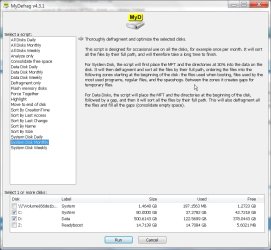
I loaded My Defrag 4.3.1 into the Toshiba laptop and ran the program. This program has a graphical view of the disk layout. It also gives out the file names stored on the HDD when the mouse cursor is placed on a non empty area.

I could see that the MFT (Master File Table) occupied the space where the report says that was the maximum I could shrink.

I ran the My Defrag program with the script "System Disk Monthly" which defragged and moved all the files to the beginning of the disk including the MFT area and the Page file.

After finishing the defragment of the C: drive, I could see that all the files have been moved to the beginning of the disk, leaving a very big chunk of free space.

(See attached images)

I again tried to shrink the C: drive and this time the report says that I could shrink my C: drive to 35 GB as that was roughly the space occupied by the C: drive when it has arrived.

Using Windows 7's disk management program, I have shrunk the C: drive to 80 GB leaving the rest of the space.

As I already had 3 primary partitions (1.4 GB containing Windows Boot Manager and active, C: (80 GB) System and 14.09 GB containing the window 7 recovery files including the bloatware) I could create an extended partition with one single logical drive D: with 500 GB space.

This exercise has achieved my goals of two partitions. C: and D: from one single large C: partiton.
 

Attachments

  • My Defrag 1.jpg
    My Defrag 1.jpg
    77.8 KB · Views: 19
  • My Defrag 2.jpg
    My Defrag 2.jpg
    76.9 KB · Views: 7
Last edited:

My Computer

Computer Manufacturer/Model Number
Toshiba Satellite P775-S7232
OS
MS Windows 7 Ultimate 64-bit SP1
CPU
i5-2410M 2.3GHz (2.9GHz Turbo-Boost) Sandy Bridge 32nm
Motherboard
Toshiba PHRAA ver. PSBY1U-00F003
Memory
4GB+4GB Samsung DDR3 PC3-10700 (1333 MHz)
Graphics Card(s)
Video Intel(R) HD Graphics Family, 1696MB available memory
Sound Card
Realtek High Definition Audio version=6.0.1.6323
Monitor(s) Displays
17.3 " Trubrite TFT LCD, LED Backlit
Screen Resolution
1600x900 32 bit, Native support for 720P content
Hard Drives
TOSHIBA MK6476GSXN
580.614 [GB] partitioned C: 80GB and D: 500GB with hidden recovery partitons.

Spare bay for 2nd HDD but no SATA connector :-(
PSU
Toshiba AC/DC Adapter
Case
Notebook
Cooling
Built-in Fan
Keyboard
Premium Raised Tile keyboard
Mouse
Logitech M215 wireless mouse
Internet Speed
Not fast enough
Other Info
Built-in Harman Kardon speakers with Dolby Advanced Audio, Waves MaxxAudio® 3. HDMI, 1xUSB3+3xUSB2 ports, WebCam, Battery life 4hrs 11mins, 4GB Readyboost SDHC card, WD My Book Essential Ext HDDs 2 TB, 2x1TB, My Passport SE 1TB and WDTV 1st Gen for Multimedia playing on a Sony Wega 32" LCD.
Recent addition to my toys are Asus Transformer Pad TF300T with 32GB onboard sd card + 32GB microsd card.
He could actually open the recovery partition (by assigning a letter, for example) and just delete the files not needed. It's very easy to single out the boot files. That way he can shrink that hard drive and maybe use the extra space to expand the other partition.
 

My Computer

Computer Manufacturer/Model Number
Asus G73SW-XN2
OS
Windows 2000 5.0 Build 2195
CPU
Intel Core i7-2630QM@2GHz(2.9GHz Turbo Boost) [Sandy Bridge]
Motherboard
Asus G73SW (Intel HM65 Chipset)
Memory
Kingston DDR3 1333 16GB (4GBx4)
Graphics Card(s)
nVidia GTX 460m 1.5GB
Sound Card
EAX Advanced HD 5.0, THX TruStudio
Monitor(s) Displays
17.3 in. primary & 23 in. secondary
Screen Resolution
1920x1080
Hard Drives
Seagate Momentus XT (SATA II) 500 GB @ 7200 RPM
Hitachi (SATA II) 500GB @ 7200 RPM

Non Raid because ASUS was crappy to choose an HM65 Chipset
Keyboard
Built-in 102-Key Backlit Keyboard
Other Info
It's a Laptop.
Is it worth taking the risk of deleting the unnecessary files to gain a small space of around 11 GB from the recovery partition compared to the space of almost 1 TB he has?
 

My Computer

Computer Manufacturer/Model Number
Toshiba Satellite P775-S7232
OS
MS Windows 7 Ultimate 64-bit SP1
CPU
i5-2410M 2.3GHz (2.9GHz Turbo-Boost) Sandy Bridge 32nm
Motherboard
Toshiba PHRAA ver. PSBY1U-00F003
Memory
4GB+4GB Samsung DDR3 PC3-10700 (1333 MHz)
Graphics Card(s)
Video Intel(R) HD Graphics Family, 1696MB available memory
Sound Card
Realtek High Definition Audio version=6.0.1.6323
Monitor(s) Displays
17.3 " Trubrite TFT LCD, LED Backlit
Screen Resolution
1600x900 32 bit, Native support for 720P content
Hard Drives
TOSHIBA MK6476GSXN
580.614 [GB] partitioned C: 80GB and D: 500GB with hidden recovery partitons.

Spare bay for 2nd HDD but no SATA connector :-(
PSU
Toshiba AC/DC Adapter
Case
Notebook
Cooling
Built-in Fan
Keyboard
Premium Raised Tile keyboard
Mouse
Logitech M215 wireless mouse
Internet Speed
Not fast enough
Other Info
Built-in Harman Kardon speakers with Dolby Advanced Audio, Waves MaxxAudio® 3. HDMI, 1xUSB3+3xUSB2 ports, WebCam, Battery life 4hrs 11mins, 4GB Readyboost SDHC card, WD My Book Essential Ext HDDs 2 TB, 2x1TB, My Passport SE 1TB and WDTV 1st Gen for Multimedia playing on a Sony Wega 32" LCD.
Recent addition to my toys are Asus Transformer Pad TF300T with 32GB onboard sd card + 32GB microsd card.
Well, it's actually pretty easy to just delete the whole recovery partition and use bcdboot to put the boot files in it :)
 

My Computer

Computer Manufacturer/Model Number
Asus G73SW-XN2
OS
Windows 2000 5.0 Build 2195
CPU
Intel Core i7-2630QM@2GHz(2.9GHz Turbo Boost) [Sandy Bridge]
Motherboard
Asus G73SW (Intel HM65 Chipset)
Memory
Kingston DDR3 1333 16GB (4GBx4)
Graphics Card(s)
nVidia GTX 460m 1.5GB
Sound Card
EAX Advanced HD 5.0, THX TruStudio
Monitor(s) Displays
17.3 in. primary & 23 in. secondary
Screen Resolution
1920x1080
Hard Drives
Seagate Momentus XT (SATA II) 500 GB @ 7200 RPM
Hitachi (SATA II) 500GB @ 7200 RPM

Non Raid because ASUS was crappy to choose an HM65 Chipset
Keyboard
Built-in 102-Key Backlit Keyboard
Other Info
It's a Laptop.
I thank everyone for the information provided and the willingness to assist me with shrinking the OS partition. I've spent hours researching the issue and have not as of yet used the Partition Wizard boot disc. I am aware of the Dell Recovery partition being the boot initiator and the workarounds involving VSS and the page file. It also crossed my mind, apparently due to common sense, that a backup image taken prior to the shrinking may not be valid after the shrinking.

I see no need to remove the Dell utility partition or the Dell recovery partition. The space they take up on my drive is insignificant. I used the Auslogics defragmenter on my laptop to see if it would move any files closer to the beginning of the disk and it did not allow me to shrink the laptop drive partition and more than before I ran it. I've been on the MyDefrag forum trying to determine if MyDefrag would move system files or the MFT closer to the beginning of the disk. I'm still reading the manual.

I did boot with the Partition Wizard disc but then decided that the interface did not give me enough input to know what I was doing. I then ejected the disc and am now trying to find a user manual online that will instruct me as to how to properly use it.

I'm still researching the issue and have not "taken the plunge". I do appreciate the tips and advice and I do respect the knowledge of all the contributors to this thread, myself excluded.
 

My Computer

Computer Manufacturer/Model Number
1.Dell Studio XPS 7100 Desktop; 2.Dell XPS 17 Laptop
OS
1.Windows 7 Ultimate x64; 2.Windows 7 Ultimate x64
CPU
1.AMD Phenom II X6 1075T; 2.Intel Core i7-2720QM 2.20 GHz
Memory
1.8GB DDR3; 2.8GB DDR3
Graphics Card(s)
1.AMD HD 5670 1GB; 2.NVIDIA GeForce GT 555M 3GB
Monitor(s) Displays
1.Samsung SyncMaster; 2.17.3in FHD
Screen Resolution
1.1600X900; 2.1920X1080
Hard Drives
1.1TB; 2.1TB 500GB X2
Keyboard
1.Microsoft Wireless; 2.Backlit
Mouse
Microsoft Wireless; 2.Microsoft Wireless Mobile 3500
Internet Speed
10.0 Mbps
Is it worth taking the risk of deleting the unnecessary files to gain a small space of around 11 GB from the recovery partition compared to the space of almost 1 TB he has?

Good question.

It´s best to leave the Recovery partition until you are ready to finally let go of ever returning to the factory install, e.g. you have wisely clean reinstalled and have such a better installation that you´d never want the preinstalled factory bloatware and useless factory utilities which have much better versions built into Win7. These can throttle the best OS ever.

Even then, I´d make the Recovery Disks and keep them on file for that computer in case you ever want to sell it and put back what came on it.

There´s nothing wrong with keeping the Recovery partition although I like to have a clean uncomplicated setup and having the Recov partition marked System Active as it is now (so that the Recovery hotkey doesn´t have to do that at boot) is a layer of complication I´d want gone myself.

I used the Auslogics defragmenter on my laptop to see if it would move any files closer to the beginning of the disk and it did not allow me to shrink the laptop drive partition and more than before I ran it. I've been on the MyDefrag forum trying to determine if MyDefrag would move system files or the MFT closer to the beginning of the disk. I'm still reading the manual.

I did boot with the Partition Wizard disc but then decided that the interface did not give me enough input to know what I was doing. I then ejected the disc and am now trying to find a user manual online that will instruct me as to how to properly use it.

I didn´t say Auslogics could shrink the system files, but that it would label which ones are in the way, likely MFT. To my knowledge only Perfect Disk can do this if done Offline and by choosing System files, but we no longer recommend it since PW works perfectly and the CD is failsafe after thousands of operations here.

PW is intuitive but perhaps we could be more helpful: Rightclick C, select Resize, drag the right grey border to the left by as much as you want to shrink it, click OK, Apply step.
Partition Wizard Use the Bootable CD
 
Last edited:

My Computer

Computer Manufacturer/Model Number
HP, Dell, Gateway, Toshiba - 4 laptops and 2 desktops
OS
Vista, Windows7, Mint Mate, Zorin, Windows 8
CPU
from 1.6GHz Duo to i7
Monitor(s) Displays
2x HP w2207
Hard Drives
5x HDD, 7x SSD, 12x Externals
Keyboard
with trackball - no mices
Mouse
Trackball mice
Internet Speed
DSL 6000
gregrocker, I ran the Auslogics defrag for one reason and that was to see if it would place these immovable files closer to the beginning of the disk, as was stated in some of the articles I read while researching the OS partition shrink.

"PW is intuitive but perhaps we could be more helpful: Rightclick C, select Resize, drag the right grey border to the left by as much as you want to shrink it, click OK, Apply step."

I appreciate this bit of information. I'm still trying to navigate the PW website to learn more about the program. I'm running the MyDefrag from within Windows now just to see what it will do, to see if it actually moves the immovable files closer to the beginning of the disk. I can't help myself. I'm curious and simply want to know.

I have used PerfectDisk for years. I am now using PerfectDisk 11 Professional but I haven't yet tried to use it to move the immovable files because I need to reread the user manual to determine how to do it. I have two very large faults. Number one, I'm a reader and can't seem to just walk away from an article without exploring it further, so when someone tells me that this will do that or that will do this I simply have to follow through and determine if that is actually the case. Number two, I'm much more curious than any cat and I can't seem to walk away from any given piece of information without exploring the validity of the same. It's just my nature.

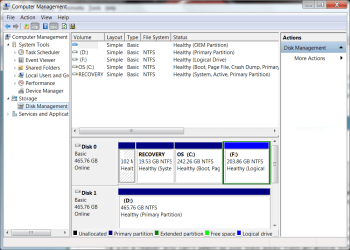
I'm going to use PW to shrink my desktop OS partition. I'm on the laptop now while MyDefrag is running on the desktop. Again, I'm simply curious as to whether or not MyDefrag will do what is stated. This morning, at about 02:30 I used the Windows Disk Management to shrink the OS partition on this laptop just for the hell of it. the screen shot, after the shrink, is shown. I'll also use PW to shrink the OS partition on the desktop sometime later today. My wife is Chinese and I need to go to Cleveland for my bi-weekly trip to all the Chinese food stores. I'll continue my quest to shrink the OS partitions on both computers when I return, after I'm sure I know what I'm doing with PW.
 

Attachments

  • Dell XPS L702X OS Partition Shrink.PNG
    Dell XPS L702X OS Partition Shrink.PNG
    42 KB · Views: 18

My Computer

Computer Manufacturer/Model Number
1.Dell Studio XPS 7100 Desktop; 2.Dell XPS 17 Laptop
OS
1.Windows 7 Ultimate x64; 2.Windows 7 Ultimate x64
CPU
1.AMD Phenom II X6 1075T; 2.Intel Core i7-2720QM 2.20 GHz
Memory
1.8GB DDR3; 2.8GB DDR3
Graphics Card(s)
1.AMD HD 5670 1GB; 2.NVIDIA GeForce GT 555M 3GB
Monitor(s) Displays
1.Samsung SyncMaster; 2.17.3in FHD
Screen Resolution
1.1600X900; 2.1920X1080
Hard Drives
1.1TB; 2.1TB 500GB X2
Keyboard
1.Microsoft Wireless; 2.Backlit
Mouse
Microsoft Wireless; 2.Microsoft Wireless Mobile 3500
Internet Speed
10.0 Mbps
Hello CBM,

After reading through your postings, I like the way you are analyzing the problems and seeking solutions without any hasty decisions. :D


Now about a small setting in MyDefrag....

My Defrag screen by default shows the start of the disk from bottom of the screen, where as most of the defraggers show from top.

Settings.Myd in the scripts folder of My Defrag program has a setting to change this display. Open this file in notepad and go to the default settings section. You will find a line as below.

DiskmapFlip(yes)

To change the diskmap to start from top left corner, replace the (yes) with (no). This is what I have done as I like this type of display.

This is only a cosmetic change and does not affect the defragmentation process in any way.
 

My Computer

Computer Manufacturer/Model Number
Toshiba Satellite P775-S7232
OS
MS Windows 7 Ultimate 64-bit SP1
CPU
i5-2410M 2.3GHz (2.9GHz Turbo-Boost) Sandy Bridge 32nm
Motherboard
Toshiba PHRAA ver. PSBY1U-00F003
Memory
4GB+4GB Samsung DDR3 PC3-10700 (1333 MHz)
Graphics Card(s)
Video Intel(R) HD Graphics Family, 1696MB available memory
Sound Card
Realtek High Definition Audio version=6.0.1.6323
Monitor(s) Displays
17.3 " Trubrite TFT LCD, LED Backlit
Screen Resolution
1600x900 32 bit, Native support for 720P content
Hard Drives
TOSHIBA MK6476GSXN
580.614 [GB] partitioned C: 80GB and D: 500GB with hidden recovery partitons.

Spare bay for 2nd HDD but no SATA connector :-(
PSU
Toshiba AC/DC Adapter
Case
Notebook
Cooling
Built-in Fan
Keyboard
Premium Raised Tile keyboard
Mouse
Logitech M215 wireless mouse
Internet Speed
Not fast enough
Other Info
Built-in Harman Kardon speakers with Dolby Advanced Audio, Waves MaxxAudio® 3. HDMI, 1xUSB3+3xUSB2 ports, WebCam, Battery life 4hrs 11mins, 4GB Readyboost SDHC card, WD My Book Essential Ext HDDs 2 TB, 2x1TB, My Passport SE 1TB and WDTV 1st Gen for Multimedia playing on a Sony Wega 32" LCD.
Recent addition to my toys are Asus Transformer Pad TF300T with 32GB onboard sd card + 32GB microsd card.
Back
Top