Shrink Space from C Partition

avinashrawat

New member
Member
Local time
1:01 AM
Messages
93
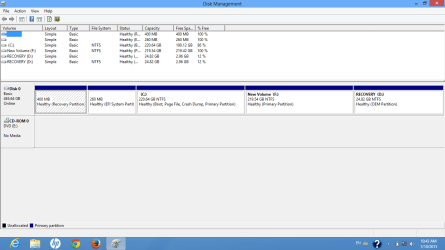
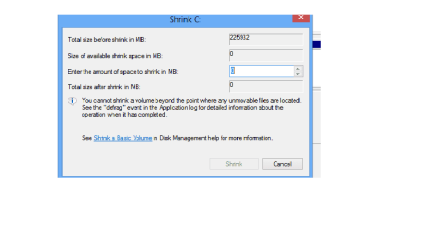
Why I am not able to shrink space from C: partition.I am attaching snapshot of disk management. Please help me how I can do this.
 

Attachments

  • disk_1.png
    disk_1.png
    24.9 KB · Views: 7
  • disk_2.png
    disk_2.png
    8.5 KB · Views: 4

My Computer

OS
windows 7 ultimate 32 bit
Use Partition Wizard to accomplish your goal.

One way to maintain C is to start the operation while running the program under Windows. It will then prompt you for a re-boot, when it will kick in to complete the operation on C and then continue on with the normal Windows startup process. When you come back up to the Windows desktop your C partition will be reduced as you want. Then you can manipulate the other partitions to your liking, using PW while under Windows.

Alternatively, you can download/burn the ISO for Partition Wizard standalone boot CD. When you run the program from this bootable CD you won't be under Windows, so you can perform the operation on C right then and there, along with all other operations. Again, once you're finished and re-boot to Windows you'll be in business just the way you want.

NOTE: since both the standalone CD approach as well as the "kick-in during Windows re-boot" approach both run the program when Windows is NOT running, you no longer have any problem with unmovable files as DISKMGMT.MSC does. PW will do exactly what is necessary to move these files while it is running not under Windows.
 

My Computer

Computer type
PC/Desktop
Computer Manufacturer/Model Number
Home-built, two systems (1) and (2)
OS
Windows 7 Pro x64 (1), Win7 Pro X64 (2)
CPU
i5-3350p 3.1Ghz/6MB-cache (1); E8400 3.0Ghz/6MB-cache (2)
Motherboard
ASUS P8Z77-V Pro (1); ASUS P5Q3 (2)
Memory
8GB PC3-12800 DDR3 (1); 4GB PC3-10600 DDR3 (2)
Graphics Card(s)
ATI HD7750 (1), (see TV cards); ATI R7 250 (2)
Sound Card
Realtek ALC892 HD Audio (1); Realtek ALC1200 HD Audio (2)
Monitor(s) Displays
Eizo HD2441W LCD, Eizo S2433W (1); Eizo 24" S2433W (2)
Screen Resolution
1920x1200, 1920x1200 (1); 1920x1200 (2)
Hard Drives
(1) 1TB SATA-II (7200RPM), 2x2TB SATA-III (7200RPM), 250GB SATA-III (10000RPM) for OS; 2x2TB external USB 3.0

(2) 320GB SATA-II (7200RPM), 750GB SATA-II (7200RPM), 150GB SATA-II (10000RPM) for OS; 2TB external USB 3.0
PSU
Nesteq ECS-6001 600W (1); Nesteq ECS-5001 500W (2)
Case
Acousti-Case 360 (1) and (2)
Cooling
Noctua NH-U12P SE2 for CPU, 2x120mm case fans (1) and (2)
Keyboard
IBM PS/2 (1) and (2)
Mouse
Logitech MX Revolution wireless (1); Microsoft wired (2)
Internet Speed
100mbps down / 10mbps up
Antivirus
Microsoft Security Essentials; Malwarebyte Anti-Malware Pro
Browser
Firefox
Other Info
Ceton InfiniTV 4-tuner cablecard-enabled TV card as well as Hauppauge HVR-2250 OTA/ATSC 2-tuner TV card in (1), running under Win7 WMC
@dsperber
Thanks for your support. But still I am facing some doubt's that is its changing partition without any changes mean reinstalling and formatting of C doesn't require. And how I can utilize this tool. so please provide me some tutorial regarding partition wizard tool.

 

My Computer

OS
windows 7 ultimate 32 bit
Partition Wizard simply creates, deletes, resizes, moves, labels, etc., partitions on your drives. It can change from primary to logical or vice versa, and it can convert drives from MBR to GPT, etc., and it can even often recover accidentally deleted partitions!

It can pretty much do just about anything you might want to do on your hard drives. And you will not have to reinstall Windows. PW is just moving things around, but maintaining complete integrity, partition alignment, etc., that you'd want and expect.

Its GUI is very much intuitive, but if you've never used it before and are a bit anxious about causing some unwanted damage, the vendor provides a complete tutorial on their web site including videos.
 

My Computer

Computer type
PC/Desktop
Computer Manufacturer/Model Number
Home-built, two systems (1) and (2)
OS
Windows 7 Pro x64 (1), Win7 Pro X64 (2)
CPU
i5-3350p 3.1Ghz/6MB-cache (1); E8400 3.0Ghz/6MB-cache (2)
Motherboard
ASUS P8Z77-V Pro (1); ASUS P5Q3 (2)
Memory
8GB PC3-12800 DDR3 (1); 4GB PC3-10600 DDR3 (2)
Graphics Card(s)
ATI HD7750 (1), (see TV cards); ATI R7 250 (2)
Sound Card
Realtek ALC892 HD Audio (1); Realtek ALC1200 HD Audio (2)
Monitor(s) Displays
Eizo HD2441W LCD, Eizo S2433W (1); Eizo 24" S2433W (2)
Screen Resolution
1920x1200, 1920x1200 (1); 1920x1200 (2)
Hard Drives
(1) 1TB SATA-II (7200RPM), 2x2TB SATA-III (7200RPM), 250GB SATA-III (10000RPM) for OS; 2x2TB external USB 3.0

(2) 320GB SATA-II (7200RPM), 750GB SATA-II (7200RPM), 150GB SATA-II (10000RPM) for OS; 2TB external USB 3.0
PSU
Nesteq ECS-6001 600W (1); Nesteq ECS-5001 500W (2)
Case
Acousti-Case 360 (1) and (2)
Cooling
Noctua NH-U12P SE2 for CPU, 2x120mm case fans (1) and (2)
Keyboard
IBM PS/2 (1) and (2)
Mouse
Logitech MX Revolution wireless (1); Microsoft wired (2)
Internet Speed
100mbps down / 10mbps up
Antivirus
Microsoft Security Essentials; Malwarebyte Anti-Malware Pro
Browser
Firefox
Other Info
Ceton InfiniTV 4-tuner cablecard-enabled TV card as well as Hauppauge HVR-2250 OTA/ATSC 2-tuner TV card in (1), running under Win7 WMC
@dsperber
Thanks for your support. I got it.
 

My Computer

OS
windows 7 ultimate 32 bit
Back
Top