Shrink Windows 7 partition

0080900

New member
Member
Local time
9:34 PM
Messages
53
Is there a way to shrink my Windows 7 volume so that I can dual boot with Windows 8?

I only want to give it 20GB, the only alternative partition manager is EASEUS Partition Master Home Edition.

I have the latest version and everything.

I'm willing to try a different partition manager, but I just want to know if it's possible to shrink my Windows 7 partition with EASEUS Partition Master Home Edition.

Any help is appreciated.
 

My Computer

Computer Manufacturer/Model Number
Compaq Presario CQ60 Notebook PC
OS
Windows 7 Ultimate
CPU
Processor AMD Athlon Dual-Core QL-62, 2000 Mhz, 2 Core(s), 2
Motherboard
Wistron 303C (Socket A)
Memory
2.0GB DDR2
Graphics Card(s)
NVIDIA GeForce 8200M G
Sound Card
Conexant High Definition SmartAudio 221
Screen Resolution
1366 x 768
Hard Drives
232GB SAMSUNG HM251JI ATA Device
Keyboard
tandard PS/2 Keyboard
Mouse
Synaptics PS/2 Port TouchPad
Have you tried to shrink with Windows Disk Management?

I haven't used that Easeus package, but it wouldn't be worth a damn if it would not shrink partitions.
 

My Computer

Computer type
PC/Desktop
Computer Manufacturer/Model Number
Ignatz Special; 4 speed manual gearbox; factory air conditioning; one of one
OS
Windows 7 Home Premium SP1, 64-bit
CPU
Intel Skylake i5-6600K, not overclocked
Motherboard
AsRock Z170M Extreme 4, micro ATX
Memory
8 GB HyperX DDR4-2666 (2 x 4 GB)
Graphics Card(s)
none; graphics are integrated on CPU
Sound Card
onboard: Realtek ALC1150; external: USB Behringer UF0-202
Monitor(s) Displays
Dell S2340M 23 inch IPS
Screen Resolution
1600 x 900
Hard Drives
System: Crucial MX100 series SSD, 128 GB;
Data: Samsung Spinpoint 103SJ, 1 TB;
Backup: WD Caviar Green WD30EZRX-00D8PB0, 3 TB
PSU
Rosewill SilentNight 500 watt fanless, semi-modular
Case
Antec Solo II
Cooling
Noctua NH-U12S; Noctua F12 intake, Noctua S12A exhaust
Keyboard
Microsoft 200 6JH-00001 USB
Mouse
Dell or Microsoft optical wired; USB
Antivirus
Microsoft Security Essentials and Malwarebytes Premium
Browser
Pale Moon
Other Info
All fans PWM; speeds at idle: CPU circa 500 rpm; intake circa 600 rpm; exhaust circa 600 rpm; CPU temps 27 idle and 47 C load in a warm room (27 C/81 F) when running Intel Extreme Tuning Utility stress test.
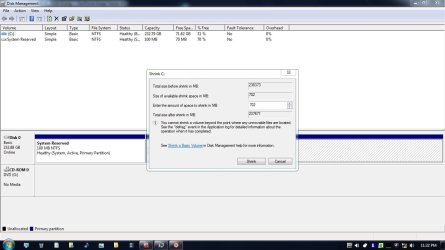
For some strange reason I have 702MB to shrink.

I have 250GB SATA HDD on my laptop, and 70GB available.

Before I proceed with shrinking: Nothing bad will if I put in a higher amount to shrink than what I have available?

I'm only going to shrink by 20GB or 30GB
 

Attachments

  • Shrink Partition.jpg
    Shrink Partition.jpg
    82.1 KB · Views: 161

My Computer

Computer Manufacturer/Model Number
Compaq Presario CQ60 Notebook PC
OS
Windows 7 Ultimate
CPU
Processor AMD Athlon Dual-Core QL-62, 2000 Mhz, 2 Core(s), 2
Motherboard
Wistron 303C (Socket A)
Memory
2.0GB DDR2
Graphics Card(s)
NVIDIA GeForce 8200M G
Sound Card
Conexant High Definition SmartAudio 221
Screen Resolution
1366 x 768
Hard Drives
232GB SAMSUNG HM251JI ATA Device
Keyboard
tandard PS/2 Keyboard
Mouse
Synaptics PS/2 Port TouchPad
Your screenshot highlights the limitations of Windows 7's disk management and the best time to partition a drive using Windows is during a clean install of the operating system.

Easeus Partition Wizard is a far more practical proposition, but when you use it make sure you boot into the PW disc you create rather than run it from Windows.

Free Download Magic Partition Manager Software - Partition Wizard Online

Use the link to download the ISO and burn it to a blank CD to create a bootable disc. ImgBurn is a great, free ISO burner.

http://www.imgburn.com/

When you've done, boot into the CD and shrink the partition to the size you want.

http://www.sevenforums.com/tutorials/93322-partition-wizard-use-bootable-cd.html
 

My Computer

Computer Manufacturer/Model Number
HP Pavilion Elite 495UK
OS
Windows 7 Ultimate SP1 64-Bit
CPU
Intel Core i7 870 @ 2.93GHz
Motherboard
MSI 2A9C (CPU1)
Memory
8Gb Dual-Channel DDR3 @ 664MHz
Graphics Card(s)
nVidia GeForce GTX 460 1024MB dedicated RAM
Sound Card
Realtek HD Audio
Monitor(s) Displays
HP2310i
Screen Resolution
1920 x 1080
Hard Drives
1x1954GB Hitachi HDS22020ALA 330 (RAID), 1x1954GB Hitachi External for backup and storage
PSU
460W
Case
HP Elite
Cooling
Air cooled
Keyboard
Logitech K750 solar-powered keyboard
Mouse
Logitech Wireless M180 mouse
Internet Speed
2Mb
Other Info
Pure Avanti Flow Internet Radio with iPod Dock, 64Gb iPod, HP USB Speakers, Sony MDR-V500 Headphones, Sony Vaio F-Series Laptop
I'm also having a shrink problem, but not the same as yours. On the surface, it sounds fairly simple,,,go to your disk manager,,,control panel, addministrative tools, computer management, and finally disk manager....on the drive you wish to shrink, right click and then left click on shrink,,,let it think and the screen will come up with the maximum amount you can shrink it by..if it is enough, great..if not,,,then that is my problem also....

TM
 

My Computer

OS
win 7 ultimate 64
sorry did not see your screen shot before...mine problem is similar...So far as I have been able to tell, part of the problem is that the process stops at the point it reaches a file that can not be moved. such as a page file or hiber, sys file or shadow file....in my case, I have a 238 gig, partition that has only about 60 gigs used....it says that I can only shrink it by 7megs. go figure

TM
 

My Computer

OS
win 7 ultimate 64
For some strange reason I have 702MB to shrink.​


I have 250GB SATA HDD on my laptop, and 70GB available.​

Before I proceed with shrinking: Nothing bad will if I put in a higher amount to shrink than what I have available?​

I'm only going to shrink by 20GB or 30GB​

That looks like you are trying to shrink the Reserve Patition. 70MB free ?

I sometimes use Acronis Disk Director.
 

My Computer

Computer Manufacturer/Model Number
Lenovo ThinkPad T60
OS
Windows 7 Ultimate 64Bit
CPU
GenuineIntel Intel(R) Core(TM) DuoCore T2400 @ 1.83GHz
Motherboard
Intel(R) 82801G (ICH7 Family)
Memory
2.00 GB
Graphics Card(s)
Mobile Intel(R) 945 Express Chipset
Sound Card
SoundMAX Integrated Digital HD Audio
Monitor(s) Displays
ThinkPad Display
Screen Resolution
1400x1050
Hard Drives
100Gb SATA
Keyboard
Standard Keyboard
Mouse
HID-compliant Mouse
Internet Speed
Cable Broadband - 54Mbps
Other Info
Intel(R) PRO/1000 PL Network Connection
11a/b/g Wireless LAN Mini PCI Express Adapter
I had a similar problem, and followed seavixen32's advice and used the partition wizard home edition..see my comments on my thread..it worked well,,,TM
 

My Computer

OS
win 7 ultimate 64
Do a disk cleanup and defrag, then try again, you might get lucky and find more free space.
 

My Computer

Computer type
PC/Desktop
Computer Manufacturer/Model Number
Home Built
OS
Windows 10 Education 64 bit
CPU
AMD Phenom II X4 980 Black Edition Deneb 3.7GHz
Motherboard
Asus M4N68T-M V2 µATX Motherboard
Memory
8GB 4GBx2 Kingston PC10600 DDR3 1333 Memory
Graphics Card(s)
Zotac NVIDIA Geforce GT640 2 Gig DDR3 PCIe
Sound Card
VIA VT1708s High Definition Audio 8-channel Onboard
Monitor(s) Displays
22" LG E2242 1080p and 2 19" I-INC AG191D
Screen Resolution
1280x1024 - 1920x1080 - 1280x1024
Hard Drives
Crucial M100 256 GB SSD and 500 GB WD Blue SATA
PSU
Thermaltake TR 620
Case
Power Up Black ATX Mid-Tower Case
Cooling
Stock heatsink and fan
Keyboard
Logitech Wireless K350 Wave
Mouse
Logitech Wireless M570 Trackman Wheel
Internet Speed
80 Mbps Down 30 Mbps Up
Antivirus
Windows Defender
Browser
Internet Explorer 11
Other Info
HP DVD1040e Lightscribe - External USB2
Back
Top