
Shut Down Computer Shortcut - Create

How to Create a Force "Shut Down" Computer Shortcut in Windows

   Information
This will show you how to create or download a force Shut Down computer shortcut with or without a time-out delay and custom shutdown message before the computer shuts down and powered off.

   Note
The time-out period can also be for how many seconds you have to use the Abort shortcut to abort the computer from shutting down after using this Shut Down Computer shortcut.


EXAMPLE: Shut Down Computer Time-Out Period Message
NOTE: This is with a 30 second time-out period. If you would like to have a custom shutdown message instead of the default message in the dialog box below, then you can use step 3 in OPTION TWO below to do so.
Shut_Down_Warning.jpg


OPTION ONE

To Download a Force "Shut Down" Shortcut


1. For an Instant Forced Shut Down Computer Shortcut
A) Click on the download button below to download the file below.
Instant_Shut_Down_Computer.zip


Download


2. For a Forced Shut Down Computer Shortcut with 30 Second Delay
NOTE: If you would like to use a different amount of time delay, then see OPTION TWO below for how.
A) Click on the download button below to download the file below.
30-second_Shut_Down_Computer.zip

Download


3. Click on Save, and save the .zip file to the desktop.

4. Open the .zip file and extract the Shut Down Computer shortcut to the desktop.

5. Right click on the Shut Down Computer shortcut, and click on Properties, General tab, and on the Unblock button.
NOTE: If you do not have a Unblock button under the General tab, then the shortcut is already unblocked and you can continue on to step 6.
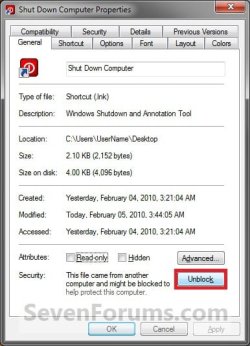
Unblock.jpg
6. Go to step 6 in OPTION TWO below to add the icon you would like to use.

7. You can now Pin to Taskbar or Pin to Start Menu this shortcut, assign a keyboard shortcut to it, or move it where you like for easy use.

8. When done, you can delete the downloaded .zip file on the desktop if you like, or save it to use again.


OPTION TWO

To Manually Create a Custom Force "Shut Down" Shortcut


1. Right click on a empty area on desktop, and click on New and Shortcut.

2. For an Instant Shut Down Computer Shortcut
A) Type the location below into the location area, and click on the Next button. (See screenshot below)
shutdown -s -f -t 00
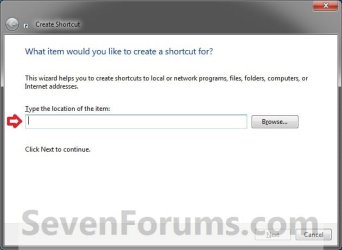
Step1.jpg
B) Go to step 4.
3. For a Shut Down Computer Shortcut with Specified Time Delay and Message
A) Type the location below into the location area, and click on the Next button. (See screenshot above)
   Note
Substitute ## in the command below with a number between 0-315360000 for how many seconds you want the time-out period to be before shutdown.

Substitute Your message here in the command below with a shutdown message up to 512 characters within quotes that you would like to see in the pop-up dialog when using the shutdown shortcut. The message will only be seen for however long you set the time delay to be.


shutdown -s -f -t ## -c "Your message here"

FOR EXAMPLE: I would type this below exactly to have a 30 second time delay with a Don't forget to turn off mouse message.

shutdown -s -f -t 30 -c "Don't forget to turn off mouse"
4. Type Shut Down Computer for the name, and click on the Finish button. (See screenshot below)
NOTE: You can name this anything you would like though.
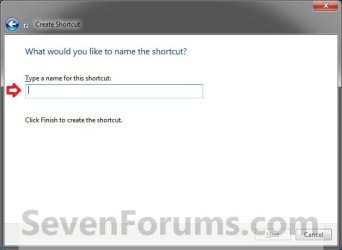
Step2.jpg
5. Right click on the new Shut Down Computer shortcut on the Desktop and click on Properties.

6. Click on the Shortcut tab, then click on the Change Icon button. (See screenshot below)
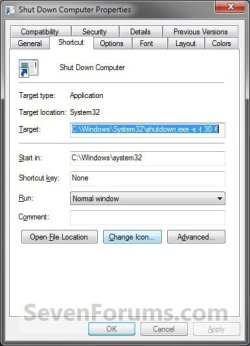
Shut_Down3.jpg
7. Click on OK. (See screenshot below)
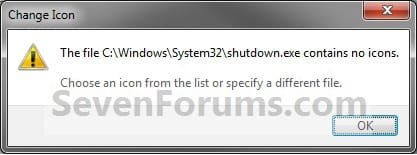
Shut_Down4.jpg
8. To Download a Custom Icon to Use
A) Click on the Download button below to download a custom Shut_Down.ico file in a ZIP file, and save it to your desktop.

Download


Shut_Down.png
B) Open the downloaded ZIP file, extract (drag and drop) the Shut_Down.ico file to your desktop.

C) Right click on the Shut_Down.ico file, and click on Properties, General tab, and on the Unblock button. (see screenshot below)
NOTE: If you do not have a Unblock button under the General tab, then the shortcut is already unblocked and you can continue on.

D) Save the Shut_Down.ico file to where you like to store it at on your Windows drive for use as the shortcut's icon.
NOTE: The icon will need to remain saved at the same location for the icon to continue to display on the shortcut.

E) Go to step 10 to select this Shut_Down.ico file at the location you saved it at.
9. To Use Your Own Custom Icon
A) In the line under "Look for icons in this file", click on Browse and navigate to the location of the 256x256 pixel icon your want to use. (See screenshot below)
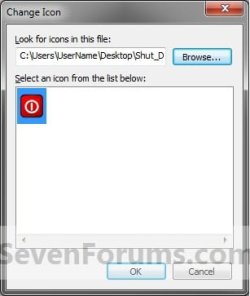
Shut_Down5.jpg
10. Select the icon and click on OK. (See screenshot above)

11. Click on OK. (See screenshot below)
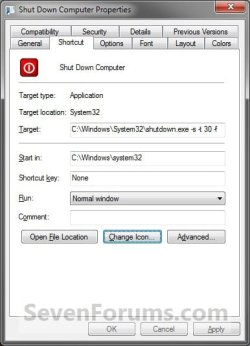
Shut_Down6.jpg
12. You can now Pin to Taskbar or Pin to Start Menu this shortcut, assign a keyboard shortcut to it, or move it where you like for easy use.
That's it,
Shawn


Attachments

Last edited:
Another Great one Shawn, I've got the shutdown,restart,restore point,recycle bin and reliability monitor shortcuts on my taskbar, nothing on my desktop.
Thanks, Derek
 

My Computer

Computer type
PC/Desktop
Computer Manufacturer/Model Number
Self Built
OS
Win 10 Pro x64
CPU
Intel I5-2500K @3.3GHz
Motherboard
Asrock P67 Extreme4
Memory
16GB G.Skill Ripjaws X (4x4GB)
Graphics Card(s)
EVGA GeForce 750 Ti SC 2GB
Sound Card
ASUS Xonar DG 5.1 Channels 24-bit 96KHz PCI Interface Sound
Monitor(s) Displays
auria eq2367
Screen Resolution
1920 x 1080
Hard Drives
250GB Samsung 850 EVO SSD
1TB WD Blue
1TB Hitachi
PSU
SeaSonic X 650W 80 Plus Gold
Case
Corsair Obsidian 750D
Cooling
Corsair H60, Three 140mm case fans
Keyboard
Logitech Wireless Keyboard K520
Mouse
Logitech Wireless Mouse M310
Internet Speed
Wave Broadband ~ 100 dn 5 up
Antivirus
Windows Defender, Malwarebytes Premium
Browser
Edge, IE11, Chrome
Other Info
Laptop specs: HP g7-1365dx /
CPU: AMD A6-3420M APU with Radeon(tm) HD Graphics /
RAM: Crucial 8Gb (2x4Gb) /
SSD: Crucial M4-CT128M4SSD2 ATA Device/ FW 000F /
GFX: AMD Radeon HD 6520G /
OS: Windows 10 Pro x64
You're most welcome Derek. :)
 

My Computer

Computer type
PC/Desktop
Computer Manufacturer/Model Number
Self built custom
OS
64-bit Windows 11 Pro for Workstations
CPU
Intel i7-8700K OC'd to 5 GHz
Motherboard
ASUS ROG Maximus XI Formula Z390
Memory
64 GB (4x16GB) G.SKILL TridentZ RGB DDR4 3600 MHz
Graphics Card(s)
ASUS ROG-STRIX-GTX1080TI-O11G-GAMING
Sound Card
Integrated
Monitor(s) Displays
2 x Samsung Odyssey G7 27"
Screen Resolution
2560x1440
Hard Drives
1TB Samsung 990 PRO M.2,
4TB Samsung 990 PRO PRO M.2,
TerraMaster F8 SSD Plus NAS
PSU
Seasonic Prime Titanium 850W
Case
Thermaltake Core P3
Cooling
Corsair Hydro H115i
Keyboard
Logitech wireless K800
Mouse
Logitech MX Master 4
Internet Speed
2 Gb/s Download and 100 Mb/s Upload
Antivirus
Malwarebyte Anti-Malware Premium
Browser
Google Chrome
Other Info
Logitech Z625 speaker system,
Logitech BRIO 4K Pro webcam,
HP Color LaserJet Pro MFP M477fdn,
APC SMART-UPS RT 1000 XL - SURT1000XLI,
Galaxy S23 Plus phone
Is it possible to create a desktop 'Undock' icon in a similar fashion? I looked at the response to typing "shutdown /?" in the command prompt window but it did not appear to be one of the options listed.
 

My Computer

OS
Windows 7 Home Premium 64bit
CPU
Intel(R) Core(TM)2 Quad CPU Q8400 @ 2.66GHz, 2
Motherboard
American Megatrends Inc. 0401, 6/06/2009
Memory
4Gb
Graphics Card(s)
NVIDIA GeForce GT 220
Sound Card
NVIDIA High Definition Audio
Monitor(s) Displays
Chimei CMV221D
Screen Resolution
1680 x 1050 x 59 hertz
Hard Drives
1Tb internal + 4 x 1Tb External USB
Nice tutorial...

I use a batch file to do mine (Shutdown, Restart, Defrag etc.)
When i run the batch file i am asked to select 1. for restart, 2. for shutdown, 3. for defrag...

I have also then set a keyboard shortcut to run that batch file:
1. Pin a program to the task bar
2. go to
Code:
C:\Users\<USER>\AppData\Roaming\Microsoft\Internet Explorer\Quick Launch\User Pinned\TaskBar\
3. Right click the program you just pinned and click properties
4. Change the target: to the location\file (e.g. c:\Test\JDobbsy1987.bat)
and Change the start in: to the location\ (e.g. c:\Test\)
5. Click OK and now when you click that program you pinned to the task bar it will run the script.

Note* when you change the target and start in, you will notice that there is a short cut option below them, if you click in that box and type a letter e.g. s you will see that it changes to CTRL + ALT + S, This means you will be able run the script by clicking the icon or by pressing CTRL + ALT + S

Regards,
JDobbsy1987
 

My Computer

Computer type
PC/Desktop
Computer Manufacturer/Model Number
Self Built
OS
Windows 8.1 Pro x64
CPU
Intel Core i5-2500K @ 3.30GHz - S1155
Motherboard
Asus P8P67 LE Rev3, Intel P67, S115
Memory
8GB Corsair DDR3 XMS3, PC3-12800
Graphics Card(s)
NVIDIA GeForce GTX 650
Sound Card
On-Board
Monitor(s) Displays
3 x 24" {Extended Display}
Screen Resolution
1920 x 1080
Hard Drives
300GB Seagate Barracuda 7200
PSU
550W Coolermaster GX550
Case
Silverstone Precision PS04B
Cooling
Stock
Keyboard
Logitech K120
Mouse
World of Warcraft Cataclysm MMO Gaming Mouse
Internet Speed
80 MB
Antivirus
MSE / Windows Defender
Browser
Chrome
Great work Shawn !

Probably I am getting rid of iShut , that I use till now for using a shut down dock icon :p
 

My Computer

Computer type
PC/Desktop
Computer Manufacturer/Model Number
Self Assembled
OS
Microsoft Windows 10 Pro Insider Preview 64-bit
CPU
Intel(R) Core(TM) i3-4130 CPU @ 3.40GHz
Motherboard
Gigabyte Technology Co., Ltd. B85M-D3H
Memory
Corsair Vengence 4GB x2 (8.00GB Dual-Channel DDR3 @ 798MHz)
Graphics Card(s)
2047MB GeForce GTS 450 (ZOTAC International)
Sound Card
Onboard (Realtek High Definition Audio)
Monitor(s) Displays
LG Flatron E2040T
Screen Resolution
1600x900
Hard Drives
Western Digital 1 TB
Seagate 500 GB
PSU
Corsair VS550
Case
Cooler Master K380
Cooling
Cooler Master Seidon 120V Plus
Keyboard
Logitech MK260r
Mouse
Logitech MK260r
Internet Speed
PMPL Broadband
Antivirus
Windows Defender + MBAM
Browser
Firefox
Other Info
Dell Studio 15" Laptop
Thank you Archie. :)
 

My Computer

Computer type
PC/Desktop
Computer Manufacturer/Model Number
Self built custom
OS
64-bit Windows 11 Pro for Workstations
CPU
Intel i7-8700K OC'd to 5 GHz
Motherboard
ASUS ROG Maximus XI Formula Z390
Memory
64 GB (4x16GB) G.SKILL TridentZ RGB DDR4 3600 MHz
Graphics Card(s)
ASUS ROG-STRIX-GTX1080TI-O11G-GAMING
Sound Card
Integrated
Monitor(s) Displays
2 x Samsung Odyssey G7 27"
Screen Resolution
2560x1440
Hard Drives
1TB Samsung 990 PRO M.2,
4TB Samsung 990 PRO PRO M.2,
TerraMaster F8 SSD Plus NAS
PSU
Seasonic Prime Titanium 850W
Case
Thermaltake Core P3
Cooling
Corsair Hydro H115i
Keyboard
Logitech wireless K800
Mouse
Logitech MX Master 4
Internet Speed
2 Gb/s Download and 100 Mb/s Upload
Antivirus
Malwarebyte Anti-Malware Premium
Browser
Google Chrome
Other Info
Logitech Z625 speaker system,
Logitech BRIO 4K Pro webcam,
HP Color LaserJet Pro MFP M477fdn,
APC SMART-UPS RT 1000 XL - SURT1000XLI,
Galaxy S23 Plus phone
problem with downloaded icon

Hi,
Great forum and super tutorials.
I created the Shut Down Computer shortcut and wanted to add your icon.
After downloading I unzipped it to my Desktop.
It did not have an Unblock box, so I assumed it to be OK.
However I am not able to move or delete the file, since it tells my that I do not have any priviliges for this file and I'm not the owner of the file.
How can I overcome this problem?
Hope you can help me.
Regards,
bufoto
 

My Computer

OS
Windows 7 Ultimate x64
Hello Bufuto, and welcome to Seven Forums.

I'm not sure why you would get that, but taking ownership of the file, then setting it's permissions to "Allow" your user account "Full Control" of it should allow you to.
 

My Computer

Computer type
PC/Desktop
Computer Manufacturer/Model Number
Self built custom
OS
64-bit Windows 11 Pro for Workstations
CPU
Intel i7-8700K OC'd to 5 GHz
Motherboard
ASUS ROG Maximus XI Formula Z390
Memory
64 GB (4x16GB) G.SKILL TridentZ RGB DDR4 3600 MHz
Graphics Card(s)
ASUS ROG-STRIX-GTX1080TI-O11G-GAMING
Sound Card
Integrated
Monitor(s) Displays
2 x Samsung Odyssey G7 27"
Screen Resolution
2560x1440
Hard Drives
1TB Samsung 990 PRO M.2,
4TB Samsung 990 PRO PRO M.2,
TerraMaster F8 SSD Plus NAS
PSU
Seasonic Prime Titanium 850W
Case
Thermaltake Core P3
Cooling
Corsair Hydro H115i
Keyboard
Logitech wireless K800
Mouse
Logitech MX Master 4
Internet Speed
2 Gb/s Download and 100 Mb/s Upload
Antivirus
Malwarebyte Anti-Malware Premium
Browser
Google Chrome
Other Info
Logitech Z625 speaker system,
Logitech BRIO 4K Pro webcam,
HP Color LaserJet Pro MFP M477fdn,
APC SMART-UPS RT 1000 XL - SURT1000XLI,
Galaxy S23 Plus phone
take ownership does not work

I cannot take ownership. Not with elevated rights either.
It states : Cannot show current owner.
Any other ideas?
 

My Computer

OS
Windows 7 Ultimate x64
I cannot take ownership. Not with elevated rights either.
It states : Cannot show current owner.
Any other ideas?

Are you logged in an administrator account?

Are you on a domain or work computer?
 

My Computer

Computer type
PC/Desktop
Computer Manufacturer/Model Number
Self built custom
OS
64-bit Windows 11 Pro for Workstations
CPU
Intel i7-8700K OC'd to 5 GHz
Motherboard
ASUS ROG Maximus XI Formula Z390
Memory
64 GB (4x16GB) G.SKILL TridentZ RGB DDR4 3600 MHz
Graphics Card(s)
ASUS ROG-STRIX-GTX1080TI-O11G-GAMING
Sound Card
Integrated
Monitor(s) Displays
2 x Samsung Odyssey G7 27"
Screen Resolution
2560x1440
Hard Drives
1TB Samsung 990 PRO M.2,
4TB Samsung 990 PRO PRO M.2,
TerraMaster F8 SSD Plus NAS
PSU
Seasonic Prime Titanium 850W
Case
Thermaltake Core P3
Cooling
Corsair Hydro H115i
Keyboard
Logitech wireless K800
Mouse
Logitech MX Master 4
Internet Speed
2 Gb/s Download and 100 Mb/s Upload
Antivirus
Malwarebyte Anti-Malware Premium
Browser
Google Chrome
Other Info
Logitech Z625 speaker system,
Logitech BRIO 4K Pro webcam,
HP Color LaserJet Pro MFP M477fdn,
APC SMART-UPS RT 1000 XL - SURT1000XLI,
Galaxy S23 Plus phone
I' m logged in as an Admin. And this is a PC at home.
 

My Computer

OS
Windows 7 Ultimate x64
Bufoto,

It sounds like you may have some sort of permissions issue or user account corruption for you not to be able to do this in an administrator account. As a test, create a new administrator account to see if you are able to do the tutorial with icon while logged into the new account.

You might also see if you may be able to use the free program Unlocker to delete the .ico file in your original user account.
 

My Computer

Computer type
PC/Desktop
Computer Manufacturer/Model Number
Self built custom
OS
64-bit Windows 11 Pro for Workstations
CPU
Intel i7-8700K OC'd to 5 GHz
Motherboard
ASUS ROG Maximus XI Formula Z390
Memory
64 GB (4x16GB) G.SKILL TridentZ RGB DDR4 3600 MHz
Graphics Card(s)
ASUS ROG-STRIX-GTX1080TI-O11G-GAMING
Sound Card
Integrated
Monitor(s) Displays
2 x Samsung Odyssey G7 27"
Screen Resolution
2560x1440
Hard Drives
1TB Samsung 990 PRO M.2,
4TB Samsung 990 PRO PRO M.2,
TerraMaster F8 SSD Plus NAS
PSU
Seasonic Prime Titanium 850W
Case
Thermaltake Core P3
Cooling
Corsair Hydro H115i
Keyboard
Logitech wireless K800
Mouse
Logitech MX Master 4
Internet Speed
2 Gb/s Download and 100 Mb/s Upload
Antivirus
Malwarebyte Anti-Malware Premium
Browser
Google Chrome
Other Info
Logitech Z625 speaker system,
Logitech BRIO 4K Pro webcam,
HP Color LaserJet Pro MFP M477fdn,
APC SMART-UPS RT 1000 XL - SURT1000XLI,
Galaxy S23 Plus phone
The strange thing was that I repeated the unzipping of the file to another map and then all went well: it mentioned being blocked and I could unblock it. So I do not think that my account is corrupted.

Back to the icon on my desktop: I downloaded the Unlocker program as you said and that did the trick!
It removed the file from my desktop. All problems solved.
Thank you very much for your help and your quick repsonses; it is much appreciated!
kind regards,
Bufoto
 

My Computer

OS
Windows 7 Ultimate x64
You're most welcome. That's great news. :)

My guess is that something may have interrupted and/or corrupted the download.
 

My Computer

Computer type
PC/Desktop
Computer Manufacturer/Model Number
Self built custom
OS
64-bit Windows 11 Pro for Workstations
CPU
Intel i7-8700K OC'd to 5 GHz
Motherboard
ASUS ROG Maximus XI Formula Z390
Memory
64 GB (4x16GB) G.SKILL TridentZ RGB DDR4 3600 MHz
Graphics Card(s)
ASUS ROG-STRIX-GTX1080TI-O11G-GAMING
Sound Card
Integrated
Monitor(s) Displays
2 x Samsung Odyssey G7 27"
Screen Resolution
2560x1440
Hard Drives
1TB Samsung 990 PRO M.2,
4TB Samsung 990 PRO PRO M.2,
TerraMaster F8 SSD Plus NAS
PSU
Seasonic Prime Titanium 850W
Case
Thermaltake Core P3
Cooling
Corsair Hydro H115i
Keyboard
Logitech wireless K800
Mouse
Logitech MX Master 4
Internet Speed
2 Gb/s Download and 100 Mb/s Upload
Antivirus
Malwarebyte Anti-Malware Premium
Browser
Google Chrome
Other Info
Logitech Z625 speaker system,
Logitech BRIO 4K Pro webcam,
HP Color LaserJet Pro MFP M477fdn,
APC SMART-UPS RT 1000 XL - SURT1000XLI,
Galaxy S23 Plus phone
hello sir! i've got to say i've learned a lot on your tutorials!best there is on the web...i'm very thankful for all this new things i can do with my pc. i never imagined i can costumized a lot!!! thanks a lot sir!!
 

My Computer

Computer Manufacturer/Model Number
hp pavilion dv7- 4285dx
OS
windows 7 Home Premium 64 bit
CPU
intel i5
Memory
8 gb
Graphics Card(s)
ati mobility radeon (512 mb)
You're most welcome Presm, and welcome to Seven Forums. Thank you for the kind words. :)
 

My Computer

Computer type
PC/Desktop
Computer Manufacturer/Model Number
Self built custom
OS
64-bit Windows 11 Pro for Workstations
CPU
Intel i7-8700K OC'd to 5 GHz
Motherboard
ASUS ROG Maximus XI Formula Z390
Memory
64 GB (4x16GB) G.SKILL TridentZ RGB DDR4 3600 MHz
Graphics Card(s)
ASUS ROG-STRIX-GTX1080TI-O11G-GAMING
Sound Card
Integrated
Monitor(s) Displays
2 x Samsung Odyssey G7 27"
Screen Resolution
2560x1440
Hard Drives
1TB Samsung 990 PRO M.2,
4TB Samsung 990 PRO PRO M.2,
TerraMaster F8 SSD Plus NAS
PSU
Seasonic Prime Titanium 850W
Case
Thermaltake Core P3
Cooling
Corsair Hydro H115i
Keyboard
Logitech wireless K800
Mouse
Logitech MX Master 4
Internet Speed
2 Gb/s Download and 100 Mb/s Upload
Antivirus
Malwarebyte Anti-Malware Premium
Browser
Google Chrome
Other Info
Logitech Z625 speaker system,
Logitech BRIO 4K Pro webcam,
HP Color LaserJet Pro MFP M477fdn,
APC SMART-UPS RT 1000 XL - SURT1000XLI,
Galaxy S23 Plus phone
Back
Top