Shut Down Problem - Setup with SSD & HDD

Ang391

New member
Local time
2:41 AM
Messages
6
Hello to everyone.
I highly respect the forum that’s why I express my problem here.
I have the Dell Inspiron 620 Desktop PC since 2011 and recently I have moved my whole setup in to an SSD. I have kept my HDD as a second (storage) drive without formatting it. I use Windows 7 Home Premium 64bit.
The problem I face is that sometimes (not every time but usually), my PC does not Shut Down. It remains for several minutes in the Shutting Down Screen and eventually I shut down the PC the hard way using the power button.
I had noticed that the problem occurred when my second storage drive HDD had gone to sleep mode and not turned up for the shutting down prosses. I have also notice that in the normal shut downs the HDD even if it had been in sleep (stopped) mode, it turned on again for some seconds for the shutting down prosses. So, I tried before shutting down my PC to wake up the HDD first. But I noticed that the problem was present again.

Does anyone have any idea about this problem?
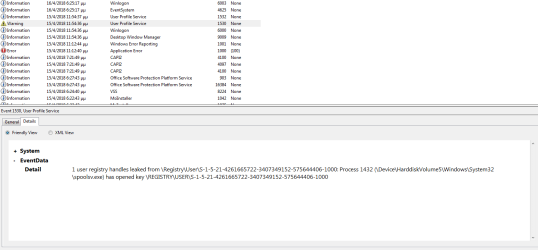
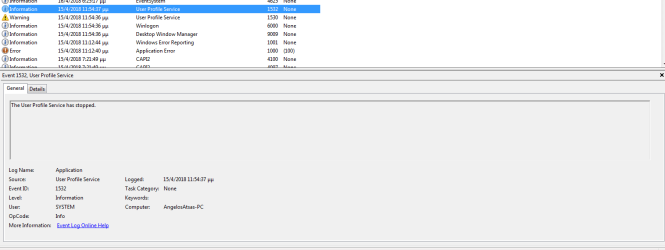
The last time I faced the problem I searched the event logs to check if anything appeared. I attach some photos of the event log, if anyone could interpret them.
 

Attachments

  • Capture1.PNG
    Capture1.PNG
    56.3 KB · Views: 2
  • Capture2.PNG
    Capture2.PNG
    53.7 KB · Views: 1
  • Capture3.PNG
    Capture3.PNG
    34.1 KB · Views: 0

My Computer

Computer type
PC/Desktop
Computer Manufacturer/Model Number
Dell Inspiron 620
OS
Windows 7 Home Premium 64bit
CPU
Intel Core I5-2310 2.90GHz
Motherboard
Intel H61
Memory
4Gb 1333 MHz DDR3 non-ECC memory only
Graphics Card(s)
AMD Radeon HD 6670
Hard Drives
SSD: WDS500G2B0A
HDD: WD10EALX
Hi Ang391, welcome to the Forum.

Usually when Windows takes a long time to shut down it's due to a program that has not closed or is very slow closing. It's not a good idea to force shut down as this can result in file corruption.

Just before you are about to shut down, Right Click of the Task Bar & select Start Task Manager, then select Processes Tab & see what is actually running. If you do this each time for a while you should be able to find the offending program. You can also End Process by Left Clicking on the offending program & press the End Process button at the bottom. If you right click on it you also find it's location if needed.

Also open Control Panel, select Device Manager & see if there are any yellow flashes showing on any devices.. Report back if there are giving details.
 

My Computer

Computer type
PC/Desktop
Computer Manufacturer/Model Number
Self built using existing case
OS
Windows 7 Home Premium 64 bit sp1
CPU
Intel i5 3570 3.4Ghz Ivy Bridge SKT 1155 quad core
Motherboard
Gigabyte Z77-HD3 SKT 1155 2xSata 3, 4x USB 3.0
Memory
G-Skill Rip Jaws 16Gb (8x2) DDR3 -1600 PC3 12800 CL 10 red
Graphics Card(s)
Gigabyte NVIDIA GT610 1Gb DDR3 810/1200 PCI-E 2.0 Silent
Sound Card
NVIDIA High Definition & Realtech High Definition Audio
Monitor(s) Displays
2 x Philips 226V4L 16:9 aspect ratio
Screen Resolution
1920 x 1080 HD
Hard Drives
Samsung 840 Pro 256gb SSD, SATA 3.
Hitachi Touro Portable 1tb, USB 3.0 HDD used for image b/ups.
PSU
Corsair VS450
Case
Codeng
Cooling
PSU fan & CPU fan
Keyboard
Logitech
Mouse
Logitech Wireless trackball M570
Internet Speed
Wireless 3G. 3mg down & 550kb up.
Antivirus
Bitdefender Internet Security 2020
Browser
Opera (Current Version) & Firefox
Other Info
MS Office 2013 Pro. Davis weather station software. MGE Nova 600 avr UPS.
Your problem is the second drive did you clone it? When windows get a disk it writes a signature hidden to the disk so it know what and were it is if you clone/copy a drive and have 2 with the same signature it thinks they are the same drive which why the errors is saying leakage from other drive
 

My Computer

Computer type
PC/Desktop
OS
win 8 32 bit
Ranger4
Ok, I will monitor the Task Manager before shutting down and try to find any running program. Usually using an SSD my shut down time is some seconds. I did a force shut down because after several minuets I believed that something had gone wrong and the pc was crashed.
The Device Manager seems OK.

samuria
I also believe that something is wrong with the 2 disks setup. No, I did not clone the old HDD to the SSD. I made a clean setup to the SSD having had unplugged the HDD during the setup process.
I saw the warning, but I didn’t understand it. A second after, as I posted, the warning seems to be resolved (The User Profile Service has stopped).
 

My Computer

Computer type
PC/Desktop
Computer Manufacturer/Model Number
Dell Inspiron 620
OS
Windows 7 Home Premium 64bit
CPU
Intel Core I5-2310 2.90GHz
Motherboard
Intel H61
Memory
4Gb 1333 MHz DDR3 non-ECC memory only
Graphics Card(s)
AMD Radeon HD 6670
Hard Drives
SSD: WDS500G2B0A
HDD: WD10EALX
Thanks for getting back with the update.

Does your old HDD which you also have connected have a copy of Windows 7 on it & was it your previous Operating System, before you did the change over to the SSD. If this is the case then there may be a clash with your User Profile being on both discs. Also having the same Windows on 2 different drives is a breach of your MS user license. If this is the case remove Windows from the HDD.
 

My Computer

Computer type
PC/Desktop
Computer Manufacturer/Model Number
Self built using existing case
OS
Windows 7 Home Premium 64 bit sp1
CPU
Intel i5 3570 3.4Ghz Ivy Bridge SKT 1155 quad core
Motherboard
Gigabyte Z77-HD3 SKT 1155 2xSata 3, 4x USB 3.0
Memory
G-Skill Rip Jaws 16Gb (8x2) DDR3 -1600 PC3 12800 CL 10 red
Graphics Card(s)
Gigabyte NVIDIA GT610 1Gb DDR3 810/1200 PCI-E 2.0 Silent
Sound Card
NVIDIA High Definition & Realtech High Definition Audio
Monitor(s) Displays
2 x Philips 226V4L 16:9 aspect ratio
Screen Resolution
1920 x 1080 HD
Hard Drives
Samsung 840 Pro 256gb SSD, SATA 3.
Hitachi Touro Portable 1tb, USB 3.0 HDD used for image b/ups.
PSU
Corsair VS450
Case
Codeng
Cooling
PSU fan & CPU fan
Keyboard
Logitech
Mouse
Logitech Wireless trackball M570
Internet Speed
Wireless 3G. 3mg down & 550kb up.
Antivirus
Bitdefender Internet Security 2020
Browser
Opera (Current Version) & Firefox
Other Info
MS Office 2013 Pro. Davis weather station software. MGE Nova 600 avr UPS.
Yes, the old HDD has a copy of Windows 7 with the same license etc. The user name is different. I used case sensitive characters (“a” instead of “A”).

In the news etup I have renamed the user name with these directions.
User Profile Folder - Change User Account Folder Name
I don’t know if this process is an issue.


I have read that to have a windows setup in your old drive is not a problem. But maybe I am wrong. However, the 1st bootable disk is the SSD. Usually the HDD is getting on sleep mode.
 

My Computer

Computer type
PC/Desktop
Computer Manufacturer/Model Number
Dell Inspiron 620
OS
Windows 7 Home Premium 64bit
CPU
Intel Core I5-2310 2.90GHz
Motherboard
Intel H61
Memory
4Gb 1333 MHz DDR3 non-ECC memory only
Graphics Card(s)
AMD Radeon HD 6670
Hard Drives
SSD: WDS500G2B0A
HDD: WD10EALX
Hello everyone!

New facts about my problem. The last time I faced the problem I decided to leave the PC without force shut down to see what would happen.

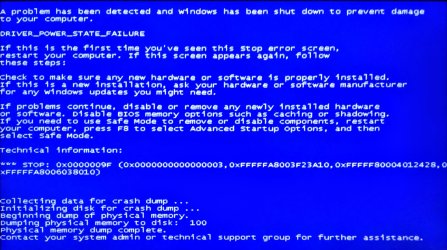
After some time (I don’t know how much because l left from home), I had blue screen with the bellow information. Could anyone recognize what the problem might be?

I want to mention that after pc started I checked the event log and there wasn't any problem marked with the yellow or orange sign.

Problem signature:
Problem Event Name: BlueScreen
OS Version: 6.1.7601.2.1.0.768.3
Locale ID: 1032
Additional information about the problem:
BCCode: 9f
BCP1: 0000000000000003
BCP2: FFFFFA8003F23A10
BCP3: FFFFF80004012428
BCP4: FFFFFA8006038010
OS Version: 6_1_7601
Service Pack: 1_0
Product: 768_1
Files that help describe the problem:
C:\Windows\Minidump\042218-19500-01.dmp
C:\Users\atsas\AppData\Local\Temp\WER-21964-0.sysdata.xml
Read our privacy statement online:
http://go.microsoft.com/fwlink/?linkid=104288&clcid=0x0409
If the online privacy statement is not available, please read our privacy statement offline:
C:\Windows\system32\en-US\erofflps.txt
 

Attachments

  • blue screen shut down.jpg
    blue screen shut down.jpg
    314.7 KB · Views: 0

My Computer

Computer type
PC/Desktop
Computer Manufacturer/Model Number
Dell Inspiron 620
OS
Windows 7 Home Premium 64bit
CPU
Intel Core I5-2310 2.90GHz
Motherboard
Intel H61
Memory
4Gb 1333 MHz DDR3 non-ECC memory only
Graphics Card(s)
AMD Radeon HD 6670
Hard Drives
SSD: WDS500G2B0A
HDD: WD10EALX
The first thing I'd do is shutdown your PC, switch off the PSU, disconnect the power lead to your HDD. Then switch on PSU, power on and boot up PC and see if BSOD recurs.
 

My Computer

Computer type
PC/Desktop
Computer Manufacturer/Model Number
Dell Vostro
OS
Windows 7 Pro 64 Bit, Windows 10 Pro 64 Bit, Linux Mint 20.1 LTS
CPU
Intel Core i5-3470 3.2 GHz
Motherboard
Intel 7 Series C/216 Chipset
Memory
6GB RAM
Graphics Card(s)
Intel HD Graphics
Monitor(s) Displays
Asus VC239 (23.5")
Hard Drives
Western Digital WD10EZEX 1TB
Western Digital WD3200AAKS 320GB
PSU
Corsair 500W
Antivirus
Microsoft Essentials, Malwarebytes, Kapersky Rescue Disk
Browser
Firefox 87 64 Bit

My Computer

Computer type
PC/Desktop
Computer Manufacturer/Model Number
Self built using existing case
OS
Windows 7 Home Premium 64 bit sp1
CPU
Intel i5 3570 3.4Ghz Ivy Bridge SKT 1155 quad core
Motherboard
Gigabyte Z77-HD3 SKT 1155 2xSata 3, 4x USB 3.0
Memory
G-Skill Rip Jaws 16Gb (8x2) DDR3 -1600 PC3 12800 CL 10 red
Graphics Card(s)
Gigabyte NVIDIA GT610 1Gb DDR3 810/1200 PCI-E 2.0 Silent
Sound Card
NVIDIA High Definition & Realtech High Definition Audio
Monitor(s) Displays
2 x Philips 226V4L 16:9 aspect ratio
Screen Resolution
1920 x 1080 HD
Hard Drives
Samsung 840 Pro 256gb SSD, SATA 3.
Hitachi Touro Portable 1tb, USB 3.0 HDD used for image b/ups.
PSU
Corsair VS450
Case
Codeng
Cooling
PSU fan & CPU fan
Keyboard
Logitech
Mouse
Logitech Wireless trackball M570
Internet Speed
Wireless 3G. 3mg down & 550kb up.
Antivirus
Bitdefender Internet Security 2020
Browser
Opera (Current Version) & Firefox
Other Info
MS Office 2013 Pro. Davis weather station software. MGE Nova 600 avr UPS.
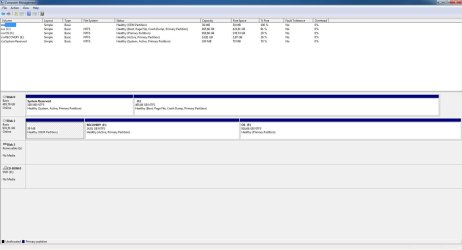
ok, this is the disk management screen.
 

Attachments

  • disk management.JPG
    disk management.JPG
    172.6 KB · Views: 7

My Computer

Computer type
PC/Desktop
Computer Manufacturer/Model Number
Dell Inspiron 620
OS
Windows 7 Home Premium 64bit
CPU
Intel Core I5-2310 2.90GHz
Motherboard
Intel H61
Memory
4Gb 1333 MHz DDR3 non-ECC memory only
Graphics Card(s)
AMD Radeon HD 6670
Hard Drives
SSD: WDS500G2B0A
HDD: WD10EALX
Dear all,

Regarding the discussed issue, I have noticed a strange pattern that maybe explain the cause of the problem. The Shut Down problem occurs when I have the Mozilla browser open, l close it quickly and suddenly I shut down the pc.
I was checking the processes in the task manager when I close the Mozilla browser and I saw the process “COM Surrogate” to start and after a while to stop.
I haven’t noticed, at any time, the Shut Down problem when the “COM Surrogate” had stopped.

Any idea?
 

My Computer

Computer type
PC/Desktop
Computer Manufacturer/Model Number
Dell Inspiron 620
OS
Windows 7 Home Premium 64bit
CPU
Intel Core I5-2310 2.90GHz
Motherboard
Intel H61
Memory
4Gb 1333 MHz DDR3 non-ECC memory only
Graphics Card(s)
AMD Radeon HD 6670
Hard Drives
SSD: WDS500G2B0A
HDD: WD10EALX

My Computer

Computer type
PC/Desktop
Computer Manufacturer/Model Number
Self built using existing case
OS
Windows 7 Home Premium 64 bit sp1
CPU
Intel i5 3570 3.4Ghz Ivy Bridge SKT 1155 quad core
Motherboard
Gigabyte Z77-HD3 SKT 1155 2xSata 3, 4x USB 3.0
Memory
G-Skill Rip Jaws 16Gb (8x2) DDR3 -1600 PC3 12800 CL 10 red
Graphics Card(s)
Gigabyte NVIDIA GT610 1Gb DDR3 810/1200 PCI-E 2.0 Silent
Sound Card
NVIDIA High Definition & Realtech High Definition Audio
Monitor(s) Displays
2 x Philips 226V4L 16:9 aspect ratio
Screen Resolution
1920 x 1080 HD
Hard Drives
Samsung 840 Pro 256gb SSD, SATA 3.
Hitachi Touro Portable 1tb, USB 3.0 HDD used for image b/ups.
PSU
Corsair VS450
Case
Codeng
Cooling
PSU fan & CPU fan
Keyboard
Logitech
Mouse
Logitech Wireless trackball M570
Internet Speed
Wireless 3G. 3mg down & 550kb up.
Antivirus
Bitdefender Internet Security 2020
Browser
Opera (Current Version) & Firefox
Other Info
MS Office 2013 Pro. Davis weather station software. MGE Nova 600 avr UPS.
Back
Top