Solved Shut down

RobertD

New member
Member
Local time
4:05 PM
Messages
66
Recently I have been getting the following message when I shut down: Operations are in progress, Please wait. Then a delay until shutdown. Have no idea why this has started, any help appreciated.
 

My Computer

Computer type
PC/Desktop
Computer Manufacturer/Model Number
Dell Inspiron 620
OS
Windows 7 Pro
CPU
3.10Gig Intel COT I3-2100
Memory
4010
Monitor(s) Displays
Acer 21"
Hard Drives
985.94 Gig Generic Multicard
Mouse
Logitech
Internet Speed
10 Mbps
Browser
Firefox
I would first and foremost urge you to fill out the system specs as much as possible. Many techs will not even respond if it looks like you could not be bothered to do so. I will try and give you a bit of help here and see if we can get your issue resolved. When you run in to shut down delays there can be many reasons and no one answer will work to fix all of them.

Basically things are running in the background that windows needs to send the kill signal to and there is a delay in response.

First I would have to ask if you have added any new programs or hardware (including updates to anything other than windows). Second I would ask you look at the message and see if it says anything at all about what program is taking so long. Something as simple as changing the shut down sound can cause an issue.

There is also a possibility of malware running in the background if you haven't made any recent changes. in which case I would start by running a malwarebytes scan then depending on what it finds, either start a new thread in the malware removal section or ask a mod to move this one.

You can get malwarebytes here for free.

Thirdly "operations in progress" sounds like a windows update. If it happens over and over you may have a failed update which will need further investigation.
 

My Computer

Computer type
PC/Desktop
Computer Manufacturer/Model Number
Custom Build MPCBS AMII
OS
Windows 7 Professional x64
CPU
AMD Athlon II x4 3.00 GHz
Motherboard
MSI GF615M-p33
Memory
16GB Kingston DDR3
Graphics Card(s)
Nvidia 8600 (dual DVI out for 2 monitors)
Sound Card
Onboard
Monitor(s) Displays
Acer H233H 23", ASUS 23"
Screen Resolution
1366 x 768
Hard Drives
(2) WD Blue 1 TB 3 partitions, (1) Seagate 7200 500GB with 2 partitions for useless and frequently deleted data Looking forward do an ssd for os soon.
PSU
Corsair 1100Watt
Case
Apevia HAF
Cooling
HAF AMD High Profile Heat sink and fan
Keyboard
wireless Logitech
Mouse
wireless Logitech
Internet Speed
16 mbps
Antivirus
eSet, AVG, Clam and Clamwin (depends on machine)
Browser
Firefox
Other Info
(9) Win 7 machines all x64 (POS Updated to Windows 7 pro YEA), (4) Linux machines x64 and x86 including a v3000 compaq lappy brought back to life with Mint 9 used to scan drives, (1) Linux Machine dual boot XP Pro (for testing and destroying), (1) Win 7 pro x64/Win 8.1 Lenovo Laptop Dual Boot.
To Mohavepc:
I thought that was already in my profile, but went in and added it.

I have run Malware scans, no problems. No new equipment added. All updates seem to be current. Will try to see if I can get any info. about what is delaying
 

My Computer

Computer type
PC/Desktop
Computer Manufacturer/Model Number
Dell Inspiron 620
OS
Windows 7 Pro
CPU
3.10Gig Intel COT I3-2100
Memory
4010
Monitor(s) Displays
Acer 21"
Hard Drives
985.94 Gig Generic Multicard
Mouse
Logitech
Internet Speed
10 Mbps
Browser
Firefox
I have been unable to determine what "background" programs are running. As noted before, no updates waiting, no malware problems. Still getting that message on each shutdown attempt. Any other ideas as to how to correct??
 

My Computer

Computer type
PC/Desktop
Computer Manufacturer/Model Number
Dell Inspiron 620
OS
Windows 7 Pro
CPU
3.10Gig Intel COT I3-2100
Memory
4010
Monitor(s) Displays
Acer 21"
Hard Drives
985.94 Gig Generic Multicard
Mouse
Logitech
Internet Speed
10 Mbps
Browser
Firefox

My Computer

Computer type
PC/Desktop
Computer Manufacturer/Model Number
Home made Desktop
OS
Windows 10 Pro. 64/ version 1709 Windows 7 Pro/64
CPU
Intel i7-6800K @ 4.3
Motherboard
ASUS X-99 Deluxe II
Memory
Corsair Platinum 16 gig @2400
Graphics Card(s)
EVGA GTX 1070 OC
Monitor(s) Displays
Asus 27" LED LCD/VE278Q
Screen Resolution
1920-1080 or 1280-720 HDMI
Hard Drives
INTEL SSD 730-240 Gb Sata 3.0/
PSU
EVGA Platium 1200W
Case
Phanteks Luxe Tempered Glass 8 fans/ one radiator
Cooling
XSPC/ Water Cooled CPU
Keyboard
Das 4 Professional
Mouse
Logitech M705/MX Anywhere 2-S
Internet Speed
100 mbits
Antivirus
Microsoft Security Essentials/ Malwarebytes Premium 3.0/ SAS
Browser
I.E. 11 default/Firefox/ ISP Time Warner Cable/Spectrum
Other Info
LG BluRay Burner/
Sound system-KLipsch-THX/
Icy Dock ssd Hot Swap bays.
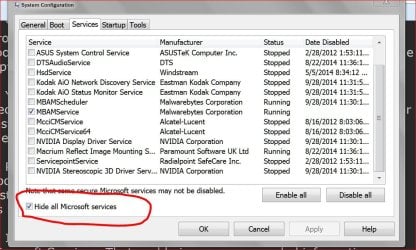
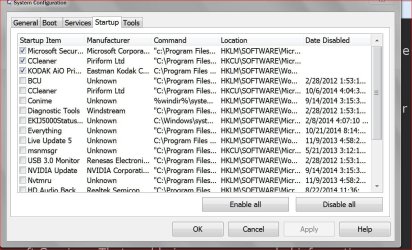
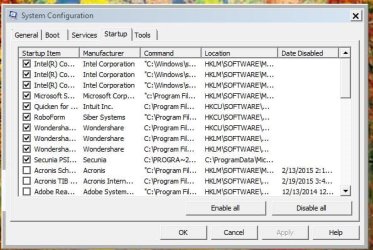
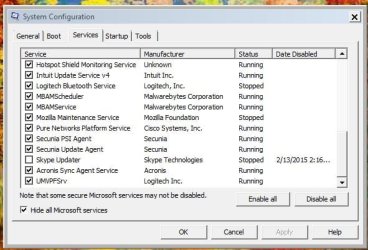
Here are the two you requested
 

Attachments

  • Startup.JPG
    Startup.JPG
    60 KB · Views: 33
  • Services.JPG
    Services.JPG
    48.4 KB · Views: 33

My Computer

Computer type
PC/Desktop
Computer Manufacturer/Model Number
Dell Inspiron 620
OS
Windows 7 Pro
CPU
3.10Gig Intel COT I3-2100
Memory
4010
Monitor(s) Displays
Acer 21"
Hard Drives
985.94 Gig Generic Multicard
Mouse
Logitech
Internet Speed
10 Mbps
Browser
Firefox
The solution for me was to do a system restore to a point before the issue became known. For example, I noticed this happening in the past week or so where the computer would not shut down and the message stayed and the only way to get out was to turn off the computer.
The solution for me - and this has been twice in the past couple of years - was simply to do a system restore to a week or so before the problem started.
 

My Computer

Computer type
PC/Desktop
Computer Manufacturer/Model Number
Asus
OS
Windows 7 x64
Hey, I see this only when scheduled backup is running. I am using Acronis. It would shutdown after backup finishes (including verification if enabled).
 

My Computer

Computer type
PC/Desktop
Computer Manufacturer/Model Number
Custom Build
OS
Windows 7 Ultimate x64 SP1
CPU
AMD Phenom 2 1090T
Motherboard
Gigabyte GA-890FXA-UD5
Memory
2x8GB Kingston HyperX Fury Black 1600Mhz Unganged
Graphics Card(s)
MSI GTX 970 Gaming 4G
Sound Card
Realtek On-Board HD 7.1 Audio / Logitech G35
Monitor(s) Displays
3xAcer GD245HQ
Screen Resolution
1920x1080
Hard Drives
Samsung 850 Pro 512GB SSD - OS /
WD Caviar Black SATA 3 - 1 TBx2 - Dynamic RAID 0 /
WD Caviar Green SATA 2 - 640GBx2 - Dynamic RAID 0 /
WD Caviar Green SATA 2 - 640GB - Internal Backup /
Seagate Barracude SATA 3 - 3TB - External Backup/ Sync
PSU
HighPower 1000W
Case
Cooler Master HAF 932
Cooling
Noctua NH-D14
Keyboard
Logitech G19
Mouse
Logitech G500
Internet Speed
100/4 Mbit Cable (100GB quota)
Antivirus
ZoneAlarm Extreme Security / MBAM Pro / MBAE Free / SAS Free
Browser
IE 11 - Firefox - Chrome
Other Info
Logitech F710/ G27/ G940/ Z5500 // TrackIR 5 // Nvidia 3D Surround Vision
Many thanks for the two answers from bubbascant and GoKay.
 

My Computer

Computer type
PC/Desktop
Computer Manufacturer/Model Number
Dell Inspiron 620
OS
Windows 7 Pro
CPU
3.10Gig Intel COT I3-2100
Memory
4010
Monitor(s) Displays
Acer 21"
Hard Drives
985.94 Gig Generic Multicard
Mouse
Logitech
Internet Speed
10 Mbps
Browser
Firefox
Back
Top