Shutdown Issue

iRHardcore

New member
Member
VIP
Local time
3:35 AM
Messages
102
Location
Rugby, United Kingdom
For over a year now, I've been having this issue.
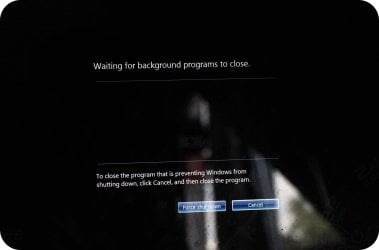
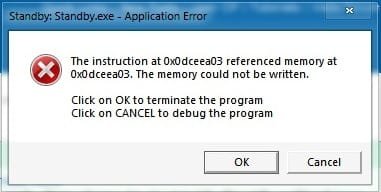
Whenever I shut down my laptop, even with no programs open or anything, this box pops up (see attached -Shutdown Error.)
I will then close this dialogue box and the shutdown will continue, but only until the next image (see attached - Force Shutdown) where it will act as if it has programs running, causing me to 'force shutdown'.

Does anyone know why this might be happening and what the code/file is in the first image?
 

Attachments
  • Shutdown Error.jpg
    Shutdown Error.jpg
    12 KB · Views: 4
  • Force Shutdown.jpg
    Force Shutdown.jpg
    328.8 KB · Views: 9

My Computer

Computer Manufacturer/Model Number
Toshiba Satellite A210
OS
Windows 7 Ultimate 32-Bit (Build 7600)
Memory
1.87GB Ram
Monitor(s) Displays
Philips 244E1SB 23.6 inch Computer LCD Monitor
Hard Drives
Fujitsu Mobile MHY2250BH 250 GB
My Computer

Computer type
PC/Desktop
Computer Manufacturer/Model Number
Dwarf Dwf/11/2012 r09/2013
OS
Windows 8.1 Pro RTM x64
CPU
Intel Core-i5-3570K 4-core @ 3.4GHz (Ivy Bridge) (OC 4.4GHz)
Motherboard
ASRock Z77 Extreme4-M
Memory
4 x 4GB DDR3-1600 Corsair Vengeance CMZ8GX3M2A1600C9B (16GB)
Graphics Card(s)
MSI GeForce GTX770 Gaming OC 2GB
Sound Card
Realtek High Definition on board solution (ALC 898)
Monitor(s) Displays
ViewSonic VA1912w Widescreen (VGA)
Screen Resolution
1440x900
Hard Drives
OCZ Agility 3 SSD 120GB SATA III x2 (RAID 0)
Samsung HD501LJ 500GB SATA II x2
Hitachi HDS721010CLA332 1TB SATA II
Iomega 1.5TB Ext USB 2.0
WD 2.0TB Ext USB 3.0
PSU
XFX Pro Series 850W Semi-Modular
Case
Gigabyte IF233
Cooling
1 x 120mm Front Inlet 1 x 120mm Rear Exhaust
Keyboard
Microsoft Comfort Curve Keyboard 3000 (USB)
Mouse
Microsoft Comfort Mouse 3000 for Business (USB)
Internet Speed
NetGear DG834Gv3 ADSL Modem/Router (Ethernet) ~4.0 Mb/s (O2)
Antivirus
Avast! 8.0.1497
Browser
IE 11
Other Info
Optical Drive: HL-DT-ST BD-RE BH10LS30 SATA Bluray
Lexmark S305 Printer/Scanner/Copier (USB)
WEI Score: 8.1/8.1/8.5/8.5/8.25
Asus Eee PC 1011PX Netbook (Windows 7 x86 Starter)
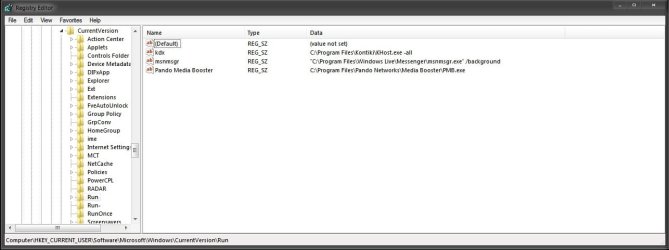
No, I don't. The only thing that is of a similar name to that is Adobe Photoshop CS5.

Also, there is a print screen of "Current_User".
But when I navigated to the same path for "Local_Machine", I got to CurrentVersion and there was no Run inside of it, only Explorer.

(Please note, there is two 'Run' options in the print screen, I'm not sure why.)
 

Attachments

  • Current User.jpg
    Current User.jpg
    49.7 KB · Views: 6

My Computer

Computer Manufacturer/Model Number
Toshiba Satellite A210
OS
Windows 7 Ultimate 32-Bit (Build 7600)
Memory
1.87GB Ram
Monitor(s) Displays
Philips 244E1SB 23.6 inch Computer LCD Monitor
Hard Drives
Fujitsu Mobile MHY2250BH 250 GB
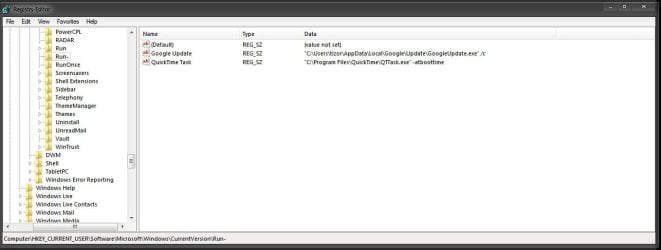
There should only be a Run and RunOnce key in both locations. What does the run- key show?

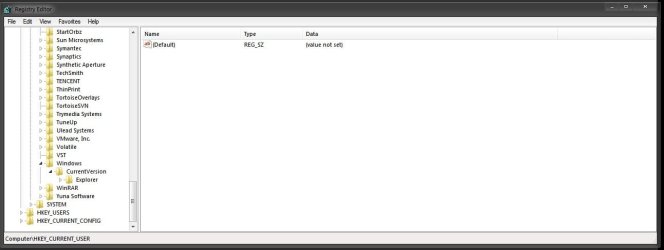
I'm surprised that you have nothing listed in the HKLM branch. Check again. Are you sure?
 

My Computer

Computer type
PC/Desktop
Computer Manufacturer/Model Number
Dwarf Dwf/11/2012 r09/2013
OS
Windows 8.1 Pro RTM x64
CPU
Intel Core-i5-3570K 4-core @ 3.4GHz (Ivy Bridge) (OC 4.4GHz)
Motherboard
ASRock Z77 Extreme4-M
Memory
4 x 4GB DDR3-1600 Corsair Vengeance CMZ8GX3M2A1600C9B (16GB)
Graphics Card(s)
MSI GeForce GTX770 Gaming OC 2GB
Sound Card
Realtek High Definition on board solution (ALC 898)
Monitor(s) Displays
ViewSonic VA1912w Widescreen (VGA)
Screen Resolution
1440x900
Hard Drives
OCZ Agility 3 SSD 120GB SATA III x2 (RAID 0)
Samsung HD501LJ 500GB SATA II x2
Hitachi HDS721010CLA332 1TB SATA II
Iomega 1.5TB Ext USB 2.0
WD 2.0TB Ext USB 3.0
PSU
XFX Pro Series 850W Semi-Modular
Case
Gigabyte IF233
Cooling
1 x 120mm Front Inlet 1 x 120mm Rear Exhaust
Keyboard
Microsoft Comfort Curve Keyboard 3000 (USB)
Mouse
Microsoft Comfort Mouse 3000 for Business (USB)
Internet Speed
NetGear DG834Gv3 ADSL Modem/Router (Ethernet) ~4.0 Mb/s (O2)
Antivirus
Avast! 8.0.1497
Browser
IE 11
Other Info
Optical Drive: HL-DT-ST BD-RE BH10LS30 SATA Bluray
Lexmark S305 Printer/Scanner/Copier (USB)
WEI Score: 8.1/8.1/8.5/8.5/8.25
Asus Eee PC 1011PX Netbook (Windows 7 x86 Starter)
Run- (see attached 1.)

I'm certain there's nothing in HKLM (see attached 2.)

Also, there is no branch entitled RunOnce
 

Attachments

  • Run-.jpg
    Run-.jpg
    46.5 KB · Views: 5
  • HKLM.jpg
    HKLM.jpg
    39.3 KB · Views: 5
Last edited:

My Computer

Computer Manufacturer/Model Number
Toshiba Satellite A210
OS
Windows 7 Ultimate 32-Bit (Build 7600)
Memory
1.87GB Ram
Monitor(s) Displays
Philips 244E1SB 23.6 inch Computer LCD Monitor
Hard Drives
Fujitsu Mobile MHY2250BH 250 GB
Are you sure you've got the correct location in the HKLM branch? This is mine, showing the location you reference to in your second image. I don't have a Windows sub key in that location.

Capture.PNG

This is what you should be seeing:

Capture1.PNG
 

My Computer

Computer type
PC/Desktop
Computer Manufacturer/Model Number
Dwarf Dwf/11/2012 r09/2013
OS
Windows 8.1 Pro RTM x64
CPU
Intel Core-i5-3570K 4-core @ 3.4GHz (Ivy Bridge) (OC 4.4GHz)
Motherboard
ASRock Z77 Extreme4-M
Memory
4 x 4GB DDR3-1600 Corsair Vengeance CMZ8GX3M2A1600C9B (16GB)
Graphics Card(s)
MSI GeForce GTX770 Gaming OC 2GB
Sound Card
Realtek High Definition on board solution (ALC 898)
Monitor(s) Displays
ViewSonic VA1912w Widescreen (VGA)
Screen Resolution
1440x900
Hard Drives
OCZ Agility 3 SSD 120GB SATA III x2 (RAID 0)
Samsung HD501LJ 500GB SATA II x2
Hitachi HDS721010CLA332 1TB SATA II
Iomega 1.5TB Ext USB 2.0
WD 2.0TB Ext USB 3.0
PSU
XFX Pro Series 850W Semi-Modular
Case
Gigabyte IF233
Cooling
1 x 120mm Front Inlet 1 x 120mm Rear Exhaust
Keyboard
Microsoft Comfort Curve Keyboard 3000 (USB)
Mouse
Microsoft Comfort Mouse 3000 for Business (USB)
Internet Speed
NetGear DG834Gv3 ADSL Modem/Router (Ethernet) ~4.0 Mb/s (O2)
Antivirus
Avast! 8.0.1497
Browser
IE 11
Other Info
Optical Drive: HL-DT-ST BD-RE BH10LS30 SATA Bluray
Lexmark S305 Printer/Scanner/Copier (USB)
WEI Score: 8.1/8.1/8.5/8.5/8.25
Asus Eee PC 1011PX Netbook (Windows 7 x86 Starter)
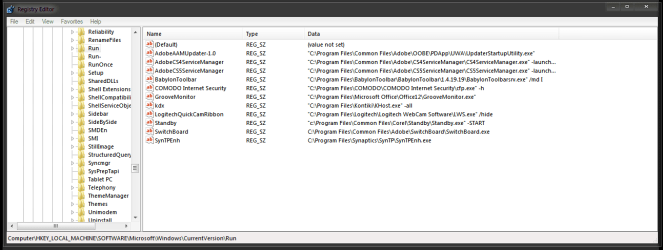
Ok my mistake, I was going straight to Windows rather than Microsoft -> Windows.
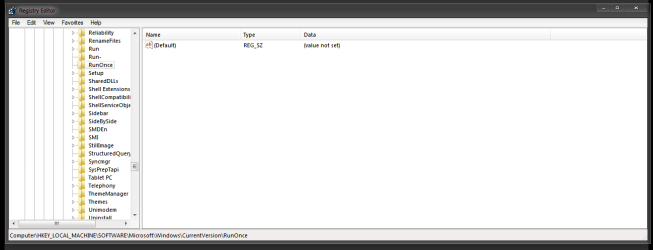
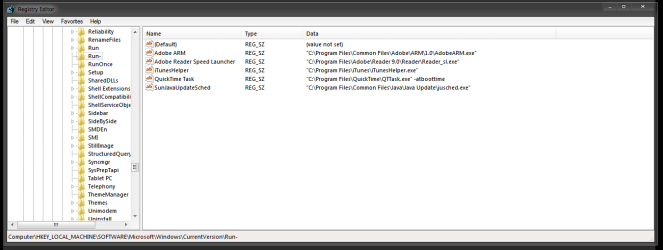
Now that's sorted, in the HKLM Current Version branch, I have: Run, Run-, RunOnce.

Here are the print screens for all three keys. Just look at the path at the bottom to work out which image is which.
 

Attachments

  • Run.png
    Run.png
    18.8 KB · Views: 8
  • RunOnce.png
    RunOnce.png
    12.9 KB · Views: 8
  • Run-.png
    Run-.png
    15.7 KB · Views: 8

My Computer

Computer Manufacturer/Model Number
Toshiba Satellite A210
OS
Windows 7 Ultimate 32-Bit (Build 7600)
Memory
1.87GB Ram
Monitor(s) Displays
Philips 244E1SB 23.6 inch Computer LCD Monitor
Hard Drives
Fujitsu Mobile MHY2250BH 250 GB
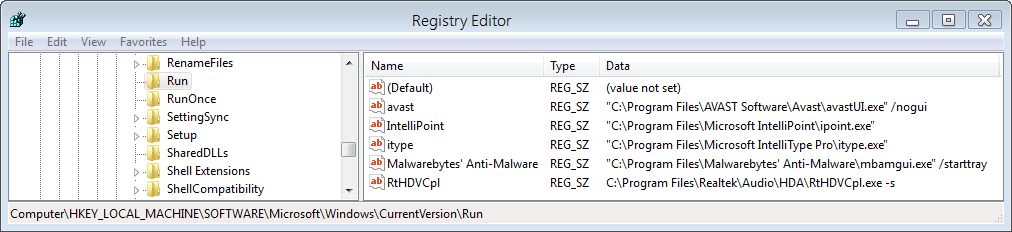
That looks better. Now, having had a look at the keys you posted, I can see that you do have an entry for Standby.exe in the Run branch. We need to remove that entry.

To do this, because the key involved is in the HKLM branch of the registry, we need to invoke the editor to run with administrative privileges. Click :orb: and type regedit into the search box. Press Ctrl + Shift + Return and provide administrative credentials when prompted. Now browse to HKEY_LOCAL_MACHINE\SOFTWARE\Microsoft\Windows\CurrentVersion\Run and, in the right hand pane, right-click on Standby and click Delete. Finally, close the registry editor.

Now restart your system. You will still get the same error message as before the first time you shutdown/restart after carrying out this operation because the program will already be running, but subsequent shutdowns/restarts should no longer give you this message.
 

My Computer

Computer type
PC/Desktop
Computer Manufacturer/Model Number
Dwarf Dwf/11/2012 r09/2013
OS
Windows 8.1 Pro RTM x64
CPU
Intel Core-i5-3570K 4-core @ 3.4GHz (Ivy Bridge) (OC 4.4GHz)
Motherboard
ASRock Z77 Extreme4-M
Memory
4 x 4GB DDR3-1600 Corsair Vengeance CMZ8GX3M2A1600C9B (16GB)
Graphics Card(s)
MSI GeForce GTX770 Gaming OC 2GB
Sound Card
Realtek High Definition on board solution (ALC 898)
Monitor(s) Displays
ViewSonic VA1912w Widescreen (VGA)
Screen Resolution
1440x900
Hard Drives
OCZ Agility 3 SSD 120GB SATA III x2 (RAID 0)
Samsung HD501LJ 500GB SATA II x2
Hitachi HDS721010CLA332 1TB SATA II
Iomega 1.5TB Ext USB 2.0
WD 2.0TB Ext USB 3.0
PSU
XFX Pro Series 850W Semi-Modular
Case
Gigabyte IF233
Cooling
1 x 120mm Front Inlet 1 x 120mm Rear Exhaust
Keyboard
Microsoft Comfort Curve Keyboard 3000 (USB)
Mouse
Microsoft Comfort Mouse 3000 for Business (USB)
Internet Speed
NetGear DG834Gv3 ADSL Modem/Router (Ethernet) ~4.0 Mb/s (O2)
Antivirus
Avast! 8.0.1497
Browser
IE 11
Other Info
Optical Drive: HL-DT-ST BD-RE BH10LS30 SATA Bluray
Lexmark S305 Printer/Scanner/Copier (USB)
WEI Score: 8.1/8.1/8.5/8.5/8.25
Asus Eee PC 1011PX Netbook (Windows 7 x86 Starter)
After deleting the key you suggested the startup.exe has stopped popping up, but the "force shutdown" issue is still taking place.

+Rep for solving half the problem.
 

My Computer

Computer Manufacturer/Model Number
Toshiba Satellite A210
OS
Windows 7 Ultimate 32-Bit (Build 7600)
Memory
1.87GB Ram
Monitor(s) Displays
Philips 244E1SB 23.6 inch Computer LCD Monitor
Hard Drives
Fujitsu Mobile MHY2250BH 250 GB

My Computer

Computer type
PC/Desktop
Computer Manufacturer/Model Number
Dwarf Dwf/11/2012 r09/2013
OS
Windows 8.1 Pro RTM x64
CPU
Intel Core-i5-3570K 4-core @ 3.4GHz (Ivy Bridge) (OC 4.4GHz)
Motherboard
ASRock Z77 Extreme4-M
Memory
4 x 4GB DDR3-1600 Corsair Vengeance CMZ8GX3M2A1600C9B (16GB)
Graphics Card(s)
MSI GeForce GTX770 Gaming OC 2GB
Sound Card
Realtek High Definition on board solution (ALC 898)
Monitor(s) Displays
ViewSonic VA1912w Widescreen (VGA)
Screen Resolution
1440x900
Hard Drives
OCZ Agility 3 SSD 120GB SATA III x2 (RAID 0)
Samsung HD501LJ 500GB SATA II x2
Hitachi HDS721010CLA332 1TB SATA II
Iomega 1.5TB Ext USB 2.0
WD 2.0TB Ext USB 3.0
PSU
XFX Pro Series 850W Semi-Modular
Case
Gigabyte IF233
Cooling
1 x 120mm Front Inlet 1 x 120mm Rear Exhaust
Keyboard
Microsoft Comfort Curve Keyboard 3000 (USB)
Mouse
Microsoft Comfort Mouse 3000 for Business (USB)
Internet Speed
NetGear DG834Gv3 ADSL Modem/Router (Ethernet) ~4.0 Mb/s (O2)
Antivirus
Avast! 8.0.1497
Browser
IE 11
Other Info
Optical Drive: HL-DT-ST BD-RE BH10LS30 SATA Bluray
Lexmark S305 Printer/Scanner/Copier (USB)
WEI Score: 8.1/8.1/8.5/8.5/8.25
Asus Eee PC 1011PX Netbook (Windows 7 x86 Starter)
Back
Top