
I want to set up simple file sharing at home for two laptops connecting through wifi and two desktops connecting through cable to the same router and all running windows 7. While communication between wired-wired and wireless-wireless devices is flawless, for some reason network discovery across wired and wireless devices is erratic at best, wired devices barely see wireless ones if at all and vice versa. (The same cross communication problem exists using homegroups.)
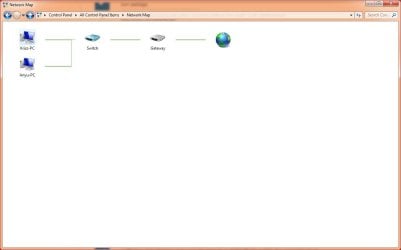
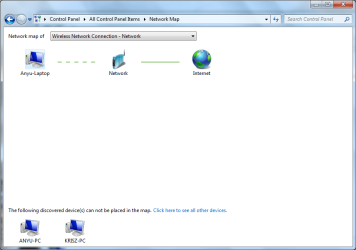
I believe the culprit is that windows thinks my router is two separate physical devices, a wifi access point for the wireless and a switch for the wired computers, therefor handling them as though they belonged to different subnets. I have attached the full network map as seen from a laptop and a desktop.
Strangely I can't access remote computers missing from the network map through windows explorer if I put computer names in the network path but SOMETIMES I can do so using ip addresses. However once I managed to access a particular computer using its ip address suddenly its name starts working in the network path AND it shows up on the network map which leads me to believe something is wrong with netbios.
Ipconfigs attached, all computers run win 7, belong to the same subnet and workgroup, have unique names, firewalls and other security software are temporarily off, the connections have lltd enabled and all belong to home network with the following settings: network discovery on, file and printer sharing on, public folder sharing off, media streaming off, 40-56 bit encryption allowed, password protected sharing off, windows manages homegroup connections. The router is a tp-link WR340G, there is no wlan isolation option or anything similar. I tried restarting and reinstalling everything capable of being reset or reinstalled.
Is there a way to make windows realise these devices all belong to the same subnet and / or have network discovery work reliably? Thanks!
I believe the culprit is that windows thinks my router is two separate physical devices, a wifi access point for the wireless and a switch for the wired computers, therefor handling them as though they belonged to different subnets. I have attached the full network map as seen from a laptop and a desktop.
Strangely I can't access remote computers missing from the network map through windows explorer if I put computer names in the network path but SOMETIMES I can do so using ip addresses. However once I managed to access a particular computer using its ip address suddenly its name starts working in the network path AND it shows up on the network map which leads me to believe something is wrong with netbios.
Ipconfigs attached, all computers run win 7, belong to the same subnet and workgroup, have unique names, firewalls and other security software are temporarily off, the connections have lltd enabled and all belong to home network with the following settings: network discovery on, file and printer sharing on, public folder sharing off, media streaming off, 40-56 bit encryption allowed, password protected sharing off, windows manages homegroup connections. The router is a tp-link WR340G, there is no wlan isolation option or anything similar. I tried restarting and reinstalling everything capable of being reset or reinstalled.
Is there a way to make windows realise these devices all belong to the same subnet and / or have network discovery work reliably? Thanks!
Attachments
My Computer
At a glance
Windows 7 Ultimate x64
- OS
- Windows 7 Ultimate x64


