Single file with all updates - Simplix

@Rhothgar

The Simplix Pack should have installed KB4474419 and KB4490628 for you. If they aren't currently on your system and you have actually run the Pack then you will need to run the Pack again. Have a look in the Simplix Pack log file on your PC. You should find the log file at C:\Windows\UpdatePack7.log

The last entry in the log (at the bottom of the log) should say, "All the latest updates are already present in the system" and "Operation of the program has been successfully finished". If that isn't at the bottom of the log file you need to keep launching the Pack until those statements appear in the last entry (at the bottom of) the log.

Nope. Nothing's changed. Tried it several times. On reboot, Windows goes into a loop. It gets to Welcome screen and then immediately reboots.

"The installation log of UpdatePack 7 / 2008 R2 / 22.1.18
Installation start time - 0:41:25 31.01.2022
Operating system - Windows 7 Ultimate SP1 x64

KB2533552 - Installation of the update has been successfully completed
KB2592687 - Installation of the update has been successfully completed
KB2670838 - Installation of the update has been successfully completed
KB2830477 - Installation of the update has been successfully completed
KB4490628 - Installation of the update has been successfully completed
KB5006749 - Installation of the update has been successfully completed

Installation finish time - 0:43:14 31.01.2022
The number of installed updates - 6
Total installation time of UpdatePack - 01:49
Operation of the program has been successfully finished"

Do I need to do this Bypass thing I have read about? ESU or something?

EDIT: From what I can make out, KB4474419 needs to be installed before 4490628 if I understand the Microsoft documentation correctly.

Just uninstalling dotNET4.8 to see if that is causing the problem. Will then retry Simplix.

- - - Updated - - -

Well. I've just restored a restore point from 2016. Not sure if this actually removes the Simplix stuff. I'd expect it would but who knows?

I've downloaded 22.1.8 again and even tried running it from the C:\Windows\System32 folder and still the same result. No joy as yet.
 
Last edited:

My Computer

Computer type
PC/Desktop
Computer Manufacturer/Model Number
HP xw4600 Workstation
OS
Windows 7 Ultimate x64 SP1
CPU
Intel Q9550 from memory
Motherboard
HP
Memory
8192Mb
Graphics Card(s)
Matrox Millenium
Hard Drives
Western Digital WD5000-AAKS (Blue Caviar?)
Antivirus
None
Browser
Firefox 48
With respect to the number of reboots required Simplix might reboot your system several times. On the last run on my system, which I'm tinkering heavily just now, it took three/four (can't remember the exact number) reboots, all initiated by Simplix until Simplix had finished its work. That said I had to launch Simplix multiple times myself until such times as it completed its work. On the penultimate run of Simplix, and after a Simplix initiated reboot, it ran a Disk Cleanup routine on C:\ to (at last) finish its work. (The cleanup took ages.) As for Windows 'getting stuck in a loop' don't worry about this and do not interrupt it in any way, leave the computer alone and just let Simplix do its thing. You need to be very, very patient with it and wait a lot while it does its thing (at times it looks like it has frozen but it hasn't really done so).

To take things from the top and how I use Simplix:

To run the pack you need to do so from a command window that has Administrator privileges. At the command prompt I use the following command (with two switches):
Code:
[B]UpdatePack7R2-22.1.18.exe /silent /reboot[/B]

That leaves Simplix in control of the process and all I have to do is sit and watch and occasionally relaunch Simplix (with the same command) if it hasn't actually completed its work in one go: which if there is a lot of updates to install it is very likely that I will have to launch it multiple times until I see in the log file that it really has finished (as previously explained).

You can get a look at what updates are included in the pack by opening it as an archive in 7-Zip.

To get a list of all the Microsoft Windows Updates installed to the system open a command window with admin privileges and use this command. (The text file list will be written to the directory the command prompt is pointing too.):
Code:
wmic qfe list > "Windows Updates Installed Tabbed List.txt"
Note that the list isn't actually 'tabbed'.

Can use this alternative command which writes the list in a different format which in some ways is easier to work with:
Code:
wmic qfe list full > "Windows Updates Installed Block List.txt"

You might find reading those lists easier to work with than trying to figure out what is going on via Windows 'Programs and Features' GUI.

If you try running the pack again it might help if you would post up a copy of the content of the Simplix log file so that others can see what it is going on and might be able to help from there. As it stands, because you are not detailing exactly step-by-step what you are doing in your posts, it's difficult to see what/where you might be going wrong.
 

My Computer

Computer type
PC/Desktop
OS
Windows 7 Pro. x64 SP1
BuddhaNature

Does it matter where UpdatePack resides? Is it best to run it from C:\ or C:\Windows\System32 please?

One time I did get as far as the Cleanup but I cancelled it as I was unsure what was going on?
 

My Computer

Computer type
PC/Desktop
Computer Manufacturer/Model Number
HP xw4600 Workstation
OS
Windows 7 Ultimate x64 SP1
CPU
Intel Q9550 from memory
Motherboard
HP
Memory
8192Mb
Graphics Card(s)
Matrox Millenium
Hard Drives
Western Digital WD5000-AAKS (Blue Caviar?)
Antivirus
None
Browser
Firefox 48
When I ran it on my own system I ran it from partition D:\ (which is my documents partition), thus: D:\UpdatePack7R2-22.1.18.exe

So, from that I would say you should be able to run in from anywhere. Do though note that for my use of it I ran a command window with administrator privileges (you must do this) with prompt pointing to D:\ i.e. where the UpdatePack7R2-22.1.18.exe was located. And then, as said before, use the command:

Code:
UpdatePack7R2-22.1.18.exe /silent /reboot

I would add that my experience of using it is that it only does the Disk Cleanup when it has actually installed successfully and the cleanup takes ages to do so, again, you need to be very patient.

Even at that, once the cleanup was over, and felt certain that Simplix really had finished, I looked in the log and it seemed okay. Then I rebooted the system and then did another launch of Simplix at which point it opened its window and that instantly vanished and it installed nothing (as everything was already installed) but it did append to the end of the install log this entry:

-------------------------------------

The installation log of UpdatePack 7 / 2008 R2 / 22.1.18
Installation start time - 17:25:13 28.01.2022
Operating system - Windows 7 Professional SP1 x64

All the latest updates are already present in the system

Installation finish time - 17:25:35 28.01.2022
The number of installed updates - 0
Total installation time of UpdatePack - 00:22
Operation of the program has been successfully finished


At which point I took it that all was well. Drama over!
 

My Computer

Computer type
PC/Desktop
OS
Windows 7 Pro. x64 SP1
Cool. I’m just letting it do its thing now.

Entered command twice so far and itms rebooted a number of times with NO change so far.

Am running it as admin in CMD.

Just going to leave it to get into its stride and see what happens. So far it‘a ran twice but installed the very same packages as my previous post but with the addition of dotNET 4.8 (presumably because I left that in the same folder).

Currently I’m on Desktop and nothing appears to be happening so I am going to leave it for 30 minutes and see if the log has changed.

- - - Updated - - -

May sound like a stupid question but should UpdatePack7R2-22.1.18.exe extract its contents to a folder and install from there?

Because previously I have seen a folder full of 11Gb of updates approx. and named UpdatePack********* and deleted it from the system.

I thought it had come from when I opened it with 7zip to look inside but I am sure I did that to desktop yet this folder was elsewhere?

- - - Updated - - -

I think I am going to time a different line as it's clearly not working.

This is latest log file entry. It says it has finished:-


The installation log of UpdatePack 7 / 2008 R2 / 22.1.18
Installation start time - 15:50:24 31.01.2022
Operating system - Windows 7 Ultimate SP1 x64

KB2533552 - Installation of the update has been successfully completed
KB2592687 - Installation of the update has been successfully completed
KB2670838 - Installation of the update has been successfully completed
KB2830477 - Installation of the update has been successfully completed
KB4490628 - Installation of the update has been successfully completed
KB5006749 - Installation of the update has been successfully completed

Installation finish time - 15:52:19 31.01.2022
The number of installed updates - 6
Total installation time of UpdatePack - 01:55
Operation of the program has been successfully finished

I do wonder if it has actually finished though as my PC is acting like it has a virus as the keyboard is playing up! I'll look at task manager. Maybe it is still working in background.

Otherwise I will use WU and run again after installing everything because perhaps it needs something it is missing. This damn keyboard...
 

My Computer

Computer type
PC/Desktop
Computer Manufacturer/Model Number
HP xw4600 Workstation
OS
Windows 7 Ultimate x64 SP1
CPU
Intel Q9550 from memory
Motherboard
HP
Memory
8192Mb
Graphics Card(s)
Matrox Millenium
Hard Drives
Western Digital WD5000-AAKS (Blue Caviar?)
Antivirus
None
Browser
Firefox 48
I don't know the answer to your questions.
From dim memory, wasn't paying too much attention at the time, I think I saw Simplix unpacking temp files (folders actually) into C:\Users\[username]\AppData\Local\Temp They were flashing in fast (SSD) and disappearing just as quickly and I just watched them rolling in. That said, where their content went after that I don't know, but would imagine, guessing really, that that is what Simplix deals with when it does the cleanup.

- - - Updated - - -

If it was me I would run Simplix again! And keep doing so until you get a final log entry saying something like this:

-------------------------------------

The installation log of UpdatePack 7 / 2008 R2 / 22.1.18
Installation start time - 17:25:13 28.01.2022
Operating system - Windows 7 Professional SP1 x64

All the latest updates are already present in the system

Installation finish time - 17:25:35 28.01.2022
The number of installed updates - 0
Total installation time of UpdatePack - 00:22
Operation of the program has been successfully finished

See! It says "The number of installed updates - 0" it's saying that because as far as it is concerned all the applicable updates for your system have been installed, so there is nothing further to install. And there is also the two lines "All the latest updates are already present in the system" and "Operation of the program has been successfully finished". That's what I got and you, I would guess, should be looking at getting something very similar. Keep running Simplix until you get something like that.
 

My Computer

Computer type
PC/Desktop
OS
Windows 7 Pro. x64 SP1
See! It says "The number of installed updates - 0" it's saying that because as far as it is concerned all the applicable updates for your system have been installed, so there is nothing further to install. And there is also the two lines "All the latest updates are already present in the system" and "Operation of the program has been successfully finished". That's what I got and you, I would guess, should be looking at getting something very similar. Keep running Simplix until you get something like that.

Just to let you know that I got it all up and running in the end.

I want to learn to edit the auto-install now so I can add other programmes into the auto-install. The ISO I created included other programmes but it only installed Windows and not the other programmes within that iso.

It's all good fun learning new skills. My only problem is at my age my memory often fails me...

Thanks for all your help.

I am going to tinker with trying to install other apps using the SiMPLiX method. Enthousiast has suggested trying POWIS by George King.
 

My Computer

Computer type
PC/Desktop
Computer Manufacturer/Model Number
HP xw4600 Workstation
OS
Windows 7 Ultimate x64 SP1
CPU
Intel Q9550 from memory
Motherboard
HP
Memory
8192Mb
Graphics Card(s)
Matrox Millenium
Hard Drives
Western Digital WD5000-AAKS (Blue Caviar?)
Antivirus
None
Browser
Firefox 48
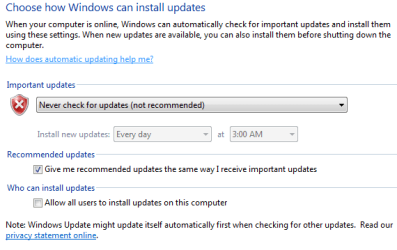
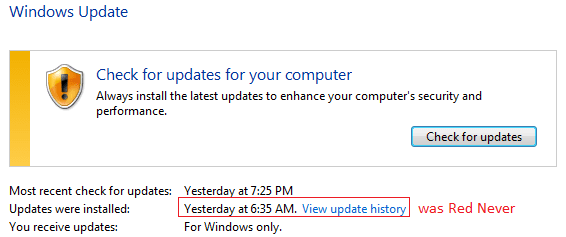
I did set "Never check" but after my running last Simplix (UpdatePack7R2-23.4.11.exe). "Never check" won't work any more. The sign of "Never" (red font) gone.

image.png

image.png

Any way to get it back? my guess, it needs removing certain hotfixes newly-installed. "Never" was there (red font).

My suggestion is to set Services - Windows Update - Manual and on WU page set it to Never check.
 

My Computers

System One System Two

  • Computer type
    PC/Desktop
    Computer Manufacturer/Model Number
    HP Elite 800 G5
    OS
    Windows 7 Pro 64-bit
    CPU
    I7-9700
    Memory
    32 GB
  • Computer type
    Laptop
    System Manufacturer/Model Number
    ASUS UX305C
    OS
    Windows 7 Pro 64-bit
I did set "Never check" but after my running last Simplix (UpdatePack7R2-23.4.11.exe). "Never check" won't work any more. The sign of "Never" (red font) gone.

View attachment 422751

View attachment 422750

Any way to get it back? my guess, it needs removing certain hotfixes newly-installed. "Never" was there (red font).

There is a little misunderstand here.
if you open Control Panel\All Control Panel Items\Windows Update\Change settings you can set to "Never Check". This means that Windows will never Automatically check for Windows Updates but will manually check and will install updates that you run to install. Simplix is a collection of Win 7 updates in a single package.

If you just install Win 7, on Control Panel\All Control Panel Items\Windows Update it will show that updates has never been installed. If you run Simplix or install an update it will show the last time a update was installed.
 

My Computers

System One System Two

  • Computer type
    PC/Desktop
    Computer Manufacturer/Model Number
    custom build
    OS
    Windows 7 HP 64
    CPU
    i5 6600K - 800MHz to 4200MHz
    Motherboard
    GA-Z170-HD3P
    Memory
    4+4G GSkill DDR4 3000
    Graphics Card(s)
    IG - Intel 530
    Monitor(s) Displays
    Samsung 226BW
    Screen Resolution
    1680x1050
    Hard Drives
    (1) -1 SM951 – 128GB M.2 AHCI PCIe SSD drive for Windows 7 and Lubuntu
    (2) -1 WD SATA 3 - 1T for Data
    (3) -1 WD SATA 3 - 1T for backup
    PSU
    Thermaltake 450W TR2 gold
    Keyboard
    Old and good Chicony mechanical keyboard
    Mouse
    Logitech mX performance - 9 buttons (had to disable some)
    Internet Speed
    500Mb/s
    Browser
    Firefox 64
    Other Info
    TinyWall firewall
  • Computer type
    Laptop
    System Manufacturer/Model Number
    Asus Q550LF
    OS
    Windows 7 Pro
    CPU
    i7-4500U 800MHz to 3.0GHz
    Motherboard
    Asus Q550LF
    Memory
    (4+4)G DDR3 1600
    Graphics Card(s)
    IG intel 4400 + NVIDIA GeForce GT 745M
    Sound Card
    Realtek
    Monitor(s) Displays
    LG Display LP156WF4-SPH1
    Screen Resolution
    1920 x 1080
    Hard Drives
    BX500 120G SSD for Windows and programs +
    1T HDD for data
    Internet Speed
    500 Mb/s
    Browser
    Firefox
    Other Info
    TinyWall firewall
got it.

It's clearer.
 

My Computers

System One System Two

  • Computer type
    PC/Desktop
    Computer Manufacturer/Model Number
    HP Elite 800 G5
    OS
    Windows 7 Pro 64-bit
    CPU
    I7-9700
    Memory
    32 GB
  • Computer type
    Laptop
    System Manufacturer/Model Number
    ASUS UX305C
    OS
    Windows 7 Pro 64-bit
new to the Win 7 forum, great sharing with those links. I recently built a new Win 7 box and had to install Avast which forced the install of the Dot net and other needed elements. This is a much better approach as I still have one Win 7 64 install to complete. Kind of a Win 7 advocate. Appreciate the information.
 

My Computers

System One System Two

  • Computer type
    PC/Desktop
    Computer Manufacturer/Model Number
    custom
    OS
    Windows 7 Pro 64
    CPU
    3.60 gigahertz AMD FX-4100 Quad-Core
    Motherboard
    Gigabyte Technology Co., Ltd. GA-970A-D3
    Memory
    16366 Megabytes
    Graphics Card(s)
    NVIDIA GeForce 210
    Hard Drives
    Samsung SSD 860 EVO 1TB
    Antivirus
    Defender / Malwarebytes
    Browser
    Firefox
  • Computer type
    PC/Desktop
How long does it take to run the Simplex file?
 

My Computer

Computer type
Laptop
Computer Manufacturer/Model Number
HP Pavilion dv7-6c23cl
OS
Windows 7 Home Premium 64bit
CPU
AMD A8-3520M
Motherboard
Hewlett-Packard 180B (Socket FS1)
Memory
6.00GB DDR3 @ 674MHz (9-9-9-24)
Graphics Card(s)
512MB ATI AMD Radeon HD 6620G
Sound Card
IDT High Definition Audio CODEC
Monitor(s) Displays
Generic PnP Monitor
Screen Resolution
(1600x900@60Hz)
Hard Drives
Samsung 850 EVO 250GB SSD
Mouse
Logitec M525
Internet Speed
30-75Mbps
Antivirus
Avast Free, Unfortunately
Browser
Google Chrome, Firefox, IE
How long does it take to run the Simplex file?

After a clean install, without updates, about 20 minutes.

If the installation already has most updates some minutes.
 

My Computers

System One System Two

  • Computer type
    PC/Desktop
    Computer Manufacturer/Model Number
    custom build
    OS
    Windows 7 HP 64
    CPU
    i5 6600K - 800MHz to 4200MHz
    Motherboard
    GA-Z170-HD3P
    Memory
    4+4G GSkill DDR4 3000
    Graphics Card(s)
    IG - Intel 530
    Monitor(s) Displays
    Samsung 226BW
    Screen Resolution
    1680x1050
    Hard Drives
    (1) -1 SM951 – 128GB M.2 AHCI PCIe SSD drive for Windows 7 and Lubuntu
    (2) -1 WD SATA 3 - 1T for Data
    (3) -1 WD SATA 3 - 1T for backup
    PSU
    Thermaltake 450W TR2 gold
    Keyboard
    Old and good Chicony mechanical keyboard
    Mouse
    Logitech mX performance - 9 buttons (had to disable some)
    Internet Speed
    500Mb/s
    Browser
    Firefox 64
    Other Info
    TinyWall firewall
  • Computer type
    Laptop
    System Manufacturer/Model Number
    Asus Q550LF
    OS
    Windows 7 Pro
    CPU
    i7-4500U 800MHz to 3.0GHz
    Motherboard
    Asus Q550LF
    Memory
    (4+4)G DDR3 1600
    Graphics Card(s)
    IG intel 4400 + NVIDIA GeForce GT 745M
    Sound Card
    Realtek
    Monitor(s) Displays
    LG Display LP156WF4-SPH1
    Screen Resolution
    1920 x 1080
    Hard Drives
    BX500 120G SSD for Windows and programs +
    1T HDD for data
    Internet Speed
    500 Mb/s
    Browser
    Firefox
    Other Info
    TinyWall firewall
Thanks Meg, I'm already at an hour and 20 minutes on a low end laptop with a first Gen i3 330M and 4GB of RAM, clean install, turned off updates off right after clean install. Rebooting for the second time now.

- - - Updated - - -

Done now at One and a half hours! Not bad on an old low end laptop.
 

My Computer

Computer type
Laptop
Computer Manufacturer/Model Number
HP Pavilion dv7-6c23cl
OS
Windows 7 Home Premium 64bit
CPU
AMD A8-3520M
Motherboard
Hewlett-Packard 180B (Socket FS1)
Memory
6.00GB DDR3 @ 674MHz (9-9-9-24)
Graphics Card(s)
512MB ATI AMD Radeon HD 6620G
Sound Card
IDT High Definition Audio CODEC
Monitor(s) Displays
Generic PnP Monitor
Screen Resolution
(1600x900@60Hz)
Hard Drives
Samsung 850 EVO 250GB SSD
Mouse
Logitec M525
Internet Speed
30-75Mbps
Antivirus
Avast Free, Unfortunately
Browser
Google Chrome, Firefox, IE
Again for those interested, the June Simplix file (June 20th, 2023) can be accompanied by a Net 4.8 rollup June 13th, 2023 from Abbodi1406 github site.
 

My Computer

Computer type
Laptop
Computer Manufacturer/Model Number
HP 250 G7
OS
Windows 7 Pro x64
CPU
Intel i5-8265U
Motherboard
Intel Coffee Lake
Memory
8gb
Graphics Card(s)
Intel Iris Plus 655
Sound Card
Realtek HDA
Monitor(s) Displays
Generic
Screen Resolution
1366 x 768
Hard Drives
Crucial P5 NVMe 1Tb internal
WD's 4Tb, 3Tb, 2 x 2Tb external
Mouse
Logi wireless
Internet Speed
45 Mbps
Antivirus
AVG
Browser
Firefox 88, Pale Moon 29, Brave 129
Other Info
Combination of i5-8265U with Crucial P5 achieves Crystal Bench scores > 5000

Iris Plus GPU (Whiskey Lake) driver from BioStar

HP 250 G7 is a budget machine
Is there an automated way to block all telemetry updates after running Simplex?
 

My Computer

Computer type
Laptop
Computer Manufacturer/Model Number
HP Pavilion dv7-6c23cl
OS
Windows 7 Home Premium 64bit
CPU
AMD A8-3520M
Motherboard
Hewlett-Packard 180B (Socket FS1)
Memory
6.00GB DDR3 @ 674MHz (9-9-9-24)
Graphics Card(s)
512MB ATI AMD Radeon HD 6620G
Sound Card
IDT High Definition Audio CODEC
Monitor(s) Displays
Generic PnP Monitor
Screen Resolution
(1600x900@60Hz)
Hard Drives
Samsung 850 EVO 250GB SSD
Mouse
Logitec M525
Internet Speed
30-75Mbps
Antivirus
Avast Free, Unfortunately
Browser
Google Chrome, Firefox, IE
Is there an automated way to block all telemetry updates after running Simplex?

As there is no more updates coming from WU, set Services - Windows Update - Manual and on WU page set it to Never check.
 

My Computers

System One System Two

  • Computer type
    PC/Desktop
    Computer Manufacturer/Model Number
    custom build
    OS
    Windows 7 HP 64
    CPU
    i5 6600K - 800MHz to 4200MHz
    Motherboard
    GA-Z170-HD3P
    Memory
    4+4G GSkill DDR4 3000
    Graphics Card(s)
    IG - Intel 530
    Monitor(s) Displays
    Samsung 226BW
    Screen Resolution
    1680x1050
    Hard Drives
    (1) -1 SM951 – 128GB M.2 AHCI PCIe SSD drive for Windows 7 and Lubuntu
    (2) -1 WD SATA 3 - 1T for Data
    (3) -1 WD SATA 3 - 1T for backup
    PSU
    Thermaltake 450W TR2 gold
    Keyboard
    Old and good Chicony mechanical keyboard
    Mouse
    Logitech mX performance - 9 buttons (had to disable some)
    Internet Speed
    500Mb/s
    Browser
    Firefox 64
    Other Info
    TinyWall firewall
  • Computer type
    Laptop
    System Manufacturer/Model Number
    Asus Q550LF
    OS
    Windows 7 Pro
    CPU
    i7-4500U 800MHz to 3.0GHz
    Motherboard
    Asus Q550LF
    Memory
    (4+4)G DDR3 1600
    Graphics Card(s)
    IG intel 4400 + NVIDIA GeForce GT 745M
    Sound Card
    Realtek
    Monitor(s) Displays
    LG Display LP156WF4-SPH1
    Screen Resolution
    1920 x 1080
    Hard Drives
    BX500 120G SSD for Windows and programs +
    1T HDD for data
    Internet Speed
    500 Mb/s
    Browser
    Firefox
    Other Info
    TinyWall firewall
That's what I was going to do but out of curiosity I let er rip and there were some Updates. But as you said somewhere they are all long before May of 2023 so must be included in Simplex somehow? Windows 7 don't have Cumulative updates right? It's not to important really but just trying to reacquaint myself with Windows 7 Updates.
 

My Computer

Computer type
Laptop
Computer Manufacturer/Model Number
HP Pavilion dv7-6c23cl
OS
Windows 7 Home Premium 64bit
CPU
AMD A8-3520M
Motherboard
Hewlett-Packard 180B (Socket FS1)
Memory
6.00GB DDR3 @ 674MHz (9-9-9-24)
Graphics Card(s)
512MB ATI AMD Radeon HD 6620G
Sound Card
IDT High Definition Audio CODEC
Monitor(s) Displays
Generic PnP Monitor
Screen Resolution
(1600x900@60Hz)
Hard Drives
Samsung 850 EVO 250GB SSD
Mouse
Logitec M525
Internet Speed
30-75Mbps
Antivirus
Avast Free, Unfortunately
Browser
Google Chrome, Firefox, IE
Back
Top
