That’s when it said it’s not for this PC.
Do you suggest Windows Update install it twice?
My Computer
At a glance
Windows 7 Home Premium
- Computer type
- PC/Desktop
- OS
- Windows 7 Home Premium

That’s when it said it’s not for this PC.
@Rhothgar
The Simplix Pack should have installed KB4474419 and KB4490628 for you. If they aren't currently on your system and you have actually run the Pack then you will need to run the Pack again. Have a look in the Simplix Pack log file on your PC. You should find the log file at C:\Windows\UpdatePack7.log
The last entry in the log (at the bottom of the log) should say, "All the latest updates are already present in the system" and "Operation of the program has been successfully finished". If that isn't at the bottom of the log file you need to keep launching the Pack until those statements appear in the last entry (at the bottom of) the log.

[B]UpdatePack7R2-22.1.18.exe /silent /reboot[/B]wmic qfe list > "Windows Updates Installed Tabbed List.txt"wmic qfe list full > "Windows Updates Installed Block List.txt"UpdatePack7R2-22.1.18.exe /silent /reboot-------------------------------------
The installation log of UpdatePack 7 / 2008 R2 / 22.1.18
Installation start time - 17:25:13 28.01.2022
Operating system - Windows 7 Professional SP1 x64
All the latest updates are already present in the system
Installation finish time - 17:25:35 28.01.2022
The number of installed updates - 0
Total installation time of UpdatePack - 00:22
Operation of the program has been successfully finished
-------------------------------------
The installation log of UpdatePack 7 / 2008 R2 / 22.1.18
Installation start time - 17:25:13 28.01.2022
Operating system - Windows 7 Professional SP1 x64
All the latest updates are already present in the system
Installation finish time - 17:25:35 28.01.2022
The number of installed updates - 0
Total installation time of UpdatePack - 00:22
Operation of the program has been successfully finished
See! It says "The number of installed updates - 0" it's saying that because as far as it is concerned all the applicable updates for your system have been installed, so there is nothing further to install. And there is also the two lines "All the latest updates are already present in the system" and "Operation of the program has been successfully finished". That's what I got and you, I would guess, should be looking at getting something very similar. Keep running Simplix until you get something like that.
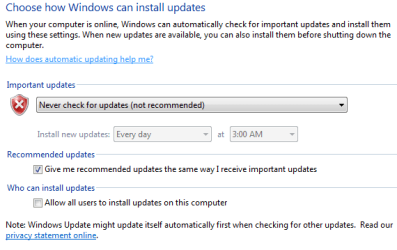
My suggestion is to set Services - Windows Update - Manual and on WU page set it to Never check.

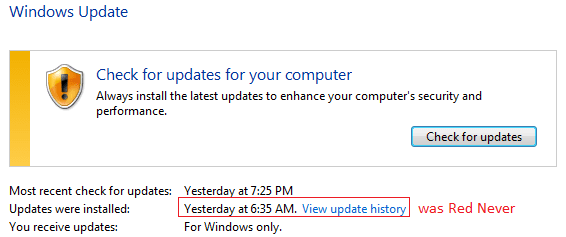
I did set "Never check" but after my running last Simplix (UpdatePack7R2-23.4.11.exe). "Never check" won't work any more. The sign of "Never" (red font) gone.
View attachment 422751
View attachment 422750
Any way to get it back? my guess, it needs removing certain hotfixes newly-installed. "Never" was there (red font).


How long does it take to run the Simplex file?
Is there an automated way to block all telemetry updates after running Simplex?


