single frequency scan

Paul1360

New member
Power User
Local time
4:46 AM
Messages
191
Location
Brynna-Wales
Hiya All,
Does any1 know if you can do a single frequency scan in W7MC, If so how to you do it.
Cheers
Paul
 

My Computer

Computer type
PC/Desktop
Computer Manufacturer/Model Number
Advent & Acer
OS
Win 8.1 Ultimate and Home Premium x64 bit
Do you need to add the ability to tune a specific channel that wasn't found on the channel scan?
 

My Computer

Computer Manufacturer/Model Number
Gateway GM5472
OS
Windows 7 Home Premium (64 bit)
CPU
AMD Athlon 56 X2 5000+
Motherboard
ECS MCP61P-AM
Memory
4.0 GB
Graphics Card(s)
Sapphire HD 4350 fanless w/512MB
Monitor(s) Displays
VeiwSonic VX2035WM
Screen Resolution
1680x1050
Other Info
Stock system except for the addition of 2GB memory, a Swann PCDVR 4 Card and a Hauppage dual HD tuner and a Sapphire HD 4550 video card
LD,
Yes thats what I'm looking to do but have been unable to find any information on how to do. Maybe it can't be done?
paul
 

My Computer

Computer type
PC/Desktop
Computer Manufacturer/Model Number
Advent & Acer
OS
Win 8.1 Ultimate and Home Premium x64 bit
I happen to know that, if it is the same issue I had.

I don't have Windows 7 in front of me right now, so I will give general instructions.

Go to setup TV, and select the Guide instead of scanning etc... (For some reason this is where to add channels).

There is the possibility that it has the channel already, but it is disabled, so if you look first in "Edit Channels" you may find it and then you can simply select it to activate it.

If it is not there, you have the option to add a channel. You just need to know whether to add as analog or QAM (which is available depends on your tuner) . This will enable you to tune the channel from then on.

I had the same issue in trying to get QAM channels set up that I knew were there because my tv gets them. Now all is well.

One additional idiosyncrasy I ran into... For QAM, I found that the numbers I needed were sometimes different with my PC and tuner than they were on my television. The couple of changes I found by experimenting were actually up 0.1 from where they were found on the TV... i.e. 107.1 on the TV is 107.2 on the PC.

 

My Computer

Computer Manufacturer/Model Number
Gateway GM5472
OS
Windows 7 Home Premium (64 bit)
CPU
AMD Athlon 56 X2 5000+
Motherboard
ECS MCP61P-AM
Memory
4.0 GB
Graphics Card(s)
Sapphire HD 4350 fanless w/512MB
Monitor(s) Displays
VeiwSonic VX2035WM
Screen Resolution
1680x1050
Other Info
Stock system except for the addition of 2GB memory, a Swann PCDVR 4 Card and a Hauppage dual HD tuner and a Sapphire HD 4550 video card
LD,
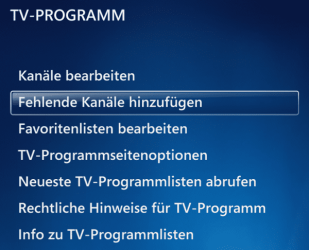
Thanks for the reply but alas, the channel is not there and also i can't find where you said about add channel as no option to do it. I done screen print which is attached
Diolch yn fawr
Paul
 

Attachments

  • Untitled.jpg
    Untitled.jpg
    6.1 KB · Views: 290

My Computer

Computer type
PC/Desktop
Computer Manufacturer/Model Number
Advent & Acer
OS
Win 8.1 Ultimate and Home Premium x64 bit
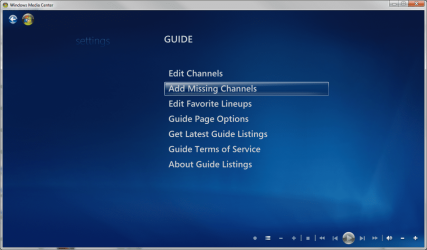
Go up one level from there, in Guide. There are different options in the guide for Edit and Add...

In other words, Add is not a sub-menu of Edit (even though that is where it seems to belong logically) it is a sibling.
 

My Computer

Computer Manufacturer/Model Number
Gateway GM5472
OS
Windows 7 Home Premium (64 bit)
CPU
AMD Athlon 56 X2 5000+
Motherboard
ECS MCP61P-AM
Memory
4.0 GB
Graphics Card(s)
Sapphire HD 4350 fanless w/512MB
Monitor(s) Displays
VeiwSonic VX2035WM
Screen Resolution
1680x1050
Other Info
Stock system except for the addition of 2GB memory, a Swann PCDVR 4 Card and a Hauppage dual HD tuner and a Sapphire HD 4550 video card
LD,
Still can't find it so in the end I setup the LiveTV on my Nero 8 and I now have the 2 channels I wanted.
Thanks for your input.

Diolch yn fawr
paul
 

My Computer

Computer type
PC/Desktop
Computer Manufacturer/Model Number
Advent & Acer
OS
Win 8.1 Ultimate and Home Premium x64 bit
I wonder if there is a difference between the guide functionality based on locality...

Glad you found a way to get what you want!
 

My Computer

Computer Manufacturer/Model Number
Gateway GM5472
OS
Windows 7 Home Premium (64 bit)
CPU
AMD Athlon 56 X2 5000+
Motherboard
ECS MCP61P-AM
Memory
4.0 GB
Graphics Card(s)
Sapphire HD 4350 fanless w/512MB
Monitor(s) Displays
VeiwSonic VX2035WM
Screen Resolution
1680x1050
Other Info
Stock system except for the addition of 2GB memory, a Swann PCDVR 4 Card and a Hauppage dual HD tuner and a Sapphire HD 4550 video card
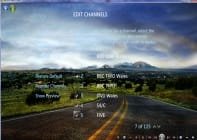
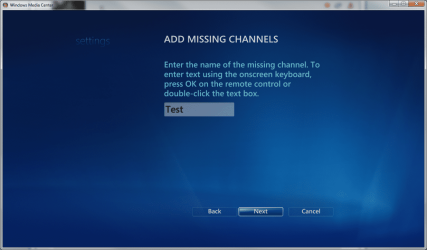
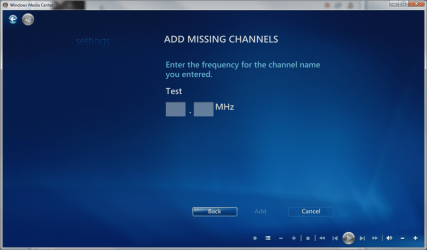
Is this procedure what you are looking?

WMC_1.PNG

WMC_2.PNG

WMC_3.PNG

WMC_4.PNG
 

My Computer

Computer type
Laptop
Computer Manufacturer/Model Number
HP ENVY 17-1150eg
OS
Windows 10 Pro x64 EN-GB
CPU
1.6 GHz Intel Core i7-720QM Processor
Memory
6 GB
Graphics Card(s)
ATI Mobility Radeon HD 5850 Graphics
Sound Card
Beats sound system with integrated subwoofer
Monitor(s) Displays
17" laptop display, 22" LED and 32" Full HD TV through HDMI
Screen Resolution
1600*900 (1), 1920*1080 (2&3)
Hard Drives
Internal: 2 x 500 GB SATA Hard Disk Drive 7200 rpm
External: 2TB for backups, 3TB USB3 network drive for media
Cooling
As Envy runs a bit warm, I have it on a Cooler Master pad
Keyboard
Logitech diNovo Media Desktop Laser (bluetooth)
Mouse
Logitech Performance Mouse MX
Internet Speed
50/10 Mbps VDSL
Antivirus
Windows Defender 4.3.9431.0
Browser
Maxthon 3.5.2., IE11
Hi both,
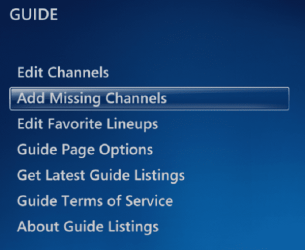
Aye up I think you may have hit the nail on the head LD, it looks as if W7MC are different. No Kari mine is different see attached file.
I wonder if it's the EU:mad: again messing things up like the browser choice, it thats the case nothing i can do.

Diolch yn fawr
paul
 

Attachments

  • wmc.jpg
    wmc.jpg
    9.7 KB · Views: 7

My Computer

Computer type
PC/Desktop
Computer Manufacturer/Model Number
Advent & Acer
OS
Win 8.1 Ultimate and Home Premium x64 bit
I am never going to believe Microsoft would put different versions of WMC in to Windows 7, based only for language. Here's some screenshots to prove my point, all taken from my various systems:

English:
WMC_EN.png

Finnish:
WMC_FI.png

German:
WMC_DE.png

Swedish:
WMC_SE.png
 

My Computer

Computer type
Laptop
Computer Manufacturer/Model Number
HP ENVY 17-1150eg
OS
Windows 10 Pro x64 EN-GB
CPU
1.6 GHz Intel Core i7-720QM Processor
Memory
6 GB
Graphics Card(s)
ATI Mobility Radeon HD 5850 Graphics
Sound Card
Beats sound system with integrated subwoofer
Monitor(s) Displays
17" laptop display, 22" LED and 32" Full HD TV through HDMI
Screen Resolution
1600*900 (1), 1920*1080 (2&3)
Hard Drives
Internal: 2 x 500 GB SATA Hard Disk Drive 7200 rpm
External: 2TB for backups, 3TB USB3 network drive for media
Cooling
As Envy runs a bit warm, I have it on a Cooler Master pad
Keyboard
Logitech diNovo Media Desktop Laser (bluetooth)
Mouse
Logitech Performance Mouse MX
Internet Speed
50/10 Mbps VDSL
Antivirus
Windows Defender 4.3.9431.0
Browser
Maxthon 3.5.2., IE11
It just occurred to me that the difference could also be based on the type of tuner or source of signal (ATSC/NTSC/QAM) Or maybe some other factor not yet identified. ;)
 

My Computer

Computer Manufacturer/Model Number
Gateway GM5472
OS
Windows 7 Home Premium (64 bit)
CPU
AMD Athlon 56 X2 5000+
Motherboard
ECS MCP61P-AM
Memory
4.0 GB
Graphics Card(s)
Sapphire HD 4350 fanless w/512MB
Monitor(s) Displays
VeiwSonic VX2035WM
Screen Resolution
1680x1050
Other Info
Stock system except for the addition of 2GB memory, a Swann PCDVR 4 Card and a Hauppage dual HD tuner and a Sapphire HD 4550 video card
Kari,
Well I've not got Add missing Channels option in my WMC, Tis 7 Ultimate 64x as you can see from my last post in the attachment. I have just checked my Win7 HP 64x and it's the same. see attachment.
So it does look like MS have not included that Option here?????????
Diolch yn fawr
paul
 

Attachments

  • wmc7hp.jpg
    wmc7hp.jpg
    19.8 KB · Views: 9

My Computer

Computer type
PC/Desktop
Computer Manufacturer/Model Number
Advent & Acer
OS
Win 8.1 Ultimate and Home Premium x64 bit
It is very odd.

For instance, Windows 7 N (Windows without WMP and WMC) users can download missing media components here. This update installs both WMP and WMC with all corresponding files. The update is only available as a single, universal update; it installs the exactly same version of WMP and WMC, not regarding from which country you download it or which N version you have (Home Basic / Premium, Pro, Ultimate).

I've seen and heard that some cracked Windows versions have had some features missing, but other than that media features should be exactly the same in every version of the Win7 except Starter Edition.

Kari
 

My Computer

Computer type
Laptop
Computer Manufacturer/Model Number
HP ENVY 17-1150eg
OS
Windows 10 Pro x64 EN-GB
CPU
1.6 GHz Intel Core i7-720QM Processor
Memory
6 GB
Graphics Card(s)
ATI Mobility Radeon HD 5850 Graphics
Sound Card
Beats sound system with integrated subwoofer
Monitor(s) Displays
17" laptop display, 22" LED and 32" Full HD TV through HDMI
Screen Resolution
1600*900 (1), 1920*1080 (2&3)
Hard Drives
Internal: 2 x 500 GB SATA Hard Disk Drive 7200 rpm
External: 2TB for backups, 3TB USB3 network drive for media
Cooling
As Envy runs a bit warm, I have it on a Cooler Master pad
Keyboard
Logitech diNovo Media Desktop Laser (bluetooth)
Mouse
Logitech Performance Mouse MX
Internet Speed
50/10 Mbps VDSL
Antivirus
Windows Defender 4.3.9431.0
Browser
Maxthon 3.5.2., IE11
Kari,
I not got cracked versions of Win7 in fact i bought the Laptop with W7HP already installed and once i got use to that I ordered W7Ult and installed on my main pc.
I've just spoke to my grandson and he checked his laptop that i got him about 10 days ago ( all pre-installed) and his is the same.
So pass on why we not got add missing channels option:cry:
paul
 

My Computer

Computer type
PC/Desktop
Computer Manufacturer/Model Number
Advent & Acer
OS
Win 8.1 Ultimate and Home Premium x64 bit
Paul, please believe me I did not mean that you might use a cracked version. No. I only meant that until now, only times I've heard about missing features have been with so called torrent Windows'.

Like I said, this is strange.

Kari
 

My Computer

Computer type
Laptop
Computer Manufacturer/Model Number
HP ENVY 17-1150eg
OS
Windows 10 Pro x64 EN-GB
CPU
1.6 GHz Intel Core i7-720QM Processor
Memory
6 GB
Graphics Card(s)
ATI Mobility Radeon HD 5850 Graphics
Sound Card
Beats sound system with integrated subwoofer
Monitor(s) Displays
17" laptop display, 22" LED and 32" Full HD TV through HDMI
Screen Resolution
1600*900 (1), 1920*1080 (2&3)
Hard Drives
Internal: 2 x 500 GB SATA Hard Disk Drive 7200 rpm
External: 2TB for backups, 3TB USB3 network drive for media
Cooling
As Envy runs a bit warm, I have it on a Cooler Master pad
Keyboard
Logitech diNovo Media Desktop Laser (bluetooth)
Mouse
Logitech Performance Mouse MX
Internet Speed
50/10 Mbps VDSL
Antivirus
Windows Defender 4.3.9431.0
Browser
Maxthon 3.5.2., IE11
Kari,
NO i NOT THINK you where saying i had cracked win 7, sorry way I replied to your email. Yes it's very strange indeed.
Maybe some1 from MS will read this and give use an answer
Paul
 

My Computer

Computer type
PC/Desktop
Computer Manufacturer/Model Number
Advent & Acer
OS
Win 8.1 Ultimate and Home Premium x64 bit
Which tuner(s) are you using?

I am not sure what may differ there, but cable/satellite/over the air???

There obviously is something different... and as long as you're willing to research, it is an interesting hunt.

Perhaps you should open an incident with MS to see what they say. I've never done that, but it seems like a logical step.

Of course there are jokes about MS support... http://www.bastichlabz.org/~tigger/TechHumor/mshelicopter.txt
 

My Computer

Computer Manufacturer/Model Number
Gateway GM5472
OS
Windows 7 Home Premium (64 bit)
CPU
AMD Athlon 56 X2 5000+
Motherboard
ECS MCP61P-AM
Memory
4.0 GB
Graphics Card(s)
Sapphire HD 4350 fanless w/512MB
Monitor(s) Displays
VeiwSonic VX2035WM
Screen Resolution
1680x1050
Other Info
Stock system except for the addition of 2GB memory, a Swann PCDVR 4 Card and a Hauppage dual HD tuner and a Sapphire HD 4550 video card
LD,
On my Main PC I'm Using AVerTV Volar Black HD A850 USB and on my Laptop Hauppauge WinTV-NOVA-T USB Stick. Both are DVB-T Digital freeview TV tuner stick.
We are not as luck as you as you have lots and lots of channels.
I got Sky TV for my main TV but as I'm a sports lover I need to have more than I platform.:D Tomorrow I'll have the Rugby, Horse Racing and Footie on
Paul
 

My Computer

Computer type
PC/Desktop
Computer Manufacturer/Model Number
Advent & Acer
OS
Win 8.1 Ultimate and Home Premium x64 bit
Back
Top