poumtatalia
New member
- Local time
- 7:36 AM
- Messages
- 4
Hi is there a way on my OS to blacklist some sites. Ex I want to make sure that no user on my machine visit facebook.
Thx.
Thx.
My Computer
- OS
- Windows seven


Hi is there a way on my OS to blacklist some sites. Ex I want to make sure that no user on my machine visit facebook.
Thx.
Hi is there a way on my OS to blacklist some sites. Ex I want to make sure that no user on my machine visit facebook.
Thx.
# Copyright (c) 1993-2009 Microsoft Corp.
#
# This is a sample HOSTS file used by Microsoft TCP/IP for Windows.
#
# This file contains the mappings of IP addresses to host names. Each
# entry should be kept on an individual line. The IP address should
# be placed in the first column followed by the corresponding host name.
# The IP address and the host name should be separated by at least one
# space.
#
# Additionally, comments (such as these) may be inserted on individual
# lines or following the machine name denoted by a '#' symbol.
#
# For example:
#
#      102.54.94.97     rhino.acme.com          # source server
#       38.25.63.10     x.acme.com              # x client host

# localhost name resolution is handled within DNS itself.
#	127.0.0.1       localhost
#	::1             localhost

0.0.0.0 facebook.com
0.0.0.0 www.facebook.com
 ). it is not changeable by the actual users.
Hi is there a way on my OS to blacklist some sites. Ex I want to make sure that no user on my machine visit facebook.
Thx.
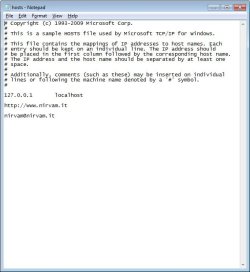
This is not a secure way but you can add a line to C:\Windows\System32\drivers\etc\hosts like this:
Or get Windows Essentials: Other Programs - Microsoft WindowsCode:# Copyright (c) 1993-2009 Microsoft Corp. # # This is a sample HOSTS file used by Microsoft TCP/IP for Windows. # # This file contains the mappings of IP addresses to host names. Each # entry should be kept on an individual line. The IP address should # be placed in the first column followed by the corresponding host name. # The IP address and the host name should be separated by at least one # space. # # Additionally, comments (such as these) may be inserted on individual # lines or following the machine name denoted by a '#' symbol. # # For example: # # 102.54.94.97 rhino.acme.com # source server # 38.25.63.10 x.acme.com # x client host # localhost name resolution is handled within DNS itself. # 127.0.0.1 localhost # ::1 localhost 0.0.0.0 facebook.com 0.0.0.0 www.facebook.com
It didn't work, Netgear router here.Hi there
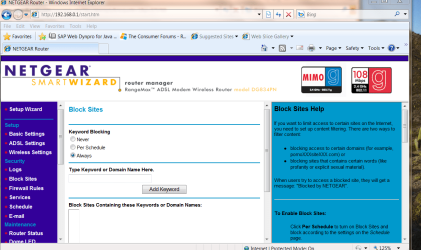
Most decent Routers in their security set ups allow you to block IP addresses.
Pic enclosed of Netgear router --others are much the same I'd guess.
You can also establish rules etc etc.
Cheers
jimbo

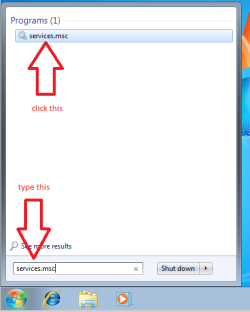
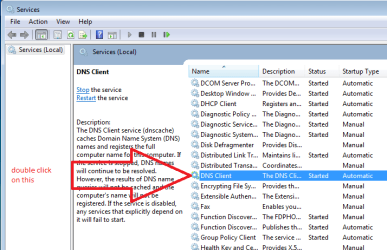
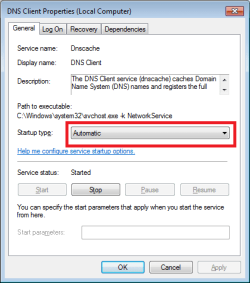
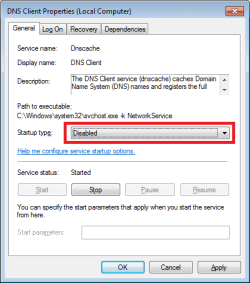
Several websites suggest disabling the Windows service named DNS Client if you are going to use a HOSTS file. You should also close your browser to make sure that the info that it has cached is cleared. Make sure that the browser has left RAM. This can take a minute or so after the Window has closed. Once you restart your browser, it should read the contents of your HOSTS file.It didn't work, I added the web address and the E-mail address on 2 separate lines so the browser can still access the web site.

*I do not think you can block e-mails via the HOSTS file or via router settings. Those blocks are meant to prevent a computer on your network from getting data from a domain (a website like facebook.com). The e-mails that you are getting are coming to you thru Google's domains/website. If you blocked Google's mail servers, you could not get any e-mails.It didn't work, Netgear router here.
I added the web address plus the E-mail address.
I started receiving "persistent and harassing" spam from a new web social service "nirvam dot it", E-mail "nirvam at nirvam dot it".
They are sending me two and even three mails every day it doesn't matter if I label it as spam in Gmail, they still keep coming.
I never visited their service nor I knew about them before getting their SPAM!
So simple question, how to I block them and eventually how do I report/blacklist them without dealing with them directly?
How can I kill them, how to report them for illegally harvesting E-mail addresses?
It allows blocking. And you can use it to gather all your email accounts to one handler. The trouble with many of the mail account servers is that you will get mail even if your account is close to a "shotgun" broadcast. This is where you might have an account called "JoeBlue" and the broadcast will go to accounts starting with J O E or J O E B L... It's just how mail servers resolve names. Also, the return address in a message may not be where it actually came from. Several websites suggest disabling the Windows service named DNS Client if you are going to use a HOSTS file.
Done it but it didn't work I believe that I failed to edit the hosts file correctly.You should also close your browser to make sure that the info that it has cached is cleared. Make sure that the browser has left RAM. This can take a minute or so after the Window has closed. Once you restart your browser, it should read the contents of your HOSTS file.
Restarting the computer (as carwiz mentioned) should clear the DNS cache too - if you opt not to disable the DNS Client service. Let's just hope that you won't be editing/restarting/testing the HOSTS file too often
If you can show us what your HOSTS file entries look like, then maybe we can spot any errors. I'm not sure how you can add/block e-mail addresses to a HOSTS file. More about that later*.
I don't think that changing e-mail address will prevent dishonest harvesters from sending me spam.I do not think you can block e-mails via the HOSTS file or via router settings. Those blocks are meant to prevent a computer on your network from getting data from a domain (a website like facebook.com). The e-mails that you are getting are coming to you thru Google's domains/website. If you blocked Google's mail servers, you could not get any e-mails.
It might be best to get a new e-mail address.
They found my Gmail account and it doesn't have a block option like Live Mail.Or get a new mail handler. Windows Live Mail works.
I'm using Outlook, unfortunately they send the spam to my Gmail account.What is your email reader ?
The best solution is to add a blacklist rule in it. Simply clicking on spam while it might work isn't as reliable as adding rules manually. For example you could add a rule to send all mails containing "nirvam" to the trash, whatever the sender's email address is.
They found my Gmail account and it doesn't have a block option like Live Mail.
Thanks very much oneeyed, I new about Gmail filter option and I knew you would say that Gmail indeed has it.Google Mail DOES have a blacklist system. It's actually one of the most powerful filter system in webmails available (makes sense since it's mostly a search engine on your mails). It can sort/forward/erase/label based on things like date/year received, sender, etc... And you can even apply it too all the mails already present in your inbox.
Launch your browser and access your gmail account from there.
Click Settings > Filters > Create a New Filter
You can either create a filter on the sender address (it might miss spam if the spammer uses different addresses) :
Type [email protected] in the "From" field
Or you can filter any mail that contains a specific text anywhere in it (title, sender, main message) :
Type nirvam in the "Has the words" field
Click Next Step and check "Delete it"
Click on "Create Filter"
And you're done ! This will put all these mails directly into the trash folder without even being downloaded or checked by your mail reader, all the work is done by gmail.
More info :
https://support.google.com/mail/answer/6579
https://support.google.com/mail/answer/7190?hl=en
Thanks very much for deep explanation although I'm still not 100% clear.re: the Windows service named DNS Client
If you disable the DNS Client service, then IE make it's queries first to the HOSTS file and then to the DNS servers on the internet. IE (and other apps) can also cache/save/remember some DNS info. That is why it is best to exit IE while changing the HOSTS file.
Also attached to this post is a HOSTS file that has the website of interest blocked. There is a reason why I listed the website two ways. Let us know if you cannot figure out how to get that file uncompressed and where it needs to be.
Thanks that is a very interesting reading.Sorry that I was not clear.
I can be that way at times :-(
It is a complicated topic.
If you disable the Windows service named DNS Client...
...you will probably never notice the difference.
(Try it and see. It won't hurt anything.)
If you decide to leave it running...
...you will probably never notice the difference.
...(because you have a tiny HOSTS file)
...(which you probably won't update/edit/change each day).
If you ever decide to use a bigger host file (about a million entries) [Google HostsMan], then it is best to have the DNS Client service turned off so that you can edit/update the HOSTS file without restarting the computer or manually flushing and reloading the DNS cache.
I delete my HOSTS file (via a script) when I want to visit what it blocks. All I have to do is open a new* browser to get to the website of interest. If I had the DNS Client service running, then I would have to do several more things to visit that website or restart the computer. Once I'm thru with the website, my script updates and replaces my HOSTS file.
The DNS Client service is needed in some corporate environments, but those people should be getting help from their IT staff. Not from these forums.
*new - as in a different browser than the one that told me the site was not available. e.g. If IE cannot get there - then I delete the HOSTS file - start Chrome or Pale Moon as my new browser and visit the website. That way, I can keep my many tabs open within IE. If I run out of browsers or I think that the website is dangerous, I use a browser inside a Virtual Machine.
edit: hmmm, if you Google HostsMan, you might see forum threads arguing against using HOSTS files this way. I'll not debate that here, but feel free to PM me.