Solved Skipped files

oneoleguy

New member
Local time
9:59 AM
Messages
2
I tried backing up my Windows 7 Pro yesterday and all 3 times I got a message that the backup was complete, but some files were skipped.

It was the same sub-directory each time. Funny thing is the sub-directory isn't on the PC any longer.

I'm afraid to think the backup was successful and that I can move on to my next task.

Any one have any suggestions?

Bill
 

My Computer

Computer Manufacturer/Model Number
HP Pavilion dv7 6c95dx Entertainment PC
OS
Windows 7 Pro X-64
CPU
Intel Core i7 2670QM 2.2 GHz
Motherboard
?
Memory
8Gig
Graphics Card(s)
?
Sound Card
?
Monitor(s) Displays
?
Hard Drives
?
PSU
?
Case
?
Cooling
?
Hello Bill, and welcome to Seven Forums.

I guess it may have just been a ghost folder (deleted folder that didn't go away until after a refresh or restart) since it's not actually on your computer for Windows Backup to include in the backup.
 

My Computer

Computer type
PC/Desktop
Computer Manufacturer/Model Number
Self built custom
OS
64-bit Windows 11 Pro for Workstations
CPU
Intel i7-8700K OC'd to 5 GHz
Motherboard
ASUS ROG Maximus XI Formula Z390
Memory
64 GB (4x16GB) G.SKILL TridentZ RGB DDR4 3600 MHz
Graphics Card(s)
ASUS ROG-STRIX-GTX1080TI-O11G-GAMING
Sound Card
Integrated
Monitor(s) Displays
2 x Samsung Odyssey G7 27"
Screen Resolution
2560x1440
Hard Drives
1TB Samsung 990 PRO M.2,
4TB Samsung 990 PRO PRO M.2,
TerraMaster F8 SSD Plus NAS
PSU
Seasonic Prime Titanium 850W
Case
Thermaltake Core P3
Cooling
Corsair Hydro H115i
Keyboard
Logitech wireless K800
Mouse
Logitech MX Master 4
Internet Speed
2 Gb/s Download and 100 Mb/s Upload
Antivirus
Malwarebyte Anti-Malware Premium
Browser
Google Chrome
Other Info
Logitech Z625 speaker system,
Logitech BRIO 4K Pro webcam,
HP Color LaserJet Pro MFP M477fdn,
APC SMART-UPS RT 1000 XL - SURT1000XLI,
Galaxy S23 Plus phone
I had same issue.

Go to start
click on your username
and right click on "documents" then "properties" under the Libraries tab on the left
delete all other refrences except "Documents" C:\users\YOURUSERNAME\ and Public Documents "C:\users\Public"


Do this for each of the others and re run backup
 
Last edited:

My Computer

OS
Windows 7 Ultimate X64
All that was in the Library was C:\user\my name\etc. and the Public directory.

What does:
Do this for each of the others and re run backup
mean?

If you mean another user, there isn't one.
 

My Computer

Computer Manufacturer/Model Number
HP Pavilion dv7 6c95dx Entertainment PC
OS
Windows 7 Pro X-64
CPU
Intel Core i7 2670QM 2.2 GHz
Motherboard
?
Memory
8Gig
Graphics Card(s)
?
Sound Card
?
Monitor(s) Displays
?
Hard Drives
?
PSU
?
Case
?
Cooling
?
Bill,

There may be an included folder in one or more of your libraries that no longer exists, or you no longer have access to. Removing it should stop the files skipped for backup message.

Basically, you would want to remove all included folders in your libraries that no longer exist, being sure to keep your default Users and Public folder locations included.

http://www.sevenforums.com/tutorials/586-library-remove-included-folder.html
 

My Computer

Computer type
PC/Desktop
Computer Manufacturer/Model Number
Self built custom
OS
64-bit Windows 11 Pro for Workstations
CPU
Intel i7-8700K OC'd to 5 GHz
Motherboard
ASUS ROG Maximus XI Formula Z390
Memory
64 GB (4x16GB) G.SKILL TridentZ RGB DDR4 3600 MHz
Graphics Card(s)
ASUS ROG-STRIX-GTX1080TI-O11G-GAMING
Sound Card
Integrated
Monitor(s) Displays
2 x Samsung Odyssey G7 27"
Screen Resolution
2560x1440
Hard Drives
1TB Samsung 990 PRO M.2,
4TB Samsung 990 PRO PRO M.2,
TerraMaster F8 SSD Plus NAS
PSU
Seasonic Prime Titanium 850W
Case
Thermaltake Core P3
Cooling
Corsair Hydro H115i
Keyboard
Logitech wireless K800
Mouse
Logitech MX Master 4
Internet Speed
2 Gb/s Download and 100 Mb/s Upload
Antivirus
Malwarebyte Anti-Malware Premium
Browser
Google Chrome
Other Info
Logitech Z625 speaker system,
Logitech BRIO 4K Pro webcam,
HP Color LaserJet Pro MFP M477fdn,
APC SMART-UPS RT 1000 XL - SURT1000XLI,
Galaxy S23 Plus phone
thanks brink for the clarification,

Also open up windows backup and restore
click on change settings
select backup destination
let me choose
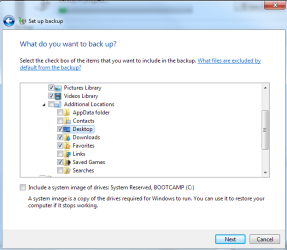
and uncheck "appdata Folder" , contacts, links, and searches

there are some know issues there
 

Attachments

  • Untitled.png
    Untitled.png
    21.9 KB · Views: 7

My Computer

OS
Windows 7 Ultimate X64
I realize this is an old thread. It helped me finally get a good backup when it kept failing. I'm assuming the fact that outlook was not included, let it go through and complete. What should be done AFTER this? Ultimately, I would like a complete backup including the Appdata file. Please advise. Thank you.
 

My Computer

Computer type
Laptop
Computer Manufacturer/Model Number
Sony Vaio
OS
Windows 7 Professional Version 6.1 64-bit
CPU
Intel (R) Core (TM)2 Duo CPU P8800 @ 2.66 GHz
Memory
6.00 GB
Hello bhadom, and welcome to Seven Forums.

This backup error is for when you have a folder included in your backup that has either been deleted or moved. When the scheduled backup tries to backup this folder, you get this error since the folder wasn't there to be backed up.

There's nothing more that needs to be done other than to change your backup settings to no longer have that folder include in the scheduled backup. :)
 

My Computer

Computer type
PC/Desktop
Computer Manufacturer/Model Number
Self built custom
OS
64-bit Windows 11 Pro for Workstations
CPU
Intel i7-8700K OC'd to 5 GHz
Motherboard
ASUS ROG Maximus XI Formula Z390
Memory
64 GB (4x16GB) G.SKILL TridentZ RGB DDR4 3600 MHz
Graphics Card(s)
ASUS ROG-STRIX-GTX1080TI-O11G-GAMING
Sound Card
Integrated
Monitor(s) Displays
2 x Samsung Odyssey G7 27"
Screen Resolution
2560x1440
Hard Drives
1TB Samsung 990 PRO M.2,
4TB Samsung 990 PRO PRO M.2,
TerraMaster F8 SSD Plus NAS
PSU
Seasonic Prime Titanium 850W
Case
Thermaltake Core P3
Cooling
Corsair Hydro H115i
Keyboard
Logitech wireless K800
Mouse
Logitech MX Master 4
Internet Speed
2 Gb/s Download and 100 Mb/s Upload
Antivirus
Malwarebyte Anti-Malware Premium
Browser
Google Chrome
Other Info
Logitech Z625 speaker system,
Logitech BRIO 4K Pro webcam,
HP Color LaserJet Pro MFP M477fdn,
APC SMART-UPS RT 1000 XL - SURT1000XLI,
Galaxy S23 Plus phone
Thank you, Brink. My problem is a different one, but the solution worked to prove the problem app was outlook. Should I open a new post for my issue? Thanks.
 

My Computer

Computer type
Laptop
Computer Manufacturer/Model Number
Sony Vaio
OS
Windows 7 Professional Version 6.1 64-bit
CPU
Intel (R) Core (TM)2 Duo CPU P8800 @ 2.66 GHz
Memory
6.00 GB
You're welcome bhadom. No need to start a new thread if your issue has been sorted. :)
 

My Computer

Computer type
PC/Desktop
Computer Manufacturer/Model Number
Self built custom
OS
64-bit Windows 11 Pro for Workstations
CPU
Intel i7-8700K OC'd to 5 GHz
Motherboard
ASUS ROG Maximus XI Formula Z390
Memory
64 GB (4x16GB) G.SKILL TridentZ RGB DDR4 3600 MHz
Graphics Card(s)
ASUS ROG-STRIX-GTX1080TI-O11G-GAMING
Sound Card
Integrated
Monitor(s) Displays
2 x Samsung Odyssey G7 27"
Screen Resolution
2560x1440
Hard Drives
1TB Samsung 990 PRO M.2,
4TB Samsung 990 PRO PRO M.2,
TerraMaster F8 SSD Plus NAS
PSU
Seasonic Prime Titanium 850W
Case
Thermaltake Core P3
Cooling
Corsair Hydro H115i
Keyboard
Logitech wireless K800
Mouse
Logitech MX Master 4
Internet Speed
2 Gb/s Download and 100 Mb/s Upload
Antivirus
Malwarebyte Anti-Malware Premium
Browser
Google Chrome
Other Info
Logitech Z625 speaker system,
Logitech BRIO 4K Pro webcam,
HP Color LaserJet Pro MFP M477fdn,
APC SMART-UPS RT 1000 XL - SURT1000XLI,
Galaxy S23 Plus phone
Not yet sorted

Brink, thank you. My problem has not been worked out. It wasn't a missing file that caused it. It was the outlook.pst file that was preventing the backup from completing. So I removed it from the backup list and got a good backup. Problem is I need a backup to "include" the outlook.pst file. So I don't know what to do next. By removing it from the list, I determined it was indeed the problem with my backup. I just need to know how to get a "complete" backup now. When I include that pst file, I get error code 0x8007450D The request could not be performed because of an I/O device error.
 

My Computer

Computer type
Laptop
Computer Manufacturer/Model Number
Sony Vaio
OS
Windows 7 Professional Version 6.1 64-bit
CPU
Intel (R) Core (TM)2 Duo CPU P8800 @ 2.66 GHz
Memory
6.00 GB

My Computer

Computer type
PC/Desktop
Computer Manufacturer/Model Number
Self built custom
OS
64-bit Windows 11 Pro for Workstations
CPU
Intel i7-8700K OC'd to 5 GHz
Motherboard
ASUS ROG Maximus XI Formula Z390
Memory
64 GB (4x16GB) G.SKILL TridentZ RGB DDR4 3600 MHz
Graphics Card(s)
ASUS ROG-STRIX-GTX1080TI-O11G-GAMING
Sound Card
Integrated
Monitor(s) Displays
2 x Samsung Odyssey G7 27"
Screen Resolution
2560x1440
Hard Drives
1TB Samsung 990 PRO M.2,
4TB Samsung 990 PRO PRO M.2,
TerraMaster F8 SSD Plus NAS
PSU
Seasonic Prime Titanium 850W
Case
Thermaltake Core P3
Cooling
Corsair Hydro H115i
Keyboard
Logitech wireless K800
Mouse
Logitech MX Master 4
Internet Speed
2 Gb/s Download and 100 Mb/s Upload
Antivirus
Malwarebyte Anti-Malware Premium
Browser
Google Chrome
Other Info
Logitech Z625 speaker system,
Logitech BRIO 4K Pro webcam,
HP Color LaserJet Pro MFP M477fdn,
APC SMART-UPS RT 1000 XL - SURT1000XLI,
Galaxy S23 Plus phone
I know I can manually back it up, but the point is, it always was included in my Windows backup prior to a few days ago. Now it is not and I would like to get it back to how it was before...included in a backup I don't have to take extra time to remember to do and then perform it. Hope that makes it more clear. I just want Windows backup to work like it used to and I can't figure out why it's suddenly a problem. Thanks.
 

My Computer

Computer type
Laptop
Computer Manufacturer/Model Number
Sony Vaio
OS
Windows 7 Professional Version 6.1 64-bit
CPU
Intel (R) Core (TM)2 Duo CPU P8800 @ 2.66 GHz
Memory
6.00 GB
I understand what you mean, but that's the only quick solution that I know of other than trying to reinstall Outlook to see if that may repair whatever is wrong with the PST file issue to allow the folder it's in to be included in the backup afterwards.
 

My Computer

Computer type
PC/Desktop
Computer Manufacturer/Model Number
Self built custom
OS
64-bit Windows 11 Pro for Workstations
CPU
Intel i7-8700K OC'd to 5 GHz
Motherboard
ASUS ROG Maximus XI Formula Z390
Memory
64 GB (4x16GB) G.SKILL TridentZ RGB DDR4 3600 MHz
Graphics Card(s)
ASUS ROG-STRIX-GTX1080TI-O11G-GAMING
Sound Card
Integrated
Monitor(s) Displays
2 x Samsung Odyssey G7 27"
Screen Resolution
2560x1440
Hard Drives
1TB Samsung 990 PRO M.2,
4TB Samsung 990 PRO PRO M.2,
TerraMaster F8 SSD Plus NAS
PSU
Seasonic Prime Titanium 850W
Case
Thermaltake Core P3
Cooling
Corsair Hydro H115i
Keyboard
Logitech wireless K800
Mouse
Logitech MX Master 4
Internet Speed
2 Gb/s Download and 100 Mb/s Upload
Antivirus
Malwarebyte Anti-Malware Premium
Browser
Google Chrome
Other Info
Logitech Z625 speaker system,
Logitech BRIO 4K Pro webcam,
HP Color LaserJet Pro MFP M477fdn,
APC SMART-UPS RT 1000 XL - SURT1000XLI,
Galaxy S23 Plus phone
Thanks, Brink. I'm afraid you are probably right :cry: Outlook is wonderful when it works!
 

My Computer

Computer type
Laptop
Computer Manufacturer/Model Number
Sony Vaio
OS
Windows 7 Professional Version 6.1 64-bit
CPU
Intel (R) Core (TM)2 Duo CPU P8800 @ 2.66 GHz
Memory
6.00 GB
Back
Top