Skype beta and microphone problem

longlife

New member
Local time
4:58 PM
Messages
11
Hello.

So if have the latest skype beta version installed and everything works fine besides the mic. I tried conversations and webcam and i can see and hear everything clearly but no one can hear me.
So i went to the sound setting in windows 7 and the mic works fine. I was able to record my voice using the built-in sound recorder. So i then went to the skype audio setting and the right device is selected but it cant hear me.
The mic works fine on windows live messenger, I was able to have a conversation.
Did anyone have this problem? or have an idea on how to fix this??

Thankx in advance for your help.
 

My Computer

Computer Manufacturer/Model Number
Eeepc 1000he
OS
Windows 7 Professional
CPU
Atom N280
Memory
2gb
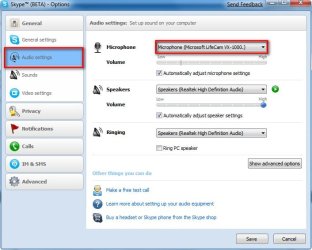
Have you tried going into the tools tab and selecting options and audio settings, you should be able to set up everything from there, mine is all working fine.

2009-01-20_013222.jpg
 

My Computer

Computer Manufacturer/Model Number
Home Brew
OS
Windows 7 Ultimate Vista Ultimate x64
CPU
Core 2 Duo E8500 3.16Ghz @ 3.8Ghz
Motherboard
eVGA 750i FTW
Memory
2x2Gigs Patriot PC2-6400 LL
Graphics Card(s)
Inno3D GeForce GTX260 216 SP
Monitor(s) Displays
ASUS VW222U 22" 2ms Response time
Screen Resolution
1680x1050
Hard Drives
SATA 150GB
SATA II 250GB
USB IDE 750GB Ext.
PSU
HYTEC 600W & Thermaltake 650W Toughpower Power Exp
Case
Thermaltake Armor LCS (Liquid Cooling System)
Cooling
Liquid Cooling System
Keyboard
Logitech G15 Gaming Keyboard
Mouse
Logitech G9 Gaming Mouse
Yes that's what I did. The device is listed, but it won't hear a sound.

Ok i don't why but it's fixed now. I was making a screenshot to show you how I configured it and skype crashed. I restarted it and it works fine now....

Don't understand what happenned but it works! so thanx anyways!
 

My Computer

Computer Manufacturer/Model Number
Eeepc 1000he
OS
Windows 7 Professional
CPU
Atom N280
Memory
2gb
hm...try to record woth SkypeCap, I use this tool
 

My Computer

OS
XP
Fwimbw, I found that my VOIP apps don't seem to transmit my voice well while I'm using utorrent. When I pause utorrent, it goes back to working fine.
 

My Computer

Computer Manufacturer/Model Number
HP DV8t quad
OS
Windows 7 Ultimate x64 (Retail)
CPU
i7-Q 720
Motherboard
Motherboard Chipset Intel Ibex Peak-M PM55, Intel Lynnfield
Memory
6 GB
Graphics Card(s)
nVidia GeForce GT 230M (1GB)
Sound Card
IDT High Definition Audio CODEC
Monitor(s) Displays
18.4 inch HP Infinity FHD (Samsung 184HT03-001)
Screen Resolution
1920 x 1080
Hard Drives
Hitachi 500GB 7200 rpm (x2)
Seagate FreeAgent 1.5 TB External USB (x2)
Thermaltake BlacX eSATA/USB 2.0 3.5/2.5 HD dock
Cooling
Zalman NC-2000 notebook cooling pad
Keyboard
laptop
Mouse
Logitech VX Revolution
Other Info
Backup Unit: Lenovo T61p
please help me
I have been able to use Skype and my mic when I had Windows Vista. I upgraded to Windows 7 and my mic is not working. I have the latest skype version installed and everything works fine besides the mic. I tested the speakers and web cam and it works fine.

I went to the skype audio setting and the right device is selected but it cant hear me.
i mhave restarted and tried everything I know.
Do you have an idea on how to fix this??
 

My Computer

Computer Manufacturer/Model Number
Acer 4810
OS
Windows 7
Memory
8 gig
Audio Cuts Out

I also upgraded to Windows 7 and have been having problems with my audio cutting out.
I've reinstalled Skype, tried to upgrade my drivers, and the problem persists.
 

My Computer

OS
Windows 7
I am having the exact same issue after upgrading from Vista to Win 7.

I was running skype 4.1.0.179 in Windows Vista, then I upgraded to Windows 7 and the microphone stopped working. I checked the settings in Skype and the correct mic is being used.

Mic is working fine - tested with Google chat, sound recorder etc. So I am sure the issue is related to Skype compatibility with Windows 7.

No answer yet huh. Please update this thread if you find a solution.

Thanks.
 

My Computer

OS
windows 7
Windows 7

I also had the same problem when installing skype on a brand new computer with windows 7. Could not make the mike work. It was extremely extremely poor. Today I took the 5 week old computer and they replaced it with an slightly upgraded computer as they did not have the 5 week old model in stock any more. Went thru all the hastle of setting up the new computer. Again downloaded skype and nearly exactly the same problem. Noticed that at least it is slightly audible but still very poor. I would say it is a compatibility problem. Kind of a bummer. Perhaps someone will benifit from reading this and not go thru all those hastles that are not gonna work. Good luck
 

My Computer

OS
windows 7
Skype calls failed to 'hear' me and after unsuccessfully trying nearly everything to fix it, updating audio drivers, assuring nothing was missing or outdated (in the "clean install" of Windows 7 Pro on a year old HP DV4-1030).

Neither the Windows 'Action Center', Skype's or even Windows troubleshooters were capable fo identifying and fixing this simple issue as all failed to just tell me that for some idiotic reason the NVIDIA High Definition Audio 'mic' was set for "external mic" (regardless that I'd never set it for that, nor do I even have an external mic).

Admittedly most might have caught this stupid setting issue right away, but amazingly or should I say "sadly" neither MS or Skype seem capable at properly coordinating the installation of programs, regardless of their so called troubleshooters and so called install wizards, because nothing fixed it but me.

Ref. Skype v4.2, a clean install of Windows 7 Pro's (OEM System Builders Pack) having all necessary OEM software and latest drivers installed.

This is Windows and Skype's 'latest & greatest'?
 

My Computer

Computer Manufacturer/Model Number
HP DV4-1030ee
OS
Windows 7 Pro
CPU
[email protected], 2 Core Logical Processors
Motherboard
Compal 30F8 99.74
Memory
Total Physical Memory 2.00 GB
Graphics Card(s)
NVIDIA GeForce9200M GS
Sound Card
NVIDIA HDMI Audio with IDT High Definition Audio CODEC
Monitor(s) Displays
Generic PnP Monitor (14.0"vis)
Screen Resolution
1200 X 800 recommended, but set to 1074 X 768
Hard Drives
FUJITSU MHY2160BH 160.04 GB drive 0
PSU
High Performance
Case
Stock
Cooling
Stock
Keyboard
Stock
Mouse
Logitech M-UV96
Internet Speed
down 2.89 Mb/s & up 0.73 Mb/s
Other Info
Acer Aspire One, XPH SP3, x86, 'Windows NT', 2.0 Ghz CPU, 2 Gb RAM, Mobile Intel 945 Express Chipset Family graphics
'card', RealtekHD Audio Driver v5.10.0.5628 audio 'card', and USB 2.0.
Microphone not working for skype - Solution for Dell Latitude

I had the same issue - i.e. microphone wouldn't work with skype.

To fix it i had to do the following

1. open the application which controls the external jacks (for headphones and microphone) - I have a Dell Latitude E6400 with a IDT HD Sound card.

This application is called IDT HD Sound. It is invoked when you plug something into the microphone jack.


Click on 'Internal Mic' on left side of window.
You will see an option for 'Settings' below.

On the right, It has a selection box which controls what type of Device is plugged into the side microphone Jack. In My case, when ever it (the Microphone) is unplugged, it always defaults to 'Unknown Device'. By Right Clicking on the right hand jack (in the 'Jacks' Section), you will have 3 options -
Device: Line In
Device: Mic
Device: Some other Device is plugged into this jack.

Select 'Device:Mic'

Now, make sure in the audio settings in skype (under Tools -> Options) the microphone is set to line in.

This got it working for me.

jimuser
 

My Computer

Computer Manufacturer/Model Number
Dell
OS
Windows 7
Memory
4G
If you upgrade from Vista all should be good - Skype should 'recognise your sound card'.

If you upgrade from XP or clean install 7, and people can't hear you on Skype when you can hear them - try installing the Vista soundcard driver for your PC (free from Realtek for Toshiba) and then you have to 'force' Windows 7 to use that driver.
 

My Computer

OS
7 Home Premium 32bit
What I did

Went to control Panel -> Hardware and Sound -> Manage audio devices.

Selected the Communications tab.

There are four radio buttons in the tab.

The radio button for the option "Reduce the volume of other sounds by 80%" was selected.

I selected the one which said "Do Nothing".

It helped a lot.

If this helps you, I would appreciate an email to [email protected] since I donot visit this forum often.

Cheers.
 

My Computer

OS
Windows 7 Ultimate x64
Back
Top