Skype Uses Too Much Memory

geekfreak

Banned
Local time
12:28 PM
Messages
68
Was not sure where this should be at, so if it is in the wrong section please move it to the appropriate section.

O.K. Skype when i launch it in the morning starts out using about 54megs of ram. If I do not shut it completely down every so often it will climb to using over 700megs. Since I first started using Skype I have done 3 clean installs of windows 7. Is there a program where I can limit the amount of ram that Skype uses?
 

My Computer

Computer Manufacturer/Model Number
self built
OS
Win 7 X32
CPU
e8400
Motherboard
asus rampage formula rev. 1
Memory
3.5 gigs ddr2
Graphics Card(s)
geforce 9500 gtx
Monitor(s) Displays
26"
Screen Resolution
1680 x 1050
Are you having an actual problem?
 

My Computer

Computer type
PC/Desktop
Computer Manufacturer/Model Number
Alienware Aurora ALX R4
OS
Windows 10 Pro (x64)
CPU
Intel Core i7-3930K (3.2GHz - 4.5GHz)
Motherboard
Alienware Aurora-R4 x79
Memory
4x Samsung 4GB PC3-12800 DDR3 (16GB 1600MHz)
Graphics Card(s)
Nvidia Geforce GTX 690
Sound Card
SteelSeries Siberia Elite
Monitor(s) Displays
Dell UltraSharp U3011
Screen Resolution
2560x1600
Hard Drives
Samsung 850 Pro 256 GB, Seagate 1TB Desktop Hybrid HDD, 2x Western Digital 4TB Green HDD
PSU
875W Some Dell PSU <.<
Case
Alienware Aurora ALX
Cooling
Custom Liquid Cooling (EK CPU & GPU blocks) dual EK 480RAD
Keyboard
Logitech G710+ Mechanical
Mouse
Logitech G700s
Internet Speed
Verizon Fios (50 mbps average)
Other Info
Server: Intel NUC D54250WYK: i5-4250U, 16GB, 256 GB mSATA, Windows Server 2012 R2

My Computer

Computer type
Laptop
Computer Manufacturer/Model Number
Y580
OS
Win7 Pro 64
CPU
i7-3610QM
Memory
8GB DDR3
Graphics Card(s)
GTX 660M
Screen Resolution
1920x1080
Mouse
G500s
Browser
Chrome

My Computer

Computer Manufacturer/Model Number
self built
OS
Win 7 X32
CPU
e8400
Motherboard
asus rampage formula rev. 1
Memory
3.5 gigs ddr2
Graphics Card(s)
geforce 9500 gtx
Monitor(s) Displays
26"
Screen Resolution
1680 x 1050
what version of skype are you using? there is a beta release just come out again
Download the beta version of Skype for Windows
and they state this>
System requirements
PC running Windows XP, Vista or 7.
Internet connection (broadband is best, GPRS is not supported for voice calls, and results may vary on a satellite connection).
Speakers and microphone – built-in or separate.
For voice and video calls we recommend a computer with at least a 1GHz processor, 256 MB RAM and of course a webcam.
For High Definition (HD) video calls both you and the person you're talking to need Skype 4.2 for Windows or higher, plus HD webcams. You'll also need a high-speed broadband connection (we recommend sustained 1.2 Mbps symmetrical bandwidth or higher) and a PC with at least a 2.0 GHz Core2Duo or equivalent processor.
Technical details
Version 5.0.0.123 File size 20 MB. Beta release. Release date: September 2, 2010. File name: SkypeSetup-Beta.exe
 

My Computer

Computer Manufacturer/Model Number
packard bell IXTREME M5722
OS
Operating System : Windows 7 Home Premium Edition 6.01.7600 SP1 (x64)
CPU
Processor : Intel Core 2 Quad Q8300 @ 2500 MHz
Motherboard
Mainboard : Packard Bell (Acer EG43M )
Memory
Physical Memory :8GB Corsair4x 2GB 800MHz C5 DDR2
Graphics Card(s)
Video Card : XFX 6700 AMD
Monitor(s) Displays
Maestro 234DL - BenQ V2220 - BenQ VW2420H
Screen Resolution
Current Display :1920x1080p pixels at 60 Hz in HD LED
Hard Drives
Hard Disks : WDC (1000 GB)
Drive C: (Hard Disk) : 428 GB available on 491 GB
Drive D: (Hard Disk) : 426 GB available on 492 GB
SAMSUNG spinpoint HD103SJ 1000.2 GB
(X 2) KINGSTON SSD NOW V 30GB
PSU
XFX ProSeries 550W PSU
Case
PACKARD BELL IXTREME
Cooling
System Blower Current: 150mA Air Flow16CFM ;Akasa 90mm rear
Keyboard
Gigabyte Aivia K8100
Mouse
TRUST-Wireless Laser Mouse - Carbon edition MI-7770C
Internet Speed
TP-LINK > TL-WN951N / AV500 Gigabit Powerline Adapters
Browser
chrome dev
Other Info
EXTRA COOLING>(FAN CONTROLLER) PC Bay Cooler 3 x 40mm fans; Akasa AK-HD-BL Blue hard drive cooler 2 x 40 mm fan 4500 rpm 29.7 dBA
Bios> American Megatrends Inc.
Version : P01-A1
Date : 08/31/2009

Attachments

  • skype3.PNG
    skype3.PNG
    4.6 KB · Views: 716

My Computer

Computer Manufacturer/Model Number
packard bell IXTREME M5722
OS
Operating System : Windows 7 Home Premium Edition 6.01.7600 SP1 (x64)
CPU
Processor : Intel Core 2 Quad Q8300 @ 2500 MHz
Motherboard
Mainboard : Packard Bell (Acer EG43M )
Memory
Physical Memory :8GB Corsair4x 2GB 800MHz C5 DDR2
Graphics Card(s)
Video Card : XFX 6700 AMD
Monitor(s) Displays
Maestro 234DL - BenQ V2220 - BenQ VW2420H
Screen Resolution
Current Display :1920x1080p pixels at 60 Hz in HD LED
Hard Drives
Hard Disks : WDC (1000 GB)
Drive C: (Hard Disk) : 428 GB available on 491 GB
Drive D: (Hard Disk) : 426 GB available on 492 GB
SAMSUNG spinpoint HD103SJ 1000.2 GB
(X 2) KINGSTON SSD NOW V 30GB
PSU
XFX ProSeries 550W PSU
Case
PACKARD BELL IXTREME
Cooling
System Blower Current: 150mA Air Flow16CFM ;Akasa 90mm rear
Keyboard
Gigabyte Aivia K8100
Mouse
TRUST-Wireless Laser Mouse - Carbon edition MI-7770C
Internet Speed
TP-LINK > TL-WN951N / AV500 Gigabit Powerline Adapters
Browser
chrome dev
Other Info
EXTRA COOLING>(FAN CONTROLLER) PC Bay Cooler 3 x 40mm fans; Akasa AK-HD-BL Blue hard drive cooler 2 x 40 mm fan 4500 rpm 29.7 dBA
Bios> American Megatrends Inc.
Version : P01-A1
Date : 08/31/2009
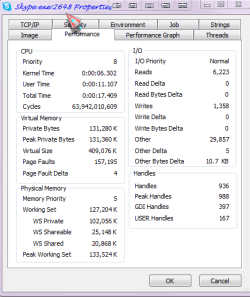
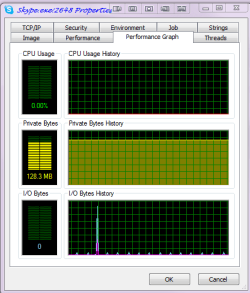
if you can take a screen shot of task manager showing the process details with skype running that would be good, and we can see whats going on, and then i can help you with running a error report on the processor using sysinternals procexp program >> as in the screen shots below
Process Explorer
 

Attachments

  • skype4.PNG
    skype4.PNG
    42.4 KB · Views: 332
  • skype5.PNG
    skype5.PNG
    32 KB · Views: 253
  • skype6.PNG
    skype6.PNG
    5.3 KB · Views: 106
Last edited:

My Computer

Computer Manufacturer/Model Number
packard bell IXTREME M5722
OS
Operating System : Windows 7 Home Premium Edition 6.01.7600 SP1 (x64)
CPU
Processor : Intel Core 2 Quad Q8300 @ 2500 MHz
Motherboard
Mainboard : Packard Bell (Acer EG43M )
Memory
Physical Memory :8GB Corsair4x 2GB 800MHz C5 DDR2
Graphics Card(s)
Video Card : XFX 6700 AMD
Monitor(s) Displays
Maestro 234DL - BenQ V2220 - BenQ VW2420H
Screen Resolution
Current Display :1920x1080p pixels at 60 Hz in HD LED
Hard Drives
Hard Disks : WDC (1000 GB)
Drive C: (Hard Disk) : 428 GB available on 491 GB
Drive D: (Hard Disk) : 426 GB available on 492 GB
SAMSUNG spinpoint HD103SJ 1000.2 GB
(X 2) KINGSTON SSD NOW V 30GB
PSU
XFX ProSeries 550W PSU
Case
PACKARD BELL IXTREME
Cooling
System Blower Current: 150mA Air Flow16CFM ;Akasa 90mm rear
Keyboard
Gigabyte Aivia K8100
Mouse
TRUST-Wireless Laser Mouse - Carbon edition MI-7770C
Internet Speed
TP-LINK > TL-WN951N / AV500 Gigabit Powerline Adapters
Browser
chrome dev
Other Info
EXTRA COOLING>(FAN CONTROLLER) PC Bay Cooler 3 x 40mm fans; Akasa AK-HD-BL Blue hard drive cooler 2 x 40 mm fan 4500 rpm 29.7 dBA
Bios> American Megatrends Inc.
Version : P01-A1
Date : 08/31/2009
what version of skype are you using? there is a beta release just come out again
Download the beta version of Skype for Windows
and they state this>
System requirements
PC running Windows XP, Vista or 7.
Internet connection (broadband is best, GPRS is not supported for voice calls, and results may vary on a satellite connection).
Speakers and microphone – built-in or separate.
For voice and video calls we recommend a computer with at least a 1GHz processor, 256 MB RAM and of course a webcam.
For High Definition (HD) video calls both you and the person you're talking to need Skype 4.2 for Windows or higher, plus HD webcams. You'll also need a high-speed broadband connection (we recommend sustained 1.2 Mbps symmetrical bandwidth or higher) and a PC with at least a 2.0 GHz Core2Duo or equivalent processor.
Technical details
Version 5.0.0.123 File size 20 MB. Beta release. Release date: September 2, 2010. File name: SkypeSetup-Beta.exe

i download the beta shortly after creating this thread. it seems to be staying between 70 and 180megs ram usage now. that i can live with. i will keep an eye on it, and if it starts it's old behavior again i'll follow the steps you listed and post the info here. thanks for the help, much appreciated
 

My Computer

Computer Manufacturer/Model Number
self built
OS
Win 7 X32
CPU
e8400
Motherboard
asus rampage formula rev. 1
Memory
3.5 gigs ddr2
Graphics Card(s)
geforce 9500 gtx
Monitor(s) Displays
26"
Screen Resolution
1680 x 1050
what version of skype are you using? there is a beta release just come out again
Download the beta version of Skype for Windows
and they state this>
System requirements
PC running Windows XP, Vista or 7.
Internet connection (broadband is best, GPRS is not supported for voice calls, and results may vary on a satellite connection).
Speakers and microphone – built-in or separate.
For voice and video calls we recommend a computer with at least a 1GHz processor, 256 MB RAM and of course a webcam.
For High Definition (HD) video calls both you and the person you're talking to need Skype 4.2 for Windows or higher, plus HD webcams. You'll also need a high-speed broadband connection (we recommend sustained 1.2 Mbps symmetrical bandwidth or higher) and a PC with at least a 2.0 GHz Core2Duo or equivalent processor.
Technical details
Version 5.0.0.123 File size 20 MB. Beta release. Release date: September 2, 2010. File name: SkypeSetup-Beta.exe

i download the beta shortly after creating this thread. it seems to be staying between 70 and 180megs ram usage now. that i can live with. i will keep an eye on it, and if it starts it's old behavior again i'll follow the steps you listed and post the info here. thanks for the help, much appreciated
no worrys pleasure to help also remember if you use a usb phone or mic this uses memory too:D
 

My Computer

Computer Manufacturer/Model Number
packard bell IXTREME M5722
OS
Operating System : Windows 7 Home Premium Edition 6.01.7600 SP1 (x64)
CPU
Processor : Intel Core 2 Quad Q8300 @ 2500 MHz
Motherboard
Mainboard : Packard Bell (Acer EG43M )
Memory
Physical Memory :8GB Corsair4x 2GB 800MHz C5 DDR2
Graphics Card(s)
Video Card : XFX 6700 AMD
Monitor(s) Displays
Maestro 234DL - BenQ V2220 - BenQ VW2420H
Screen Resolution
Current Display :1920x1080p pixels at 60 Hz in HD LED
Hard Drives
Hard Disks : WDC (1000 GB)
Drive C: (Hard Disk) : 428 GB available on 491 GB
Drive D: (Hard Disk) : 426 GB available on 492 GB
SAMSUNG spinpoint HD103SJ 1000.2 GB
(X 2) KINGSTON SSD NOW V 30GB
PSU
XFX ProSeries 550W PSU
Case
PACKARD BELL IXTREME
Cooling
System Blower Current: 150mA Air Flow16CFM ;Akasa 90mm rear
Keyboard
Gigabyte Aivia K8100
Mouse
TRUST-Wireless Laser Mouse - Carbon edition MI-7770C
Internet Speed
TP-LINK > TL-WN951N / AV500 Gigabit Powerline Adapters
Browser
chrome dev
Other Info
EXTRA COOLING>(FAN CONTROLLER) PC Bay Cooler 3 x 40mm fans; Akasa AK-HD-BL Blue hard drive cooler 2 x 40 mm fan 4500 rpm 29.7 dBA
Bios> American Megatrends Inc.
Version : P01-A1
Date : 08/31/2009
Not sure I should start my own thread or add to this one.

I have Skype on my desktop Win 7 32 and it consumes an ever increasing amount of memory as time goes on. for example I captured a screen shot at 3 different times
one using 28.6K when on a fresh boot 1 hour later 102.7K I left the machine running all night and the next morning it was 660.3K.

My laptop runs Skype and the memory is constant at 34.2K

My friend also runs Skype same windows version on Asus p5 Q and the memory is constant.

I am beginning to look into it being a hardware conflict somehow, but then I think hmmm its working OK on XP

I have freshly loaded the OS several times leaving various drivers out or loading them, downloading windows updates or leaving them off nothing I do seems to make any difference. I upgraded to the beta versions same thing happens.

I am back to running XP on the same machine Asus P5q Pro Turbo, Skype memory usage is constant @53.7K
 

My Computer

OS
Windows 7 Ultimate 32bit
CPU
Intel core2 quad q9550 2,83ghz
Motherboard
Asus P5q Pro Turbo
Memory
4 Gig
Graphics Card(s)
ATI Saphire Radeon
Sound Card
On Board
Monitor(s) Displays
Viewsonic
Screen Resolution
1280x1024
Hard Drives
2 @500 gig Sata
1 @ 80 gig Sata
PSU
Corsair 750 Watt
Case
Generic
Keyboard
Microsoft wireless
Mouse
Logitech Wireless
Internet Speed
1.5meg wireless
Not sure I should start my own thread or add to this one.

I have Skype on my desktop Win 7 32 and it consumes an ever increasing amount of memory as time goes on. for example I captured a screen shot at 3 different times
one using 28.6K when on a fresh boot 1 hour later 102.7K I left the machine running all night and the next morning it was 660.3K.

My laptop runs Skype and the memory is constant at 34.2K

My friend also runs Skype same windows version on Asus p5 Q and the memory is constant.

I am beginning to look into it being a hardware conflict somehow, but then I think hmmm its working OK on XP

I have freshly loaded the OS several times leaving various drivers out or loading them, downloading windows updates or leaving them off nothing I do seems to make any difference. I upgraded to the beta versions same thing happens.

I am back to running XP on the same machine Asus P5q Pro Turbo, Skype memory usage is constant @53.7K

you mean 660.3 megabytes. which is 660,300 k.
 

My Computer

Computer Manufacturer/Model Number
self built
OS
Win 7 X32
CPU
e8400
Motherboard
asus rampage formula rev. 1
Memory
3.5 gigs ddr2
Graphics Card(s)
geforce 9500 gtx
Monitor(s) Displays
26"
Screen Resolution
1680 x 1050
HI ALL :) if you follow the steps in post 7 along with task manager showing skype processor and post a screen shot that will give an idea whats going on:)

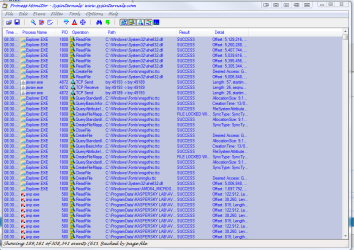
run Process Monitor and task manager (in task manager enable "show all processes for all users"),run skype (don't close any window!) go to task manager find skype processer right click on it and choose "save as dump file",save anywhere,save also log in Process Monitor as *.PML format,pack all,upload on rapidshare and give me URL addresses to uploaded files. i posted a screen shot of what process monitor looks like.
Process Explorer
 

Attachments

  • process monitor.PNG
    process monitor.PNG
    173.3 KB · Views: 266
Last edited:

My Computer

Computer Manufacturer/Model Number
packard bell IXTREME M5722
OS
Operating System : Windows 7 Home Premium Edition 6.01.7600 SP1 (x64)
CPU
Processor : Intel Core 2 Quad Q8300 @ 2500 MHz
Motherboard
Mainboard : Packard Bell (Acer EG43M )
Memory
Physical Memory :8GB Corsair4x 2GB 800MHz C5 DDR2
Graphics Card(s)
Video Card : XFX 6700 AMD
Monitor(s) Displays
Maestro 234DL - BenQ V2220 - BenQ VW2420H
Screen Resolution
Current Display :1920x1080p pixels at 60 Hz in HD LED
Hard Drives
Hard Disks : WDC (1000 GB)
Drive C: (Hard Disk) : 428 GB available on 491 GB
Drive D: (Hard Disk) : 426 GB available on 492 GB
SAMSUNG spinpoint HD103SJ 1000.2 GB
(X 2) KINGSTON SSD NOW V 30GB
PSU
XFX ProSeries 550W PSU
Case
PACKARD BELL IXTREME
Cooling
System Blower Current: 150mA Air Flow16CFM ;Akasa 90mm rear
Keyboard
Gigabyte Aivia K8100
Mouse
TRUST-Wireless Laser Mouse - Carbon edition MI-7770C
Internet Speed
TP-LINK > TL-WN951N / AV500 Gigabit Powerline Adapters
Browser
chrome dev
Other Info
EXTRA COOLING>(FAN CONTROLLER) PC Bay Cooler 3 x 40mm fans; Akasa AK-HD-BL Blue hard drive cooler 2 x 40 mm fan 4500 rpm 29.7 dBA
Bios> American Megatrends Inc.
Version : P01-A1
Date : 08/31/2009
what version of skype are you using? there is a beta release just come out again
Download the beta version of Skype for Windows
and they state this>
System requirements
PC running Windows XP, Vista or 7.
Internet connection (broadband is best, GPRS is not supported for voice calls, and results may vary on a satellite connection).
Speakers and microphone – built-in or separate.
For voice and video calls we recommend a computer with at least a 1GHz processor, 256 MB RAM and of course a webcam.
For High Definition (HD) video calls both you and the person you're talking to need Skype 4.2 for Windows or higher, plus HD webcams. You'll also need a high-speed broadband connection (we recommend sustained 1.2 Mbps symmetrical bandwidth or higher) and a PC with at least a 2.0 GHz Core2Duo or equivalent processor.
Technical details
Version 5.0.0.123 File size 20 MB. Beta release. Release date: September 2, 2010. File name: SkypeSetup-Beta.exe

looks like the latest beta is doing it as well, however it may not be a skype problem. sys was being sluggest yesterday morning so i brought up task manager. both skype and firefox(3.6.9) were just over 500 megs each. unlike what i did with skype i doid not monitor ff after reopening it to see if it started out high or if it just slowly climbed. i'll try to get the files to you by 5pm my time. it is now 6:30am here.
 

My Computer

Computer Manufacturer/Model Number
self built
OS
Win 7 X32
CPU
e8400
Motherboard
asus rampage formula rev. 1
Memory
3.5 gigs ddr2
Graphics Card(s)
geforce 9500 gtx
Monitor(s) Displays
26"
Screen Resolution
1680 x 1050
what version of skype are you using? there is a beta release just come out again
Download the beta version of Skype for Windows
and they state this>
System requirements
PC running Windows XP, Vista or 7.
Internet connection (broadband is best, GPRS is not supported for voice calls, and results may vary on a satellite connection).
Speakers and microphone – built-in or separate.
For voice and video calls we recommend a computer with at least a 1GHz processor, 256 MB RAM and of course a webcam.
For High Definition (HD) video calls both you and the person you're talking to need Skype 4.2 for Windows or higher, plus HD webcams. You'll also need a high-speed broadband connection (we recommend sustained 1.2 Mbps symmetrical bandwidth or higher) and a PC with at least a 2.0 GHz Core2Duo or equivalent processor.
Technical details
Version 5.0.0.123 File size 20 MB. Beta release. Release date: September 2, 2010. File name: SkypeSetup-Beta.exe

looks like the latest beta is doing it as well, however it may not be a skype problem. sys was being sluggest yesterday morning so i brought up task manager. both skype and firefox(3.6.9) were just over 500 megs each. unlike what i did with skype i doid not monitor ff after reopening it to see if it started out high or if it just slowly climbed. i'll try to get the files to you by 5pm my time. it is now 6:30am here.

okey dokey also check other hungry processors a rule of thumb is if you are not using a program and it is sitting in the background turn it off if not needed :Dwindows will see what programs are being used and give them priority and reduces the priority to unused programs in the background but they still use memory ;)
 

My Computer

Computer Manufacturer/Model Number
packard bell IXTREME M5722
OS
Operating System : Windows 7 Home Premium Edition 6.01.7600 SP1 (x64)
CPU
Processor : Intel Core 2 Quad Q8300 @ 2500 MHz
Motherboard
Mainboard : Packard Bell (Acer EG43M )
Memory
Physical Memory :8GB Corsair4x 2GB 800MHz C5 DDR2
Graphics Card(s)
Video Card : XFX 6700 AMD
Monitor(s) Displays
Maestro 234DL - BenQ V2220 - BenQ VW2420H
Screen Resolution
Current Display :1920x1080p pixels at 60 Hz in HD LED
Hard Drives
Hard Disks : WDC (1000 GB)
Drive C: (Hard Disk) : 428 GB available on 491 GB
Drive D: (Hard Disk) : 426 GB available on 492 GB
SAMSUNG spinpoint HD103SJ 1000.2 GB
(X 2) KINGSTON SSD NOW V 30GB
PSU
XFX ProSeries 550W PSU
Case
PACKARD BELL IXTREME
Cooling
System Blower Current: 150mA Air Flow16CFM ;Akasa 90mm rear
Keyboard
Gigabyte Aivia K8100
Mouse
TRUST-Wireless Laser Mouse - Carbon edition MI-7770C
Internet Speed
TP-LINK > TL-WN951N / AV500 Gigabit Powerline Adapters
Browser
chrome dev
Other Info
EXTRA COOLING>(FAN CONTROLLER) PC Bay Cooler 3 x 40mm fans; Akasa AK-HD-BL Blue hard drive cooler 2 x 40 mm fan 4500 rpm 29.7 dBA
Bios> American Megatrends Inc.
Version : P01-A1
Date : 08/31/2009
i checked the other processes and they all look normal. it seems to just be firefox and skype that are pulling this stunt. you are right there are several services that can be either set to manual instead of automatic along with several services that can be disabled.
 

My Computer

Computer Manufacturer/Model Number
self built
OS
Win 7 X32
CPU
e8400
Motherboard
asus rampage formula rev. 1
Memory
3.5 gigs ddr2
Graphics Card(s)
geforce 9500 gtx
Monitor(s) Displays
26"
Screen Resolution
1680 x 1050
well done just dont run ones you dont need when i am on the phone on skype i use alot of memory also and my cpu goes high but it does not do any damage thats how its designed i have 6 gig of ram but its best to have that extra because even if the machine will never use all that the average room for error is lower if you have more:)
 

My Computer

Computer Manufacturer/Model Number
packard bell IXTREME M5722
OS
Operating System : Windows 7 Home Premium Edition 6.01.7600 SP1 (x64)
CPU
Processor : Intel Core 2 Quad Q8300 @ 2500 MHz
Motherboard
Mainboard : Packard Bell (Acer EG43M )
Memory
Physical Memory :8GB Corsair4x 2GB 800MHz C5 DDR2
Graphics Card(s)
Video Card : XFX 6700 AMD
Monitor(s) Displays
Maestro 234DL - BenQ V2220 - BenQ VW2420H
Screen Resolution
Current Display :1920x1080p pixels at 60 Hz in HD LED
Hard Drives
Hard Disks : WDC (1000 GB)
Drive C: (Hard Disk) : 428 GB available on 491 GB
Drive D: (Hard Disk) : 426 GB available on 492 GB
SAMSUNG spinpoint HD103SJ 1000.2 GB
(X 2) KINGSTON SSD NOW V 30GB
PSU
XFX ProSeries 550W PSU
Case
PACKARD BELL IXTREME
Cooling
System Blower Current: 150mA Air Flow16CFM ;Akasa 90mm rear
Keyboard
Gigabyte Aivia K8100
Mouse
TRUST-Wireless Laser Mouse - Carbon edition MI-7770C
Internet Speed
TP-LINK > TL-WN951N / AV500 Gigabit Powerline Adapters
Browser
chrome dev
Other Info
EXTRA COOLING>(FAN CONTROLLER) PC Bay Cooler 3 x 40mm fans; Akasa AK-HD-BL Blue hard drive cooler 2 x 40 mm fan 4500 rpm 29.7 dBA
Bios> American Megatrends Inc.
Version : P01-A1
Date : 08/31/2009
i checked the other processes and they all look normal. it seems to just be firefox and skype that are pulling this stunt. you are right there are several services that can be either set to manual instead of automatic along with several services that can be disabled.

just be careful you do not change certain operating services to manual because some will start up on boot and need to run waiting for a trigger to start them like a domino effect. also task scheduler will 9 times out of 10 have programs waiting to start its worth checking.
have a read of this http://www.askvg.com/windows-7-services-that-can-be-safely-set-to-manual/
what security do you use ? if it has its own firewall turn windows firewall off also you dont need windows defender running if you have anti spyware and mailware in the security you use,this will cause con-flicks and slow processors down .
 
Last edited:

My Computer

Computer Manufacturer/Model Number
packard bell IXTREME M5722
OS
Operating System : Windows 7 Home Premium Edition 6.01.7600 SP1 (x64)
CPU
Processor : Intel Core 2 Quad Q8300 @ 2500 MHz
Motherboard
Mainboard : Packard Bell (Acer EG43M )
Memory
Physical Memory :8GB Corsair4x 2GB 800MHz C5 DDR2
Graphics Card(s)
Video Card : XFX 6700 AMD
Monitor(s) Displays
Maestro 234DL - BenQ V2220 - BenQ VW2420H
Screen Resolution
Current Display :1920x1080p pixels at 60 Hz in HD LED
Hard Drives
Hard Disks : WDC (1000 GB)
Drive C: (Hard Disk) : 428 GB available on 491 GB
Drive D: (Hard Disk) : 426 GB available on 492 GB
SAMSUNG spinpoint HD103SJ 1000.2 GB
(X 2) KINGSTON SSD NOW V 30GB
PSU
XFX ProSeries 550W PSU
Case
PACKARD BELL IXTREME
Cooling
System Blower Current: 150mA Air Flow16CFM ;Akasa 90mm rear
Keyboard
Gigabyte Aivia K8100
Mouse
TRUST-Wireless Laser Mouse - Carbon edition MI-7770C
Internet Speed
TP-LINK > TL-WN951N / AV500 Gigabit Powerline Adapters
Browser
chrome dev
Other Info
EXTRA COOLING>(FAN CONTROLLER) PC Bay Cooler 3 x 40mm fans; Akasa AK-HD-BL Blue hard drive cooler 2 x 40 mm fan 4500 rpm 29.7 dBA
Bios> American Megatrends Inc.
Version : P01-A1
Date : 08/31/2009
i checked the other processes and they all look normal. it seems to just be firefox and skype that are pulling this stunt. you are right there are several services that can be either set to manual instead of automatic along with several services that can be disabled.

just be careful you do not change certain operating services to manual because some will start up on boot and need to run waiting for a trigger to start them like a domino effect. also task scheduler will 9 times out of 10 have programs waiting to start its worth checking.
have a read of this Windows 7 Services that can be Safely Set to MANUAL - Tweaking with Vishal

thanks for the info, but between xp, vista, and now 7 i know what i can and cannot set to manual or disabled. as for ending task through task manager if i need one of the programs a simple 20 sec logoff and logon will get those services running again.
 

My Computer

Computer Manufacturer/Model Number
self built
OS
Win 7 X32
CPU
e8400
Motherboard
asus rampage formula rev. 1
Memory
3.5 gigs ddr2
Graphics Card(s)
geforce 9500 gtx
Monitor(s) Displays
26"
Screen Resolution
1680 x 1050
i checked the other processes and they all look normal. it seems to just be firefox and skype that are pulling this stunt. you are right there are several services that can be either set to manual instead of automatic along with several services that can be disabled.

just be careful you do not change certain operating services to manual because some will start up on boot and need to run waiting for a trigger to start them like a domino effect. also task scheduler will 9 times out of 10 have programs waiting to start its worth checking.
have a read of this Windows 7 Services that can be Safely Set to MANUAL - Tweaking with Vishal

thanks for the info, but between xp, vista, and now 7 i know what i can and cannot set to manual or disabled. as for ending task through task manager if i need one of the programs a simple 20 sec logoff and logon will get those services running again.

i updated that post since you posted this please read about security
 

My Computer

Computer Manufacturer/Model Number
packard bell IXTREME M5722
OS
Operating System : Windows 7 Home Premium Edition 6.01.7600 SP1 (x64)
CPU
Processor : Intel Core 2 Quad Q8300 @ 2500 MHz
Motherboard
Mainboard : Packard Bell (Acer EG43M )
Memory
Physical Memory :8GB Corsair4x 2GB 800MHz C5 DDR2
Graphics Card(s)
Video Card : XFX 6700 AMD
Monitor(s) Displays
Maestro 234DL - BenQ V2220 - BenQ VW2420H
Screen Resolution
Current Display :1920x1080p pixels at 60 Hz in HD LED
Hard Drives
Hard Disks : WDC (1000 GB)
Drive C: (Hard Disk) : 428 GB available on 491 GB
Drive D: (Hard Disk) : 426 GB available on 492 GB
SAMSUNG spinpoint HD103SJ 1000.2 GB
(X 2) KINGSTON SSD NOW V 30GB
PSU
XFX ProSeries 550W PSU
Case
PACKARD BELL IXTREME
Cooling
System Blower Current: 150mA Air Flow16CFM ;Akasa 90mm rear
Keyboard
Gigabyte Aivia K8100
Mouse
TRUST-Wireless Laser Mouse - Carbon edition MI-7770C
Internet Speed
TP-LINK > TL-WN951N / AV500 Gigabit Powerline Adapters
Browser
chrome dev
Other Info
EXTRA COOLING>(FAN CONTROLLER) PC Bay Cooler 3 x 40mm fans; Akasa AK-HD-BL Blue hard drive cooler 2 x 40 mm fan 4500 rpm 29.7 dBA
Bios> American Megatrends Inc.
Version : P01-A1
Date : 08/31/2009

My Computer

Computer Manufacturer/Model Number
packard bell IXTREME M5722
OS
Operating System : Windows 7 Home Premium Edition 6.01.7600 SP1 (x64)
CPU
Processor : Intel Core 2 Quad Q8300 @ 2500 MHz
Motherboard
Mainboard : Packard Bell (Acer EG43M )
Memory
Physical Memory :8GB Corsair4x 2GB 800MHz C5 DDR2
Graphics Card(s)
Video Card : XFX 6700 AMD
Monitor(s) Displays
Maestro 234DL - BenQ V2220 - BenQ VW2420H
Screen Resolution
Current Display :1920x1080p pixels at 60 Hz in HD LED
Hard Drives
Hard Disks : WDC (1000 GB)
Drive C: (Hard Disk) : 428 GB available on 491 GB
Drive D: (Hard Disk) : 426 GB available on 492 GB
SAMSUNG spinpoint HD103SJ 1000.2 GB
(X 2) KINGSTON SSD NOW V 30GB
PSU
XFX ProSeries 550W PSU
Case
PACKARD BELL IXTREME
Cooling
System Blower Current: 150mA Air Flow16CFM ;Akasa 90mm rear
Keyboard
Gigabyte Aivia K8100
Mouse
TRUST-Wireless Laser Mouse - Carbon edition MI-7770C
Internet Speed
TP-LINK > TL-WN951N / AV500 Gigabit Powerline Adapters
Browser
chrome dev
Other Info
EXTRA COOLING>(FAN CONTROLLER) PC Bay Cooler 3 x 40mm fans; Akasa AK-HD-BL Blue hard drive cooler 2 x 40 mm fan 4500 rpm 29.7 dBA
Bios> American Megatrends Inc.
Version : P01-A1
Date : 08/31/2009
Back
Top