
Sleep mode not working

I don't think you are tapping the DEL key quick enough before Windows Starts, that is why you are getting the normal or safe mode screen.
 

My Computer

Computer type
PC/Desktop
Computer Manufacturer/Model Number
Built them myself, Science Experiments !
OS
Win7 Enterprise, Win7 x86 (Ult 7600), Win7 x64 Ult 7600, TechNet RTM on AMD x64 (2.8Ghz)
CPU
AMD fx8350 4ghz, AMD-32 2400mhz, AMD-64 3200mhz, AMDx64 2.8G
Motherboard
SIS 755, ECS-K8M890M-M (Ult 7600), GigaByte & others
Memory
2gb, 4gb on the Ult 7600, 4gb on Technet RTM, 32gb on FX8350
Graphics Card(s)
Draw my own Graphics, several nVidia cards
Sound Card
on motherboard
Monitor(s) Displays
19" flat scr, 28" I-Inc widescr,22" Emprex Widescr, 23" Acer
Screen Resolution
1280 x 1024, 1440 x 900, 1920 x 1080
Hard Drives
6 pata Ide HD's & 2 Sata HD's
added 80gb external on Ult 7600 computer,
numerous extra 1tb, 2TB, 3Tb SATA HD's
A collection of ext HD Docks w/ HDs
PSU
430w, 550w, 600w, 700, 800, etc
Case
All Generic Full Towers
Cooling
Open Air & a few fans, some w/ colored LEDs
Keyboard
Compaq & Dell recycled from GoodWill
Mouse
Made in China Optical Wired Mouse
Internet Speed
Fast Cable InterNet
Antivirus
AVG Free on 24 different Desktops, NO Problems!
Browser
IE 8 is preferred, but use FireFox sometimes
Other Info
Linksys Routers, switches, & Hubs
Too Many USB Flash Drives to count, Biggest is 64GB !
Eight computers in my home network.
Sixteen computers at my business network.
Linked via TeamViewer !
Lots of old used spare computer parts everywhere!

Attachments

  • Bios_Pwr_Mgmt.JPG
    Bios_Pwr_Mgmt.JPG
    58.6 KB · Views: 99

My Computer

Computer type
PC/Desktop
Computer Manufacturer/Model Number
Built them myself, Science Experiments !
OS
Win7 Enterprise, Win7 x86 (Ult 7600), Win7 x64 Ult 7600, TechNet RTM on AMD x64 (2.8Ghz)
CPU
AMD fx8350 4ghz, AMD-32 2400mhz, AMD-64 3200mhz, AMDx64 2.8G
Motherboard
SIS 755, ECS-K8M890M-M (Ult 7600), GigaByte & others
Memory
2gb, 4gb on the Ult 7600, 4gb on Technet RTM, 32gb on FX8350
Graphics Card(s)
Draw my own Graphics, several nVidia cards
Sound Card
on motherboard
Monitor(s) Displays
19" flat scr, 28" I-Inc widescr,22" Emprex Widescr, 23" Acer
Screen Resolution
1280 x 1024, 1440 x 900, 1920 x 1080
Hard Drives
6 pata Ide HD's & 2 Sata HD's
added 80gb external on Ult 7600 computer,
numerous extra 1tb, 2TB, 3Tb SATA HD's
A collection of ext HD Docks w/ HDs
PSU
430w, 550w, 600w, 700, 800, etc
Case
All Generic Full Towers
Cooling
Open Air & a few fans, some w/ colored LEDs
Keyboard
Compaq & Dell recycled from GoodWill
Mouse
Made in China Optical Wired Mouse
Internet Speed
Fast Cable InterNet
Antivirus
AVG Free on 24 different Desktops, NO Problems!
Browser
IE 8 is preferred, but use FireFox sometimes
Other Info
Linksys Routers, switches, & Hubs
Too Many USB Flash Drives to count, Biggest is 64GB !
Eight computers in my home network.
Sixteen computers at my business network.
Linked via TeamViewer !
Lots of old used spare computer parts everywhere!
Do you have a model number for your you computer? That will help us find a bios update if there is one, I found one for mine on the HP website, and all the drivers, even though my computer came with 32bit Vista and I am now running 64bit 7. Also, you said your computer is a HP, if getting into bios is the same as on mine (a HP) you will need to tap the (esc) key a few times when the blue, circular HP icon appears when you first power on the computer. This will bring up a menu, press F10 to enter bios. On mine however, there is nothing you can change regarding sleep modes, it automatically detects the settings.

Hopefully we are getting to the bottom of this, Tim.
 

My Computer

Computer Manufacturer/Model Number
HP Dv3-2137tx
OS
7 Home Premium x64
CPU
Core 2 P8700 2.53ghz
Motherboard
Compaq
Memory
4gb DDR2
Graphics Card(s)
Nvidia GeForce 105M
Sound Card
Integrated
Monitor(s) Displays
13" 1366x768
Hard Drives
500gb 5400rpm
Cooling
Stock
Thanks 205tim, Here is her model of the HP computer :


Computer Name JULIAZHU-PC
Scan Time 2010-04-18T17:28:04Z
Scan Duration 60 seconds
System Manufacturer Hewlett-Packard
System Product Name Pavilion dv2310ca (GA154UA#ABL)
BIOS Date 11/22/2007
BIOS Version F.39
OS Build 7600
Platform Role PlatformRoleMobile
Plugged In false
Process Count 60
Thread Count 745
Report GUID {016a7164-855e-49c4-86d3-c0b094641d15
 

My Computer

Computer type
PC/Desktop
Computer Manufacturer/Model Number
Built them myself, Science Experiments !
OS
Win7 Enterprise, Win7 x86 (Ult 7600), Win7 x64 Ult 7600, TechNet RTM on AMD x64 (2.8Ghz)
CPU
AMD fx8350 4ghz, AMD-32 2400mhz, AMD-64 3200mhz, AMDx64 2.8G
Motherboard
SIS 755, ECS-K8M890M-M (Ult 7600), GigaByte & others
Memory
2gb, 4gb on the Ult 7600, 4gb on Technet RTM, 32gb on FX8350
Graphics Card(s)
Draw my own Graphics, several nVidia cards
Sound Card
on motherboard
Monitor(s) Displays
19" flat scr, 28" I-Inc widescr,22" Emprex Widescr, 23" Acer
Screen Resolution
1280 x 1024, 1440 x 900, 1920 x 1080
Hard Drives
6 pata Ide HD's & 2 Sata HD's
added 80gb external on Ult 7600 computer,
numerous extra 1tb, 2TB, 3Tb SATA HD's
A collection of ext HD Docks w/ HDs
PSU
430w, 550w, 600w, 700, 800, etc
Case
All Generic Full Towers
Cooling
Open Air & a few fans, some w/ colored LEDs
Keyboard
Compaq & Dell recycled from GoodWill
Mouse
Made in China Optical Wired Mouse
Internet Speed
Fast Cable InterNet
Antivirus
AVG Free on 24 different Desktops, NO Problems!
Browser
IE 8 is preferred, but use FireFox sometimes
Other Info
Linksys Routers, switches, & Hubs
Too Many USB Flash Drives to count, Biggest is 64GB !
Eight computers in my home network.
Sixteen computers at my business network.
Linked via TeamViewer !
Lots of old used spare computer parts everywhere!
hey thanks guys i appreciate all your help.
i entered the BIOS but there was no option to change the sleep mode...and once again went to the hp chat, and the person told me to reset BIOS so i did that...

he also told me to reinstall power management...i guess i'll do that now...hopefully it will work this time!!!
 

My Computer

OS
windows 7 ultimate
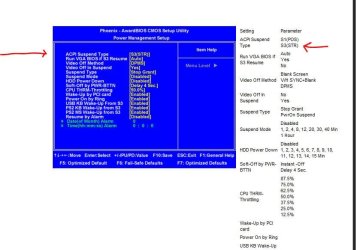
The Bios setup did not have a similar screen for power management like I posted above >?
 

My Computer

Computer type
PC/Desktop
Computer Manufacturer/Model Number
Built them myself, Science Experiments !
OS
Win7 Enterprise, Win7 x86 (Ult 7600), Win7 x64 Ult 7600, TechNet RTM on AMD x64 (2.8Ghz)
CPU
AMD fx8350 4ghz, AMD-32 2400mhz, AMD-64 3200mhz, AMDx64 2.8G
Motherboard
SIS 755, ECS-K8M890M-M (Ult 7600), GigaByte & others
Memory
2gb, 4gb on the Ult 7600, 4gb on Technet RTM, 32gb on FX8350
Graphics Card(s)
Draw my own Graphics, several nVidia cards
Sound Card
on motherboard
Monitor(s) Displays
19" flat scr, 28" I-Inc widescr,22" Emprex Widescr, 23" Acer
Screen Resolution
1280 x 1024, 1440 x 900, 1920 x 1080
Hard Drives
6 pata Ide HD's & 2 Sata HD's
added 80gb external on Ult 7600 computer,
numerous extra 1tb, 2TB, 3Tb SATA HD's
A collection of ext HD Docks w/ HDs
PSU
430w, 550w, 600w, 700, 800, etc
Case
All Generic Full Towers
Cooling
Open Air & a few fans, some w/ colored LEDs
Keyboard
Compaq & Dell recycled from GoodWill
Mouse
Made in China Optical Wired Mouse
Internet Speed
Fast Cable InterNet
Antivirus
AVG Free on 24 different Desktops, NO Problems!
Browser
IE 8 is preferred, but use FireFox sometimes
Other Info
Linksys Routers, switches, & Hubs
Too Many USB Flash Drives to count, Biggest is 64GB !
Eight computers in my home network.
Sixteen computers at my business network.
Linked via TeamViewer !
Lots of old used spare computer parts everywhere!
My HP doesn't have a power management screen like the one you posted earlier either, from what I understand they are somewhat known for having a very 'locked down' bios.

Also had a look on the HP support site, and there seems to be no W7 support for the model of laptop in question, so no bios updates.
 

My Computer

Computer Manufacturer/Model Number
HP Dv3-2137tx
OS
7 Home Premium x64
CPU
Core 2 P8700 2.53ghz
Motherboard
Compaq
Memory
4gb DDR2
Graphics Card(s)
Nvidia GeForce 105M
Sound Card
Integrated
Monitor(s) Displays
13" 1366x768
Hard Drives
500gb 5400rpm
Cooling
Stock
ahh tim how did you fix it so easily? we seem to have very similar laptops.
do you mind printscreen or tell me what you have for advanced power option screen with all the + sign open?? here's what i have that i think might affect it,

sleep
- "sleep after" (on battery 10 minutes, plugged in 20 minutes)
- "allow hybrid sleep" (on battery ON, plugged in ON)
Power buttons and lid
- "lid close action" (do nothing for both)
- "power button option" (sleep for both)
-"sleep button action" (do nothing for both)
Hard disk
-"turn off hard disk after" (20 minutes for both)

i wonder if those affect anything..but thanks so much !
 

My Computer

OS
windows 7 ultimate
Ok, so here are my advanced power settings;

Hard disk
Turn HDD off after (20minutes for both)

Wireless Adapter Settings
Power Saving Mode (Maximum Performance for Both)

Sleep
Sleep After (Never for Both)
Allow Hybrid Sleep (On for Both)
Hibernate After (30min on battery, Never when plugged in)
Allow Wake Timers (Never for Both)

Power Buttons and Lid
Lid Close action ( Do Nothing for Both)
Power Button Action ( Shutdown for Both)
Sleep Button Action ( Sleep for Both)

PCI Express
Link State Power Managment (Off for Both)


So there are my settings, Hopefully this helps.
 

My Computer

Computer Manufacturer/Model Number
HP Dv3-2137tx
OS
7 Home Premium x64
CPU
Core 2 P8700 2.53ghz
Motherboard
Compaq
Memory
4gb DDR2
Graphics Card(s)
Nvidia GeForce 105M
Sound Card
Integrated
Monitor(s) Displays
13" 1366x768
Hard Drives
500gb 5400rpm
Cooling
Stock
omg it's finally fixed!!
i'm not sure what was the problem though, i fixed 3 things yesterday
i reset BIOS, then reinstalled the ACPI fixed feature button and reajusted what Tim posted earlier. and voila it's fixed FINALLY!:D:D thanks for all your help guys!
 

My Computer

OS
windows 7 ultimate
Congrats :D

Glad you stayed with it until it was solved ;)
 

My Computer

Computer type
PC/Desktop
Computer Manufacturer/Model Number
Built them myself, Science Experiments !
OS
Win7 Enterprise, Win7 x86 (Ult 7600), Win7 x64 Ult 7600, TechNet RTM on AMD x64 (2.8Ghz)
CPU
AMD fx8350 4ghz, AMD-32 2400mhz, AMD-64 3200mhz, AMDx64 2.8G
Motherboard
SIS 755, ECS-K8M890M-M (Ult 7600), GigaByte & others
Memory
2gb, 4gb on the Ult 7600, 4gb on Technet RTM, 32gb on FX8350
Graphics Card(s)
Draw my own Graphics, several nVidia cards
Sound Card
on motherboard
Monitor(s) Displays
19" flat scr, 28" I-Inc widescr,22" Emprex Widescr, 23" Acer
Screen Resolution
1280 x 1024, 1440 x 900, 1920 x 1080
Hard Drives
6 pata Ide HD's & 2 Sata HD's
added 80gb external on Ult 7600 computer,
numerous extra 1tb, 2TB, 3Tb SATA HD's
A collection of ext HD Docks w/ HDs
PSU
430w, 550w, 600w, 700, 800, etc
Case
All Generic Full Towers
Cooling
Open Air & a few fans, some w/ colored LEDs
Keyboard
Compaq & Dell recycled from GoodWill
Mouse
Made in China Optical Wired Mouse
Internet Speed
Fast Cable InterNet
Antivirus
AVG Free on 24 different Desktops, NO Problems!
Browser
IE 8 is preferred, but use FireFox sometimes
Other Info
Linksys Routers, switches, & Hubs
Too Many USB Flash Drives to count, Biggest is 64GB !
Eight computers in my home network.
Sixteen computers at my business network.
Linked via TeamViewer !
Lots of old used spare computer parts everywhere!
YAY!
 

My Computer

Computer Manufacturer/Model Number
HP Dv3-2137tx
OS
7 Home Premium x64
CPU
Core 2 P8700 2.53ghz
Motherboard
Compaq
Memory
4gb DDR2
Graphics Card(s)
Nvidia GeForce 105M
Sound Card
Integrated
Monitor(s) Displays
13" 1366x768
Hard Drives
500gb 5400rpm
Cooling
Stock
Back
Top