Solved Slipstream OEM Win 7 (with OEM disc)

Nat1

New member
Local time
12:50 AM
Messages
9
Hello everyone. Before I go on, I'd like to state that I'm a noob and I do apologize if my concerns sound stupid.

So I'd like to perform a clean install. It's a Win 7 Home OEM. For some reason, it wasn't equipped with a recovery partition so I've been looking into doing a clean install and slipstreaming it since I have the OEM disc. However, I'm not sure if it's possible due to a couple of reasons:

1. When I first bought the laptop, the Win 7 was the 32-bit version. I then got my RAM upgraded and the technician switched it to a 64-bit. Will I still be able to activate my Windows despite the changes if I do decide to carry out the clean install/slipstream?

2. From what I've read online, some say it's feasible to slipstream Win 7 OEM while others say it isn't. Hence I'd like to get a definite answer. I'm not sure if having the OEM disc would matter.
 

My Computer My Computer

Computer type
Laptop
Computer Manufacturer/Model Number
Lenovo G480
OS
Windows 7 Home x64
CPU
Core i5
Other Info
Combo audio jack, stereo speakers
Welcome to the forum.

Edit your profile and add ALL your hardware specs. https://www.sevenforums.com/profile.php?do=extra
We have to know what kind of license you have.
Run this software and post the results here. https://go.microsoft.com/fwlink/?linkid=52012

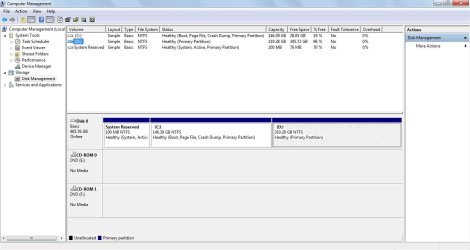
It seems that when the technician switched it to a 64-bit it cleaned all disk. Post an image of disk manager. Disk Management - Post a Screen Capture Image - Windows 7 Help Forums

Do you have the Win 7 Home 64 installation disk or only the 32 that came with the computer?
Do you have the COA stick with the key that came with your computer? Look at the side of the case.
 

My Computers My Computers

System One System Two

  • Computer type
    PC/Desktop
    Computer Manufacturer/Model Number
    custom build
    OS
    Windows 7 HP 64
    CPU
    i5 6600K - 800MHz to 4200MHz
    Motherboard
    GA-Z170-HD3P
    Memory
    4+4G GSkill DDR4 3000
    Graphics Card(s)
    IG - Intel 530
    Monitor(s) Displays
    Samsung 226BW
    Screen Resolution
    1680x1050
    Hard Drives
    (1) -1 SM951 – 128GB M.2 AHCI PCIe SSD drive for Windows 7 and Lubuntu
    (2) -1 WD SATA 3 - 1T for Data
    (3) -1 WD SATA 3 - 1T for backup
    PSU
    Thermaltake 450W TR2 gold
    Keyboard
    Old and good Chicony mechanical keyboard
    Mouse
    Logitech mX performance - 9 buttons (had to disable some)
    Internet Speed
    500Mb/s
    Browser
    Firefox 64
    Other Info
    TinyWall firewall
  • Computer type
    Laptop
    System Manufacturer/Model Number
    Asus Q550LF
    OS
    Windows 7 Pro
    CPU
    i7-4500U 800MHz to 3.0GHz
    Motherboard
    Asus Q550LF
    Memory
    (4+4)G DDR3 1600
    Graphics Card(s)
    IG intel 4400 + NVIDIA GeForce GT 745M
    Sound Card
    Realtek
    Monitor(s) Displays
    LG Display LP156WF4-SPH1
    Screen Resolution
    1920 x 1080
    Hard Drives
    BX500 120G SSD for Windows and programs +
    1T HDD for data
    Internet Speed
    500 Mb/s
    Browser
    Firefox
    Other Info
    TinyWall firewall
Thank you.

I've updated my profile and added the hardware specs the best I could.

My disk was fine though, nothing in the partitions got deleted. Perhaps they only cleaned the system recovery partition?

I re-checked the OEM disc and it's the 64-bit. I'm sorry if I recalled incorrectly and if it was actually 64-bit all along, it was a long time ago. (Although, I'm pretty sure the person said it was 32-bit unless it was possible to upgrade it without any additional cost?)

And yes, I still have the COA sticker.
 

Attachments

  • MGADiag.txt
    MGADiag.txt
    5.8 KB · Views: 3
  • Disk.jpg
    Disk.jpg
    81.4 KB · Views: 5
Last edited:

My Computer My Computer

Computer type
Laptop
Computer Manufacturer/Model Number
Lenovo G480
OS
Windows 7 Home x64
CPU
Core i5
Other Info
Combo audio jack, stereo speakers
So what is it you want to do ?

1) Your key works for 32 bit and/or 64 bit.

2) If the tech installed 64 Bit you`re good, there`s nothing more to do.

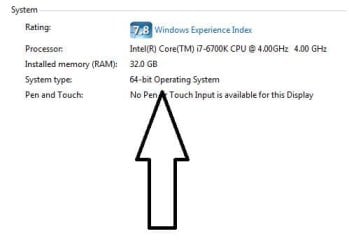
If you want to be sure, click the start orb, then right click on computer and click properties, it will tell you what bit version you have installed.

Once again, Welcome to Seven Forums :)
 

Attachments

  • Capture.JPG
    Capture.JPG
    19.5 KB · Views: 18

My Computer My Computer

Computer type
PC/Desktop
Computer Manufacturer/Model Number
Skylake Special #666
OS
Windows 10 Pro x64
CPU
Intel Core i7 6700K
Motherboard
Asus Sabertooth Z170 Mark 1
Memory
GSkill TridentZ RGB 16GB 3600 16-16-16-36
Graphics Card(s)
EVGA GTX 980 Ti SC x2
Sound Card
Realtek High Definition
Monitor(s) Displays
AOC G2460PG
Screen Resolution
1920 x 1080 144Hz
Hard Drives
Samsung 860 Pro 256GB, Seagate Barracuda 4TB x2
PSU
EVGA 1000 P2, EVGA White Custom Braided Cables
Case
Corsair Vengeance C70 Gunmetal Black
Cooling
Corsair H100i v2, Corsair ML120 x2, Thermal Grizzly Kryonaut
Keyboard
Logitech G910 Orion Spectrum
Mouse
Logitech G700s
Internet Speed
Verizon Fios Quantum Gateway 75/75
Antivirus
Windows Defender, Malwarebytes Free 3.8.3
Browser
Chrome
Other Info
Corsair SP120 x4, LG Blu-ray Drive, Durabrand HT-395 100 Watt Dolby Digital Amp, Corsair H2100 Wireless 7.1 Headset
Thank you. :)

I've checked and it's the 64-bit.

Well, that only leaves the second half of my concerns.

I'm looking into slipstreaming my Win 7 OEM (perhaps with RT7Lite) but I'm not sure if it's possible. From what I've read online, some say it is while others say it isn't. I'd like to get a definite answer (and if owning the OEM disc itself would matter or not in this case), and if RT7Lite isn't the best program to do it, which program is better suited to accomplish such task.
 

My Computer My Computer

Computer type
Laptop
Computer Manufacturer/Model Number
Lenovo G480
OS
Windows 7 Home x64
CPU
Core i5
Other Info
Combo audio jack, stereo speakers
You can build any installer you`d like, you just have to know how to do it ;)

Unless you have to install windows on a hundred computers, it`s not worth the effort.

Since you don`t have a recovery partition, it would be wise to create a system image, you can use Windows built in imaging program or download and install Macrium Reflect free edition.

A Macrium image will take up less space on your data partition.
 

My Computer My Computer

Computer type
PC/Desktop
Computer Manufacturer/Model Number
Skylake Special #666
OS
Windows 10 Pro x64
CPU
Intel Core i7 6700K
Motherboard
Asus Sabertooth Z170 Mark 1
Memory
GSkill TridentZ RGB 16GB 3600 16-16-16-36
Graphics Card(s)
EVGA GTX 980 Ti SC x2
Sound Card
Realtek High Definition
Monitor(s) Displays
AOC G2460PG
Screen Resolution
1920 x 1080 144Hz
Hard Drives
Samsung 860 Pro 256GB, Seagate Barracuda 4TB x2
PSU
EVGA 1000 P2, EVGA White Custom Braided Cables
Case
Corsair Vengeance C70 Gunmetal Black
Cooling
Corsair H100i v2, Corsair ML120 x2, Thermal Grizzly Kryonaut
Keyboard
Logitech G910 Orion Spectrum
Mouse
Logitech G700s
Internet Speed
Verizon Fios Quantum Gateway 75/75
Antivirus
Windows Defender, Malwarebytes Free 3.8.3
Browser
Chrome
Other Info
Corsair SP120 x4, LG Blu-ray Drive, Durabrand HT-395 100 Watt Dolby Digital Amp, Corsair H2100 Wireless 7.1 Headset
I'm quite sure the technician cleaned all disk as it doesn't have a recover partition.
Is the OEM disc you have a Lenovo or MS disk label?
Does your COA license is *****-*****-WPKCV-K3MQW-V84P9 ?

As you have a Win 7 Home OEM 64 disk and a COA license, you can do a clean install or a repair install.
- Clean install will erase ALL partitions then install Win 7. Clean Install Windows 7 - Windows 7 Help Forums
- Repair install will reinstall win 7, keeping all data and programs. Repair Install - Windows 7 Help Forums

I always do a clean install and reinstall all programs and recover my data from the backup.

I see from MGADiag that you have a Enterprise Office. Do you have the installation disk and Key?
You must do a Data backup on an external disk.
Run this program to find all installed keys and save on an external disk. http://www.klinzmann.name/licensecrawler.htm

My suggestion is to do a clean install.
For the updates MS releases SP2 for Windows 7 - Windows 7 Help Forums
 

My Computers My Computers

System One System Two

  • Computer type
    PC/Desktop
    Computer Manufacturer/Model Number
    custom build
    OS
    Windows 7 HP 64
    CPU
    i5 6600K - 800MHz to 4200MHz
    Motherboard
    GA-Z170-HD3P
    Memory
    4+4G GSkill DDR4 3000
    Graphics Card(s)
    IG - Intel 530
    Monitor(s) Displays
    Samsung 226BW
    Screen Resolution
    1680x1050
    Hard Drives
    (1) -1 SM951 – 128GB M.2 AHCI PCIe SSD drive for Windows 7 and Lubuntu
    (2) -1 WD SATA 3 - 1T for Data
    (3) -1 WD SATA 3 - 1T for backup
    PSU
    Thermaltake 450W TR2 gold
    Keyboard
    Old and good Chicony mechanical keyboard
    Mouse
    Logitech mX performance - 9 buttons (had to disable some)
    Internet Speed
    500Mb/s
    Browser
    Firefox 64
    Other Info
    TinyWall firewall
  • Computer type
    Laptop
    System Manufacturer/Model Number
    Asus Q550LF
    OS
    Windows 7 Pro
    CPU
    i7-4500U 800MHz to 3.0GHz
    Motherboard
    Asus Q550LF
    Memory
    (4+4)G DDR3 1600
    Graphics Card(s)
    IG intel 4400 + NVIDIA GeForce GT 745M
    Sound Card
    Realtek
    Monitor(s) Displays
    LG Display LP156WF4-SPH1
    Screen Resolution
    1920 x 1080
    Hard Drives
    BX500 120G SSD for Windows and programs +
    1T HDD for data
    Internet Speed
    500 Mb/s
    Browser
    Firefox
    Other Info
    TinyWall firewall
I have made a system image.

It's just that I saw on a few forums that it's tricky to slipstream Win 7 OEM, but the last post I could find was written in 2011, and I can no longer find the RT7 forum to look this up/post this concern. So I was wondering if there are some things that need to be done in order for this operation to be successful. Sorry if this is the wrong place to ask.
 

My Computer My Computer

Computer type
Laptop
Computer Manufacturer/Model Number
Lenovo G480
OS
Windows 7 Home x64
CPU
Core i5
Other Info
Combo audio jack, stereo speakers
There`s no reason to reinstall W7, he`s fine.

Creating a W7 installer with all the updates and programs you want, Slip Streaming, as you call it, can be quite complicated to a novice and takes experience and research. Better left to the IT Admins that get paid to do it.

But I believe there are 1 or 2 Tutorials here somewhere. And you can always Google it. :)
 

My Computer My Computer

Computer type
PC/Desktop
Computer Manufacturer/Model Number
Skylake Special #666
OS
Windows 10 Pro x64
CPU
Intel Core i7 6700K
Motherboard
Asus Sabertooth Z170 Mark 1
Memory
GSkill TridentZ RGB 16GB 3600 16-16-16-36
Graphics Card(s)
EVGA GTX 980 Ti SC x2
Sound Card
Realtek High Definition
Monitor(s) Displays
AOC G2460PG
Screen Resolution
1920 x 1080 144Hz
Hard Drives
Samsung 860 Pro 256GB, Seagate Barracuda 4TB x2
PSU
EVGA 1000 P2, EVGA White Custom Braided Cables
Case
Corsair Vengeance C70 Gunmetal Black
Cooling
Corsair H100i v2, Corsair ML120 x2, Thermal Grizzly Kryonaut
Keyboard
Logitech G910 Orion Spectrum
Mouse
Logitech G700s
Internet Speed
Verizon Fios Quantum Gateway 75/75
Antivirus
Windows Defender, Malwarebytes Free 3.8.3
Browser
Chrome
Other Info
Corsair SP120 x4, LG Blu-ray Drive, Durabrand HT-395 100 Watt Dolby Digital Amp, Corsair H2100 Wireless 7.1 Headset
I'm quite sure the technician cleaned all disk as it doesn't have a recover partition.
Is the OEM disc you have a Lenovo or MS disk label?
Does your COA license is *****-*****-WPKCV-K3MQW-V84P9 ?

As you have a Win 7 Home OEM 64 disk and a COA license, you can do a clean install or a repair install.
- Clean install will erase ALL partitions then install Win 7. Clean Install Windows 7 - Windows 7 Help Forums
- Repair install will reinstall win 7, keeping all data and programs. Repair Install - Windows 7 Help Forums

I always do a clean install and reinstall all programs and recover my data from the backup.

I see from MGADiag that you have a Enterprise Office. Do you have the installation disk and Key?
You must do a Data backup on an external disk.
Run this program to find all installed keys and save on an external disk. http://www.klinzmann.name/licensecrawler.htm

My suggestion is to do a clean install.
For the updates MS releases SP2 for Windows 7 - Windows 7 Help Forums


The only thing I remember is that my files were fine. The Novo key never worked either, even before upgrading my RAM.

The OEM disc is MS.

Yes, that's my license.

I was thinking about doing that, but speeding the process up with the updates and the programs by slipstreaming it. My internet can be slow so I assumed slipstreaming would be a better option.
 

My Computer My Computer

Computer type
Laptop
Computer Manufacturer/Model Number
Lenovo G480
OS
Windows 7 Home x64
CPU
Core i5
Other Info
Combo audio jack, stereo speakers

My Computer My Computer

Computer type
Laptop
Computer Manufacturer/Model Number
Lenovo G480
OS
Windows 7 Home x64
CPU
Core i5
Other Info
Combo audio jack, stereo speakers
Nat, what is the problem with your installation and what you want to do?
Why does your disk have two partitions? What is in disk D: ?
Slipstream is to add something to the Win 7 installation disk as updates and / or drivers. I've once tried RT7 and it didn't work as expected.
 

My Computers My Computers

System One System Two

  • Computer type
    PC/Desktop
    Computer Manufacturer/Model Number
    custom build
    OS
    Windows 7 HP 64
    CPU
    i5 6600K - 800MHz to 4200MHz
    Motherboard
    GA-Z170-HD3P
    Memory
    4+4G GSkill DDR4 3000
    Graphics Card(s)
    IG - Intel 530
    Monitor(s) Displays
    Samsung 226BW
    Screen Resolution
    1680x1050
    Hard Drives
    (1) -1 SM951 – 128GB M.2 AHCI PCIe SSD drive for Windows 7 and Lubuntu
    (2) -1 WD SATA 3 - 1T for Data
    (3) -1 WD SATA 3 - 1T for backup
    PSU
    Thermaltake 450W TR2 gold
    Keyboard
    Old and good Chicony mechanical keyboard
    Mouse
    Logitech mX performance - 9 buttons (had to disable some)
    Internet Speed
    500Mb/s
    Browser
    Firefox 64
    Other Info
    TinyWall firewall
  • Computer type
    Laptop
    System Manufacturer/Model Number
    Asus Q550LF
    OS
    Windows 7 Pro
    CPU
    i7-4500U 800MHz to 3.0GHz
    Motherboard
    Asus Q550LF
    Memory
    (4+4)G DDR3 1600
    Graphics Card(s)
    IG intel 4400 + NVIDIA GeForce GT 745M
    Sound Card
    Realtek
    Monitor(s) Displays
    LG Display LP156WF4-SPH1
    Screen Resolution
    1920 x 1080
    Hard Drives
    BX500 120G SSD for Windows and programs +
    1T HDD for data
    Internet Speed
    500 Mb/s
    Browser
    Firefox
    Other Info
    TinyWall firewall
Nat, what is the problem with your installation and what you want to do?
Why does your disk have two partitions? What is in disk D: ?
Slipstream is to add something to the Win 7 installation disk as updates and / or drivers. I've once tried RT7 and it didn't work as expected.

Nothing wrong, I'd simply like to speed up the process by slipstreaming because my internet can be slow.
I've had two partitions ever since I got this laptop so I don't know.
 

My Computer My Computer

Computer type
Laptop
Computer Manufacturer/Model Number
Lenovo G480
OS
Windows 7 Home x64
CPU
Core i5
Other Info
Combo audio jack, stereo speakers
So slipstreaming would be to add the updates to the installation disk?
If you read my post MS releases SP2 for Windows 7 - Windows 7 Help Forums
you'll see that MS has released a single file update with almost all updates. Once you downloaded you will have 90% of the updates.
Don't waste your time with slipstreaming. It won't help with the slow internet on day use.
 

My Computers My Computers

System One System Two

  • Computer type
    PC/Desktop
    Computer Manufacturer/Model Number
    custom build
    OS
    Windows 7 HP 64
    CPU
    i5 6600K - 800MHz to 4200MHz
    Motherboard
    GA-Z170-HD3P
    Memory
    4+4G GSkill DDR4 3000
    Graphics Card(s)
    IG - Intel 530
    Monitor(s) Displays
    Samsung 226BW
    Screen Resolution
    1680x1050
    Hard Drives
    (1) -1 SM951 – 128GB M.2 AHCI PCIe SSD drive for Windows 7 and Lubuntu
    (2) -1 WD SATA 3 - 1T for Data
    (3) -1 WD SATA 3 - 1T for backup
    PSU
    Thermaltake 450W TR2 gold
    Keyboard
    Old and good Chicony mechanical keyboard
    Mouse
    Logitech mX performance - 9 buttons (had to disable some)
    Internet Speed
    500Mb/s
    Browser
    Firefox 64
    Other Info
    TinyWall firewall
  • Computer type
    Laptop
    System Manufacturer/Model Number
    Asus Q550LF
    OS
    Windows 7 Pro
    CPU
    i7-4500U 800MHz to 3.0GHz
    Motherboard
    Asus Q550LF
    Memory
    (4+4)G DDR3 1600
    Graphics Card(s)
    IG intel 4400 + NVIDIA GeForce GT 745M
    Sound Card
    Realtek
    Monitor(s) Displays
    LG Display LP156WF4-SPH1
    Screen Resolution
    1920 x 1080
    Hard Drives
    BX500 120G SSD for Windows and programs +
    1T HDD for data
    Internet Speed
    500 Mb/s
    Browser
    Firefox
    Other Info
    TinyWall firewall
Ah I see. Alright. Thank you.

One last thing if you don't mind, I also saw this program called WSUS Offline Update. Would you also recommend using that?
 

My Computer My Computer

Computer type
Laptop
Computer Manufacturer/Model Number
Lenovo G480
OS
Windows 7 Home x64
CPU
Core i5
Other Info
Combo audio jack, stereo speakers
There are many programs that search on MS catalog to find updates.
I have used WSUS Offline Update to have all MS Office 10 offline updates.
For Windows I use the SP2 and the Security only offline updates.
 

My Computers My Computers

System One System Two

  • Computer type
    PC/Desktop
    Computer Manufacturer/Model Number
    custom build
    OS
    Windows 7 HP 64
    CPU
    i5 6600K - 800MHz to 4200MHz
    Motherboard
    GA-Z170-HD3P
    Memory
    4+4G GSkill DDR4 3000
    Graphics Card(s)
    IG - Intel 530
    Monitor(s) Displays
    Samsung 226BW
    Screen Resolution
    1680x1050
    Hard Drives
    (1) -1 SM951 – 128GB M.2 AHCI PCIe SSD drive for Windows 7 and Lubuntu
    (2) -1 WD SATA 3 - 1T for Data
    (3) -1 WD SATA 3 - 1T for backup
    PSU
    Thermaltake 450W TR2 gold
    Keyboard
    Old and good Chicony mechanical keyboard
    Mouse
    Logitech mX performance - 9 buttons (had to disable some)
    Internet Speed
    500Mb/s
    Browser
    Firefox 64
    Other Info
    TinyWall firewall
  • Computer type
    Laptop
    System Manufacturer/Model Number
    Asus Q550LF
    OS
    Windows 7 Pro
    CPU
    i7-4500U 800MHz to 3.0GHz
    Motherboard
    Asus Q550LF
    Memory
    (4+4)G DDR3 1600
    Graphics Card(s)
    IG intel 4400 + NVIDIA GeForce GT 745M
    Sound Card
    Realtek
    Monitor(s) Displays
    LG Display LP156WF4-SPH1
    Screen Resolution
    1920 x 1080
    Hard Drives
    BX500 120G SSD for Windows and programs +
    1T HDD for data
    Internet Speed
    500 Mb/s
    Browser
    Firefox
    Other Info
    TinyWall firewall
Ok. Thank you very much for the help and advice. :)
 

My Computer My Computer

Computer type
Laptop
Computer Manufacturer/Model Number
Lenovo G480
OS
Windows 7 Home x64
CPU
Core i5
Other Info
Combo audio jack, stereo speakers
Back
Top