Hello.
This is really more an annoyance than an immediate issue. Here's what happens:
On startup, the black welcome screen for Win7 stays black for about 1-2 minutes before the animated Windows logo appears. The "Welcome To Windows" text does appear at the bottom normally for this delay, but nothing happens beyond that over the delay. It should be noted that, while this delay happens repeatedly and constantly, I have had very few problems otherwise with either the machine or Win7.
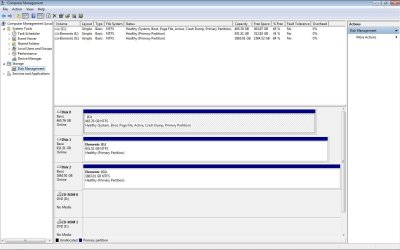
On the fresh install when I first got this machine, it took about 30-45 seconds to get through this screen, but I have recently added a second external hard drive to my system, and it seems to have slowed to the 1-2 minute delay I am now experiencing. The first external hard drive I added didn't seem to slow anything down any more when I connected it, so I am skeptical that it is a cause.
Any help would be appreciated.
Here are my specs in case they don't show up in my profile:
Intel i3-2120 @ 3GHz (Dual)
Gigabyte P67A-D3-B3 Motherboard
4GB DDR3 Memory
Asus Radeon HD 6450 Video Card
WD WD5002AALX 500GB 7200RPM SATA HHD
WD Elements 1GB External USB HDD (Old)
WD Elements 2GB External USB HDD (New)
Win7 Ultimate 32-bit
This is really more an annoyance than an immediate issue. Here's what happens:
On startup, the black welcome screen for Win7 stays black for about 1-2 minutes before the animated Windows logo appears. The "Welcome To Windows" text does appear at the bottom normally for this delay, but nothing happens beyond that over the delay. It should be noted that, while this delay happens repeatedly and constantly, I have had very few problems otherwise with either the machine or Win7.
On the fresh install when I first got this machine, it took about 30-45 seconds to get through this screen, but I have recently added a second external hard drive to my system, and it seems to have slowed to the 1-2 minute delay I am now experiencing. The first external hard drive I added didn't seem to slow anything down any more when I connected it, so I am skeptical that it is a cause.
Any help would be appreciated.
Here are my specs in case they don't show up in my profile:
Intel i3-2120 @ 3GHz (Dual)
Gigabyte P67A-D3-B3 Motherboard
4GB DDR3 Memory
Asus Radeon HD 6450 Video Card
WD WD5002AALX 500GB 7200RPM SATA HHD
WD Elements 1GB External USB HDD (Old)
WD Elements 2GB External USB HDD (New)
Win7 Ultimate 32-bit
My Computer
- Computer type
- PC/Desktop
- Computer Manufacturer/Model Number
- Custom
- OS
- Windows 7 Ultimate 32-Bit
- CPU
- Intel i3-2120 @ 3.3GHz
- Motherboard
- Ggabyte P67A-D3-B3
- Memory
- 4GB DDR3
- Graphics Card(s)
- AMD Radeon HD
- Sound Card
- On-Board
- Monitor(s) Displays
- ViewSonic VA1912wb
- Screen Resolution
- 1440x900
- Hard Drives
- WD 5002AALX 500GB 7200rpm SATA
WD Elements 1GB External USB HDD
WD Elements 2GB External USB HDD
- Antivirus
- AVG 2013
- Browser
- Mozilla Firefox