

- Local time
- 2:52 AM
- Messages
- 63
Gooday all. I was having a look around the site to see if I could find a post related to my problem, ie, slow boot up. One of the suggestions was in MSCONFIG have a look at the start up tab and see how many services were in there. I checked and found 11 and I don't need any of them right at start up.
I then checked the services tab and there were in excess of 100 entries there, not all of them running. I checked the hide all windows services and was left with about 14. I would like some advice on rectifying this slowness, although no one is going to die just because my computer takes 3 minutes to start, I would just like it running better. Speccy included below.
http://speccy.piriform.com/results/fVvEY806ixuzAtlceTBWuTi
I just noted that my specs on the left are for my lappy not my desktop, which is the machine this query is about.
I then checked the services tab and there were in excess of 100 entries there, not all of them running. I checked the hide all windows services and was left with about 14. I would like some advice on rectifying this slowness, although no one is going to die just because my computer takes 3 minutes to start, I would just like it running better. Speccy included below.
http://speccy.piriform.com/results/fVvEY806ixuzAtlceTBWuTi
I just noted that my specs on the left are for my lappy not my desktop, which is the machine this query is about.
Last edited:
My Computer
- Computer Manufacturer/Model Number
- Sont Vaio VPCEH13FD
- OS
- Windows7 Home Premium 64 bit SP1
- CPU
- INTEL CORE i3/i5/i7 @2.10ghz Sandy Bridge 32nm Technology
- Motherboard
- Sony Corporation VAIO (N/A)
- Memory
- 6.00gb Dual Channel DDR3 @665 mhz (9-9-9-24)
- Graphics Card(s)
- Generic PnP Monitor (1366x768 @60 Hz. Intel(R) HD Graphics F
- Sound Card
- Conexant Smart Audio HD
- Hard Drives
- 625 gb SamsungHM641JI SATA


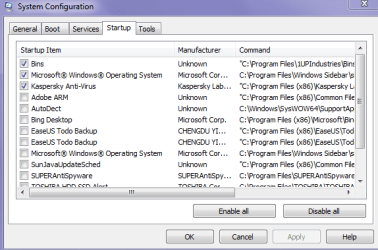

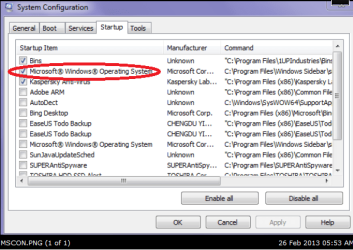
 But I am still leaving my Kaspersky ticked come whatever LOL!!
