
Slow system response time

Klamfyr

New member
Member
Local time
5:42 AM
Messages
60
Location
Denmark
Hello SF,
I recently reinstalled windows on my new SSD - had a slow system response time before, thought it was the SSD and now got a new one of them from Integral even though they couldn't find a problem with the old one. Installed windows and it ran just fine until I used windows update. It's hard to explain but it feels like everything takes a really long time and I have small spikes all the time. I updated all drivers, did a performance check (system health report thing), checked all hardware and so on. I attached the system health report since I'm not sure how to interpret the result.
P.S.
I know about the antivirus problem, just temparely disabled it while running the system health report
Thanks in advance <3
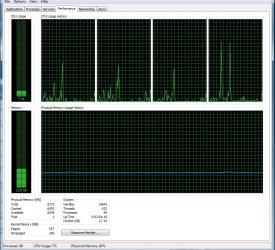
Attached a picture of my CPU/Memory usage, does this help any of you? I can see theres only 1 RAM free, could this have anything to do with the problem? Opening anything takes forever, even loading webpages/folders/anything. It also went from spiking to just being constant slow
 

Attachments
Last edited:

My Computer

OS
Windows Ultimate x64
CPU
Intel(R) Core(TM) i5 CPU Q 3,3Ghz
Motherboard
Asus P67 B3 Revision (New)
Memory
8 GB DDR3 RAM
Graphics Card(s)
Nvidia GeForce 9800 GT SLI
Monitor(s) Displays
2
Screen Resolution
Double Monitor 1920x1080
Hard Drives
SSD
HDD
Mouse
Logitech Mx518
Installed CCleaner and did a full registry clean and it seems like my pc speeded up, its still really slow opening stuff though, any ideas?
 

My Computer

OS
Windows Ultimate x64
CPU
Intel(R) Core(TM) i5 CPU Q 3,3Ghz
Motherboard
Asus P67 B3 Revision (New)
Memory
8 GB DDR3 RAM
Graphics Card(s)
Nvidia GeForce 9800 GT SLI
Monitor(s) Displays
2
Screen Resolution
Double Monitor 1920x1080
Hard Drives
SSD
HDD
Mouse
Logitech Mx518
Hello, I'll try that and let you know how it turns out
 

My Computer

OS
Windows Ultimate x64
CPU
Intel(R) Core(TM) i5 CPU Q 3,3Ghz
Motherboard
Asus P67 B3 Revision (New)
Memory
8 GB DDR3 RAM
Graphics Card(s)
Nvidia GeForce 9800 GT SLI
Monitor(s) Displays
2
Screen Resolution
Double Monitor 1920x1080
Hard Drives
SSD
HDD
Mouse
Logitech Mx518
I basically did everything but the memtest and repair-install and no problems found.
However, I noticed that WEI only rates my SSD to 5,9 - the same score as my old HDD. It's weird cause the SSD is the boot/system/primary drive and it still seems to be prioritizing the HDD. Could this have any affect on the constant slow response time?
One more thing, been monitoring the CPU usage and it stays on 0% for a very long time, then suddenly goes to 10-25% for a few secs then drops to 0% again for a long time. So what could this mean?

One last thing, I noticed that when doing any command (etc opening software, control+alt+delte) it takes a really long time to load the first time, but the second is almost instant in most cases.
 

My Computer

OS
Windows Ultimate x64
CPU
Intel(R) Core(TM) i5 CPU Q 3,3Ghz
Motherboard
Asus P67 B3 Revision (New)
Memory
8 GB DDR3 RAM
Graphics Card(s)
Nvidia GeForce 9800 GT SLI
Monitor(s) Displays
2
Screen Resolution
Double Monitor 1920x1080
Hard Drives
SSD
HDD
Mouse
Logitech Mx518
Try unplugging all others but the SSD to check performance.

You can also post back a screenshot of your maximized Disk Mangement drive map with listings, using the Snipping Tool in Start Menu, for us to look over.

Have you achieved a Clean Boot with only the AV listed in msconfig>Startup and >Services after Hiding all MS Services?

I would definitely test the RAM.
 
Yes, I tried to do the memtest as well, but my pc has no CD drive (not since my external sata CD drive failed me yesterday) and for some reason the only USB I have, besides my external HDD, is not bootable even after using the memtest86 install which should make it bootable.
I took a screen shot of the Disk Management drive map (not sure I did it right)
and I'll try that clean boot right away :)
Thanks a lot for response
 

Attachments

  • Disk map.jpg
    Disk map.jpg
    106.7 KB · Views: 52

My Computer

OS
Windows Ultimate x64
CPU
Intel(R) Core(TM) i5 CPU Q 3,3Ghz
Motherboard
Asus P67 B3 Revision (New)
Memory
8 GB DDR3 RAM
Graphics Card(s)
Nvidia GeForce 9800 GT SLI
Monitor(s) Displays
2
Screen Resolution
Double Monitor 1920x1080
Hard Drives
SSD
HDD
Mouse
Logitech Mx518
I did a clean boot without any problems :) It's weird - I feel like my pc has speeded up, but still when loading stuff for the first time or installing software it takes forever - what I'm trying to say is that the lag is not constant anymore. Etc. it just took me 20 mins to install adobe reader but it loaded Heroes Of Newerth instantly.

Just reran WEI scores with only the SSD plugged in - still 5.9 :O The exact same disc scored a lot higher (close to 7 if my memory serves me right) before the old one crashed :S
 

My Computer

OS
Windows Ultimate x64
CPU
Intel(R) Core(TM) i5 CPU Q 3,3Ghz
Motherboard
Asus P67 B3 Revision (New)
Memory
8 GB DDR3 RAM
Graphics Card(s)
Nvidia GeForce 9800 GT SLI
Monitor(s) Displays
2
Screen Resolution
Double Monitor 1920x1080
Hard Drives
SSD
HDD
Mouse
Logitech Mx518
I just checked the event viewer and daaaaamn. Sooo many errors :) I attached the file
 

Attachments

My Computer

OS
Windows Ultimate x64
CPU
Intel(R) Core(TM) i5 CPU Q 3,3Ghz
Motherboard
Asus P67 B3 Revision (New)
Memory
8 GB DDR3 RAM
Graphics Card(s)
Nvidia GeForce 9800 GT SLI
Monitor(s) Displays
2
Screen Resolution
Double Monitor 1920x1080
Hard Drives
SSD
HDD
Mouse
Logitech Mx518
If you're just getting set up you might try clean reinstalling following these tips to get a perfect Clean Reinstall Windows 7 Factory OEM. You can ignore the steps which pertain to factory OEM.

You may also have alignment issues with the SSD. Check this tutorial and feel free to message it's author Wolfgang who is our expert on SSD's: SSD Alignment - Windows 7 Forums

What AV are you using? Use Microsoft Security Essentials with Windows firewall for best performance.


As stated in troubleshooting steps you can google the verbatim text of repeat errors to find how others have resolved them. This is how I work my chronic errors out.

Besides the Admin log, I would also watch the Task Manager CPU column (click to order it) when the hang occurs to try to determine which Service is responsible. You can drill down even deeper into actual Process:Service using Process Explorer.
 
Using the Microsoft Security Essentials with Windows firewall and thanks ;) I'll look into it myself
 

My Computer

OS
Windows Ultimate x64
CPU
Intel(R) Core(TM) i5 CPU Q 3,3Ghz
Motherboard
Asus P67 B3 Revision (New)
Memory
8 GB DDR3 RAM
Graphics Card(s)
Nvidia GeForce 9800 GT SLI
Monitor(s) Displays
2
Screen Resolution
Double Monitor 1920x1080
Hard Drives
SSD
HDD
Mouse
Logitech Mx518
When I first Installed my SSD and made it my Primary drive for Windows - I unplugged my other drives and installed windows as an Independent Locale. After i loaded Windows I Flashed my Bios with the Latest & Greatest Flash from my Mobo manufacturer. D/L'd and installed the Inf update that is needed by my RAID & other controllers on my mobo that was required above all else and the other driver went down the line - It is really important You do the Latest Inf update for you mobo for you SSD configuration.

You may have had an older version of windows on another drive and by default it could be overriding your SSD/windows MBR.

Seriously, If I were you - I'd make an image of your old drive (store that image on a CD or several) for DATA only and then Wipe the disk in Disk management.
 

My Computer

Computer Manufacturer/Model Number
N/A
OS
windows 7 professional x64 SP1
CPU
Intel Core i7-3770K 3.5Ghz, 3.9Ghz Turbo
Motherboard
GIGABYTE GA-Z68XP-UD5 LGA 1155
Memory
CORSAIR Vengeance 16GB (4 x 4GB) (CML16GX3M4A1600C9B)
Graphics Card(s)
EVGA GeForce GTX 680; 04G-P4-3687-KR
Sound Card
Onboard
Monitor(s) Displays
SAMSUNG XL2370-1 Charcoal Gray 23" 2ms Full HD HDMI LED
Screen Resolution
1080p
Hard Drives
x2 Seagate Barracuda XT ST32000641AS 2TB 7200 RPM SATA 6.0Gb/s
Plextor M3 Series PX-128M3 2.5" 128GB SATA III SSD
PSU
SeaSonic X750 Gold 750W ATX12V V2.3/EPS 12V V2.91
Case
Corsair Obsidian Series 650D (CC650DW-1)
Cooling
CORSAIR H80 (CWCH80) High Performance Liquid CPU Cooler
Okey so I think I fixed it, but everytime I think that its just temporary... But tried a different sata connection on the MB and it seems like it fixed everything (ofcouse after I reinstalled windows and everything).

But I'll run it for a few days and let you guys know how it all turns out :)
Thanks so much for all your help!
 

My Computer

OS
Windows Ultimate x64
CPU
Intel(R) Core(TM) i5 CPU Q 3,3Ghz
Motherboard
Asus P67 B3 Revision (New)
Memory
8 GB DDR3 RAM
Graphics Card(s)
Nvidia GeForce 9800 GT SLI
Monitor(s) Displays
2
Screen Resolution
Double Monitor 1920x1080
Hard Drives
SSD
HDD
Mouse
Logitech Mx518
Okey so been running without many problems since my last post. I specified the problem a bit more sence then, it seems like its only the first time I open something it takes a long time. Ex. The first time I open firefox/anything else it takes +10 secs, second time it's instant - any idea what could be wrong, also system health report detects a long disc queue + not all data is collected since there is a problem with Event Tracing whatever that is :/
Any ideas?
 

My Computer

OS
Windows Ultimate x64
CPU
Intel(R) Core(TM) i5 CPU Q 3,3Ghz
Motherboard
Asus P67 B3 Revision (New)
Memory
8 GB DDR3 RAM
Graphics Card(s)
Nvidia GeForce 9800 GT SLI
Monitor(s) Displays
2
Screen Resolution
Double Monitor 1920x1080
Hard Drives
SSD
HDD
Mouse
Logitech Mx518
I would run a full Disk Check and the HD maker's HD Diagnostic extended CD scan.

Are you doing any tweaking, modding or theming beyond normal System settings?

Are you using the drivers from the installer and then quickly updated by optional Windows Updates, or changing them out without trying them first?
 
Thanks I'll try that, I did the /chkdsk already though, no errors :P
 

My Computer

OS
Windows Ultimate x64
CPU
Intel(R) Core(TM) i5 CPU Q 3,3Ghz
Motherboard
Asus P67 B3 Revision (New)
Memory
8 GB DDR3 RAM
Graphics Card(s)
Nvidia GeForce 9800 GT SLI
Monitor(s) Displays
2
Screen Resolution
Double Monitor 1920x1080
Hard Drives
SSD
HDD
Mouse
Logitech Mx518
Back
Top