Slow system

LarryE1946

New member
Local time
6:48 PM
Messages
30
For the past few days, my Windows 7 x64 Ultimate desktop PC has bee sluggish. I click on anything, whether in a browser or to open any other window, and it just takes a few seconds to respond. I've checked task manager to see if anything new is running, and nothing. I show 0% CPU usage and 9% physical memory. I have an i7 980 Extreme (not overclocked) 24GB of DDR3 RAM and 2GB Graphics card. Only new software installed is Corel Video Studio Pro X4, but it's not running. Only things running in the background are my Microsoft Security Essentials, Intellipoint and Microsoft Office. But those three have always been running and have not been a problem.

Anyone have any idea at all what could be going on?
 

My Computer

OS
Window 7
CPU
Intel Core 2 Quad
Memory
8GB DDR 2
Graphics Card(s)
nVidia GeForce 9800 GT
Sound Card
Creative SB X-Fi
Monitor(s) Displays
HP w2408HDMI
Screen Resolution
1920 X 1200
Hard Drives
325GB 7200
Mouse
Microsoft Laser Mouse
Internet Speed
50Mbps Extreme tier from Comcast.
For the past few days, my Windows 7 x64 Ultimate desktop PC has bee sluggish. I click on anything, whether in a browser or to open any other window, and it just takes a few seconds to respond. I've checked task manager to see if anything new is running, and nothing. I show 0% CPU usage and 9% physical memory. I have an i7 980 Extreme (not overclocked) 24GB of DDR3 RAM and 2GB Graphics card. Only new software installed is Corel Video Studio Pro X4, but it's not running. Only things running in the background are my Microsoft Security Essentials, Intellipoint and Microsoft Office. But those three have always been running and have not been a problem.

Anyone have any idea at all what could be going on?


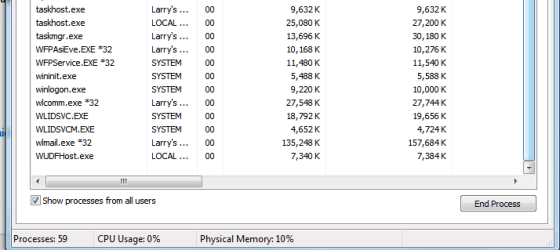
Can we get a snip of the performance tab of task manager showing processes from all users?
 

My Computer

Computer Manufacturer/Model Number
HP Pavillion dv-7 1005 Tx
OS
Win 8 Release candidate 8400
CPU
[email protected]
Memory
4 gigs
Graphics Card(s)
Nvidia 9600M
Sound Card
HD built-in
Monitor(s) Displays
17" Wxga
Screen Resolution
1440x900
Cooling
none
Internet Speed
45Mb down 5Mb up
Ok, here you go. Hope this is what you need and if not, please let me know.
 

Attachments

  • Performance.png
    Performance.png
    59.6 KB · Views: 30
  • Process1.png
    Process1.png
    99.4 KB · Views: 39
  • Process2.png
    Process2.png
    25.2 KB · Views: 21

My Computer

OS
Window 7
CPU
Intel Core 2 Quad
Memory
8GB DDR 2
Graphics Card(s)
nVidia GeForce 9800 GT
Sound Card
Creative SB X-Fi
Monitor(s) Displays
HP w2408HDMI
Screen Resolution
1920 X 1200
Hard Drives
325GB 7200
Mouse
Microsoft Laser Mouse
Internet Speed
50Mbps Extreme tier from Comcast.
Ok, here you go. Hope this is what you need and if not, please let me know.

Well with 61 processes running.

What I don't understand, not only your system, is why Windows is using such a large page file with a large amount of RAM.

I installed another 8GBs of memory in my system to bring it to 16GBs. With 8GB the page file was under 1GB use. Now with 16GBs it is 1.4+GBs with nothing else running.

I would think as you gain physical RAM the page file use would go down. BUT NO it goes up.

Try shutting some of that junk you have running all the time down.
9 times out of 10 you don't need all that stuff starting up with the OS for the program to actually function the way they are supposed to.
For some reason every software vendor likes to start stuff up when windows starts that really isn't needed to make the program function.
All it does is put a strain on the system.
 

My Computer

Computer Manufacturer/Model Number
Built be Me
OS
Windows 7 Pro x64
CPU
i5 760
Motherboard
Asus P7P55D-E Pro
Memory
16GB
Graphics Card(s)
Nvidia GTS450
Sound Card
On board
Monitor(s) Displays
Dell 2007WFP Dell 1800FP
Screen Resolution
1680x1050 1280x1024
Hard Drives
Seagate 250GB & 750GB
WD 1TB
PSU
Antec 750
Case
In Win
Cooling
Cooler Master Hyper 212+
Keyboard
IBM
Mouse
MS
Thanks for the reply and the suggestion. But - that's where I get confused. I checked on some of the items that are running and they all seem to say that they are necessary for Windows to function so what in the heck can I stop that won't mess up Windows?
 

My Computer

OS
Window 7
CPU
Intel Core 2 Quad
Memory
8GB DDR 2
Graphics Card(s)
nVidia GeForce 9800 GT
Sound Card
Creative SB X-Fi
Monitor(s) Displays
HP w2408HDMI
Screen Resolution
1920 X 1200
Hard Drives
325GB 7200
Mouse
Microsoft Laser Mouse
Internet Speed
50Mbps Extreme tier from Comcast.
On my Win 7 Pro desktop I have at startup 34 Processes running and that is with the Windows Live ID junk running that gets installed with any of the Live programs like Live mail (which is the only LIVE software I have installed).
But then I don't use any anti virus or spyware/malware programs. Nor do I even have a anti virus installed. Stopped that about 3 years ago. Don't use the Windows firewall, why would I. I have a very good firewall router, I don't install junk software, I watch where I go on the internet.
And most important I do regular images of my system. If I get any type of infection, which I haven't had in over 10 years (and only then from someone using a infected floppy disk on my system), I just reimage my drive from 2-5 days before. Nothing lost as I backup my personal files to other PCs on my network on a daily basis.

You should be able to pare that down to something like 40+ services, maybe even a little less, without causing Windows to stop functioning or limiting your AV and the like software.

I'll have a closer look at the processes you have running and give you some suggestions.
 

My Computer

Computer Manufacturer/Model Number
Built be Me
OS
Windows 7 Pro x64
CPU
i5 760
Motherboard
Asus P7P55D-E Pro
Memory
16GB
Graphics Card(s)
Nvidia GTS450
Sound Card
On board
Monitor(s) Displays
Dell 2007WFP Dell 1800FP
Screen Resolution
1680x1050 1280x1024
Hard Drives
Seagate 250GB & 750GB
WD 1TB
PSU
Antec 750
Case
In Win
Cooling
Cooler Master Hyper 212+
Keyboard
IBM
Mouse
MS
Wow, thank you very much. I would appreciate any and all suggestions you may have.
 

My Computer

OS
Window 7
CPU
Intel Core 2 Quad
Memory
8GB DDR 2
Graphics Card(s)
nVidia GeForce 9800 GT
Sound Card
Creative SB X-Fi
Monitor(s) Displays
HP w2408HDMI
Screen Resolution
1920 X 1200
Hard Drives
325GB 7200
Mouse
Microsoft Laser Mouse
Internet Speed
50Mbps Extreme tier from Comcast.
Here are some suggestions.

1) dpupdchk.exe Not a Windows process. What is it? Why are you letting it run? What is it supposed to do?

2) FileChurn.exe *32. Not Windows. As above.

3)IAStorDataMgrSvr.exe *32. That is a Intel program for RAID, I think (IIRC). If you are not running a RAID aray it is not needed at startup. And even if you are running a RAID aray it is not needed at startup.

4) That LSSrvc.exe*32 service? That is for a lightscibe DVD burner. Do you use it often? If not think about disabliing it at startup. If you don't have a burner that does lightscrib then it could be malware. Even if you disble the service from starting with Windows I bet you can still write on CD/DVDs using the program.

5)LVPrcSrv.exe*32 that is for a camera and adds certain configuration options. Do you use the web cam much? Do you need access to those options all the time? Consider shutting it down along with those other 2 LVP programs.

6)The PSIservice, both of them, is a licensing service related to Corel software. I have found that you can stop this service and if needed start it up before you run the program. Your choice here.

7)OSPPSVC. Read this.
How to disable background tasks in Office 2010? - Microsoft Answers

That's about it.
Good luck.
 

My Computer

Computer Manufacturer/Model Number
Built be Me
OS
Windows 7 Pro x64
CPU
i5 760
Motherboard
Asus P7P55D-E Pro
Memory
16GB
Graphics Card(s)
Nvidia GTS450
Sound Card
On board
Monitor(s) Displays
Dell 2007WFP Dell 1800FP
Screen Resolution
1680x1050 1280x1024
Hard Drives
Seagate 250GB & 750GB
WD 1TB
PSU
Antec 750
Case
In Win
Cooling
Cooler Master Hyper 212+
Keyboard
IBM
Mouse
MS
Wow, thank you very much. That knocked the processes down to 46. We'll see what happens in the next few days. That dpupdchk.exe is part of Intellipoint and checks for updates. I've turned that off.

Really appreciate your help and advice. Have a great weekend.
 

My Computer

OS
Window 7
CPU
Intel Core 2 Quad
Memory
8GB DDR 2
Graphics Card(s)
nVidia GeForce 9800 GT
Sound Card
Creative SB X-Fi
Monitor(s) Displays
HP w2408HDMI
Screen Resolution
1920 X 1200
Hard Drives
325GB 7200
Mouse
Microsoft Laser Mouse
Internet Speed
50Mbps Extreme tier from Comcast.
Wow, thank you very much. That knocked the processes down to 46. We'll see what happens in the next few days. That dpupdchk.exe is part of Intellipoint and checks for updates. I've turned that off.

Really appreciate your help and advice. Have a great weekend.

You are welcome. Hope it all works out for you.

I have to add that many will say there is no reason to stop services. Win 7 is as lean and mean as any OS MS has ever released. And that it will take care of itself.
I think differently. In fact I posted this on another thread.
I just installed another 8GBs of RAM in my system. Bringing the total to 16GBs.
When I had only 8GBs my page files usage at startup was under 1GB in size. With this other 8GBs of RAM installed you would think the page file usage size would go down as the system has more RAM to use. NO the page file is now 1.4+GBs at startup with the exact same services running. Seems kind of ASS BACKWARDS to me.
 

My Computer

Computer Manufacturer/Model Number
Built be Me
OS
Windows 7 Pro x64
CPU
i5 760
Motherboard
Asus P7P55D-E Pro
Memory
16GB
Graphics Card(s)
Nvidia GTS450
Sound Card
On board
Monitor(s) Displays
Dell 2007WFP Dell 1800FP
Screen Resolution
1680x1050 1280x1024
Hard Drives
Seagate 250GB & 750GB
WD 1TB
PSU
Antec 750
Case
In Win
Cooling
Cooler Master Hyper 212+
Keyboard
IBM
Mouse
MS
You are welcome. Hope it all works out for you.

I have to add that many will say there is no reason to stop services. Win 7 is as lean and mean as any OS MS has ever released. And that it will take care of itself.
I think differently. In fact I posted this on another thread.
I just installed another 8GBs of RAM in my system. Bringing the total to 16GBs.
When I had only 8GBs my page files usage at startup was under 1GB in size. With this other 8GBs of RAM installed you would think the page file usage size would go down as the system has more RAM to use. NO the page file is now 1.4+GBs at startup with the exact same services running. Seems kind of ASS BACKWARDS to me.

Yes, that does sound rather backwards to me also. Wonder if anyone can explain why?
 

My Computer

OS
Window 7
CPU
Intel Core 2 Quad
Memory
8GB DDR 2
Graphics Card(s)
nVidia GeForce 9800 GT
Sound Card
Creative SB X-Fi
Monitor(s) Displays
HP w2408HDMI
Screen Resolution
1920 X 1200
Hard Drives
325GB 7200
Mouse
Microsoft Laser Mouse
Internet Speed
50Mbps Extreme tier from Comcast.
Uncheck everything in msconfig>Startup except AV and gadgets - all others are freeloaders on your RAM/CPU, Startup and can spy on you. http://www.sevenforums.com/tutorials/1401-startup-programs-change.html

After several restarts, find out what is writing itself back into Startup list, then turn it off in its Preferences.

Next hide all MS Services in msconfig>Services to see what else is starting without your knowledge. Uncheck the items and restart to check performance. If they write themselves back in, turn them off in Preferences or uninstall them.

Other Win7 troubleshooting tips: http://www.sevenforums.com/general-...-lags-every-couple-seconds-2.html#post1131640
 
Thanks for the advice. I appreciate it. Only thing running in msconfig is my anti-virus software and Intellipoint because I have the mouse buttons configured and if I turn that off, my buttons don't work the way I want them to. Other than that, nothing else is loading. As far as the services, I've gone through the list of services that was prepared by Black Viper and have followed his advice. The changes I made this morning seem to have helped and I honestly think it was the Corel software I recently installed that was messing up.

Again, thanks for the advice.
 

My Computer

OS
Window 7
CPU
Intel Core 2 Quad
Memory
8GB DDR 2
Graphics Card(s)
nVidia GeForce 9800 GT
Sound Card
Creative SB X-Fi
Monitor(s) Displays
HP w2408HDMI
Screen Resolution
1920 X 1200
Hard Drives
325GB 7200
Mouse
Microsoft Laser Mouse
Internet Speed
50Mbps Extreme tier from Comcast.
I was not referring to Black Viper service edits which are outmoded with Win7, which is as lean as it can be and requires no tweaking.

If you read the steps I gave you carefully you'll see I was referring to how program sneak into the msconfig>Services tab and how to keep them out - just as with the Startup tab.

Try uninstalling the Corel software long enough to see what happens.
 
I know what you were talking about and if you read my message I said that I had already taken care of MSCONFIG. The first thing I do when I get a new computer is get rid of all the "bloatware" and make sure only one or two things I really need are running in the background. And the Black Viper list has been updated for Windows 7, which is not quite as lean as you say it is. There are still processess running that are not necessary and need to be either disabled or set to manual.
 

My Computer

OS
Window 7
CPU
Intel Core 2 Quad
Memory
8GB DDR 2
Graphics Card(s)
nVidia GeForce 9800 GT
Sound Card
Creative SB X-Fi
Monitor(s) Displays
HP w2408HDMI
Screen Resolution
1920 X 1200
Hard Drives
325GB 7200
Mouse
Microsoft Laser Mouse
Internet Speed
50Mbps Extreme tier from Comcast.
I know what you were talking about and if you read my message I said that I had already taken care of MSCONFIG. The first thing I do when I get a new computer is get rid of all the "bloatware" and make sure only one or two things I really need are running in the background. And the Black Viper list has been updated for Windows 7, which is not quite as lean as you say it is. There are still processess running that are not necessary and need to be either disabled or set to manual.

I agree with you on turning off some services that I do not need. One is the WLan service. I don't have a Wireless card in my desktop PC, no need to have that service running. I also don't use the windows firewall, that is set to manual. Home group services are set to manual. I don't use the home group I have it setup as a work network PC.

In any event many say Win 7 is lean. Not in my opinion.
 

My Computer

Computer Manufacturer/Model Number
Built be Me
OS
Windows 7 Pro x64
CPU
i5 760
Motherboard
Asus P7P55D-E Pro
Memory
16GB
Graphics Card(s)
Nvidia GTS450
Sound Card
On board
Monitor(s) Displays
Dell 2007WFP Dell 1800FP
Screen Resolution
1680x1050 1280x1024
Hard Drives
Seagate 250GB & 750GB
WD 1TB
PSU
Antec 750
Case
In Win
Cooling
Cooler Master Hyper 212+
Keyboard
IBM
Mouse
MS
More advanced users may find services they personally don't use to turn off, but when average users try to use service edits they can run into unintended consequences.

Many of us who lived by Black Viper's service Edits in XP and early Vista watched over a year's time as Windows 7 developed to where service edits and tweaks outside of normal System Settings are not needed and counterproductive.

The way to go with Win7 if you need additinoal performance is hardware upgrading.

Those who insist on tweaking and editing WIn7 services should bookmark our Crashes forum as this is where they will end up if they don't know exactly what they're doing.

Tips for cleaning up factory bloatware based on hundreds done here: Clean Reinstall steps
 
Back
Top