
- Local time
- 8:52 AM
- Messages
- 192
Why is my laptop having slow file transfer speeds?
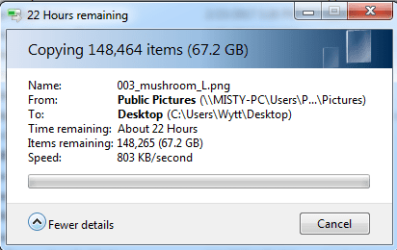
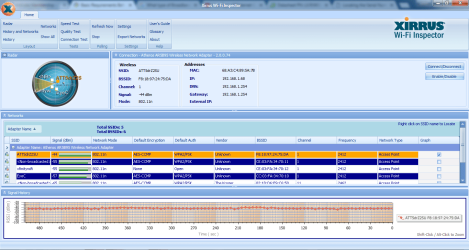
803 kb/s is what is in the attached image. Usual speeds are ranging from 200 kb/s to 450 kb/s.
1. Connection: Wireless
2. ISP: AT&T
3. Broadband: DSL (I believe)
4. Uncertain of the exact Make and Model of my Modem, Router or Modem/Router Combo -
Recently returned a ATT U-verse for servicing.
We have in the policy the option to upgrade to a full U-verse subscription plan.
5. Anti-Virus: Avast! Free Anti-virus
6.
Windows IP Configuration
Host Name . . . . . . . . . . . . : Wytt-PC
Primary Dns Suffix . . . . . . . :
Node Type . . . . . . . . . . . . : Hybrid
IP Routing Enabled. . . . . . . . : No
WINS Proxy Enabled. . . . . . . . : No
DNS Suffix Search List. . . . . . : attlocal.net
Wireless LAN adapter Wireless Network Connection:
Connection-specific DNS Suffix . : attlocal.net
Description . . . . . . . . . . . : Atheros AR5B95 Wireless Network Adapter
Physical Address. . . . . . . . . : 68-A3-C4-89-5A-7B
DHCP Enabled. . . . . . . . . . . : Yes
Autoconfiguration Enabled . . . . : Yes
IPv4 Address. . . . . . . . . . . : 192.168.1.68(Preferred)
Subnet Mask . . . . . . . . . . . : 255.255.255.0
Lease Obtained. . . . . . . . . . : Thursday, March 23, 2017 11:47:21 AM
Lease Expires . . . . . . . . . . : Friday, March 24, 2017 11:00:17 PM
Default Gateway . . . . . . . . . : 192.168.1.254
DHCP Server . . . . . . . . . . . : 192.168.1.254
DNS Servers . . . . . . . . . . . : 192.168.1.254
NetBIOS over Tcpip. . . . . . . . : Enabled
Tunnel adapter isatap.attlocal.net:
Media State . . . . . . . . . . . : Media disconnected
Connection-specific DNS Suffix . :
Description . . . . . . . . . . . : Microsoft ISATAP Adapter
Physical Address. . . . . . . . . : 00-00-00-00-00-00-00-E0
DHCP Enabled. . . . . . . . . . . : No
Autoconfiguration Enabled . . . . : Yes
Tunnel adapter Teredo Tunneling Pseudo-Interface:
Media State . . . . . . . . . . . : Media disconnected
Connection-specific DNS Suffix . :
Description . . . . . . . . . . . : Teredo Tunneling Pseudo-Interface
Physical Address. . . . . . . . . : 00-00-00-00-00-00-00-E0
DHCP Enabled. . . . . . . . . . . : No
Autoconfiguration Enabled . . . . : Yes
803 kb/s is what is in the attached image. Usual speeds are ranging from 200 kb/s to 450 kb/s.
1. Connection: Wireless
2. ISP: AT&T
3. Broadband: DSL (I believe)
4. Uncertain of the exact Make and Model of my Modem, Router or Modem/Router Combo -
Recently returned a ATT U-verse for servicing.
We have in the policy the option to upgrade to a full U-verse subscription plan.
5. Anti-Virus: Avast! Free Anti-virus
6.
Windows IP Configuration
Host Name . . . . . . . . . . . . : Wytt-PC
Primary Dns Suffix . . . . . . . :
Node Type . . . . . . . . . . . . : Hybrid
IP Routing Enabled. . . . . . . . : No
WINS Proxy Enabled. . . . . . . . : No
DNS Suffix Search List. . . . . . : attlocal.net
Wireless LAN adapter Wireless Network Connection:
Connection-specific DNS Suffix . : attlocal.net
Description . . . . . . . . . . . : Atheros AR5B95 Wireless Network Adapter
Physical Address. . . . . . . . . : 68-A3-C4-89-5A-7B
DHCP Enabled. . . . . . . . . . . : Yes
Autoconfiguration Enabled . . . . : Yes
IPv4 Address. . . . . . . . . . . : 192.168.1.68(Preferred)
Subnet Mask . . . . . . . . . . . : 255.255.255.0
Lease Obtained. . . . . . . . . . : Thursday, March 23, 2017 11:47:21 AM
Lease Expires . . . . . . . . . . : Friday, March 24, 2017 11:00:17 PM
Default Gateway . . . . . . . . . : 192.168.1.254
DHCP Server . . . . . . . . . . . : 192.168.1.254
DNS Servers . . . . . . . . . . . : 192.168.1.254
NetBIOS over Tcpip. . . . . . . . : Enabled
Tunnel adapter isatap.attlocal.net:
Media State . . . . . . . . . . . : Media disconnected
Connection-specific DNS Suffix . :
Description . . . . . . . . . . . : Microsoft ISATAP Adapter
Physical Address. . . . . . . . . : 00-00-00-00-00-00-00-E0
DHCP Enabled. . . . . . . . . . . : No
Autoconfiguration Enabled . . . . : Yes
Tunnel adapter Teredo Tunneling Pseudo-Interface:
Media State . . . . . . . . . . . : Media disconnected
Connection-specific DNS Suffix . :
Description . . . . . . . . . . . : Teredo Tunneling Pseudo-Interface
Physical Address. . . . . . . . . : 00-00-00-00-00-00-00-E0
DHCP Enabled. . . . . . . . . . . : No
Autoconfiguration Enabled . . . . : Yes
Attachments
My Computer
At a glance
Microsoft Windows 7 Home Premium 64-bit 7601 ...Intel(R) Core(TM) i3-N3054.00 GBStandard VGA Graphics Adapter
- Computer type
- Laptop
- Computer Manufacturer/Model Number
- LENOVO IdeaPad Slim 3 15IAN8
- OS
- Microsoft Windows 7 Home Premium 64-bit 7601 Multiprocessor Free Service Pack 1
- CPU
- Intel(R) Core(TM) i3-N305
- Motherboard
- Oracle Corporation VirtualBox
- Memory
- 4.00 GB
- Graphics Card(s)
- Standard VGA Graphics Adapter
- Sound Card
- High Definition Audio Device
- Hard Drives
- VBOX HARDDISK ATA Device

