
boredJonathan
New member
- Local time
- 1:59 PM
- Messages
- 2
Hello all,
First off, I have been searching these forums for several days and have seen a number of people reporting slow wireless connections in Windows 7. Which was comforting, knowing I was not alone - but unfortunately I've yet to find the answer in any of the older posts, so I am hoping that making one of my own will help resolve this. Sorry to add to the noise, but I'm kind of out of ideas. Now for the problem:
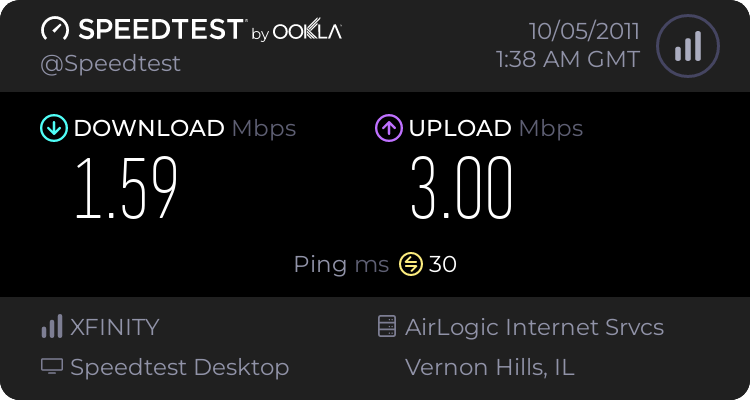
Initially my wireless speed in Windows 7 was comparable to what I got under XP - mainly 54mbps but occasionally dropping lower, but nothing out of the ordinary. However, I've recently noticed that I am never going about 18mpbs now on my wireless connection, and the actual speed seems to be bottlenecked even slower than that. Example, here is a speed test I just ran.
Here is the results of my ipconfig /all
I have checked for the latest drivers on my Broadcom 802.11g Network Adapter through Windows, and even going so far as to try and find the reference drivers. (Which is turns out is "Broadcom Dell Wireless 1350 WLAN MiniPCI Card" but I've been unable to find anything worthwhile there.) The router is a WRT54G2 running the latest firmware version: 1.0.04.
Also, the issue seems to be on just this ONE machine. We have a Win7 Home Premium 64bit laptop that connects at 54mpbs and the speedtests done there are closer to 15-20mbps that I should be getting here. (Also, for giggles and grins I ran a speedtest on my iPhone connected to the same wireless network and received better speeds than on my desktop!)
I realize that was a lot of info to dump all at once, but I figured best to get the obvious questions out of the way up front. So, anyone have any suggestions? Any help would be greatly appreciated.
Thanks!
First off, I have been searching these forums for several days and have seen a number of people reporting slow wireless connections in Windows 7. Which was comforting, knowing I was not alone - but unfortunately I've yet to find the answer in any of the older posts, so I am hoping that making one of my own will help resolve this. Sorry to add to the noise, but I'm kind of out of ideas. Now for the problem:
Initially my wireless speed in Windows 7 was comparable to what I got under XP - mainly 54mbps but occasionally dropping lower, but nothing out of the ordinary. However, I've recently noticed that I am never going about 18mpbs now on my wireless connection, and the actual speed seems to be bottlenecked even slower than that. Example, here is a speed test I just ran.
Here is the results of my ipconfig /all
Code:
Windows IP Configuration

   Host Name . . . . . . . . . . . . : Jon-PC
   Primary Dns Suffix  . . . . . . . :
   Node Type . . . . . . . . . . . . : Hybrid
   IP Routing Enabled. . . . . . . . : No
   WINS Proxy Enabled. . . . . . . . : No
   DNS Suffix Search List. . . . . . : provenahealth.com

Ethernet adapter Local Area Connection 2:

   Connection-specific DNS Suffix  . :
   Description . . . . . . . . . . . : Cisco AnyConnect VPN Virtual Miniport Ada
pter for Windows x64
   Physical Address. . . . . . . . . : 00-05-9A-3C-7A-00
   DHCP Enabled. . . . . . . . . . . : No
   Autoconfiguration Enabled . . . . : Yes
   Link-local IPv6 Address . . . . . : fe80::d5b0:3e81:da0d:400c%14(Preferred)
   Default Gateway . . . . . . . . . :
   DHCPv6 IAID . . . . . . . . . . . : 218105242
   DHCPv6 Client DUID. . . . . . . . : 00-01-00-01-15-8D-B5-AC-6C-F0-49-72-21-A5

   DNS Servers . . . . . . . . . . . : fec0:0:0:ffff::1%1
                                       fec0:0:0:ffff::2%1
                                       fec0:0:0:ffff::3%1
   NetBIOS over Tcpip. . . . . . . . : Enabled

Wireless LAN adapter Wireless Network Connection:

   Connection-specific DNS Suffix  . : hsd1.il.comcast.net.
   Description . . . . . . . . . . . : Broadcom 802.11g Network Adapter
   Physical Address. . . . . . . . . : 00-0F-66-6E-40-DA
   DHCP Enabled. . . . . . . . . . . : Yes
   Autoconfiguration Enabled . . . . : Yes
   IPv4 Address. . . . . . . . . . . : 192.168.1.106(Preferred)
   Subnet Mask . . . . . . . . . . . : 255.255.255.0
   Lease Obtained. . . . . . . . . . : Tuesday, October 04, 2011 7:23:56 PM
   Lease Expires . . . . . . . . . . : Wednesday, October 05, 2011 7:23:56 PM
   Default Gateway . . . . . . . . . : 192.168.1.1
   DHCP Server . . . . . . . . . . . : 192.168.1.1
   DNS Servers . . . . . . . . . . . : 8.8.8.8
                                       8.8.4.4
   NetBIOS over Tcpip. . . . . . . . : Enabled

Tunnel adapter isatap.hsd1.il.comcast.net.:

   Media State . . . . . . . . . . . : Media disconnected
   Connection-specific DNS Suffix  . : hsd1.il.comcast.net.
   Description . . . . . . . . . . . : Microsoft ISATAP Adapter
   Physical Address. . . . . . . . . : 00-00-00-00-00-00-00-E0
   DHCP Enabled. . . . . . . . . . . : No
   Autoconfiguration Enabled . . . . : Yes

Tunnel adapter Teredo Tunneling Pseudo-Interface:

   Connection-specific DNS Suffix  . :
   Description . . . . . . . . . . . : Teredo Tunneling Pseudo-Interface
   Physical Address. . . . . . . . . : 00-00-00-00-00-00-00-E0
   DHCP Enabled. . . . . . . . . . . : No
   Autoconfiguration Enabled . . . . : Yes
   IPv6 Address. . . . . . . . . . . : 2001:0:4137:9e76:ccf:1527:3f57:fe95(Prefe
rred)
   Link-local IPv6 Address . . . . . : fe80::ccf:1527:3f57:fe95%12(Preferred)
   Default Gateway . . . . . . . . . : ::
   NetBIOS over Tcpip. . . . . . . . : Disabled

Tunnel adapter isatap.{1D3CC08A-B0C6-48FE-AF82-CCE8652220B9}:

   Media State . . . . . . . . . . . : Media disconnected
   Connection-specific DNS Suffix  . :
   Description . . . . . . . . . . . : Microsoft ISATAP Adapter #2
   Physical Address. . . . . . . . . : 00-00-00-00-00-00-00-E0
   DHCP Enabled. . . . . . . . . . . : No
   Autoconfiguration Enabled . . . . : Yes
I have checked for the latest drivers on my Broadcom 802.11g Network Adapter through Windows, and even going so far as to try and find the reference drivers. (Which is turns out is "Broadcom Dell Wireless 1350 WLAN MiniPCI Card" but I've been unable to find anything worthwhile there.) The router is a WRT54G2 running the latest firmware version: 1.0.04.
Also, the issue seems to be on just this ONE machine. We have a Win7 Home Premium 64bit laptop that connects at 54mpbs and the speedtests done there are closer to 15-20mbps that I should be getting here. (Also, for giggles and grins I ran a speedtest on my iPhone connected to the same wireless network and received better speeds than on my desktop!)
I realize that was a lot of info to dump all at once, but I figured best to get the obvious questions out of the way up front. So, anyone have any suggestions? Any help would be greatly appreciated.
Thanks!
My Computer
At a glance
Windows 7 Home Premium 64bitAMD Phenom II X49658.00 GB Dual-Channel DDR3 @ 669MHz (9-9-9-24)ATI Radeon HD 5800 Series (XFX Pine Group)
- OS
- Windows 7 Home Premium 64bit
- CPU
- AMD Phenom II X4965
- Motherboard
- Gigabyte Technology Co., Ltd. GA-MA785GMT-UD2H (Socket M2)
- Memory
- 8.00 GB Dual-Channel DDR3 @ 669MHz (9-9-9-24)
- Graphics Card(s)
- ATI Radeon HD 5800 Series (XFX Pine Group)
- Sound Card
- AMD High Definition Audio Device
- Monitor(s) Displays
- HP w2408
- Screen Resolution
- 1920x1200 pixels
- Hard Drives
- 977GB Western Digital WDC WD1002FAEX-00Z3A0 ATA Device (SATA)


