Sluggish UI & High CPU usage

SailingNut

New member
Member
VIP
Local time
6:39 PM
Messages
127
I've noticed quite a bit of "hesitation" in the Windows 7 UI compared to Vista. I've been looking at my CPU usage and it also seems high.

I've been looking at task manager to see what processes seem to be using a lot of CPU and I can't quite pin it down to a single process that seems to be hogging the CPU when things are sluggish. :confused:

Any good suggestions foe next steps on troubleshooting this?

I've given some thought to it being my Nvidia drivers. Anyone else out there running the 191.07 drivers and seeing similar problems? (FYI I'm running an Nvidia 8800 GTS card)

TIA!
 

My Computer

Computer Manufacturer/Model Number
Home Build
OS
Windows 7 Ultimate x64
CPU
Core i5 760
Motherboard
Biostar T5XE (P55)
Memory
2x2GB Mushkin PC3-10666
Graphics Card(s)
GeForce GTX 460
Internet Speed
FiOS 25Gbps down & up
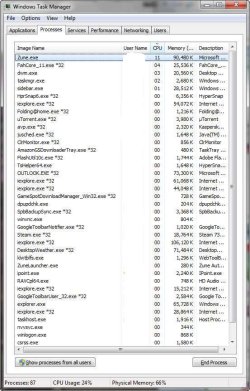
Often times anti-virus software can use a lot of resources. Can you post a screenshot of the task manager?
 

My Computer

Computer Manufacturer/Model Number
Custom
OS
Windows 7 Professional x64
CPU
Intel i7 2600K OC'd @ 4620 MHz
Motherboard
Asus P8Z68-V Pro
Memory
16GB GSkill Sniper 2133 Mhz (4x4GB)
Graphics Card(s)
EVGA GeForce GTX 480 SuperClocked+
Sound Card
Realtek High Definition Audio
Monitor(s) Displays
2x Acer S273HLbmii 27"
Screen Resolution
2 x 1920x1080
Hard Drives
64GB Crucial M4 SSD

Storage: Hitachi 1TB 5400RPM, Samsung 1.5TB 5400RPM
PSU
Corsair HW Series 750w (modular)
Case
Cooler Master HAF 932 Advanced Blue Edition
Cooling
CM Hyper 212+ CPU cooler, 3x 230mm + 1x 140mm case fans
Keyboard
Logitech MK320 (wireless)
Mouse
Logitech MK320 (wireless)
Internet Speed
30 Mb/s : 2 Mb/s
Here's a shot of my task manager attached
 

Attachments

  • Task Manager.jpg
    Task Manager.jpg
    72.9 KB · Views: 216

My Computer

Computer Manufacturer/Model Number
Home Build
OS
Windows 7 Ultimate x64
CPU
Core i5 760
Motherboard
Biostar T5XE (P55)
Memory
2x2GB Mushkin PC3-10666
Graphics Card(s)
GeForce GTX 460
Internet Speed
FiOS 25Gbps down & up
What security software do you use?
 

My Computer

Computer Manufacturer/Model Number
Custom
OS
Windows 7 Professional x64
CPU
Intel i7 2600K OC'd @ 4620 MHz
Motherboard
Asus P8Z68-V Pro
Memory
16GB GSkill Sniper 2133 Mhz (4x4GB)
Graphics Card(s)
EVGA GeForce GTX 480 SuperClocked+
Sound Card
Realtek High Definition Audio
Monitor(s) Displays
2x Acer S273HLbmii 27"
Screen Resolution
2 x 1920x1080
Hard Drives
64GB Crucial M4 SSD

Storage: Hitachi 1TB 5400RPM, Samsung 1.5TB 5400RPM
PSU
Corsair HW Series 750w (modular)
Case
Cooler Master HAF 932 Advanced Blue Edition
Cooling
CM Hyper 212+ CPU cooler, 3x 230mm + 1x 140mm case fans
Keyboard
Logitech MK320 (wireless)
Mouse
Logitech MK320 (wireless)
Internet Speed
30 Mb/s : 2 Mb/s
Using Kaspersky antivirus.

I have been watching things more closely and I see that when I browse to a new page in IE8 it's CPU jumps to 30-50% In Outlook when I switch folders in my e-mail it uses 50% or more of the CPU. Also starting a game from the games folder causes explorer to jump to around 50%

I've never really watched my CPU so closely so those number could be normal, but they seem awfully high to me.
 

My Computer

Computer Manufacturer/Model Number
Home Build
OS
Windows 7 Ultimate x64
CPU
Core i5 760
Motherboard
Biostar T5XE (P55)
Memory
2x2GB Mushkin PC3-10666
Graphics Card(s)
GeForce GTX 460
Internet Speed
FiOS 25Gbps down & up
The CPU jumping to 50% is normal when an application is doing something. What matters is how long it is at 50%. Since you have a dual-core processor, 50% means one thread is executing on one core. 100% would be two threads are using both cores.

Try disabling or uninstalling your antivirus for the time being, and/or download any updated drivers you can find.
 

My Computer

Computer type
PC/Desktop
Computer Manufacturer/Model Number
Alienware Aurora ALX R4
OS
Windows 10 Pro (x64)
CPU
Intel Core i7-3930K (3.2GHz - 4.5GHz)
Motherboard
Alienware Aurora-R4 x79
Memory
4x Samsung 4GB PC3-12800 DDR3 (16GB 1600MHz)
Graphics Card(s)
Nvidia Geforce GTX 690
Sound Card
SteelSeries Siberia Elite
Monitor(s) Displays
Dell UltraSharp U3011
Screen Resolution
2560x1600
Hard Drives
Samsung 850 Pro 256 GB, Seagate 1TB Desktop Hybrid HDD, 2x Western Digital 4TB Green HDD
PSU
875W Some Dell PSU <.<
Case
Alienware Aurora ALX
Cooling
Custom Liquid Cooling (EK CPU & GPU blocks) dual EK 480RAD
Keyboard
Logitech G710+ Mechanical
Mouse
Logitech G700s
Internet Speed
Verizon Fios (50 mbps average)
Other Info
Server: Intel NUC D54250WYK: i5-4250U, 16GB, 256 GB mSATA, Windows Server 2012 R2
I also have a "dual core" CPU monitor gadget running and it shows both cores jumping up quite high from time to time, but since it doesn't show processes I can't correlate it with any particular one.

I just did a check and when I open a new tab in IE both cores jump to 100% at a point and they are both over 75% for 2-3 seconds before the new tab finally opens. I also see the same thing happen when opening a game from the games folder.

Any ideas what i can do to dig in farther to see what might be causing this to happen? (It seems quite excessive to take several seconds to open a new tab or a game.)
 

My Computer

Computer Manufacturer/Model Number
Home Build
OS
Windows 7 Ultimate x64
CPU
Core i5 760
Motherboard
Biostar T5XE (P55)
Memory
2x2GB Mushkin PC3-10666
Graphics Card(s)
GeForce GTX 460
Internet Speed
FiOS 25Gbps down & up
Don't worry about the jump in CPU usage. The CPU usage is going to jump like that because well...you have to use the CPU to do anything. Did you try disabling your antivirus? Cause you know a lot of them want to scan everything that you click on.
 

My Computer

Computer type
PC/Desktop
Computer Manufacturer/Model Number
Alienware Aurora ALX R4
OS
Windows 10 Pro (x64)
CPU
Intel Core i7-3930K (3.2GHz - 4.5GHz)
Motherboard
Alienware Aurora-R4 x79
Memory
4x Samsung 4GB PC3-12800 DDR3 (16GB 1600MHz)
Graphics Card(s)
Nvidia Geforce GTX 690
Sound Card
SteelSeries Siberia Elite
Monitor(s) Displays
Dell UltraSharp U3011
Screen Resolution
2560x1600
Hard Drives
Samsung 850 Pro 256 GB, Seagate 1TB Desktop Hybrid HDD, 2x Western Digital 4TB Green HDD
PSU
875W Some Dell PSU <.<
Case
Alienware Aurora ALX
Cooling
Custom Liquid Cooling (EK CPU & GPU blocks) dual EK 480RAD
Keyboard
Logitech G710+ Mechanical
Mouse
Logitech G700s
Internet Speed
Verizon Fios (50 mbps average)
Other Info
Server: Intel NUC D54250WYK: i5-4250U, 16GB, 256 GB mSATA, Windows Server 2012 R2
Understood that the CPU does have to do the work.

I disabled my AV and the sypmtoms are still there. (I didn't have this sort of problem under Vista even with AV enabled)

I timed it out and when opening solitaire from the games folder and the CPU is over 75% for about 11 seconds. It hits 100% just as the UI is drawn for the game and stays there for a second or two after the UI us drawn. It then hovers in the 95% range for a few seconds.
 

My Computer

Computer Manufacturer/Model Number
Home Build
OS
Windows 7 Ultimate x64
CPU
Core i5 760
Motherboard
Biostar T5XE (P55)
Memory
2x2GB Mushkin PC3-10666
Graphics Card(s)
GeForce GTX 460
Internet Speed
FiOS 25Gbps down & up
You seem to have a lot of processes running. The sheer number of tasks it has running can also contribute.
 

My Computer

Computer Manufacturer/Model Number
Custom
OS
Windows 7 Professional x64
CPU
Intel i7 2600K OC'd @ 4620 MHz
Motherboard
Asus P8Z68-V Pro
Memory
16GB GSkill Sniper 2133 Mhz (4x4GB)
Graphics Card(s)
EVGA GeForce GTX 480 SuperClocked+
Sound Card
Realtek High Definition Audio
Monitor(s) Displays
2x Acer S273HLbmii 27"
Screen Resolution
2 x 1920x1080
Hard Drives
64GB Crucial M4 SSD

Storage: Hitachi 1TB 5400RPM, Samsung 1.5TB 5400RPM
PSU
Corsair HW Series 750w (modular)
Case
Cooler Master HAF 932 Advanced Blue Edition
Cooling
CM Hyper 212+ CPU cooler, 3x 230mm + 1x 140mm case fans
Keyboard
Logitech MK320 (wireless)
Mouse
Logitech MK320 (wireless)
Internet Speed
30 Mb/s : 2 Mb/s
I'll go over the processes I have running & see if I can pare the list down a bit.

The thing that is bothering me is that the only real change is upgrading from Vista to 7 and a new version of Nvidia drivers. So, my focus is on the things that have most recently changed. But you are right some of the programs might not behave as well with 7 as they did with Vista
 

My Computer

Computer Manufacturer/Model Number
Home Build
OS
Windows 7 Ultimate x64
CPU
Core i5 760
Motherboard
Biostar T5XE (P55)
Memory
2x2GB Mushkin PC3-10666
Graphics Card(s)
GeForce GTX 460
Internet Speed
FiOS 25Gbps down & up
Just as a comparison for you, I started Solitaire, and my CPU usage jumped to a maximum of 16% for maybe 1 second, and then immediately dropped to 5, and dropped to 2 within 5 seconds of first poking the solitaire icon.

This is on a Core 2 Duo 6600 with 4 GB of RAM, probably a mid-level PC by today's standards.
 

My Computer

Computer type
PC/Desktop
Computer Manufacturer/Model Number
Ignatz Special; 4 speed manual gearbox; factory air conditioning; one of one
OS
Windows 7 Home Premium SP1, 64-bit
CPU
Intel Skylake i5-6600K, not overclocked
Motherboard
AsRock Z170M Extreme 4, micro ATX
Memory
8 GB HyperX DDR4-2666 (2 x 4 GB)
Graphics Card(s)
none; graphics are integrated on CPU
Sound Card
onboard: Realtek ALC1150; external: USB Behringer UF0-202
Monitor(s) Displays
Dell S2340M 23 inch IPS
Screen Resolution
1600 x 900
Hard Drives
System: Crucial MX100 series SSD, 128 GB;
Data: Samsung Spinpoint 103SJ, 1 TB;
Backup: WD Caviar Green WD30EZRX-00D8PB0, 3 TB
PSU
Rosewill SilentNight 500 watt fanless, semi-modular
Case
Antec Solo II
Cooling
Noctua NH-U12S; Noctua F12 intake, Noctua S12A exhaust
Keyboard
Microsoft 200 6JH-00001 USB
Mouse
Dell or Microsoft optical wired; USB
Antivirus
Microsoft Security Essentials and Malwarebytes Premium
Browser
Pale Moon
Other Info
All fans PWM; speeds at idle: CPU circa 500 rpm; intake circa 600 rpm; exhaust circa 600 rpm; CPU temps 27 idle and 47 C load in a warm room (27 C/81 F) when running Intel Extreme Tuning Utility stress test.
Just as a comparison for you, I started Solitaire, and my CPU usage jumped to a maximum of 16% for maybe 1 second, and then immediately dropped to 5, and dropped to 2 within 5 seconds of first poking the solitaire icon.

Thanks for the comparison info!

This is on a Core 2 Duo 6600 with 4 GB of RAM, probably a mid-level PC by today's standards.

Mine is a Core 2 Duo E6400 with 3 Gigs of ram. So not too different on hardware but seems to be quite different on observed performance.
 

My Computer

Computer Manufacturer/Model Number
Home Build
OS
Windows 7 Ultimate x64
CPU
Core i5 760
Motherboard
Biostar T5XE (P55)
Memory
2x2GB Mushkin PC3-10666
Graphics Card(s)
GeForce GTX 460
Internet Speed
FiOS 25Gbps down & up
Back
Top