Snipping tool

artinusa

New member
Member
VIP
Local time
8:50 PM
Messages
229
I have lost the snipping tool not sure why did not delete etc...how do I get it back..no trace of it on my 7X64 at all. anyone help me please Sorry for wasting time and space I have found it in system32 as snippingtool.exe Thanks for your reply
 
Last edited:

My Computer

Computer type
PC/Desktop
Computer Manufacturer/Model Number
Compaq Presario
OS
Windows 7 64 bit
Hello.


What happens if you type snipping tool in the Windows 7 start menu search box?
 

My Computer

Computer Manufacturer/Model Number
* BFK Customs *
OS
W 7 64-bit Ultimate
CPU
Intel Q9550 Yorkfield
Motherboard
ASUS P5Q Pro
Memory
8GB Dominator 8500C5D
Graphics Card(s)
ATI : XFX 5870
Sound Card
Realtek HD Audio 7-1
Monitor(s) Displays
1x 47" LCD HDMI & 3x 26" LCD HDMI
Screen Resolution
1920x1080P & 1920x1200
Hard Drives
1x 80GB Intel X25-M G2 SSD : 1x 500GB & 1x 640GB WD Caviar Black(s)
PSU
Corsair 620HX
Case
Cooler Master RC-690
Cooling
Tuniq Tower 120, 2x 140mm and 3x 120mm case fans
Keyboard
Microsoft 500
Mouse
Razer Diamondback 3G
Internet Speed
14 Mb/s
Other Info
1x Koutech 3Gb/s SATA HDD Hot Swap Rack
Hi, artinusa. Try taking a look in C:\Windows\System32 for a file called SnippingTool.exe.
 

My Computer

Computer Manufacturer/Model Number
Lenovo ThinkPad W520 (4270CT)
OS
Windows 7 Professional x64
CPU
Intel Core i7-2720QM
Memory
4GB (2 x 2GB)
Graphics Card(s)
NVIDIA Quadro 2000M (with Optimus)
Hard Drives
500 GB @ 7200 RPM

My Computer

Computer type
PC/Desktop
Computer Manufacturer/Model Number
Airbot 2.0
OS
Windows 7 Ultimate x64 SP1
CPU
Core i7 920 (D0) @ 4Ghz, *26c idle *65c full load on air
Motherboard
Asus P6X58D Premium - Sata 6Gb/s - USB 3.0
Memory
12GB DDR3 Corsair Dominator -CMD12GX3M6A1600C8 at 1600MHz
Graphics Card(s)
Zotac Geforce GTX 770
Sound Card
ASUS Xonar D2X
Monitor(s) Displays
1 LG 24" Flatron W2453V-PF 1 Samsung 24" P2450H both 2ms RT
Screen Resolution
1920x1080@60hz
Hard Drives
1 Samsung 250GB 840 Evo SSD
1 OCZ Vertex2 180GB SSD
1 TB Samsung Spinpoint F1 7200RPM 32MB cache
2 500GB WD Caviar Blacks 7200RPM 32MB cache (WD5001AALS)

Pioneer DVD Burner DVR-S18M
PSU
Corsair HX1000W
Case
Cooler Master HAF 932
Cooling
Case Fans *3 230mm, *1 140mm/CPU - *Tuniq Tower 120 Extreme
Keyboard
Logitech Wireless MK700
Mouse
Logitech Wireless MK700
Internet Speed
DL 15 Mbps UL 0.98 Mbps
Antivirus
None
Browser
Firefox Nightly
Other Info
Processor-7.7 *RAM- 7.9 *Graphics-7.9 *Gaming Graphics- 7.9 *SSD- 7.8 W.E.I final score= 7.7
*Phone- LG Nexus 5
SOLVED Snipping tool

the tablet PC was turned off not sure why as it was on for sure..and I found the exe as suggested in the sytem32 folder thanks SOLVED
 

My Computer

Computer type
PC/Desktop
Computer Manufacturer/Model Number
Compaq Presario
OS
Windows 7 64 bit
Fwiw. Does the tablet function relate to the snipping tool? I have it turned off, on any new installation, as my first default. I still have the snipping tool??
 

My Computer

Computer Manufacturer/Model Number
Three desktops and one laptop with good specs..
OS
Vista and now 7 in 32 and 64 bit.
Hmm, seems you're right. :huh:
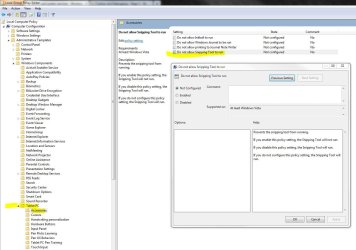
Was always just a community belief that Snipping tool was registered with the Tablet PC Components since Vista. Even though there doesn't appear to be any hard statement saying so from MS. They do kind of off hand mention the relation.

Was the same belief for StickyNotes as well, but that doesn't appear correct either.

Missing Snipping Tool in Windows 7 - Insufficient data from Andrew Fryer - Site Home - TechNet Blogs
http://www.sevenforums.com/software/3086-snipping-tool-missing.html
http://www.sevenforums.com/general-discussion/44540-snipping-tool.html
http://www.sevenforums.com/tutorials/6275-sticky-notes-create-delete.html


NOTE: The Snipping Tool is not available in the Vista Home Basic edition. This is a part of the Tablet PC Optional Components in Windows Features that is turned on by default in Vista. If it is not turned on, then check the Tablet PC Optional Components box here: How to Turn Windows Features On or Off in Vista
How to Use the Snipping Tool
If you googled with the keywords - Tablet PC Components snipping tool, and a search here of SF, you could see that belief has been around for years all over.

But it appears if it was tied in with Tablet PC Components in Vista, it doesn't appear that way anymore with Win 7.


News to me.


http://www.sevenforums.com/general-discussion/86437-snipping-tool-removed.html#post747117
http://www.sevenforums.com/general-discussion/86437-snipping-tool-removed.html#post747843


Capture.JPG
 
Last edited:

My Computer

Computer type
PC/Desktop
Computer Manufacturer/Model Number
Airbot 2.0
OS
Windows 7 Ultimate x64 SP1
CPU
Core i7 920 (D0) @ 4Ghz, *26c idle *65c full load on air
Motherboard
Asus P6X58D Premium - Sata 6Gb/s - USB 3.0
Memory
12GB DDR3 Corsair Dominator -CMD12GX3M6A1600C8 at 1600MHz
Graphics Card(s)
Zotac Geforce GTX 770
Sound Card
ASUS Xonar D2X
Monitor(s) Displays
1 LG 24" Flatron W2453V-PF 1 Samsung 24" P2450H both 2ms RT
Screen Resolution
1920x1080@60hz
Hard Drives
1 Samsung 250GB 840 Evo SSD
1 OCZ Vertex2 180GB SSD
1 TB Samsung Spinpoint F1 7200RPM 32MB cache
2 500GB WD Caviar Blacks 7200RPM 32MB cache (WD5001AALS)

Pioneer DVD Burner DVR-S18M
PSU
Corsair HX1000W
Case
Cooler Master HAF 932
Cooling
Case Fans *3 230mm, *1 140mm/CPU - *Tuniq Tower 120 Extreme
Keyboard
Logitech Wireless MK700
Mouse
Logitech Wireless MK700
Internet Speed
DL 15 Mbps UL 0.98 Mbps
Antivirus
None
Browser
Firefox Nightly
Other Info
Processor-7.7 *RAM- 7.9 *Graphics-7.9 *Gaming Graphics- 7.9 *SSD- 7.8 W.E.I final score= 7.7
*Phone- LG Nexus 5
Back
Top