So, how is windows xp mode?

Mitchell4500

New member
Local time
8:47 AM
Messages
21
Location
USA
I was never able to get the pleasure of trying it... My PC dosent like windows 7 (But i do, so my pc can kiss it) and it dose not support "Hardware Assited Virtuization". So i have some questions about XP mode.

I know its like a VM, but is it a true VM or dose it like intergrate your windows 7 setup (documents, settings, ect) into it?, or just a simple VM?

What am i missing lol :p

Would i be able to possibly run it in VM ware? is there some possible way i can run it without "Hardware Assisted Virtuization" ?

:)
 

My Computer

Computer Manufacturer/Model Number
Dell B130
OS
Windows 7 Ultimate RTM
CPU
Intel Celeron M
Motherboard
Intel
Memory
1GB DDR2
Graphics Card(s)
Intel 915 (... Sucks)
Sound Card
Sigmatel
Monitor(s) Displays
Intel Intergrated 915
Screen Resolution
1200 x 800
Internet Speed
5mbs

Attachments

  • XP Virtual PC Wi 7.png
    XP Virtual PC Wi 7.png
    489.8 KB · Views: 367

My Computer

Computer Manufacturer/Model Number
Asus
OS
Windows 7 x64 Ultimate SP1
CPU
I5 875K Unlocked
Motherboard
P7P55D-E-PRO
Memory
Kingston HyperX Genesis DDR3-1600MHz 9-9-9-27 @ 1.65V XMP
Graphics Card(s)
EVGA GeForce GTX 570 HD 732 MHz GPU 1280 MB, 152 GB Mem
Sound Card
Onboard Via 1828S
Monitor(s) Displays
Samsung T240 HD
Screen Resolution
Dual 1920X1200 1027X768
Hard Drives
OCZ Vertex II Extended Sandforce SSD 60 Gig 2X WD Black Caviar 1 terabyte 6GBS Transer Sata 3 Marvell Chip
PSU
Corsair Gold fully Modular 80 Plus 850
Case
Coolermaster Half X Full Tower
Cooling
Noctua NH-U12P
Keyboard
MS
Mouse
MS
Internet Speed
Fast enough
Other Info
My fridge has a water tap
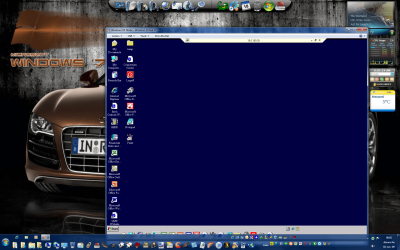
Is win xp in remote desktop? Or is that just how it looks?
 

My Computer

Computer Manufacturer/Model Number
Dell B130
OS
Windows 7 Ultimate RTM
CPU
Intel Celeron M
Motherboard
Intel
Memory
1GB DDR2
Graphics Card(s)
Intel 915 (... Sucks)
Sound Card
Sigmatel
Monitor(s) Displays
Intel Intergrated 915
Screen Resolution
1200 x 800
Internet Speed
5mbs
In this image it's in remote. If you install a software that only works with XP mode, you will have that option in virtual xp menu and it will run as a normal window.

I have to use the XP interface to be able to log to remote connection.

Here is what it looks like with remote connection. (32 bit enabled)
 

Attachments

  • XP Virtual PC Wi 7 001.png
    XP Virtual PC Wi 7 001.png
    158.1 KB · Views: 393

My Computer

Computer Manufacturer/Model Number
Asus
OS
Windows 7 x64 Ultimate SP1
CPU
I5 875K Unlocked
Motherboard
P7P55D-E-PRO
Memory
Kingston HyperX Genesis DDR3-1600MHz 9-9-9-27 @ 1.65V XMP
Graphics Card(s)
EVGA GeForce GTX 570 HD 732 MHz GPU 1280 MB, 152 GB Mem
Sound Card
Onboard Via 1828S
Monitor(s) Displays
Samsung T240 HD
Screen Resolution
Dual 1920X1200 1027X768
Hard Drives
OCZ Vertex II Extended Sandforce SSD 60 Gig 2X WD Black Caviar 1 terabyte 6GBS Transer Sata 3 Marvell Chip
PSU
Corsair Gold fully Modular 80 Plus 850
Case
Coolermaster Half X Full Tower
Cooling
Noctua NH-U12P
Keyboard
MS
Mouse
MS
Internet Speed
Fast enough
Other Info
My fridge has a water tap
It's handy to have Xp mode VM running in the background. I used it as a supplement OS to my main one, to download files the majority of time. Although it works fine with 2Gb RAM i think it works alot better if you have 4Gb.

I like to play around with RDP between it and my main OS, do enough RPD sessions and u might be lost lol.
 

My Computer

Computer Manufacturer/Model Number
Lenovo ThinkPad T60
OS
Windows 7 Ultimate 64Bit
CPU
GenuineIntel Intel(R) Core(TM) DuoCore T2400 @ 1.83GHz
Motherboard
Intel(R) 82801G (ICH7 Family)
Memory
2.00 GB
Graphics Card(s)
Mobile Intel(R) 945 Express Chipset
Sound Card
SoundMAX Integrated Digital HD Audio
Monitor(s) Displays
ThinkPad Display
Screen Resolution
1400x1050
Hard Drives
100Gb SATA
Keyboard
Standard Keyboard
Mouse
HID-compliant Mouse
Internet Speed
Cable Broadband - 54Mbps
Other Info
Intel(R) PRO/1000 PL Network Connection
11a/b/g Wireless LAN Mini PCI Express Adapter
XP Mode is a real virtual machine. Microsoft has built-in some functionality to make it run more seamlessly with your underlying host OS. Personally, I find it to be a security risk as you typically want to sandbox your virtual machines.

The biggest issue with XP mode is speed...or significant lack thereof. The performance of XP Mode is horrible.

If you don't have a CPU which supports virtualization, use a different product like VMWare Server 2.0 or Virtualbox 3.0.8...both of which are free and will run circles around XP Mode without requiring XP Mode.
 

My Computer

Computer Manufacturer/Model Number
Self-Built in July 2009
OS
Windows 7 Ultimate x64
CPU
Intel Q9550 2.83Ghz OC'd to 3.40Ghz
Motherboard
Gigabyte GA-EP45-UD3R rev. 1.1, F12 BIOS
Memory
8GB G.Skill PI DDR2-800, 4-4-4-12 timings
Graphics Card(s)
EVGA 1280MB Nvidia GeForce GTX570
Sound Card
Realtek ALC899A 8 channel onboard audio
Monitor(s) Displays
23" Acer x233H
Screen Resolution
1920x1080
Hard Drives
Intel X25-M 80GB Gen 2 SSD
Western Digital 1TB Caviar Black, 32MB cache. WD1001FALS
PSU
Corsair 620HX modular
Case
Antec P182
Cooling
stock
Keyboard
ABS M1 Mechanical
Mouse
Logitech G9 Laser Mouse
Internet Speed
15/2 cable modem
Other Info
Windows and Linux enthusiast. Logitech G35 Headset.
XP Mode is a real virtual machine. Microsoft has built-in some functionality to make it run more seamlessly with your underlying host OS. Personally, I find it to be a security risk as you typically want to sandbox your virtual machines.

The biggest issue with XP mode is speed...or significant lack thereof. The performance of XP Mode is horrible.

If you don't have a CPU which supports virtualization, use a different product like VMWare Server 2.0 or Virtualbox 3.0.8...both of which are free and will run circles around XP Mode without requiring XP Mode.

Like any OS, security issues are delt with proper software. I installed Avast free and have netscreen. Nothing gets through.

I find that it reacts quite well with what I do. Of course if you overload a virtual machine with a lot of sotware, you might just want to run dual boot instead. I have it but it's a keep safe in case my one of the Os fails. (Bios boot that is not os Dual).
 

My Computer

Computer Manufacturer/Model Number
Asus
OS
Windows 7 x64 Ultimate SP1
CPU
I5 875K Unlocked
Motherboard
P7P55D-E-PRO
Memory
Kingston HyperX Genesis DDR3-1600MHz 9-9-9-27 @ 1.65V XMP
Graphics Card(s)
EVGA GeForce GTX 570 HD 732 MHz GPU 1280 MB, 152 GB Mem
Sound Card
Onboard Via 1828S
Monitor(s) Displays
Samsung T240 HD
Screen Resolution
Dual 1920X1200 1027X768
Hard Drives
OCZ Vertex II Extended Sandforce SSD 60 Gig 2X WD Black Caviar 1 terabyte 6GBS Transer Sata 3 Marvell Chip
PSU
Corsair Gold fully Modular 80 Plus 850
Case
Coolermaster Half X Full Tower
Cooling
Noctua NH-U12P
Keyboard
MS
Mouse
MS
Internet Speed
Fast enough
Other Info
My fridge has a water tap
Like any OS, security issues are delt with proper software. I installed Avast free and have netscreen. Nothing gets through.
Everybody has their own opinions. I generally don't want mapped drives right off the start between my virtual machines and my host machines. Regardless of whatever security software I have installed, it's just something that I would rather not have.

I find that it reacts quite well with what I do. Of course if you overload a virtual machine with a lot of sotware
How many other virtual software packages have you used? I use VMWare extensively at work and VirtualBox at home. The performance difference between these other VM packages and XP Mode is night and day. I'm not talking about an overloaded VM.

Look at these threads to see the kind of difference that I am talking about:
http://www.sevenforums.com/virtualization/21575-xp-mode-slow-any-way-improve.html

http://www.sevenforums.com/virtualization/23302-kinda-slow.html
 

My Computer

Computer Manufacturer/Model Number
Self-Built in July 2009
OS
Windows 7 Ultimate x64
CPU
Intel Q9550 2.83Ghz OC'd to 3.40Ghz
Motherboard
Gigabyte GA-EP45-UD3R rev. 1.1, F12 BIOS
Memory
8GB G.Skill PI DDR2-800, 4-4-4-12 timings
Graphics Card(s)
EVGA 1280MB Nvidia GeForce GTX570
Sound Card
Realtek ALC899A 8 channel onboard audio
Monitor(s) Displays
23" Acer x233H
Screen Resolution
1920x1080
Hard Drives
Intel X25-M 80GB Gen 2 SSD
Western Digital 1TB Caviar Black, 32MB cache. WD1001FALS
PSU
Corsair 620HX modular
Case
Antec P182
Cooling
stock
Keyboard
ABS M1 Mechanical
Mouse
Logitech G9 Laser Mouse
Internet Speed
15/2 cable modem
Other Info
Windows and Linux enthusiast. Logitech G35 Headset.
Everybody has their own opinions. I generally don't want mapped drives right off the start between my virtual machines and my host machines. Regardless of whatever security software I have installed, it's just something that I would rather not have.

I hear you and yes, I agree, it's your opinion.

How many other virtual software packages have you used? I use VMWare extensively at work and VirtualBox at home. The performance difference between these other VM packages and XP Mode is night and day. I'm not talking about an overloaded VM.
Look at these threads to see the kind of difference that I am talking about:
http://www.sevenforums.com/virtualization/21575-xp-mode-slow-any-way-improve.html

http://www.sevenforums.com/virtualization/23302-kinda-slow.html

Wasn't trying to rattle you dude. :o

I haven't used any other. So yes you have a large advantage over my knowledge of VMs. I was just implying that this is a very good add-on (in my case) for geeks like me who have to use old crap like outdated netscreen to run remote desktop to work that will only run on XP. It's a lot better than just getting dreamscene (like with Vista) and a bunch of language packs. What I also meant (especially for users like me) who might run a lot of crap in this VM that it was better to run a dual BIOS boot. Actually, this XP add-on was made to give us a break with our old software.

Can we at least say that it's a step in the right direction? ;)
 

My Computer

Computer Manufacturer/Model Number
Asus
OS
Windows 7 x64 Ultimate SP1
CPU
I5 875K Unlocked
Motherboard
P7P55D-E-PRO
Memory
Kingston HyperX Genesis DDR3-1600MHz 9-9-9-27 @ 1.65V XMP
Graphics Card(s)
EVGA GeForce GTX 570 HD 732 MHz GPU 1280 MB, 152 GB Mem
Sound Card
Onboard Via 1828S
Monitor(s) Displays
Samsung T240 HD
Screen Resolution
Dual 1920X1200 1027X768
Hard Drives
OCZ Vertex II Extended Sandforce SSD 60 Gig 2X WD Black Caviar 1 terabyte 6GBS Transer Sata 3 Marvell Chip
PSU
Corsair Gold fully Modular 80 Plus 850
Case
Coolermaster Half X Full Tower
Cooling
Noctua NH-U12P
Keyboard
MS
Mouse
MS
Internet Speed
Fast enough
Other Info
My fridge has a water tap
For me, Internet Explorer in XP mode runs incredibly fast in comparison to IE8 in Windows 7.
 

My Computer

OS
Windows 7
CPU
Q6600
Memory
4 GB
Sound Card
X-Fi Platinum
Hard Drives
3 TB
Wasn't trying to rattle you dude. :o

I haven't used any other. So yes you have a large advantage over my knowledge of VMs. I was just implying that this is a very good add-on (in my case) for geeks like me who have to use old crap like outdated netscreen to run remote desktop to work that will only run on XP. It's a lot better than just getting dreamscene (like with Vista) and a bunch of language packs. What I also meant (especially for users like me) who might run a lot of crap in this VM that it was better to run a dual BIOS boot. Actually, this XP add-on was made to give us a break with our old software.

Can we at least say that it's a step in the right direction? ;)

Absolutely, wasn't trying to rattle you either. I totally agree that this is a great step and for MANY...it's going to be an eye opening experience into the world of virtualization.

However, I'm trying to ensure that those who are new..realize that there are alternatives out there, which are free, which will run on Windows 7 and will perform quite a bit better. The others are particularly great for those with CPU's which don't support Virtualization Technologies and thus they cannot use Windows XP mode. They can use these other products.
 

My Computer

Computer Manufacturer/Model Number
Self-Built in July 2009
OS
Windows 7 Ultimate x64
CPU
Intel Q9550 2.83Ghz OC'd to 3.40Ghz
Motherboard
Gigabyte GA-EP45-UD3R rev. 1.1, F12 BIOS
Memory
8GB G.Skill PI DDR2-800, 4-4-4-12 timings
Graphics Card(s)
EVGA 1280MB Nvidia GeForce GTX570
Sound Card
Realtek ALC899A 8 channel onboard audio
Monitor(s) Displays
23" Acer x233H
Screen Resolution
1920x1080
Hard Drives
Intel X25-M 80GB Gen 2 SSD
Western Digital 1TB Caviar Black, 32MB cache. WD1001FALS
PSU
Corsair 620HX modular
Case
Antec P182
Cooling
stock
Keyboard
ABS M1 Mechanical
Mouse
Logitech G9 Laser Mouse
Internet Speed
15/2 cable modem
Other Info
Windows and Linux enthusiast. Logitech G35 Headset.
Peeps, at the end of the day (or the Mayan calendar if you believe in 2012), use what works best for you. Peace.
 

My Computer

Computer Manufacturer/Model Number
Lenovo ThinkPad T60
OS
Windows 7 Ultimate 64Bit
CPU
GenuineIntel Intel(R) Core(TM) DuoCore T2400 @ 1.83GHz
Motherboard
Intel(R) 82801G (ICH7 Family)
Memory
2.00 GB
Graphics Card(s)
Mobile Intel(R) 945 Express Chipset
Sound Card
SoundMAX Integrated Digital HD Audio
Monitor(s) Displays
ThinkPad Display
Screen Resolution
1400x1050
Hard Drives
100Gb SATA
Keyboard
Standard Keyboard
Mouse
HID-compliant Mouse
Internet Speed
Cable Broadband - 54Mbps
Other Info
Intel(R) PRO/1000 PL Network Connection
11a/b/g Wireless LAN Mini PCI Express Adapter
Peeps, at the end of the day (or the Mayan calendar if you believe in 2012), use what works best for you. Peace.

We aren't arguing, but merely sharing opinions. Besides, if nobody with experience with any other products spoke up, how would anybody know that anything better than XP Mode or Windows Virtual PC even existed???

Give XP mode a shot and see if you like what it does. If you get value from the fundamentals of what virtualization provides, take some time and evaluate some of the other freebie applications that you can buy. It's amazing what can be done for free these days...completely legally of course.
 

My Computer

Computer Manufacturer/Model Number
Self-Built in July 2009
OS
Windows 7 Ultimate x64
CPU
Intel Q9550 2.83Ghz OC'd to 3.40Ghz
Motherboard
Gigabyte GA-EP45-UD3R rev. 1.1, F12 BIOS
Memory
8GB G.Skill PI DDR2-800, 4-4-4-12 timings
Graphics Card(s)
EVGA 1280MB Nvidia GeForce GTX570
Sound Card
Realtek ALC899A 8 channel onboard audio
Monitor(s) Displays
23" Acer x233H
Screen Resolution
1920x1080
Hard Drives
Intel X25-M 80GB Gen 2 SSD
Western Digital 1TB Caviar Black, 32MB cache. WD1001FALS
PSU
Corsair 620HX modular
Case
Antec P182
Cooling
stock
Keyboard
ABS M1 Mechanical
Mouse
Logitech G9 Laser Mouse
Internet Speed
15/2 cable modem
Other Info
Windows and Linux enthusiast. Logitech G35 Headset.
+1 :cry:

:p
 

My Computer

Computer Manufacturer/Model Number
Asus
OS
Windows 7 x64 Ultimate SP1
CPU
I5 875K Unlocked
Motherboard
P7P55D-E-PRO
Memory
Kingston HyperX Genesis DDR3-1600MHz 9-9-9-27 @ 1.65V XMP
Graphics Card(s)
EVGA GeForce GTX 570 HD 732 MHz GPU 1280 MB, 152 GB Mem
Sound Card
Onboard Via 1828S
Monitor(s) Displays
Samsung T240 HD
Screen Resolution
Dual 1920X1200 1027X768
Hard Drives
OCZ Vertex II Extended Sandforce SSD 60 Gig 2X WD Black Caviar 1 terabyte 6GBS Transer Sata 3 Marvell Chip
PSU
Corsair Gold fully Modular 80 Plus 850
Case
Coolermaster Half X Full Tower
Cooling
Noctua NH-U12P
Keyboard
MS
Mouse
MS
Internet Speed
Fast enough
Other Info
My fridge has a water tap
Back
Top