So Slow

brona68

New member
Local time
1:54 AM
Messages
9
:cry: I love the look of my new Windows 7 but it is soooooooo slow with just about everything.... Opening email attachments, syncing itunes (it took over 24 hours to do that!), opening files and folders, and don't get me started on trying to open a thumbnail photo!!!!!
We have 3 computers on our home network. The other 2 do not have windows 7 and they are quick and efficient with all the things mentioned above. My computer is actually newer and faster (in theory) than the other 2 and we do not understand why it is so painfully slow. My husband has checked all the configurations and settings to no obvious avail.
I have been reading about other people also suffering from extremely slow windows 7, but none of the responses so far seem to be applicable to us.
I have just spent half an hour trying to upload one photo onto ebay and have given up in frustration. This is a process that takes a couple of minutes on the other 2 computers - why is this so???
 

My Computer

OS
MS Windows 7 32-bit
CPU
Intel Core 2 Duo E8400 @ 3.00GHz 38 °C
Motherboard
Gigabyte Technology Co., Ltd. G41M-ES2H (Socket 775)
Memory
2.0GB Dual-Channel DDR2 @ 400MHz 5-5-5-18
Graphics Card(s)
VX2233wm-3 @ 1920x1080
Sound Card
Realtek High Definition Audio
Monitor(s) Displays
VX2233wm-3 on NVIDIA GeForce 9600 GT
Hard Drives
976.76GB Seagate ST31000528AS ATA Device (IDE) 31 °C
Keyboard
HID Keyboard Device
Mouse
PS/2 Compatible Mouse
Internet Speed
4,121 kbps download, 413 kbps upload
Other Info
Modem: Billion 7402 ADSL 2+
Router: NETGEAR WNDR3700
All files stored on NETGEAR ReadyNAS Duo, accessed via wireless connection using NETGEAR WG111v3 USB Adapter
This is difficult without your system specs. Could be memory, over loaded system tray with software, iTunes is a resource hog.

Try Speccy and fill out as much system specs as possible.

Speccy - Download
 

My Computer

Computer type
PC/Desktop
Computer Manufacturer/Model Number
Dell OP7010
OS
Windows 7 Enterprise (x64); Windows Server 2008 R2 (x64)
Memory
16GB
Monitor(s) Displays
4 Dell 24" LCD
Screen Resolution
1280x1024
Keyboard
Dell
Mouse
Dell Optical
Internet Speed
40meg
Yes, something is drastically wrong, Win7 is actually quite speedy...

Early on I ran one of the betas on an older single core 1.7gHz AMD computer and thought it was amazingly responsive.

Since you're registered fill out the computer's specs, there's many knowledgeable folks here.

Ap
 

My Computer

Computer Manufacturer/Model Number
Assembled in my workshop
OS
Windows 7 Home Premium
CPU
Intel Core 2 Duo @ 3.00gHz
Motherboard
Gigabyte GA-P35-S3G
Memory
4 GB
Graphics Card(s)
ATI Radeon HD 2600 XT
Sound Card
RME 24/96 Card, Realtek Internal Audio PreSonus FireStudio
Monitor(s) Displays
Acer 1917 (x2)
Screen Resolution
1280 x 1024 on both monitors
Hard Drives
Three 250GB Seagate SATA Barracuda 7200rpm
PSU
Rosewill 500-watt
Case
Rosewill mid-tower
Cooling
Noctua NH-U9B (CPU), PwrSupply fan + single large case Fan
Keyboard
Macally w/2/USB ports.
Mouse
Trackman Wheel
Other Info
Event 20/20 bas studio monitors, Yamaha sub.
Rackmount Korg/Roland/Yamaha synthesizers,
Cubase MIDI/audio recording. Sony Soundforge audio/mastering software. CD Architect Mastering. RME & Presonus audio interfaces.
hi
windows 7 is fast you could be experiencing a number of defects on your machine i would system restore then do a performance test to begin and check your anti virus and windows defender post your machine specs in this thread and everyone will have a better idea about your system as long as you have the required spec on your machine for windows 7 operating system (ram cpu disc) you should be ok.
 

My Computer

Computer Manufacturer/Model Number
packard bell IXTREME M5722
OS
Operating System : Windows 7 Home Premium Edition 6.01.7600 SP1 (x64)
CPU
Processor : Intel Core 2 Quad Q8300 @ 2500 MHz
Motherboard
Mainboard : Packard Bell (Acer EG43M )
Memory
Physical Memory :8GB Corsair4x 2GB 800MHz C5 DDR2
Graphics Card(s)
Video Card : XFX 6700 AMD
Monitor(s) Displays
Maestro 234DL - BenQ V2220 - BenQ VW2420H
Screen Resolution
Current Display :1920x1080p pixels at 60 Hz in HD LED
Hard Drives
Hard Disks : WDC (1000 GB)
Drive C: (Hard Disk) : 428 GB available on 491 GB
Drive D: (Hard Disk) : 426 GB available on 492 GB
SAMSUNG spinpoint HD103SJ 1000.2 GB
(X 2) KINGSTON SSD NOW V 30GB
PSU
XFX ProSeries 550W PSU
Case
PACKARD BELL IXTREME
Cooling
System Blower Current: 150mA Air Flow16CFM ;Akasa 90mm rear
Keyboard
Gigabyte Aivia K8100
Mouse
TRUST-Wireless Laser Mouse - Carbon edition MI-7770C
Internet Speed
TP-LINK > TL-WN951N / AV500 Gigabit Powerline Adapters
Browser
chrome dev
Other Info
EXTRA COOLING>(FAN CONTROLLER) PC Bay Cooler 3 x 40mm fans; Akasa AK-HD-BL Blue hard drive cooler 2 x 40 mm fan 4500 rpm 29.7 dBA
Bios> American Megatrends Inc.
Version : P01-A1
Date : 08/31/2009
So I've run the speccy....
Operating System
MS Windows 7 32-bit
CPU
Intel Core 2 Duo E8400 @ 3.00GHz 38 °C
Wolfdale 45nm Technology
RAM
2.0GB Dual-Channel DDR2 @ 400MHz 5-5-5-18
Motherboard
Gigabyte Technology Co., Ltd. G41M-ES2H (Socket 775)
Graphics
VX2233wm-3 @ 1920x1080
512MB GeForce 9600 GT (Gigabyte) 35 °C
Hard Drives
976.76GB Seagate ST31000528AS ATA Device (IDE) 31 °C
Optical Drives
HL-DT-ST DVDRAM GH22NS50 ATA Device
Audio
Realtek High Definition Audio
.....and this is what came up.
Does this help?
 

My Computer

OS
MS Windows 7 32-bit
CPU
Intel Core 2 Duo E8400 @ 3.00GHz 38 °C
Motherboard
Gigabyte Technology Co., Ltd. G41M-ES2H (Socket 775)
Memory
2.0GB Dual-Channel DDR2 @ 400MHz 5-5-5-18
Graphics Card(s)
VX2233wm-3 @ 1920x1080
Sound Card
Realtek High Definition Audio
Monitor(s) Displays
VX2233wm-3 on NVIDIA GeForce 9600 GT
Hard Drives
976.76GB Seagate ST31000528AS ATA Device (IDE) 31 °C
Keyboard
HID Keyboard Device
Mouse
PS/2 Compatible Mouse
Internet Speed
4,121 kbps download, 413 kbps upload
Other Info
Modem: Billion 7402 ADSL 2+
Router: NETGEAR WNDR3700
All files stored on NETGEAR ReadyNAS Duo, accessed via wireless connection using NETGEAR WG111v3 USB Adapter
Is this a clean install or an upgrade over the top of WinXP or Vista?

Ap
 

My Computer

Computer Manufacturer/Model Number
Assembled in my workshop
OS
Windows 7 Home Premium
CPU
Intel Core 2 Duo @ 3.00gHz
Motherboard
Gigabyte GA-P35-S3G
Memory
4 GB
Graphics Card(s)
ATI Radeon HD 2600 XT
Sound Card
RME 24/96 Card, Realtek Internal Audio PreSonus FireStudio
Monitor(s) Displays
Acer 1917 (x2)
Screen Resolution
1280 x 1024 on both monitors
Hard Drives
Three 250GB Seagate SATA Barracuda 7200rpm
PSU
Rosewill 500-watt
Case
Rosewill mid-tower
Cooling
Noctua NH-U9B (CPU), PwrSupply fan + single large case Fan
Keyboard
Macally w/2/USB ports.
Mouse
Trackman Wheel
Other Info
Event 20/20 bas studio monitors, Yamaha sub.
Rackmount Korg/Roland/Yamaha synthesizers,
Cubase MIDI/audio recording. Sony Soundforge audio/mastering software. CD Architect Mastering. RME & Presonus audio interfaces.
My husband is not home yet, so I can't check with him, but I think it was done as an upgrade. I used to have XP. Speed test has download at 6.51 mb/s and upload 0.80 mb/s
 

My Computer

OS
MS Windows 7 32-bit
CPU
Intel Core 2 Duo E8400 @ 3.00GHz 38 °C
Motherboard
Gigabyte Technology Co., Ltd. G41M-ES2H (Socket 775)
Memory
2.0GB Dual-Channel DDR2 @ 400MHz 5-5-5-18
Graphics Card(s)
VX2233wm-3 @ 1920x1080
Sound Card
Realtek High Definition Audio
Monitor(s) Displays
VX2233wm-3 on NVIDIA GeForce 9600 GT
Hard Drives
976.76GB Seagate ST31000528AS ATA Device (IDE) 31 °C
Keyboard
HID Keyboard Device
Mouse
PS/2 Compatible Mouse
Internet Speed
4,121 kbps download, 413 kbps upload
Other Info
Modem: Billion 7402 ADSL 2+
Router: NETGEAR WNDR3700
All files stored on NETGEAR ReadyNAS Duo, accessed via wireless connection using NETGEAR WG111v3 USB Adapter
My husband is not home yet, so I can't check with him, but I think it was done as an upgrade. I used to have XP. Speed test has download at 6.51 mb/s and upload 0.80 mb/s


Right click on the taskbar, select "Start Task Manager".

Select the "Processes" tab.

Make sure the check box "Show processes from all users" is selected.

Next, look down the CPU column to see which task is using the most CPU. (or click on "CPU" in the column header to move the active tasks to the top).

Is there a task using a good percentage of your CPU?

Ap
 

My Computer

Computer Manufacturer/Model Number
Assembled in my workshop
OS
Windows 7 Home Premium
CPU
Intel Core 2 Duo @ 3.00gHz
Motherboard
Gigabyte GA-P35-S3G
Memory
4 GB
Graphics Card(s)
ATI Radeon HD 2600 XT
Sound Card
RME 24/96 Card, Realtek Internal Audio PreSonus FireStudio
Monitor(s) Displays
Acer 1917 (x2)
Screen Resolution
1280 x 1024 on both monitors
Hard Drives
Three 250GB Seagate SATA Barracuda 7200rpm
PSU
Rosewill 500-watt
Case
Rosewill mid-tower
Cooling
Noctua NH-U9B (CPU), PwrSupply fan + single large case Fan
Keyboard
Macally w/2/USB ports.
Mouse
Trackman Wheel
Other Info
Event 20/20 bas studio monitors, Yamaha sub.
Rackmount Korg/Roland/Yamaha synthesizers,
Cubase MIDI/audio recording. Sony Soundforge audio/mastering software. CD Architect Mastering. RME & Presonus audio interfaces.
Yes - system idle pro is using anywhere between 98 -93 CPU
 

My Computer

OS
MS Windows 7 32-bit
CPU
Intel Core 2 Duo E8400 @ 3.00GHz 38 °C
Motherboard
Gigabyte Technology Co., Ltd. G41M-ES2H (Socket 775)
Memory
2.0GB Dual-Channel DDR2 @ 400MHz 5-5-5-18
Graphics Card(s)
VX2233wm-3 @ 1920x1080
Sound Card
Realtek High Definition Audio
Monitor(s) Displays
VX2233wm-3 on NVIDIA GeForce 9600 GT
Hard Drives
976.76GB Seagate ST31000528AS ATA Device (IDE) 31 °C
Keyboard
HID Keyboard Device
Mouse
PS/2 Compatible Mouse
Internet Speed
4,121 kbps download, 413 kbps upload
Other Info
Modem: Billion 7402 ADSL 2+
Router: NETGEAR WNDR3700
All files stored on NETGEAR ReadyNAS Duo, accessed via wireless connection using NETGEAR WG111v3 USB Adapter
Yes - system idle pro is using anywhere between 98 -93 CPU

Ok, that's "system idle process" the divider has to be moved to see the whole word. That's fine, it means the CPU is idle (waiting) for 98-93 percent of the time, completely normal.

Let us know if it was an upgrade or fresh install and I'm sure some solutions will be found.

Ap
 

My Computer

Computer Manufacturer/Model Number
Assembled in my workshop
OS
Windows 7 Home Premium
CPU
Intel Core 2 Duo @ 3.00gHz
Motherboard
Gigabyte GA-P35-S3G
Memory
4 GB
Graphics Card(s)
ATI Radeon HD 2600 XT
Sound Card
RME 24/96 Card, Realtek Internal Audio PreSonus FireStudio
Monitor(s) Displays
Acer 1917 (x2)
Screen Resolution
1280 x 1024 on both monitors
Hard Drives
Three 250GB Seagate SATA Barracuda 7200rpm
PSU
Rosewill 500-watt
Case
Rosewill mid-tower
Cooling
Noctua NH-U9B (CPU), PwrSupply fan + single large case Fan
Keyboard
Macally w/2/USB ports.
Mouse
Trackman Wheel
Other Info
Event 20/20 bas studio monitors, Yamaha sub.
Rackmount Korg/Roland/Yamaha synthesizers,
Cubase MIDI/audio recording. Sony Soundforge audio/mastering software. CD Architect Mastering. RME & Presonus audio interfaces.
Windows 7 was installed clean - it's a new machine, it came with it.
 

My Computer

OS
MS Windows 7 32-bit
CPU
Intel Core 2 Duo E8400 @ 3.00GHz 38 °C
Motherboard
Gigabyte Technology Co., Ltd. G41M-ES2H (Socket 775)
Memory
2.0GB Dual-Channel DDR2 @ 400MHz 5-5-5-18
Graphics Card(s)
VX2233wm-3 @ 1920x1080
Sound Card
Realtek High Definition Audio
Monitor(s) Displays
VX2233wm-3 on NVIDIA GeForce 9600 GT
Hard Drives
976.76GB Seagate ST31000528AS ATA Device (IDE) 31 °C
Keyboard
HID Keyboard Device
Mouse
PS/2 Compatible Mouse
Internet Speed
4,121 kbps download, 413 kbps upload
Other Info
Modem: Billion 7402 ADSL 2+
Router: NETGEAR WNDR3700
All files stored on NETGEAR ReadyNAS Duo, accessed via wireless connection using NETGEAR WG111v3 USB Adapter
Can you post an image of the performance tab in your task manager when you attempting any of the activities that are slowing your system down.
 

My Computer

Computer Manufacturer/Model Number
Homemade
OS
Win 7 64 bit professional
CPU
CPU: 3930K @ 4.8 MHz Stable as a rock
Motherboard
ASUS Rampage IV Extreme LGA 2011
Memory
CORSAIR DOMINATOR GT 16GB (4 x 4GB) 240-Pin DDR3
Graphics Card(s)
EVGA SuperClocked+ GeForce GTX 680
Monitor(s) Displays
Dell 3007WFP
Screen Resolution
2560 x 1600
Hard Drives
Vector(256gb) x 2
RevoDrive 3 X2 space (240 GB)
Crucial C300 256 GB SSD
PSU
CORSAIR AX1200i 1200W Digital ATX12V v2.31 and EPS 2.92 SLI
Cooling
Water cooling EK Supremacy ELITE
Mouse
ratZ-7
Other Info
WEI-7.8
was it always this slow? how was it when u first started it? also did u buy a custom made pc with pre installed 7. because u have a 9600 graphics card those dont come packaged with retail computers. if u bought the pc from a computer store that they build it may be faulty hardware. also maby u should try a system restore.

the problem is not windows 7 its something else.
 

My Computer

OS
Windows 7 Ultimate 64bit
CPU
AMD Phenom II X4 945 @3.0ghz
Motherboard
Asrock
Memory
4gb kingston hyperX
Graphics Card(s)
1gb Radeon HD 5670
Windows 7 was installed clean - it's a new machine, it came with it.

This is a puzzle, your computer should be very quick.

One other thing to look at. Go to Control Panel, open the "System" icon then select "Device Manager" from the list.

This is a listing of your hardware and related software drivers.

Are there any ? question marks or ! exclamation points by any of the devices, anything look suspicious?

My only other thought is a hard drive problem. Thuumbnail pictures should open instantly, most functions should be very fast.

Ap
 

My Computer

Computer Manufacturer/Model Number
Assembled in my workshop
OS
Windows 7 Home Premium
CPU
Intel Core 2 Duo @ 3.00gHz
Motherboard
Gigabyte GA-P35-S3G
Memory
4 GB
Graphics Card(s)
ATI Radeon HD 2600 XT
Sound Card
RME 24/96 Card, Realtek Internal Audio PreSonus FireStudio
Monitor(s) Displays
Acer 1917 (x2)
Screen Resolution
1280 x 1024 on both monitors
Hard Drives
Three 250GB Seagate SATA Barracuda 7200rpm
PSU
Rosewill 500-watt
Case
Rosewill mid-tower
Cooling
Noctua NH-U9B (CPU), PwrSupply fan + single large case Fan
Keyboard
Macally w/2/USB ports.
Mouse
Trackman Wheel
Other Info
Event 20/20 bas studio monitors, Yamaha sub.
Rackmount Korg/Roland/Yamaha synthesizers,
Cubase MIDI/audio recording. Sony Soundforge audio/mastering software. CD Architect Mastering. RME & Presonus audio interfaces.
well the pc has a geforce 9600gt which is an aftermarket card and computers u buy from retailers wont have it. so either u bought the pc from a shop that custom builds them or your husband had put the card in after he bought it. there may be some thing wrong with the driver for that card which is conflicting with windows. i suggest u try taking the card out and see how it runs or get the most up to date drivers for it.
 

My Computer

OS
Windows 7 Ultimate 64bit
CPU
AMD Phenom II X4 945 @3.0ghz
Motherboard
Asrock
Memory
4gb kingston hyperX
Graphics Card(s)
1gb Radeon HD 5670
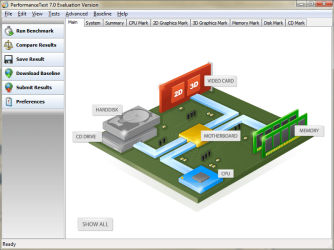
Get this http://www.passmark.com/ftp/petst.exe. It's a called a benchmark test after the fact that many computer technicians call their workspace a "workbench". You will need to install and run this file and see a screen that looks like this
Untitled.png
Click Run Benchmark and post the results back here. This will isolate the root cause of the performance problem. Thank you for your patience.
 

My Computer

Computer type
Laptop
Computer Manufacturer/Model Number
Apple
OS
El Capitan / Windows 10
CPU
i7-4980HQ
Memory
16GB
Graphics Card(s)
Iris 5200
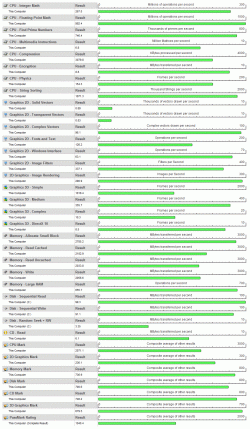
Thanks so much for recommending PassMark - it's great. I've run the test and attached it as a GIF file. The PC was custom built, including the graphics card.

My husband suggested I clarify that the problem with slow speeds occurs when accessing photos, files & folders from a NAS drive (wireless connection). The computer is super quick processing photos and files on C: drive.

I've updated my PC specs with modem, router and NAS drive info. The PCs running XP (and which are much older) access the photos without a problem. My husband is going to install PassMark on another PC so we can run the Networking test as well.
 

Attachments

  • PerfRes.gif
    PerfRes.gif
    288.9 KB · Views: 70

My Computer

OS
MS Windows 7 32-bit
CPU
Intel Core 2 Duo E8400 @ 3.00GHz 38 °C
Motherboard
Gigabyte Technology Co., Ltd. G41M-ES2H (Socket 775)
Memory
2.0GB Dual-Channel DDR2 @ 400MHz 5-5-5-18
Graphics Card(s)
VX2233wm-3 @ 1920x1080
Sound Card
Realtek High Definition Audio
Monitor(s) Displays
VX2233wm-3 on NVIDIA GeForce 9600 GT
Hard Drives
976.76GB Seagate ST31000528AS ATA Device (IDE) 31 °C
Keyboard
HID Keyboard Device
Mouse
PS/2 Compatible Mouse
Internet Speed
4,121 kbps download, 413 kbps upload
Other Info
Modem: Billion 7402 ADSL 2+
Router: NETGEAR WNDR3700
All files stored on NETGEAR ReadyNAS Duo, accessed via wireless connection using NETGEAR WG111v3 USB Adapter
Thanks so much for recommending PassMark - it's great. I've run the test and attached it as a GIF file. The PC was custom built, including the graphics card.

My husband suggested I clarify that the problem with slow speeds occurs when accessing photos, files & folders from a NAS drive (wireless connection). The computer is super quick processing photos and files on C: drive.

I've updated my PC specs with modem, router and NAS drive info. The PCs running XP (and which are much older) access the photos without a problem. My husband is going to install PassMark on another PC so we can run the Networking test as well.


Are you using "homegroup" for networking? One some systems it can have the problems you describe. One way to find out would be to set up a new network connection using "workgroup" Home group is for win 7 systems only and runs IPv6. Workgroup uses IPv4 and work well in mixed OS environments.
 

My Computer

Computer Manufacturer/Model Number
HP Pavillion dv-7 1005 Tx
OS
Win 8 Release candidate 8400
CPU
[email protected]
Memory
4 gigs
Graphics Card(s)
Nvidia 9600M
Sound Card
HD built-in
Monitor(s) Displays
17" Wxga
Screen Resolution
1440x900
Cooling
none
Internet Speed
45Mb down 5Mb up
Thanks so much for recommending PassMark - it's great. I've run the test and attached it as a GIF file. The PC was custom built, including the graphics card.

My husband suggested I clarify that the problem with slow speeds occurs when accessing photos, files & folders from a NAS drive (wireless connection). The computer is super quick processing photos and files on C: drive.

I've updated my PC specs with modem, router and NAS drive info. The PCs running XP (and which are much older) access the photos without a problem. My husband is going to install PassMark on another PC so we can run the Networking test as well.

What is the make and model of your NAS?
 

My Computer

Computer type
Laptop
Computer Manufacturer/Model Number
Apple
OS
El Capitan / Windows 10
CPU
i7-4980HQ
Memory
16GB
Graphics Card(s)
Iris 5200
My husband suggested I clarify that the problem with slow speeds occurs when accessing photos, files & folders from a NAS drive (wireless connection). The computer is super quick processing photos and files on C: drive.

This is most likely your problem. Accessing large data files over wireless is normally a very bad idea. I have never seen it work well enough for my liking. If you are just accessing word documents and small files wireless NAS is great. Connect the NAS via a wired network and I believe you will have much better experience.
 

My Computer

Computer type
PC/Desktop
Computer Manufacturer/Model Number
Dell OP7010
OS
Windows 7 Enterprise (x64); Windows Server 2008 R2 (x64)
Memory
16GB
Monitor(s) Displays
4 Dell 24" LCD
Screen Resolution
1280x1024
Keyboard
Dell
Mouse
Dell Optical
Internet Speed
40meg
Back
Top