Some Advice is Needed Please.

Manbreed AW

Manbreed AW
Addressing my Printer problem that I appreciate,your effort's reguardless if they helped or not,I look at this situation like a stepping stone, in learning how to tweak my Win 7 Ultimate 32 bit to perform like a top notch OS should. I had to totally reformat my PC, but while I was at it, I put in a new Western Digital 1tb Sata hard drive and partitioned it to a 160 gig, and the other part of the drive is a 782 New Volume,on the same 1tb Drive. I had a Maxtor 160 gig thmy Printer at I had as my Data Drive so I took it and made a External Drive in which,it is a IDE/PATA Drive to use as an extra storage.I took my old 160 gig Western Digital and made it my new Data drive instead. I got everything up and running again, but I have to replace my Video Card which I mentioned before in my past communications,I have orderd a EVGA Ge Force 6200 512 AGP wDVI Graphics Card,I should get it in the next couple of days,no more ATI Components in my PC's,in the last 3 years Ive had 4 ATI Motherboards and they all went bad in a matter of months,from now on it's just Intel and Nividia components. I have a question on down loading the Virtual XP in my Ultimate, can I put the Virtual files in the New Volume in my 1tb instead of using my C:Drive? If so whats the step by step instructions in this complecated idea.Since my so called Tech guy put in a 250 power supply, I upgraded it to a 600 watt Power Supply so I could have more upgrading options in the future,so I am using the info, to cut down on tech BS,and get it done right the first time......Your response would be appreciated.......Manbreed AW
 

My Computer

Computer Manufacturer/Model Number
Gateway Custom Built
OS
Windows 7 Ultimate 32 bit
CPU
Intel(R)Pentium(R)4CPU 3.00GHz
Motherboard
Midway
Memory
4 Gig
Graphics Card(s)
Nivida GEForce 6200
Sound Card
C Media PCI Audio Device SRS Audio Essentials
Monitor(s) Displays
INC 19 inch Display
Screen Resolution
768 /1024
Hard Drives
WCD WD 10EARS-00Y5B1 ATA Device(0.91TB)
WCD WD1600 AAJB-00PVA0
PSU
Eagle 600 PCU
Case
Ultra
Cooling
PCU fan/Motherboard Double ballbearing fan/AOC System Blower
Keyboard
Microsoft Wireless Multimedia Keyboard 1.1
Mouse
Microsoft Wireless Optical Mouse 2000
Internet Speed
Cable Broadband /Belkin network Router 600
Other Info
Custom built,everything new. using the same Gateway Bios got case from Police Auction in KC Kansas
Hi there
Just a suggestion -- Break your post up a bit -- Very hard to follow what you want to do when one has to trawl through nearly half a page of SOLID text unbroken by some paragraphs.

Not trying to be nasty BTW -- you'll help YOURSELF a lot and make it easier for others to help you too.

Cheers

jimbo
 

My Computer

Computer type
PC/Desktop
Computer Manufacturer/Model Number
Custom built, several laptops HP/ASUS
OS
Linux CENTOS 7 / various Windows OS'es and servers
CPU
Intel i7 Intel i5
Memory
8GB, 16GB
Graphics Card(s)
On Motherboard
Sound Card
Realtek HD audio
Monitor(s) Displays
Apple Cinema display, Samsung LCD
Screen Resolution
1920 X 1080
Hard Drives
4 X 1TB SATA
Mouse
Toshiba wireless laser
Internet Speed
> 20MB up

My Computer

Computer Manufacturer/Model Number
Compaq Desktop
OS
Windows 7 Ultimate x64
CPU
AMD Sempron Dual Core
Memory
3GB
Graphics Card(s)
NVIDIA GeForce 6150SE nForce 430
Screen Resolution
1024x768
Hard Drives
150GB Sata
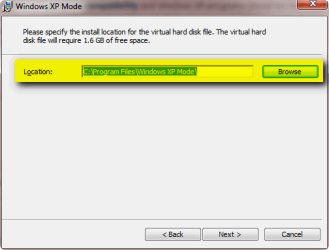
When you install XP Mode, two virtual hard disk images are set up. The parental vhd (file name: Windows XP Mode base.vhd) is by default installed in folder %systemdrive%\Program Files\Windows XP Mode, and the differencing vhd (file name: Windows XP Mode.vhd)to %systemdrive%\Users\Your_Username\AppData\Local\Microsoft\Windows Virtual PC\Virtual Machines.

The base vhd should not be touched (moved or edited) at all after installation. It's about 1.2 GB big, the size of base vhd do not change when XP Mode is used. It is the part of XP Mode that contains XP system core, files and data needed for XP Mode to run. If you do not want base vhd to be saved in default location, choose a new location when installing XP Mode:

XPM_Install_1.png

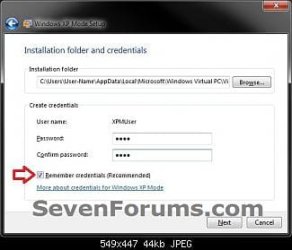
Differencing vhd is installed thereafter. It is the part of XP Mode which contains all user specific parts of XP; this vhd contains all user data, files and folders. Differencing vhd is quite small file when XP Mode is first created, about 1 GB, but it can expand up to 127 GB when user fills it with applications and files.

When XP Mode installation continues after setting up the base vhd as told above, you can then choose a desired location where to create the differencing vhd, or leave it to default location:

XPM_Install_2.png

Notice that the base vhd is same for all users, that is also why it should in no circumstances be moved from installed location. The differencing vhd however is individual for every user account of your computer, so when XP Mode is first time run on each account, you can decide a suitable location for the differencing vhd for that user. Please remember that differencing vhd of every user can be as big as 127 GB so it is extremely important to choose a good location with enough space for the vhd to expand when needed, especially if you have many user accounts using XP Mode.

Kari
 

My Computer

Computer type
Laptop
Computer Manufacturer/Model Number
HP ENVY 17-1150eg
OS
Windows 10 Pro x64 EN-GB
CPU
1.6 GHz Intel Core i7-720QM Processor
Memory
6 GB
Graphics Card(s)
ATI Mobility Radeon HD 5850 Graphics
Sound Card
Beats sound system with integrated subwoofer
Monitor(s) Displays
17" laptop display, 22" LED and 32" Full HD TV through HDMI
Screen Resolution
1600*900 (1), 1920*1080 (2&3)
Hard Drives
Internal: 2 x 500 GB SATA Hard Disk Drive 7200 rpm
External: 2TB for backups, 3TB USB3 network drive for media
Cooling
As Envy runs a bit warm, I have it on a Cooler Master pad
Keyboard
Logitech diNovo Media Desktop Laser (bluetooth)
Mouse
Logitech Performance Mouse MX
Internet Speed
50/10 Mbps VDSL
Antivirus
Windows Defender 4.3.9431.0
Browser
Maxthon 3.5.2., IE11
Thanks for the Quick response guys I will attempt to follow through and, I will post it when I get done, finishing tweakin my OS,and to the one that has a problem reading my so called ramblings without breaking it down in simple paragraphs, you need to understand that when your in a hurry,to get the problem solved as long as you can mentally understand the words that, I'm projecting on this Forum that's all that matters. Not trying to be BTW but,real men handle the problem, without the irritating, English Teacher petiteness , that is totally ridiculous, and has no real bearing on anything but, maybe too much/tea or coffee during you aggravated feel of your mind? Of that particular time? Some people are cut and dry to the point in solving problems, without all of silly how it look's issues. All that matters is that the individual that reads this, can understand what I'm discussing........ :focus: :doh: Manbreed Aw
 

My Computer

Computer Manufacturer/Model Number
Gateway Custom Built
OS
Windows 7 Ultimate 32 bit
CPU
Intel(R)Pentium(R)4CPU 3.00GHz
Motherboard
Midway
Memory
4 Gig
Graphics Card(s)
Nivida GEForce 6200
Sound Card
C Media PCI Audio Device SRS Audio Essentials
Monitor(s) Displays
INC 19 inch Display
Screen Resolution
768 /1024
Hard Drives
WCD WD 10EARS-00Y5B1 ATA Device(0.91TB)
WCD WD1600 AAJB-00PVA0
PSU
Eagle 600 PCU
Case
Ultra
Cooling
PCU fan/Motherboard Double ballbearing fan/AOC System Blower
Keyboard
Microsoft Wireless Multimedia Keyboard 1.1
Mouse
Microsoft Wireless Optical Mouse 2000
Internet Speed
Cable Broadband /Belkin network Router 600
Other Info
Custom built,everything new. using the same Gateway Bios got case from Police Auction in KC Kansas
You're welcome and we hope that it answers your question in full :)
 

My Computer

Computer Manufacturer/Model Number
Compaq Desktop
OS
Windows 7 Ultimate x64
CPU
AMD Sempron Dual Core
Memory
3GB
Graphics Card(s)
NVIDIA GeForce 6150SE nForce 430
Screen Resolution
1024x768
Hard Drives
150GB Sata
One thing to remember is that BIG files like VHDs get fragmented and tend to stay fragmented, when mixed with little files, so do not keep them on your System or Boot partition, or on a data partition with a lot of relatively small files like documents, images or music.

I always create a swap partition of about 2x my installed RAM which I then let the system managed pagefile.sys reside upon. I also direct any crash dumps there.

I disable hibernation, so that no hiberfil.sys sits on my boot partition.

Depending how they are set up, virtual hard disks grow or "bud off" differencing disks, and it appears that they rapidly fill a much greater size than a real system would with the same amount of use. It is therefore useful to devote a reasonably large partition just for virtual disks.
 

My Computer

Computer Manufacturer/Model Number
Acer 7520, Packard Bell dot se, Acer travelmate 2423
OS
Win 7 Ult + Starter, XP Pro +Home, 2kAS, Linux Mint 8, SuperOS
CPU
AMD 64 Athlon X2 , Intel Atom N450, Intel Celeron M 1.50 Ghz
Motherboard
Acer Fuquene
Memory
2.5GB ; 1GB; 2GB
Graphics Card(s)
Nvidia GeForce7000m; Intel; Intel
Sound Card
Realtek AC57
Monitor(s) Displays
17" ;10.1"; 19"
Screen Resolution
1440x900;1024x600;1440x900;
Hard Drives
WD 80, WD 320;
PSU
19v
Case
Laptop
Cooling
Air
Internet Speed
9.7Mb/s down 0.99Mb/s up
Other Info
ISP VIRGINMEDIA 10M cable broadband - D-Link DIR615 wireless router, 3Com OfficeConnect ASDL router used as wireless extender switch
Thanks for the Quick response guys I will attempt to follow through and, I will post it when I get done, finishing tweakin my OS,and to the one that has a problem reading my so called ramblings without breaking it down in simple paragraphs, you need to understand that when your in a hurry,to get the problem solved as long as you can mentally understand the words that, I'm projecting on this Forum that's all that matters. Not trying to be BTW but,real men handle the problem, without the irritating, English Teacher petiteness , that is totally ridiculous, and has no real bearing on anything but, maybe too much/tea or coffee during you aggravated feel of your mind? Of that particular time? Some people are cut and dry to the point in solving problems, without all of silly how it look's issues. All that matters is that the individual that reads this, can understand what I'm discussing........ :focus: :doh: Manbreed Aw

Hi there
I wasn't trying to be in "Teacher Mode" but was simply stating that some of us on these Forums aren't necessarily Native English speakers and it DOES help considerably to break the content up so anybody can understand the problem you want solved.

Actually if you ever have to do a presentation in front of an audience or Management this is also important too.

Glad you got your answer anyway.

Cheers
jimbo
 

My Computer

Computer type
PC/Desktop
Computer Manufacturer/Model Number
Custom built, several laptops HP/ASUS
OS
Linux CENTOS 7 / various Windows OS'es and servers
CPU
Intel i7 Intel i5
Memory
8GB, 16GB
Graphics Card(s)
On Motherboard
Sound Card
Realtek HD audio
Monitor(s) Displays
Apple Cinema display, Samsung LCD
Screen Resolution
1920 X 1080
Hard Drives
4 X 1TB SATA
Mouse
Toshiba wireless laser
Internet Speed
> 20MB up
I did as you suggested and it worked out very well in installing the XP mode on my partitioned 1tb to 160 gig/782 gig in, which the XP mode was sent to,and It has plenty of room to breathe, and so far so good.Your steps really did help in me not screwing the pooch so to speak.:shock:the only problem that I'm having is the Media Player in both modes regular ultimate/and XP mode keep reloading, and downloading the same songs twice and three times in the Media Player, no matter what I do in turning off the area's of setting up refreshing songs and etc, in the option's section of the media player. Right now that is the only problem in in the reformatting of this OS, and your help has been a Godsend guy's,Thank's. :cool:I also installed a new, Nividia Ge Force 6200 Graphics Vidio card and that made all the difference in the world got rid of my sticking problem every thing so far is running smoother, do you have any advice on the quirkyness of the media player? Thanks again Guy's :D Manbreed AW.....
 

My Computer

Computer Manufacturer/Model Number
Gateway Custom Built
OS
Windows 7 Ultimate 32 bit
CPU
Intel(R)Pentium(R)4CPU 3.00GHz
Motherboard
Midway
Memory
4 Gig
Graphics Card(s)
Nivida GEForce 6200
Sound Card
C Media PCI Audio Device SRS Audio Essentials
Monitor(s) Displays
INC 19 inch Display
Screen Resolution
768 /1024
Hard Drives
WCD WD 10EARS-00Y5B1 ATA Device(0.91TB)
WCD WD1600 AAJB-00PVA0
PSU
Eagle 600 PCU
Case
Ultra
Cooling
PCU fan/Motherboard Double ballbearing fan/AOC System Blower
Keyboard
Microsoft Wireless Multimedia Keyboard 1.1
Mouse
Microsoft Wireless Optical Mouse 2000
Internet Speed
Cable Broadband /Belkin network Router 600
Other Info
Custom built,everything new. using the same Gateway Bios got case from Police Auction in KC Kansas
Windows Media Player being constantly corrupted

I have tried for the last 9 months to get this problem solved ,and I have failed to total sickness. I have reset my Media Player at least 25 times and it still is corrupted,the trouble shooter in Windows 7, can't or wont fix it.:(

The Media Player when it is pulled up won't scroll like it supposed to the Media Player won't respond until it feel's like it ,it tells me at the top it won't respond I have reformatted this PC 4 times in 2 years, first the Media Center Quit working and I had to reformat, then the Device Printer Quit working,and I had to redo it again. The fix it tool is worthless in this problem as well, I have used it at least 30 times on this issue alone. I even changed to a new Hard Drive, still this Windows 7 has been a royal pain in the ****, I even tried to run the sfc/scannow and the process wont follow through or finish.

I am very dissapointed in Win 7 Ultimate 32 bit , Me and my wife have the same Identical Desktop Pc's with the same operating system and she has had no problems with her's,very weird and she uses her's more than I use mine. The only Error message when the Media Player is loaded ,is when I run the Troubleshooter in the Action Center for resetting the Media Player.


At the end of the scan the Troubleshooter tells me it is corrupted then I use the Microsoft Fix it to put it back at default . Then I attempt to redo my Music Library...... As for me maybe going to Apple, I understand that they even have some issues, but when you have been patient like I have and have been fighting this issue for over a year.:confused::shock:

So far I have went to Control Panel/ Programs and Functions and Disactivate Windows Functions and un tick theWMP box? In my Control Panel there is no Programs and Functions,only Programs and Features but I found the,Turn off or on Windows Features and went in and checked the boxes to turn off the Media Player

,so I even went as far after re clicking into and starting the WMP and the PC and going and, using the Microsoft Fix it to assist cleaning, and resetting the Media Player ,and to no avail it still came up after the scan it was corrupted.

The same music is on my Vista 64 bit and even, my Developer Win 8 and the the Virtual XP in my Media Player's are not corrupted so I know it isn't, my Music. It is even on my wife's PC,and there isn't any corrupted file's, or similar problems with my other OS system's.

I have even gone as far as using Window's 7 Manager, a third party complete Software that is particularly for Windows 7 OS only. To straighten out any files or corrupted registry files or any preexisting problem's in the Win 7 OS in my PC. :thumbsup:


It is only Human to get vast amount's of dissapointment on dealing with these OS Systems . I do appreciate your response and technical suggestions, I have been loyal and faithful to Microsoft. I have had 6 desktop's and 2 laptop's in the last 10 years.

But it seems that Win 7 has more problems than XP,and Vista at least from my experience I have only reformatted Vista 3 time's in 6 years. I will try to follow through to your instruction's to the letter.


I have put in a new PSU, memory, 1 TB Western Digital Hard Drive new 6200 Nivdia Video Card and added a Fan that pushes the hot air out of the case. The 1TB is partitioned into 3 sections and I have a Data Drive that is 160 gig that has the Developer Series on that drive,and since Win 7 Ultimate has Virtual XP it is active on one of the partitions on the 1TB .

That is some of the only adjustment's that have been made so far. So, if all of that poses as a problem to use your suggestions on this system in using the OS disk to correct the Media Player detailed info would help...Nobody can say this kind of work is boring or doesn't keep you on your toe's, on my last few Dilemmas that I had with the same OS, and Desktop the Individuals that helped were top's in handling these problem's that shouldn't be in the first place. :geek: You guy's Rock,......Manbreed Aw


:cool:
 

My Computer

Computer Manufacturer/Model Number
Gateway Custom Built
OS
Windows 7 Ultimate 32 bit
CPU
Intel(R)Pentium(R)4CPU 3.00GHz
Motherboard
Midway
Memory
4 Gig
Graphics Card(s)
Nivida GEForce 6200
Sound Card
C Media PCI Audio Device SRS Audio Essentials
Monitor(s) Displays
INC 19 inch Display
Screen Resolution
768 /1024
Hard Drives
WCD WD 10EARS-00Y5B1 ATA Device(0.91TB)
WCD WD1600 AAJB-00PVA0
PSU
Eagle 600 PCU
Case
Ultra
Cooling
PCU fan/Motherboard Double ballbearing fan/AOC System Blower
Keyboard
Microsoft Wireless Multimedia Keyboard 1.1
Mouse
Microsoft Wireless Optical Mouse 2000
Internet Speed
Cable Broadband /Belkin network Router 600
Other Info
Custom built,everything new. using the same Gateway Bios got case from Police Auction in KC Kansas
Back
Top