Hi,
I'm a first time user and I'm not that much into computers. Noting that my computer is reaching its space capacity I decided to move my files to the external drive. Nothing much have changed so I used the space sniffer app to check what was taking the space. To my surprise I was just using 9.1 gb of space, the rest were computer files. An IT friend of mine deleted some things in order help with that, but not that much changed either with the exception that I wasn't able to see most of the icons on my desktop (IBM SPSS, Office, ADOBE, Skype, and Vsee, as far as I identified).
Giving it a week, an update downloaded and I was able to see some of the icons (Vsee, some of the adobe files, and some of the office files). Trying to identify which ones appear and which didn't, it appears that the Office ones that appear are the newer ones, not the past 2010 file versions, same happens with adobe. Checking a little bit more, I found out that some other icons don't appear, as you can see in the taskbar (like the intel wifi icon). I tried this tutorial of yours, as it was a recommendation, plus was the first one that appear in google and had good reviews. Nothing work. I even did the .reg one that you have (Default File Type Associations - Restore), and nothing happened either.
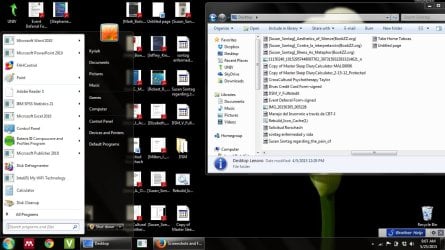
I work with a lot of documents, and it helped me a lot to see the small preview of the icon before when looking for the docs. Now it pisses me off not to being able. I'm attaching a screen shot so you can see whats going on. (In the screenshot you will see that the adobe files in the desktop appear, but in the separate windows of the desktop, they don't). I really appreciate all of the help that you can give me.
Thanks.
I'm a first time user and I'm not that much into computers. Noting that my computer is reaching its space capacity I decided to move my files to the external drive. Nothing much have changed so I used the space sniffer app to check what was taking the space. To my surprise I was just using 9.1 gb of space, the rest were computer files. An IT friend of mine deleted some things in order help with that, but not that much changed either with the exception that I wasn't able to see most of the icons on my desktop (IBM SPSS, Office, ADOBE, Skype, and Vsee, as far as I identified).
Giving it a week, an update downloaded and I was able to see some of the icons (Vsee, some of the adobe files, and some of the office files). Trying to identify which ones appear and which didn't, it appears that the Office ones that appear are the newer ones, not the past 2010 file versions, same happens with adobe. Checking a little bit more, I found out that some other icons don't appear, as you can see in the taskbar (like the intel wifi icon). I tried this tutorial of yours, as it was a recommendation, plus was the first one that appear in google and had good reviews. Nothing work. I even did the .reg one that you have (Default File Type Associations - Restore), and nothing happened either.
I work with a lot of documents, and it helped me a lot to see the small preview of the icon before when looking for the docs. Now it pisses me off not to being able. I'm attaching a screen shot so you can see whats going on. (In the screenshot you will see that the adobe files in the desktop appear, but in the separate windows of the desktop, they don't). I really appreciate all of the help that you can give me.
Thanks.
Attachments
My Computer
- Computer type
- Laptop
- Computer Manufacturer/Model Number
- Lenovo
- OS
- Windos 7 Ultimate 64 bit
- Antivirus
- webroot
- Browser
- mozilla