some questions about windows 7 installation

muiacir

New member
Member
VIP
Local time
5:30 AM
Messages
161
hi guys.
1- i heard that we can only install windows 7 in C Drive. is there a way to install it on another Drive like E?
2- again i heard that if we want both windows like 7 and xp on our system we should install xp first.so if we do not know this information and we first install 7 and then xp what can we do?
3-i installed windows 7 in C drive and my C drive free space now is only 500mb.
i want to get 10gig from E drive and send to C.is it possible?please explain easy
 

My Computer My Computer

OS
windows 7 ultimate x64
Please post back a screenshot of your maximized Disk Management drive map and listings:

1. Type Disk Management in Start Search box.
2. Open Disk Mgmt. window and maximize it.
3. Type Snipping Tool in Start Search box.
4. Open Snipping Tool, choose Rectangular Snip, draw a box around full map and all listings.
5, Save Snip, attach using paper clip in Reply Box.

Tell us what is on each partition.

Dual Boot Installation with Windows 7 and XP

There is no reason to install Win7 to any drive letter except C. Even if another OS is already on C, Win7 will assume another letter when not booted and assume C when it is booted. This works fine and causes no problems whatsoever. So be sure to boot the installer when you install Win7 so it always assumes C when booted. Clean Install Windows 7
 
thanks my friend.
1- as i understand you mean if i install windows 7 in another drive letter except c , the bootloader of win7 assume it is C Drive? so if my C Drive volume is not enough for indows 7 and i want to install it on for example B Dribe isnot possible?
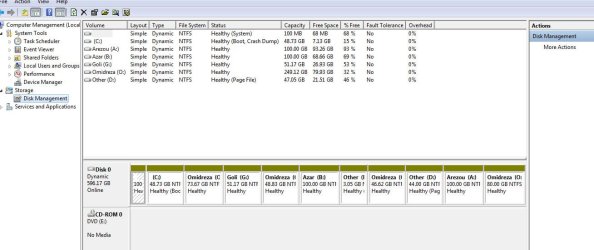
2-i added the screenshot:
 

Attachments

  • Snap1.jpg
    Snap1.jpg
    79.6 KB · Views: 26

My Computer My Computer

OS
windows 7 ultimate x64
A major problem is that you converted your HD to Dynamic which is only meant to be used to span a partition across multiple HD's. Apparently you didn't see the warning message when you exceeded 4 Primary or 3 Primary and unlimited Logical partitions.

The solution to solve this non-destructively is to boot free Partition Wizard CD version 4.2 which is the last one which offers this as a free feature: pw422.zip ISO - Windows Live.

Download the ISO, rightclick to burn it to CD using Windows Image Burner, or use ImgBurn.

Boot the PW CD. You will need to delete the extra partition(s) you created which tipped it to convert to Dynamic before it will convert back to Basic. You can only have 4 Primary, or 3 Primary and unlimited Logical partitions. When you get below this threshold it will convert. Then you can go in and convert one Primary to Logical to add as many other adjacent Logical partitions as you wish.

Here is a video tutorial: How to convert dynamic disk to basic disk with Partition Wizard?
 
thanks my friend.i will do this steps and write the resault here. but you did not aswer mt 1st question in my second post
 

My Computer My Computer

OS
windows 7 ultimate x64
A major problem is that you converted your HD to Dynamic which is only meant to be used to span a partition across multiple HD's. Apparently you didn't see the warning message when you exceeded 4 Primary or 3 Primary and unlimited Logical partitions.

The solution to solve this non-destructively is to boot free Partition Wizard CD version 4.2 which is the last one which offers this as a free feature: pw422.zip ISO - Windows Live.

Download the ISO, rightclick to burn it to CD using Windows Image Burner, or use ImgBurn.

Boot the PW CD. You will need to delete the extra partition(s) you created which tipped it to convert to Dynamic before it will convert back to Basic. You can only have 4 Primary, or 3 Primary and unlimited Logical partitions. When you get below this threshold it will convert. Then you can go in and convert one Primary to Logical to add as many other adjacent Logical partitions as you wish.

Here is a video tutorial: How to convert dynamic disk to basic disk with Partition Wizard?
which partitions exactly should i delete?(according to the picture that i inserted)
 

My Computer My Computer

OS
windows 7 ultimate x64
Did you have any logical partitions before it asked you if you wanted to convert to Dynamic Disk and you blindly decided to let it do so?

If you know which were Logical partitions you can count them as one Primary and keep three other partitions since you can have three Primary and unlimited Logical partitions, or four total Primary partitions.

If you don't know which were Primary or Logical then I would back up my files then delete all but the first four partitions before converting to Basic disk.
 
Back
Top