Someones computer showing up under Networks...

ExNavy11

Member
Power User
Local time
10:34 PM
Messages
256
Someone else computer is showing up under Networks on my computer. Must be someone who lives in this building. How do I keep this from showing up and if her's shows up on mine, does mine show up on hers?
 

Attachments

  • Capture.PNG
    Capture.PNG
    2.1 KB · Views: 1,793

My Computer My Computer

Computer Manufacturer/Model Number
Built
OS
Windows 7 RTM
CPU
Intel I7 920 2.67 ghz
Motherboard
EVGA X58
Memory
6GB CORSAIR DOMINATOR
Graphics Card(s)
GeForce GTX 260 Core 216 896MB 448-bit GDDR3 PCI Express 2.0
Are you on Wireless network?
 

My Computer My Computer

Computer type
PC/Desktop
Computer Manufacturer/Model Number
Built them myself, Science Experiments !
OS
Win7 Enterprise, Win7 x86 (Ult 7600), Win7 x64 Ult 7600, TechNet RTM on AMD x64 (2.8Ghz)
CPU
AMD fx8350 4ghz, AMD-32 2400mhz, AMD-64 3200mhz, AMDx64 2.8G
Motherboard
SIS 755, ECS-K8M890M-M (Ult 7600), GigaByte & others
Memory
2gb, 4gb on the Ult 7600, 4gb on Technet RTM, 32gb on FX8350
Graphics Card(s)
Draw my own Graphics, several nVidia cards
Sound Card
on motherboard
Monitor(s) Displays
19" flat scr, 28" I-Inc widescr,22" Emprex Widescr, 23" Acer
Screen Resolution
1280 x 1024, 1440 x 900, 1920 x 1080
Hard Drives
6 pata Ide HD's & 2 Sata HD's
added 80gb external on Ult 7600 computer,
numerous extra 1tb, 2TB, 3Tb SATA HD's
A collection of ext HD Docks w/ HDs
PSU
430w, 550w, 600w, 700, 800, etc
Case
All Generic Full Towers
Cooling
Open Air & a few fans, some w/ colored LEDs
Keyboard
Compaq & Dell recycled from GoodWill
Mouse
Made in China Optical Wired Mouse
Internet Speed
Fast Cable InterNet
Antivirus
AVG Free on 24 different Desktops, NO Problems!
Browser
IE 8 is preferred, but use FireFox sometimes
Other Info
Linksys Routers, switches, & Hubs
Too Many USB Flash Drives to count, Biggest is 64GB !
Eight computers in my home network.
Sixteen computers at my business network.
Linked via TeamViewer !
Lots of old used spare computer parts everywhere!
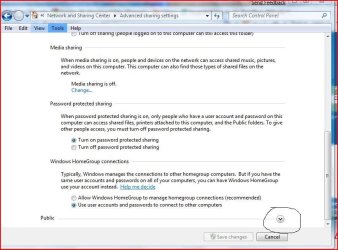
As long as you set a password at install then your icon for chuckj is all katiedid will ever see, If all you have is one pc you can go to network and sharing center and then advance share settings public, and change to not let others see this pc. good luck
 

My Computer My Computer

Computer Manufacturer/Model Number
Gateway GT5692
OS
Windows 7 Ulti. x64
CPU
AMD Phenom 8450 triple-core 2.10 ghz
Memory
4GB
Graphics Card(s)
ATI Radion HD 3200
Monitor(s) Displays
Gateway FPD1775W
Screen Resolution
1280x720
Hard Drives
465.6613 Gibibytes
I have a wireless router but use a wired connection for my computer. I do use a wireless connection for my Xbox 360 sometimes. I think turning Network Discovery 'OFF' will affect that. I did leave it off for now.

Wish there was a way where you could only allow certain computers or devices.
 

My Computer My Computer

Computer Manufacturer/Model Number
Built
OS
Windows 7 RTM
CPU
Intel I7 920 2.67 ghz
Motherboard
EVGA X58
Memory
6GB CORSAIR DOMINATOR
Graphics Card(s)
GeForce GTX 260 Core 216 896MB 448-bit GDDR3 PCI Express 2.0
Someone else computer is showing up under Networks on my computer. Must be someone who lives in this building. How do I keep this from showing up and if her's shows up on mine, does mine show up on hers?

Hey BucSox79, have you checked the setting on your network, like change the name of your workgroup to some thing else and always make your wireless network secure, use WEP or WPA.
 
Last edited:

My Computer My Computer

Computer Manufacturer/Model Number
HP G60-230US
OS
Windows 7 Ultimate X64
CPU
Intel Pentium Dual-Core T4200 @ 2.0 GHz
Memory
4GB's
Graphics Card(s)
Mobile Intel 45 Express
Sound Card
Conexant High Definition SmartAudio 221
Monitor(s) Displays
16"
Screen Resolution
1366X768
Hard Drives
320GB
Mouse
Logitech M305
Internet Speed
Cable
I have a wireless router but use a wired connection for my computer. I do use a wireless connection for my Xbox 360 sometimes. I think turning Network Discovery 'OFF' will affect that. I did leave it off for now.

Wish there was a way where you could only allow certain computers or devices.
try turning home network discover on and public network discover off,
advance2.JPG
 

My Computer My Computer

Computer Manufacturer/Model Number
Gateway GT5692
OS
Windows 7 Ulti. x64
CPU
AMD Phenom 8450 triple-core 2.10 ghz
Memory
4GB
Graphics Card(s)
ATI Radion HD 3200
Monitor(s) Displays
Gateway FPD1775W
Screen Resolution
1280x720
Hard Drives
465.6613 Gibibytes
Hey BucSox79, have you checked the setting on your network, like change the name of your workgroup to some thing else and always make your wireless network secure, use WEP or WPA.

I totally agree, if you can see her machine then she's connected to the same network/adapter as you. I'd password protect the router if I were you.

You could also check the router webpage to see what devices are attached.

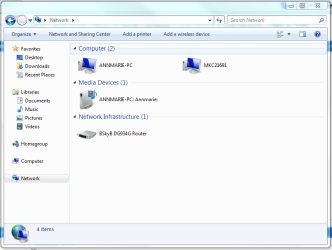
1, Open explorer & go to Network, you should see your router in that screen
Capture.PNG

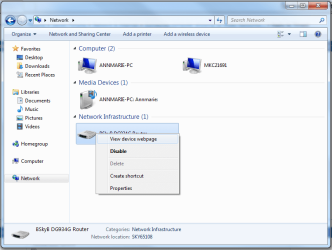
2, Right-click and select 'View device webpage'.
Untitled.png
   Note
You will/may be asked to input a username & password, your router documentation will have this info


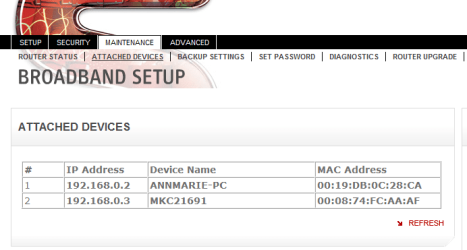
3, (normally) under 'Advanced' you can see 'Attatched Devices'
Capture1.PNG

If you can see her computer then she's using your router to connect to the internet. While in the device webpage, under security, you can set a password for access to the router.

Hope this helps :)


Jeff
 

My Computer My Computer

Computer Manufacturer/Model Number
Compaq Desktop
OS
Windows 7 Ultimate x64
CPU
AMD Sempron Dual Core
Memory
3GB
Graphics Card(s)
NVIDIA GeForce 6150SE nForce 430
Screen Resolution
1024x768
Hard Drives
150GB Sata
Shure password your router that is like Banderz777 and Orbital Shark said that should do it. Reboot and katiedid will be history. My bad I thought maybe you were sharing a router with everyone in the building as is done in some travel motels or some such. Good luck to you and have a great weekend,lm
 

My Computer My Computer

Computer Manufacturer/Model Number
Gateway GT5692
OS
Windows 7 Ulti. x64
CPU
AMD Phenom 8450 triple-core 2.10 ghz
Memory
4GB
Graphics Card(s)
ATI Radion HD 3200
Monitor(s) Displays
Gateway FPD1775W
Screen Resolution
1280x720
Hard Drives
465.6613 Gibibytes
Back
Top