
Something new in 7264

Blongs

New member
Power User
Local time
7:04 PM
Messages
54
Location
Jackson, New Jersey
I just installed build 7264 with a clean install and everything went fine. I currently triple boot Vista/Win7 7260/Win7 7264. Previously whatever version I was currently using would always show as being on C: drive (ie if I logged into 7260 that was C: and 7232 was D: and if I logged into 7232 that would be C: and 7260 would be D:). Now 7260 is always drive C: even if I'm using build 7264. I'm only mentioning this because some programs by default install to C: which may not be the version of Windows I'm using at that time. Check the attachment you will see I'm in 7264 but it is showing as being drive D:
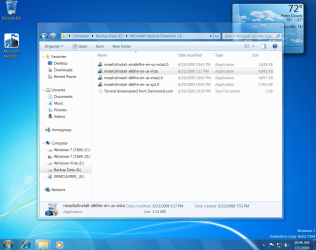

Capture.PNG
 

My Computer

Computer Manufacturer/Model Number
HP Pavilion e9107c
OS
Windows 7 Home Premium 64 bit
CPU
Intel Core 2 Quad Q8200 @ 2.33 GHz
Memory
8 GB DDR3
Graphics Card(s)
ATI Radeon HD 4350
Monitor(s) Displays
HP 23 in. High Definition (w2338h)
Screen Resolution
1920 x 1080
Hard Drives
750 GB
Keyboard
Logitech Illuminated keyboard
Mouse
Logitech Laser mouse
Well here is what i noticed from installing previous builds (i have not yet installed 7264 64bit, am currently on 7232 64bit) :

I dual-boot with Xp SP3 32bit on c: partition.
When i install Win 7 32bit by starting the install process from within Xp ( as obviously i cannot start the install of a 64 bit OS from within a 32bit OS), when the install finishes, and i boot into WIN 7, the partition is not assigned as C, but is assigned a different letter ( the actual letter of the partition/drive that i installed it to.
But if i install Win 7 (64 bit) by booting from a dvd installation disk and i install to the same partition/drive as the above case, when the install is done and i boot into Win 7, the Win7 partition is assigned as C.

:huh:
 

My Computer

Computer Manufacturer/Model Number
custom built
OS
Windows 7 Home Basic 64bit
CPU
Intel Core 2 Duo 6420 (2.13 Ghz)
Motherboard
Asus P5B-E Plus
Memory
2x1 GB Kingston KVR DDR2 800Mhz
Graphics Card(s)
Saphire ATI HD4870 512MB
Sound Card
Creative Audigy 4 PCI
Monitor(s) Displays
Samsung SyncMaster T220
Screen Resolution
1680x1050
Hard Drives
WD 320GB (Sata2)
Maxtor 250GB (ATA133)
Maxtor 80GB (ATA133)
PSU
Coolermaster Silent Pro 700Watt
Case
Chieftec midi tower case
Cooling
stock cpu cooler/fan
Keyboard
Logitech UltraX Premium Keyboard (usb 2.0)
Mouse
Logitech MX518 gaming grade optical mouse 1800dpi(usb2.0)
That indeed is the way it works by my observations too. From that perspective I always install from a booted DVD for clean installs.
 

My Computer

Computer Manufacturer/Model Number
Custom workstation /// Lenovo X61t tablet notebook
OS
Windows 7 RTM x64
CPU
Core i7 980X @ 4.04GHz OC /// Core Duo L7500 @ 1.6GHz
Motherboard
Asus P6T6 WS Revolution ///
Memory
12GB G. Skill @ DDR-1600 OC /// 4GB
Graphics Card(s)
Saphire HD4870 Toxic 1GB /// Intel Mobile GMA X3100
Monitor(s) Displays
Dual Eizo 24" SX2461W /// 12"
Screen Resolution
1920x1200 /// 1400x1050
Hard Drives
Workstation:
5x 750GB Barracuda-11 on Areca ARC-1220;
4x 1.5TB Barracuda-11 on Intel ICH10R;
Volumes:
300GB RAID 0, 2.7TB RAID 10 on Intel;
100GB RAID 0, 1.4TB RAID 10 on Areca ///
Notebook: G.Skill Titan 256GB SSD
PSU
Tagan ITZ 1100
Case
GHS-1500 ///
Cooling
Thermalright IFX-14 + a slew of stealth fans ///
Keyboard
Logitech Edge ///
Mouse
Logitech Wireless Optical Trackball
Internet Speed
5Mbps down / 820Kbps up
Other Info
Main use: photography;
DVD Drive: L.G GGW-H20L Blu-Ray / DVD;
OC: QPI/DRAM @ 1.33v, CPU @ 1.293v, DRAM Bus @ 1.65v, CPU PLL @ 1.88v, CPU mult = 25x, BCLK = 160, DDR3-1604 @ 7-8-7-24
Something else I noticed, you can run desktop gadgets with UAC turned off in 7264. I remember earlier builds UAC had to be on to use them, or else you had to use a registry hack.
 

My Computer

Computer Manufacturer/Model Number
Self-built // Gateway FX P-6860
OS
Windows 7 Ultimate retail // Windows 7 build 7264 x64, Vista Home Premium SP2 x64
CPU
Intel Core i7 920 // Intel Core2Duo T-5550 1.86x1.86
Motherboard
EVGA x58 SLI LE //
Memory
12 GB Corsair XMS3 Tri-channel 1333 // 4 GB DDR2
Graphics Card(s)
EVGA GTX 295 // Nvidia GeForce 8800 GTS
Sound Card
Integrated Realtek // RealTek HD integrated sound
Monitor(s) Displays
19" Acer flatpanel // Laptop Display, Secondary CRT
Screen Resolution
1440 x 900 1152x864 // 1440x900, 1152x864
Hard Drives
750 GB WD Caviar Black 7200 RPM - in desktop
320 GB -laptop
80 GB - laptop secondary drive
PSU
Corsair HX1000w // Laptop PSU?
Case
Thermaltake Armor+
Cooling
Assload of fans, intel stock cpu cooler // GearHead Fan dock
Keyboard
Razer Lycosa // laptop keyboard
Mouse
Razer DeathAdder // Logitech Laser
Internet Speed
3.0 MB down/ 768 Kb up
Other Info
Just built my computer in 12/09
Back
Top