sony vgn ar630e laptop

Datman

New member
Member
VIP
Local time
8:34 AM
Messages
158
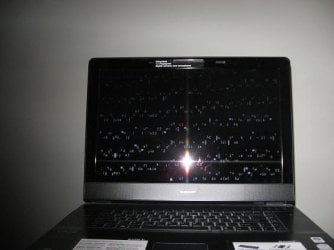
I had already wrote this one off thinking the onboard video was whacked. Several months ago the screen had vertical lines across the entire screen and it never seemed to go away. It would frequently get the blue screen of death.


Another computer I use for mobile recording multi channel audio also has gone bad. So I thought maybe this would work with W7 and installed it on the machine.

Today prior to installing w7 I opened it up and blew out the cooling fins but it seems once it gets hot and it runs very hot and once it happens nothing short of a windows fresh install will fix it

I thought it was fixed and of coarse I was wrong.

It seemed to run fine recorded 12 channels in 24bit/48khz for several hours ran at 65c but with a fan got down to 54c. I never checked the temps before but now it idles at 50c plus.

I’m wondering if when it cools completely down if the lines go away. I may need to take it completely apart there are 2 copper cooling tubes that may be plugged up.

Any thoughts?
 

Attachments

  • IMG_2539.JPG
    IMG_2539.JPG
    17.7 KB · Views: 6

My Computer My Computer

OS
Window 7 home x64
CPU
AMD FX-8150 Zambezi 3.6GHz Socket AM3+
Motherboard
GIGABYTE GA-970A-UD3 AM3
Memory
G.SKILL Ripjaws X Series 8GB (2 x 4GB
Graphics Card(s)
SAPPHIRE 100328L Radeon HD 6770 1GB GDDR5
Sound Card
Asus xonar hdav 1.3 deluxe
Hard Drives
Seagate Barracuda ST31000524AS 1TB 7200 RPM SATA 6.0Gb/s
Case
Rosewill CHALLENGER Black Gaming ATX Mid Tower
Cooling
CORSAIR Hydro Series H60
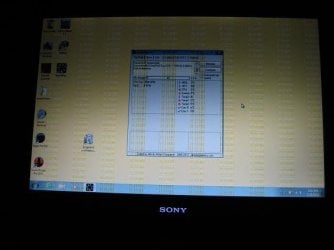
here's a couple more photos. The 1st one is as windows is booting what should be a black screen the other show temps after the boot as high as 57c.
 

Attachments

  • IMG_2547.JPG
    IMG_2547.JPG
    29.7 KB · Views: 5
  • IMG_2549.JPG
    IMG_2549.JPG
    26.7 KB · Views: 5

My Computer My Computer

OS
Window 7 home x64
CPU
AMD FX-8150 Zambezi 3.6GHz Socket AM3+
Motherboard
GIGABYTE GA-970A-UD3 AM3
Memory
G.SKILL Ripjaws X Series 8GB (2 x 4GB
Graphics Card(s)
SAPPHIRE 100328L Radeon HD 6770 1GB GDDR5
Sound Card
Asus xonar hdav 1.3 deluxe
Hard Drives
Seagate Barracuda ST31000524AS 1TB 7200 RPM SATA 6.0Gb/s
Case
Rosewill CHALLENGER Black Gaming ATX Mid Tower
Cooling
CORSAIR Hydro Series H60
I opened it back up and cleaned the dry thermo paste off, it was very dry and hard to get off. Both the cpu and gpu. It's running at 27c after the boot. Might be a start. I still have no idea why the lines stay on the screen.
 

My Computer My Computer

OS
Window 7 home x64
CPU
AMD FX-8150 Zambezi 3.6GHz Socket AM3+
Motherboard
GIGABYTE GA-970A-UD3 AM3
Memory
G.SKILL Ripjaws X Series 8GB (2 x 4GB
Graphics Card(s)
SAPPHIRE 100328L Radeon HD 6770 1GB GDDR5
Sound Card
Asus xonar hdav 1.3 deluxe
Hard Drives
Seagate Barracuda ST31000524AS 1TB 7200 RPM SATA 6.0Gb/s
Case
Rosewill CHALLENGER Black Gaming ATX Mid Tower
Cooling
CORSAIR Hydro Series H60
you should anyway replace the thermal paste... it should really help to mantain "cold" temperatures on your laptop's components.
 

My Computer My Computer

Computer type
PC/Desktop
yes that's what I did. I'm reinstalling windows. I still have the lines on the screen. I think when it reboots they will be gone.
 

My Computer My Computer

OS
Window 7 home x64
CPU
AMD FX-8150 Zambezi 3.6GHz Socket AM3+
Motherboard
GIGABYTE GA-970A-UD3 AM3
Memory
G.SKILL Ripjaws X Series 8GB (2 x 4GB
Graphics Card(s)
SAPPHIRE 100328L Radeon HD 6770 1GB GDDR5
Sound Card
Asus xonar hdav 1.3 deluxe
Hard Drives
Seagate Barracuda ST31000524AS 1TB 7200 RPM SATA 6.0Gb/s
Case
Rosewill CHALLENGER Black Gaming ATX Mid Tower
Cooling
CORSAIR Hydro Series H60
...good luck :confused:

keep in mind that the problem could be your GPU but also your screen...
 

My Computer My Computer

Computer type
PC/Desktop
I guess any thing is possible. To me it looks like something gets whacked with the drivers and not the screen. The lines change in between boot screens. Before when I restored to original OS the lines were gone. I'm in the middle of it now and they are still there.
I could live with the screen if I was sure the computer won't crash during a record session.


now the lines are horizontal
 

My Computer My Computer

OS
Window 7 home x64
CPU
AMD FX-8150 Zambezi 3.6GHz Socket AM3+
Motherboard
GIGABYTE GA-970A-UD3 AM3
Memory
G.SKILL Ripjaws X Series 8GB (2 x 4GB
Graphics Card(s)
SAPPHIRE 100328L Radeon HD 6770 1GB GDDR5
Sound Card
Asus xonar hdav 1.3 deluxe
Hard Drives
Seagate Barracuda ST31000524AS 1TB 7200 RPM SATA 6.0Gb/s
Case
Rosewill CHALLENGER Black Gaming ATX Mid Tower
Cooling
CORSAIR Hydro Series H60
NVIDA® GeForce® Go 8400M GT graphics card
 

My Computer My Computer

OS
Window 7 home x64
CPU
AMD FX-8150 Zambezi 3.6GHz Socket AM3+
Motherboard
GIGABYTE GA-970A-UD3 AM3
Memory
G.SKILL Ripjaws X Series 8GB (2 x 4GB
Graphics Card(s)
SAPPHIRE 100328L Radeon HD 6770 1GB GDDR5
Sound Card
Asus xonar hdav 1.3 deluxe
Hard Drives
Seagate Barracuda ST31000524AS 1TB 7200 RPM SATA 6.0Gb/s
Case
Rosewill CHALLENGER Black Gaming ATX Mid Tower
Cooling
CORSAIR Hydro Series H60
I loaded acronis boot disc to scrub the drive and even on that screen I get the lines. does that mean the bios is whacked?
 

My Computer My Computer

OS
Window 7 home x64
CPU
AMD FX-8150 Zambezi 3.6GHz Socket AM3+
Motherboard
GIGABYTE GA-970A-UD3 AM3
Memory
G.SKILL Ripjaws X Series 8GB (2 x 4GB
Graphics Card(s)
SAPPHIRE 100328L Radeon HD 6770 1GB GDDR5
Sound Card
Asus xonar hdav 1.3 deluxe
Hard Drives
Seagate Barracuda ST31000524AS 1TB 7200 RPM SATA 6.0Gb/s
Case
Rosewill CHALLENGER Black Gaming ATX Mid Tower
Cooling
CORSAIR Hydro Series H60
I think the graphics card has problems. I heard also that Nvidia 8000M-9000M series has a lot of issues on laptops, especially ehwn talking about overheating and lines on screen...
 

My Computer My Computer

Computer type
PC/Desktop
if that is the computer is junk? I don't see how to upgrade it.
 

My Computer My Computer

OS
Window 7 home x64
CPU
AMD FX-8150 Zambezi 3.6GHz Socket AM3+
Motherboard
GIGABYTE GA-970A-UD3 AM3
Memory
G.SKILL Ripjaws X Series 8GB (2 x 4GB
Graphics Card(s)
SAPPHIRE 100328L Radeon HD 6770 1GB GDDR5
Sound Card
Asus xonar hdav 1.3 deluxe
Hard Drives
Seagate Barracuda ST31000524AS 1TB 7200 RPM SATA 6.0Gb/s
Case
Rosewill CHALLENGER Black Gaming ATX Mid Tower
Cooling
CORSAIR Hydro Series H60
I think the graphics card has problems. I heard also that Nvidia 8000M-9000M series has a lot of issues on laptops, especially ehwn talking about overheating and lines on screen...
You were right about this. Google has been my friend again. I found many youtube videos with Sony’s as well as others with exactly the same issue. You can fix it temporarily by using a heat gun around the GPU. Some people take the MOBO out and bake it at 180deg for 10 min.

I used the heat gun and it did fix it. This is about a 3 month fix depending on how you use your computer. One guy cooked his 4 times and it’s still working.

It’s caused from poor solder used in the mid 2000’s and reheating it makes the solder re conform. It can be professionally fixed by re-flow of solder . Beware a less reputable shop could just reheat it and you would be none the wiser.
 
Last edited:

My Computer My Computer

OS
Window 7 home x64
CPU
AMD FX-8150 Zambezi 3.6GHz Socket AM3+
Motherboard
GIGABYTE GA-970A-UD3 AM3
Memory
G.SKILL Ripjaws X Series 8GB (2 x 4GB
Graphics Card(s)
SAPPHIRE 100328L Radeon HD 6770 1GB GDDR5
Sound Card
Asus xonar hdav 1.3 deluxe
Hard Drives
Seagate Barracuda ST31000524AS 1TB 7200 RPM SATA 6.0Gb/s
Case
Rosewill CHALLENGER Black Gaming ATX Mid Tower
Cooling
CORSAIR Hydro Series H60
Back
Top