Sort folders and files differently

jseh

New member
Local time
8:19 AM
Messages
13
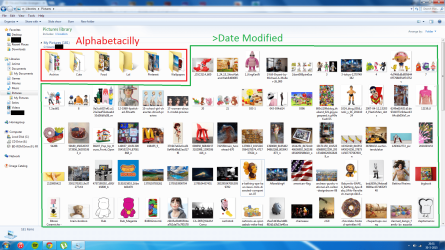
Is it possible to sort your folders alphabetically while at the same time sorting your files on date?
I want to do this(see picture)
 

Attachments

  • organize1.png
    organize1.png
    365.3 KB · Views: 8

My Computer

Computer type
PC/Desktop
OS
Windows 7 Ultimate 64-bit
CPU
Intel Core i5 3470 @ 3.20GHz
Graphics Card(s)
AMD Radeon HD 7800 Series
Antivirus
AVG 2015
I never heard of split criteria. You could investigate the 3rd party file managers like Directory Opus, FreeCommander, Total Commander, Q-Dir etc..

If not mixed in one view a multi-tabbed file manager has the advantage you can set different sort and details for the same root folder and have the views come up together. Some file managers you can save tabs as a set or layout.

Edit: Also you could turn on the Treeview to see the folders on the left. There are Explorer enhancers like QTTabBar that add multiple pane capability to Explorer.
 

My Computer

Computer Manufacturer/Model Number
HP Media Center
OS
Windows 7 32 bit
CPU
AMD 5200+ dual core
Memory
2 GB
Graphics Card(s)
NVidia GeForce 6150SE 128 MB
Monitor(s) Displays
CRT
Screen Resolution
1280x1024
Hard Drives
500 GB Sata internal :

SIIG USB 3.0 docking stations w/WD Caviar Black 6 Gb/s drives
Keyboard
PS/2
Mouse
PS/2 Wheel Mouse
Other Info
SIIG USB 3.0 PCIexpress card.
This turns out to be real easy.

Open Windows Explorer.
Navigate to the folder you want to look at.
Click on the 1st column header you want to sort by, like Type.
The files and folders will be sorted by file type.
Now hold the Shift key and click on another column header, like Date.
The files and folders will be sorted by date while maintaining the grouping caused by the Type sort.

Don't know where I originally found this so can't provide proper attribution, sorry.

 

My Computer

Computer type
PC/Desktop
Computer Manufacturer/Model Number
Lenovo IdeaCenter 450
OS
Windows 10 Pro X64
CPU
Intel Quad Core i7-4770 @ 3.4Ghz
Memory
16.0GB PC3-12800 DDR3 SDRAM 1600 MHz
Graphics Card(s)
Intel Integrated HD Graphics
Sound Card
Realtek HD Audio
Monitor(s) Displays
HP 22" LCD
Screen Resolution
1680 x 1050
Hard Drives
250GB Samsung EVO SATA-3 SSD
2TB Seagate ST2000DM001 SATA-2
1.5TB Seagate ST3150041AS SATA
Keyboard
Dell USB
Mouse
Lenovo USB
Internet Speed
Cable via Road Runner 3MB Upload, 30MB Download
Antivirus
Windows Defender, MBAM Pro, MBAE
Browser
Seamonkey
Other Info
UEFI/GPT
PLDS DVD-RW DH16AERSH
"Group by" and "Sort by"

You can also choose "Group by" and "Sort by" from the Context menu.

I assume that is what Ztruker's trick does.
Click on picture for animation

198111d1329113324-there-way-disable-default-copy-when-you-highlight-items-details-sort-group.gif

 
Last edited:

My Computer

Computer type
PC/Desktop
Computer Manufacturer/Model Number
n/a
OS
W7 Ultimate SP1, LM19.2 MATE, W10 Home 1703, W10 Pro 1703 VM, #All 64 bit
CPU
AMD Phenom II x6 1100T, 3.3 GHz
Motherboard
ASUS M4A88T-M/USB3 (AM3)
Memory
12GB DDR3 1333 G-Skill (4GB x 2), G-Skill (2GB x 2)
Graphics Card(s)
NVIDIA GeForce GTX 660
Sound Card
Realtek?
Monitor(s) Displays
Samsung S23B350
Screen Resolution
1920x1080
Hard Drives
WD Green 2TB (SATA), WD Green 3TB (SATA), WD Blue 4TB (SATA), WD Blue 6TB (SATA)
PSU
Cooler Master
Case
Antec GX300 Tower
Cooling
3x Antec TRICOOL 120mm Fans
Mouse
Wired Optical
Internet Speed
DSL
Antivirus
Avast
Browser
Pale Moon (64 bit)
Other Info
2018-12-27 Upgraded HDDs
2015-12-10 Upgraded case, graphics card, storage
2015-08-15 Upgraded motherboard & RAM
2015-07-15 Upgraded LM17.1 to LM17.2
This turns out to be real easy.

Open Windows Explorer.
Navigate to the folder you want to look at.
Click on the 1st column header you want to sort by, like Type.
The files and folders will be sorted by file type.
Now hold the Shift key and click on another column header, like Date.
The files and folders will be sorted by date while maintaining the grouping caused by the Type sort.

Don't know where I originally found this so can't provide proper attribution, sorry.
I didn't know about the shift key option. :cool:

But I don't think it does what the OP asked. He wanted the files sorted by mod date while the folders remained sorted by name. When I follow your procedure I get folders and files sorted by mod date with the folders at the top(not sorted by name anymore.)
 

My Computer

Computer Manufacturer/Model Number
HP Media Center
OS
Windows 7 32 bit
CPU
AMD 5200+ dual core
Memory
2 GB
Graphics Card(s)
NVidia GeForce 6150SE 128 MB
Monitor(s) Displays
CRT
Screen Resolution
1280x1024
Hard Drives
500 GB Sata internal :

SIIG USB 3.0 docking stations w/WD Caviar Black 6 Gb/s drives
Keyboard
PS/2
Mouse
PS/2 Wheel Mouse
Other Info
SIIG USB 3.0 PCIexpress card.
After re-reading the original post I agree, not quite what the OP wanted. I don't think it's doable with anything native to Windows.
 

My Computer

Computer type
PC/Desktop
Computer Manufacturer/Model Number
Lenovo IdeaCenter 450
OS
Windows 10 Pro X64
CPU
Intel Quad Core i7-4770 @ 3.4Ghz
Memory
16.0GB PC3-12800 DDR3 SDRAM 1600 MHz
Graphics Card(s)
Intel Integrated HD Graphics
Sound Card
Realtek HD Audio
Monitor(s) Displays
HP 22" LCD
Screen Resolution
1680 x 1050
Hard Drives
250GB Samsung EVO SATA-3 SSD
2TB Seagate ST2000DM001 SATA-2
1.5TB Seagate ST3150041AS SATA
Keyboard
Dell USB
Mouse
Lenovo USB
Internet Speed
Cable via Road Runner 3MB Upload, 30MB Download
Antivirus
Windows Defender, MBAM Pro, MBAE
Browser
Seamonkey
Other Info
UEFI/GPT
PLDS DVD-RW DH16AERSH
Back
Top