SP1 fails to download

Ran disk cleanup with system files option, no change. Will not download even one KB of SP1
 

My Computer My Computer

At a glance

win7 64bit ultimatejdcarrolljdcarrolljdcarroll
Computer Manufacturer/Model Number
jdcarroll
OS
win7 64bit ultimate
CPU
jdcarroll
Motherboard
jdcarroll
Memory
jdcarroll
Graphics Card(s)
jdcarroll
Sound Card
jdcarroll
Monitor(s) Displays
jdcarroll
Hard Drives
jdcarroll
PSU
jdcarroll
Case
jdcarroll
Cooling
jdcarroll
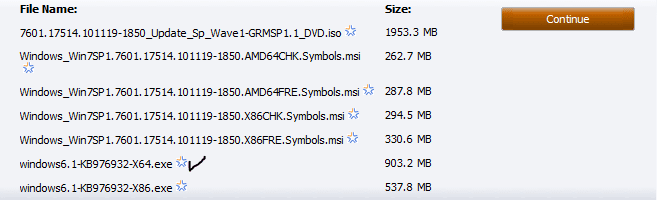
Is it possible to download just the SP1 64bit from the manual site and if so how?
 

My Computer My Computer

At a glance

win7 64bit ultimatejdcarrolljdcarrolljdcarroll
Computer Manufacturer/Model Number
jdcarroll
OS
win7 64bit ultimate
CPU
jdcarroll
Motherboard
jdcarroll
Memory
jdcarroll
Graphics Card(s)
jdcarroll
Sound Card
jdcarroll
Monitor(s) Displays
jdcarroll
Hard Drives
jdcarroll
PSU
jdcarroll
Case
jdcarroll
Cooling
jdcarroll
One more thing, Open Internet Explorer. Click on "Tools" in the upper right of the page. Click on "Internet Options". Then in the "Browsing History" section, click on the delete tab. Then Apply, then OK.
 

My Computer My Computer

At a glance

Windows 8 ProIntel Centrino Dual Core P7450 2.13GHz4gbATI Mobility Raedon HD3650
Computer Manufacturer/Model Number
Toshiba P300
OS
Windows 8 Pro
CPU
Intel Centrino Dual Core P7450 2.13GHz
Memory
4gb
Graphics Card(s)
ATI Mobility Raedon HD3650
Hard Drives
Toshiba MK3252GSX ATA
Internet Speed
Wish it were faster

Attachments

  • Capture 4.PNG
    Capture 4.PNG
    5.8 KB · Views: 24

My Computer My Computer

At a glance

Windows 8 ProIntel Centrino Dual Core P7450 2.13GHz4gbATI Mobility Raedon HD3650
Computer Manufacturer/Model Number
Toshiba P300
OS
Windows 8 Pro
CPU
Intel Centrino Dual Core P7450 2.13GHz
Memory
4gb
Graphics Card(s)
ATI Mobility Raedon HD3650
Hard Drives
Toshiba MK3252GSX ATA
Internet Speed
Wish it were faster
Ok, cleaned all browsing and ran CCleaner just to make sure. No change
 

My Computer My Computer

At a glance

win7 64bit ultimatejdcarrolljdcarrolljdcarroll
Computer Manufacturer/Model Number
jdcarroll
OS
win7 64bit ultimate
CPU
jdcarroll
Motherboard
jdcarroll
Memory
jdcarroll
Graphics Card(s)
jdcarroll
Sound Card
jdcarroll
Monitor(s) Displays
jdcarroll
Hard Drives
jdcarroll
PSU
jdcarroll
Case
jdcarroll
Cooling
jdcarroll
Ok , I assumed that was the one but how do i pick just that one, I do not see the download button on this page?
 

My Computer My Computer

At a glance

win7 64bit ultimatejdcarrolljdcarrolljdcarroll
Computer Manufacturer/Model Number
jdcarroll
OS
win7 64bit ultimate
CPU
jdcarroll
Motherboard
jdcarroll
Memory
jdcarroll
Graphics Card(s)
jdcarroll
Sound Card
jdcarroll
Monitor(s) Displays
jdcarroll
Hard Drives
jdcarroll
PSU
jdcarroll
Case
jdcarroll
Cooling
jdcarroll
Never mind, just had to run validation. Manuel download is running now and I am saving the file just incase.
 

My Computer My Computer

At a glance

win7 64bit ultimatejdcarrolljdcarrolljdcarroll
Computer Manufacturer/Model Number
jdcarroll
OS
win7 64bit ultimate
CPU
jdcarroll
Motherboard
jdcarroll
Memory
jdcarroll
Graphics Card(s)
jdcarroll
Sound Card
jdcarroll
Monitor(s) Displays
jdcarroll
Hard Drives
jdcarroll
PSU
jdcarroll
Case
jdcarroll
Cooling
jdcarroll
Got to love Service Packs man....

Ever since XP SP2, I automatically just do a clean install, and slap the service pack straight on. A lot less headaches that way.

I must say I can't remember them not even wanting to download though. :rolleyes:
 

My Computer My Computer

At a glance

Windows 8 ProIntel Centrino Dual Core P7450 2.13GHz4gbATI Mobility Raedon HD3650
Computer Manufacturer/Model Number
Toshiba P300
OS
Windows 8 Pro
CPU
Intel Centrino Dual Core P7450 2.13GHz
Memory
4gb
Graphics Card(s)
ATI Mobility Raedon HD3650
Hard Drives
Toshiba MK3252GSX ATA
Internet Speed
Wish it were faster
I'm crossing my fingers for you. :cool: Hopefully I wake up in the morning and you have everything installed and running smoothly.
 

My Computer My Computer

At a glance

Windows 8 ProIntel Centrino Dual Core P7450 2.13GHz4gbATI Mobility Raedon HD3650
Computer Manufacturer/Model Number
Toshiba P300
OS
Windows 8 Pro
CPU
Intel Centrino Dual Core P7450 2.13GHz
Memory
4gb
Graphics Card(s)
ATI Mobility Raedon HD3650
Hard Drives
Toshiba MK3252GSX ATA
Internet Speed
Wish it were faster
One more thing, It wouldn't be a bad idea to run a quick defrag before you installed this. You did probably clear out a heap of temporary system files.
 

My Computer My Computer

At a glance

Windows 8 ProIntel Centrino Dual Core P7450 2.13GHz4gbATI Mobility Raedon HD3650
Computer Manufacturer/Model Number
Toshiba P300
OS
Windows 8 Pro
CPU
Intel Centrino Dual Core P7450 2.13GHz
Memory
4gb
Graphics Card(s)
ATI Mobility Raedon HD3650
Hard Drives
Toshiba MK3252GSX ATA
Internet Speed
Wish it were faster
I finally got SP1 downloaded and saved from the manual site. When I tried to run it it errored out and asked that I run the SUR . So far it has been running about that about an hour. I will just let it run for a while and try again. Will report back
jd
 

My Computer My Computer

At a glance

win7 64bit ultimatejdcarrolljdcarrolljdcarroll
Computer Manufacturer/Model Number
jdcarroll
OS
win7 64bit ultimate
CPU
jdcarroll
Motherboard
jdcarroll
Memory
jdcarroll
Graphics Card(s)
jdcarroll
Sound Card
jdcarroll
Monitor(s) Displays
jdcarroll
Hard Drives
jdcarroll
PSU
jdcarroll
Case
jdcarroll
Cooling
jdcarroll
SPI will not install. I get the error message TRUST_E_NOSIGNATURE(0x800b0100)
 

My Computer My Computer

At a glance

win7 64bit ultimatejdcarrolljdcarrolljdcarroll
Computer Manufacturer/Model Number
jdcarroll
OS
win7 64bit ultimate
CPU
jdcarroll
Motherboard
jdcarroll
Memory
jdcarroll
Graphics Card(s)
jdcarroll
Sound Card
jdcarroll
Monitor(s) Displays
jdcarroll
Hard Drives
jdcarroll
PSU
jdcarroll
Case
jdcarroll
Cooling
jdcarroll
Hi, JD.

You are making progress, although it may not seem so.

That error is listed in Description of the System Update Readiness Tool for Windows Vista, for Windows Server 2008, for Windows 7, and for Windows Server 2008 R2 as included in "What Windows Update installation errors can the System Update Readiness Tool potentially address":

The following table lists error messages that you might receive when you try to install a software update. These errors might be caused by a system irregularity that the System Update Readiness Tool might be able to resolve. However, the tool might be unable to fix all instances in which these errors occur.

Since the tool ran for so long, it sounds as though it attempted to fix the error -- although what "No signature was present in the subject." means, I have no clue! I suggest running the SUR again. Then make sure MSE, the firewall and any anti-malware software are disabled.
 

My Computer My Computer

At a glance

Windows 7 & Windows Vista Ultimate
OS
Windows 7 & Windows Vista Ultimate
The SUR is attempting to install Hotfix KB947821 which shows as already being installed. I have googled the no signature piece but have not found a solution yet. Thanks again to you and all the other awesome talent here who are willing to share their time and expertise. I'll just have to keep digging.
jd
 

My Computer My Computer

At a glance

win7 64bit ultimatejdcarrolljdcarrolljdcarroll
Computer Manufacturer/Model Number
jdcarroll
OS
win7 64bit ultimate
CPU
jdcarroll
Motherboard
jdcarroll
Memory
jdcarroll
Graphics Card(s)
jdcarroll
Sound Card
jdcarroll
Monitor(s) Displays
jdcarroll
Hard Drives
jdcarroll
PSU
jdcarroll
Case
jdcarroll
Cooling
jdcarroll
This post mirrors my experience exactly. Same errors, I had no problems installing beta and later SP1 RC it appears that the problem is being caused after removing the RC. Checksur log references KB976933 whick is a language pack. God knows why this should cause a problem with downloading SP or installing standalone version of SP. All other updates are working fine from windows update. Why cant microsoft have their packages give a literal description of why update is not proceeding? I have never used drive cleaner or any reg cleaners. I want to resolve the problem rather than doing a reinstall. Other forums just go in circles with people posting how they had no problems, this dosen't help those that are.
 

My Computer My Computer

At a glance

Windows 7 32bitDual Core 3.22 gigNVidia 220
OS
Windows 7 32bit
CPU
Dual Core 3.2
Motherboard
Gigabyte
Memory
2 gig
Graphics Card(s)
NVidia 220
Sound Card
On Board
Monitor(s) Displays
LG
Hard Drives
Seagate Sata
PSU
500
Case
Antec
I'm not sure where to go next with this problem but I too have had a full day of it.
jd
 

My Computer My Computer

At a glance

win7 64bit ultimatejdcarrolljdcarrolljdcarroll
Computer Manufacturer/Model Number
jdcarroll
OS
win7 64bit ultimate
CPU
jdcarroll
Motherboard
jdcarroll
Memory
jdcarroll
Graphics Card(s)
jdcarroll
Sound Card
jdcarroll
Monitor(s) Displays
jdcarroll
Hard Drives
jdcarroll
PSU
jdcarroll
Case
jdcarroll
Cooling
jdcarroll
How opposed are you to just backing up all of your data, wiping the hard drive and clean installing Windows from scratch.

My theory is, you can get this done maybe in less time than actually sorting this problem out. A SP installed on a fresh install of Windows is the way to go in my book.

I know it seems like a daunting procedure but I'll break it down like this.

1 hour backing up your important files and data.
45 minutes installing Windows on a clean drive.
25 Minutes installing the service pack. (Just make sure your PC is connected to the net as you start the install)
Install the programs as you need them(This does not need to be done all in one hit)


Let me know what you think about this.
 

My Computer My Computer

At a glance

Windows 8 ProIntel Centrino Dual Core P7450 2.13GHz4gbATI Mobility Raedon HD3650
Computer Manufacturer/Model Number
Toshiba P300
OS
Windows 8 Pro
CPU
Intel Centrino Dual Core P7450 2.13GHz
Memory
4gb
Graphics Card(s)
ATI Mobility Raedon HD3650
Hard Drives
Toshiba MK3252GSX ATA
Internet Speed
Wish it were faster
Oh and if you decide to do the clean install, don't even activate Windows Updates.

You have the standalone installer already.

The reason you should be connected to the net when you install the standalone installer is because it will access the files needed from the servers prior to the installation.

I went this route and my PC is running really snappy at the moment. You won't regret the time invested with the final outcome.

When the SP is installed successfuly, run Windows Backup and create a fresh Imge of your installation. You will have a clean install to restore if you ever have to, and when SP2 is released, you can reload the fresh image and load SP2 straight on top of that.
 

My Computer My Computer

At a glance

Windows 8 ProIntel Centrino Dual Core P7450 2.13GHz4gbATI Mobility Raedon HD3650
Computer Manufacturer/Model Number
Toshiba P300
OS
Windows 8 Pro
CPU
Intel Centrino Dual Core P7450 2.13GHz
Memory
4gb
Graphics Card(s)
ATI Mobility Raedon HD3650
Hard Drives
Toshiba MK3252GSX ATA
Internet Speed
Wish it were faster
The problems mentioned by the "The Servicing Guy", a MSFT Windows support engineer, regarding 0x800b0100 for SP2 for Windows 2008 seem to echo what Gary1951 said:


  • At some point the beta or RC version of the Service Pack was installed and needs to be removed
  • Another package hasnt finished installing properly and needs to be finalized.
  • The actual servicing stack is corrupted and cannot be repaired.
Following electrotune1200's suggestion may indeed be the best option at this point. Another option is a Repair Install.

If you are not ready to go that route, free unlimited installation and compatibility support is available for issues related to Windows 7 Service Packs from Microsoft. Availability of chat, phone or e-mail support differs depending on your geographic location. Some issues may require more advanced support for which there may be a charge. (Note: If you select Other, please have your Product Identification Number available as it will be needed to determine if no-charge support is available)

https://support.microsoft.com/oas/default.aspx?&gprid=14496&&st=1&wfxredirect=1&sd=gn

It will be helpful to provide "C:\Windows\Logs\CBS" resulting from running the System Update Readiness Tool. You will need to copy all the files to your document folder (otherwise you can't upload it), zip all files into 1 ZIP file. If the zip file is too large to attach to your support request, upload the zip file to your SkyDrive and include the file name and link in your support request.
 

My Computer My Computer

At a glance

Windows 7 & Windows Vista Ultimate
OS
Windows 7 & Windows Vista Ultimate
Why doesn't this affect other downloads or installs? You should simply be able to reinstall the package that is causing the problem. Why is a language pack so important to install a SP? This very same error appeared back with vista sp upgrades' was it resolved then? if not that is why the problem persists and telling people to do a clean install is a cop out.
Microsoft must be aware by now as to what was removed by deleting sp1 RC. Just tell us what needs to be fixed.
 

My Computer My Computer

At a glance

Windows 7 32bitDual Core 3.22 gigNVidia 220
OS
Windows 7 32bit
CPU
Dual Core 3.2
Motherboard
Gigabyte
Memory
2 gig
Graphics Card(s)
NVidia 220
Sound Card
On Board
Monitor(s) Displays
LG
Hard Drives
Seagate Sata
PSU
500
Case
Antec
Back
Top