Solved Speech Recognition Error.

expo703

New member
Local time
4:33 PM
Messages
31
I noticed there's some issues with this but could not fine a resolution. When i first installed Windows 7 I ran the Tutorial for Speech Recognition and it worked perfect... I also used it for awhile and it worked perfect , then i rebooted and was installing stuff i dont remmeber what... but since i just updated i installed alot of stuff... I disabled speech recognition to auto-start when windows booted up and ever since i get this error...

When i try to open speech recognition you can see it pop open for a quick second up top and then i get this...

"SPEECH RECOGNITION COULD NOT START BECAUSE THE LANGUAGE CONFIGURATION IS NOT SUPPORTED.....THE RECOGNIZER LANGUAGE MUST MATCH THE LANGUAGE OF THE USER INTERFACE. PLEASE CHANGE THE RECOGNIZER LANGUAGE IN THE SPEECH RECOGNITION CONTROL PANEL UNDER ADVANCED OPTIONS"

Now.... i'm not a total idiot and it was set to US the whole time... and this Windows 7 Beta 7000 32 bit English...oh and all the other speech regonistion otpions work such as tutorial and Train the computer to better understand you (yeah i sat there and read the whole thing for about 5 mins and it worked perfect)...

I'm not the only one with this issue... i have a Creative X-FI new beta drivers... for windows 7.. Nvidia 9600 GT . Q6600 Intel and ASUS P5K mobo..

HELP?
Thanks
John
 

My Computer

OS
Windows 7
BUMP... how can it work perfect for over an hour and then stop all the sudden!!
 

My Computer

OS
Windows 7
Hi expo703 and welcome to the forum!

I've tried using the speech recognition on my system which have loads of programs installed. No problems encountered.
The issues you have is a tricky one.
Please try using CCleaner, found here and post here, run the registry scan and cleaner, restart.
See if this solves it.
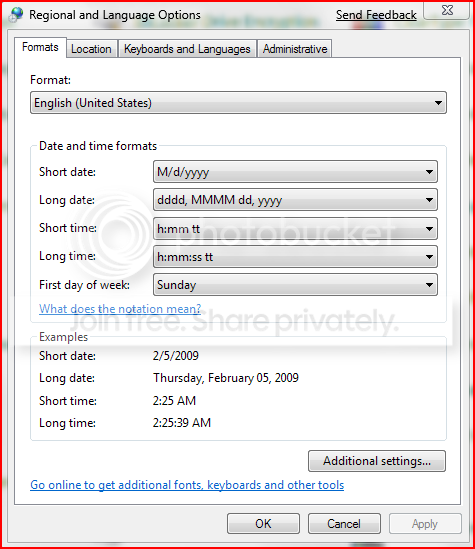
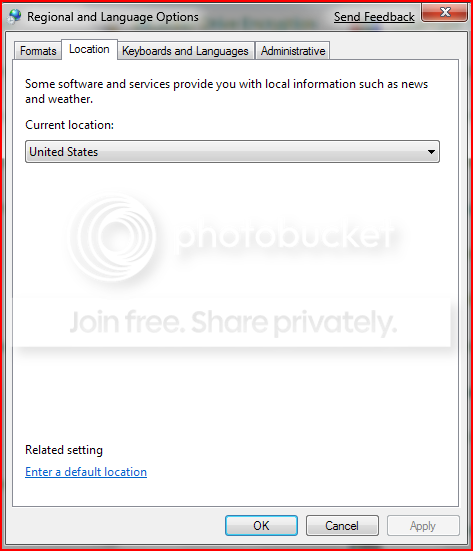
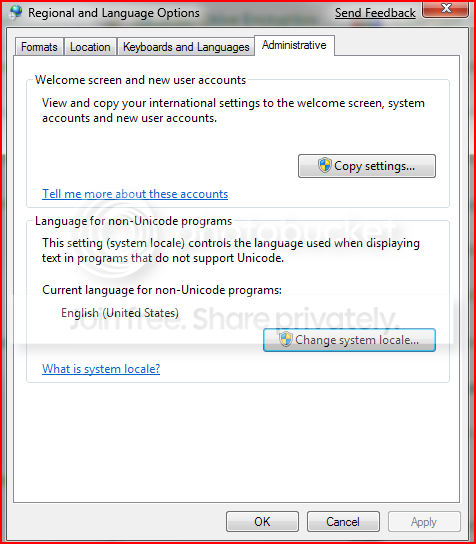
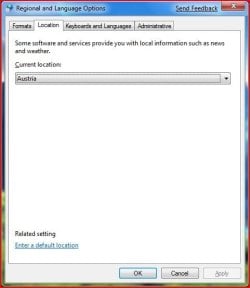
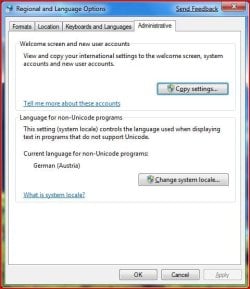
Next steps, verify the following in Control Panel > Regional and Language Settings;
Capture-2.png

Capture1.png

Capture2-1.png

Making sure that everything is set correctly.
After making the necessary adjustments if any was made, restart.
Go back and try to activate Speech Recognition.

Now, if all else fail, I'd recommend doing a Repair Install.

Please let us know how this works out ;)
 

My Computer

Computer Manufacturer/Model Number
Custom Build
OS
Windows 7 Build 7048 x64
CPU
Athlon 64 X2 Dual Core 4600+
Motherboard
EMX-AMD750G-PRO
Memory
4 x 1GB Kingston 400MHz 6-6-6-18 (800MHz)
Graphics Card(s)
ATI Radeon 3650
Sound Card
Realtek HD Audio
Monitor(s) Displays
22" AOC 2216Vw
Screen Resolution
1680x1050
Cooling
Arctic Cooling Freezer 64 Pro PWM
Keyboard
Generic Enhanced Natural Keyboard
Mouse
Logitech VX Nano
Other Info
Edifier M1550
"SPEECH RECOGNITION COULD NOT START BECAUSE THE LANGUAGE CONFIGURATION IS NOT SUPPORTED.....THE RECOGNIZER LANGUAGE MUST MATCH THE LANGUAGE OF THE USER INTERFACE. PLEASE CHANGE THE RECOGNIZER LANGUAGE IN THE SPEECH RECOGNITION CONTROL PANEL UNDER ADVANCED OPTIONS"

Honestly, I'm not really sure if that error message is accurate.

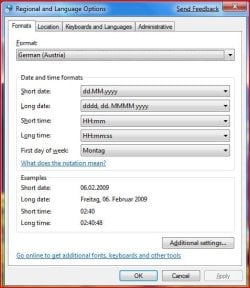
I'm using Speech Recognition without any problems using the following settings:
Formats: German (Austria)
Location: Austria
Language for non-Unicode programs: German

Installed keyboard layouts:
German (Austria)
Korean (Korean)
English (US)
 

Attachments

  • region1.JPG
    region1.JPG
    46.1 KB · Views: 196
  • region2.JPG
    region2.JPG
    32.1 KB · Views: 174
  • region3.JPG
    region3.JPG
    43 KB · Views: 169

My Computer

Computer Manufacturer/Model Number
Acer Aspire 1692
OS
XP pro, Win7 Ultimate x86
CPU
Pentium M 1.73GHz
Memory
2GB Samsung DDR2 667
Graphics Card(s)
ATI Mobility Radeon X700 64MB
Sound Card
Conexant AC-Link Audio
Screen Resolution
1280x800
NOTaccurate? i typed it out perfectly and there are many ppl who have this issue its not just me......All my settings are fine, everythings on USA/English... I have CC cleaner already and have ran it.. I do not think i have to repair this is a brand new install 100% perfect not even a upgrade clean isntall from XP. It worked 100% fine till i rebooted and then just stopps working...
 

My Computer

OS
Windows 7
Hey expo703,
I think you misunderstood. I only meant to say, that maybe the error message itself doesn't state the problem correctly. Or not all of it, whatever.

My point simply was, that, although I'm not at all using the settings suggested by NosferatuX, I'm having no problems using speech recognition with the English beta build. So it might be something else causing your problem.
 

My Computer

Computer Manufacturer/Model Number
Acer Aspire 1692
OS
XP pro, Win7 Ultimate x86
CPU
Pentium M 1.73GHz
Memory
2GB Samsung DDR2 667
Graphics Card(s)
ATI Mobility Radeon X700 64MB
Sound Card
Conexant AC-Link Audio
Screen Resolution
1280x800
Just an idea. You could try changing the locale to a different one, restart, change it back to your preferred locale and see if this sorts out your problem. The idea behind that is to just make sure that the locale settings on your system are properly applied as it might have been messed up somewhere either by another program or could be anything else as what killercat has suggested. Might be worth a try ;)
 

My Computer

Computer Manufacturer/Model Number
Custom Build
OS
Windows 7 Build 7048 x64
CPU
Athlon 64 X2 Dual Core 4600+
Motherboard
EMX-AMD750G-PRO
Memory
4 x 1GB Kingston 400MHz 6-6-6-18 (800MHz)
Graphics Card(s)
ATI Radeon 3650
Sound Card
Realtek HD Audio
Monitor(s) Displays
22" AOC 2216Vw
Screen Resolution
1680x1050
Cooling
Arctic Cooling Freezer 64 Pro PWM
Keyboard
Generic Enhanced Natural Keyboard
Mouse
Logitech VX Nano
Other Info
Edifier M1550
Locale you mean my location under control pannel> regional settings > location.. to say EU and reboot and then see if it works?
 

My Computer

OS
Windows 7
THAT WORKED SPREAD THE WORD :} I SWITCHED my location to austria rebooted.. and it worked... i switched it back to USA rebooted and it worked!! THANKX
 

My Computer

OS
Windows 7
Glad to hear that expo703!

My apologies to reply only now, I was out this weekend ;)
 

My Computer

Computer Manufacturer/Model Number
Custom Build
OS
Windows 7 Build 7048 x64
CPU
Athlon 64 X2 Dual Core 4600+
Motherboard
EMX-AMD750G-PRO
Memory
4 x 1GB Kingston 400MHz 6-6-6-18 (800MHz)
Graphics Card(s)
ATI Radeon 3650
Sound Card
Realtek HD Audio
Monitor(s) Displays
22" AOC 2216Vw
Screen Resolution
1680x1050
Cooling
Arctic Cooling Freezer 64 Pro PWM
Keyboard
Generic Enhanced Natural Keyboard
Mouse
Logitech VX Nano
Other Info
Edifier M1550
The same error used to occur in Vista. I spent a week training the voice recognition only to lose it all after a reboot :rolleyes:

Once the novelty wears off. It's not worth the hassle ;)
 

My Computer

Computer type
PC/Desktop
Computer Manufacturer/Model Number
Systems by SmartEyeball
OS
8 Pro x64
CPU
i7 3770K 4.6GHz
Motherboard
ASUS P8Z77 WS
Memory
16GB G.Skill Trident X 2666mhz
Graphics Card(s)
x2 EVGA 780 Ti Superclocked SLI
Sound Card
SB X-FI Surround 5.1 PRO USB / ATH-AD900 Headphones
Monitor(s) Displays
x3 Dell U2410 / 58" Samsung
Screen Resolution
5760*1200/ 1920*1200
Hard Drives
2x Intel 520 240GB (RAID 0) * 2x WD Caviar Blacks 2TB (RAID 0) * 2TB WD Caviar Black * Sony Optirac DVD
PSU
Silverstone Strider Evolution 1200W
Case
Thermaltake Level 10 GT Snow Edition
Cooling
Noctua NH-D14
Keyboard
Topre Realforce // Ducky Shine MX Black // Filco Ninja TKL
Mouse
Thermaltake Theron (Highly Recommended) + Razer Imperator
Antivirus
MSE
Browser
IE, FF, WaterFox
Other Info
GT Extreme V2 Sim Racing Cockpit + 40" LCD and K/B Mouse stand ▼
Fanatec CSR Elite Wheel + Clubsport V1 Pedals + CSR shifter/7G-H ▼Saitek X52 Pro ▼ TrackIR 5 Pro
Buttkicker v2 Seat Rumbler with Dedicated 5.1 and Sub Woofer attached to frame ▼
=
Bloody Big Grin
The same error used to occur in Vista. I spent a week training the voice recognition only to lose it all after a reboot :rolleyes:

Once the novelty wears off. It's not worth the hassle ;)


haha, yea, only i had these thoughts back in the whistler days ;)
 

My Computer

Computer Manufacturer/Model Number
CUSTOM
OS
XP/win7 x86 build 7127
CPU
Athlon64 X2 DUAL 4200+ 2.21ghz
Motherboard
ASUS K8 PRO SLI
Memory
2GB Dual Chan DDR2 Corsair
Graphics Card(s)
Nvidia 6800GT
Sound Card
nvidia
Monitor(s) Displays
19' LCD
Screen Resolution
1280x1024
Hard Drives
WD 250, 2x500, 2x1TB IDE/USB
WD 250 SATA (system)
SEAGATE 120 Sata
PSU
coolermaster 450
Case
SUPERFLOWER
Cooling
1 HDD bay fan, 5x80mm Case Fans, AEROGATE II Fan/Temp
Keyboard
MS wireless
Mouse
MS Wireless
Internet Speed
fassssssssst
Hi all,

i've the same problem of expo 703, i've tried to change the setup language but i doesn't work i'm italian i've install the OS in english, could you please help me????
 

My Computer

OS
windows7
Great, I can add a "me too".

Win 7 Pro x86 EN-US
Formats: German (Austria)
Location: Austria
Keyboard: German (Austria) [default], English (US)
System Locale: German (Austria)

I tried various combinations (rebooting every time) but still I can't get speech recognition to start. Hardware-wise everything seems to be okay as I can complete the tutorial. IIRC Vista Business worked on this machine with the same locale settings.
 

My Computer

OS
Windows 7 RTM
It does NOT work with my Windows 7, 64 bit.
All the lessons work fine and type out without error. But in real life it does NOT work.
Do any of you use it with 64 BIT?????????
 

My Computer

Computer Manufacturer/Model Number
HP Q8200
OS
windows 7
CPU
Intel Q8200
Motherboard
Plegarion
Memory
8GB
Graphics Card(s)
NVDA 9400GT
Sound Card
built in
Monitor(s) Displays
HP 17"
Screen Resolution
max
Hard Drives
3HD, i internal, 2 external
Keyboard
MS Wireless
Mouse
MS wireless
Internet Speed
22MB up, 4GB down Comcast
I noticed there's some issues with this but could not fine a resolution. When i first installed Windows 7 I ran the Tutorial for Speech Recognition and it worked perfect... I also used it for awhile and it worked perfect , then i rebooted and was installing stuff i dont remmeber what... but since i just updated i installed alot of stuff... I disabled speech recognition to auto-start when windows booted up and ever since i get this error...

When i try to open speech recognition you can see it pop open for a quick second up top and then i get this...

"SPEECH RECOGNITION COULD NOT START BECAUSE THE LANGUAGE CONFIGURATION IS NOT SUPPORTED.....THE RECOGNIZER LANGUAGE MUST MATCH THE LANGUAGE OF THE USER INTERFACE. PLEASE CHANGE THE RECOGNIZER LANGUAGE IN THE SPEECH RECOGNITION CONTROL PANEL UNDER ADVANCED OPTIONS"

Now.... i'm not a total idiot and it was set to US the whole time... and this Windows 7 Beta 7000 32 bit English...oh and all the other speech regonistion otpions work such as tutorial and Train the computer to better understand you (yeah i sat there and read the whole thing for about 5 mins and it worked perfect)...

I'm not the only one with this issue... i have a Creative X-FI new beta drivers... for windows 7.. Nvidia 9600 GT . Q6600 Intel and ASUS P5K mobo..

HELP?
Thanks
John

I have the same problem. Fast machine, plenty of RAM. 23 years at IBM. Windows 7, 64 bit.
 

My Computer

Computer Manufacturer/Model Number
HP Q8200
OS
windows 7
CPU
Intel Q8200
Motherboard
Plegarion
Memory
8GB
Graphics Card(s)
NVDA 9400GT
Sound Card
built in
Monitor(s) Displays
HP 17"
Screen Resolution
max
Hard Drives
3HD, i internal, 2 external
Keyboard
MS Wireless
Mouse
MS wireless
Internet Speed
22MB up, 4GB down Comcast
I think MS never got it to work with their OWN 64 bit windows7.
 

My Computer

Computer Manufacturer/Model Number
HP Q8200
OS
windows 7
CPU
Intel Q8200
Motherboard
Plegarion
Memory
8GB
Graphics Card(s)
NVDA 9400GT
Sound Card
built in
Monitor(s) Displays
HP 17"
Screen Resolution
max
Hard Drives
3HD, i internal, 2 external
Keyboard
MS Wireless
Mouse
MS wireless
Internet Speed
22MB up, 4GB down Comcast
SOLVED

Hi,
the simpile answer to the question is:
Put the orignal CD/DVD in the drive:
1. Press install
2. press update

no settings will be changed it will take about an hour

Good luck
(i have Windows Proffsianal):geek::geek::geek:
 

My Computer

OS
windows 7
I, like so many others, went through dozens of posts about this problem. My conclusion is that it is limited to 64 bit versions of Win 7, but that's just my opinion.

I tried everything I read... switched languages, reboot, switch back, etc.

Lots of stuff was suggested. I resisted putting the original Windows 7 install disc into my drive. Ugh, a re0-install of some sort. Great.

Finally, after exhausting all of the suggestions that were posted, I chucked my windows seven installed desk into my drive. I performed the installation that did not completely erase my current windows installation. It will be obvious to you when you have to make that choice.

I am quite happy to be able to dictate this post to you! It completely fixed my inability to start speech recognition AND it had no apparent impact on the rest of my system.

I wish everyone the best of luck in fixing their incredibly frustrating problem. I know it's spooky to perform any sort of installation from the windows disc, but if you're desperate then go for it.
 

My Computer

OS
Windows 7 64 bit
Back
Top