
Hey I recently reinstalled Windows 7 Home Premium x64 from scratch and I was being stupid and set my c: drive to only 26gb of space and I quickly ran out of space since every program auto stores everything in the "User" or "Program Files x86" files.
I have a E: drive set with 570gb of space which will be nice for anything that isn't automatically stored in the C:.
But I would like to move like 200gb to the C: drive if possible.
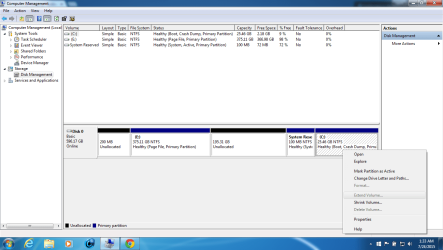
I'm in the Disk Management trying to merge the partitions by Shrinking E: by 200gb which creates 197.31GB of unallocated space.
When I try to "Extend Volume" in C: I am not able to click Extend Volume. So now I am stumped.
There is also no "Merge" option.
Thanks in advance
I have a E: drive set with 570gb of space which will be nice for anything that isn't automatically stored in the C:.
But I would like to move like 200gb to the C: drive if possible.
I'm in the Disk Management trying to merge the partitions by Shrinking E: by 200gb which creates 197.31GB of unallocated space.
When I try to "Extend Volume" in C: I am not able to click Extend Volume. So now I am stumped.
There is also no "Merge" option.
Thanks in advance
Attachments
My Computer
- Computer type
- Laptop
- Computer Manufacturer/Model Number
- HP
- OS
- Windows 7 Home Premium x64

