
ssd configuration

davy crockett

New member
Local time
12:42 AM
Messages
23
I just installed ssd in my computer and it doesn't show up in the explorer - I'm assuming that's because it isn't formatted yet. So I went into the computer management screen and the ssd is there as "not initialized". A dialog came up saying the ssd disk must be intialized before the logical disk manager can access it - there were 2 choices for intializing: MBR or GPT. I am not sure which one I should go for.
Or should I leave it to windows 7 to format it when I install win7 on the ssd?
 

My Computer

Computer type
PC/Desktop
OS
Microsoft Windows 7 Home Premium 32-bit 7601 Multiprocessor Free Service Pack 1
CPU
Intel(R) Core(TM) i5-4670K CPU @ 3.40GHz
Motherboard
Gigabyte Technology Co., Ltd. Z87M-D3H
Memory
4.00 GB
Graphics Card(s)
Intel(R) HD Graphics 4600
Sound Card
High Definition Audio Device
Screen Resolution
1024 x 768 x 32 bits (4294967296 colors) @ 60 Hz
Hard Drives
(1) OCZ-AGIL OCZ-AGILITY3 SCSI Disk Device (2) ST950056 ST95005620AS SCSI Disk Device
Post a screen shot of your Disk Management.

I'd disconnect all other drives before trying to install Windows to an SSD---or to any drive for that matter.
 

My Computer

Computer type
PC/Desktop
Computer Manufacturer/Model Number
Ignatz Special; 4 speed manual gearbox; factory air conditioning; one of one
OS
Windows 7 Home Premium SP1, 64-bit
CPU
Intel Skylake i5-6600K, not overclocked
Motherboard
AsRock Z170M Extreme 4, micro ATX
Memory
8 GB HyperX DDR4-2666 (2 x 4 GB)
Graphics Card(s)
none; graphics are integrated on CPU
Sound Card
onboard: Realtek ALC1150; external: USB Behringer UF0-202
Monitor(s) Displays
Dell S2340M 23 inch IPS
Screen Resolution
1600 x 900
Hard Drives
System: Crucial MX100 series SSD, 128 GB;
Data: Samsung Spinpoint 103SJ, 1 TB;
Backup: WD Caviar Green WD30EZRX-00D8PB0, 3 TB
PSU
Rosewill SilentNight 500 watt fanless, semi-modular
Case
Antec Solo II
Cooling
Noctua NH-U12S; Noctua F12 intake, Noctua S12A exhaust
Keyboard
Microsoft 200 6JH-00001 USB
Mouse
Dell or Microsoft optical wired; USB
Antivirus
Microsoft Security Essentials and Malwarebytes Premium
Browser
Pale Moon
Other Info
All fans PWM; speeds at idle: CPU circa 500 rpm; intake circa 600 rpm; exhaust circa 600 rpm; CPU temps 27 idle and 47 C load in a warm room (27 C/81 F) when running Intel Extreme Tuning Utility stress test.
Here is a screenshot of my disk management:

disk management screenshot.png
 

My Computer

Computer type
PC/Desktop
OS
Microsoft Windows 7 Home Premium 32-bit 7601 Multiprocessor Free Service Pack 1
CPU
Intel(R) Core(TM) i5-4670K CPU @ 3.40GHz
Motherboard
Gigabyte Technology Co., Ltd. Z87M-D3H
Memory
4.00 GB
Graphics Card(s)
Intel(R) HD Graphics 4600
Sound Card
High Definition Audio Device
Screen Resolution
1024 x 768 x 32 bits (4294967296 colors) @ 60 Hz
Hard Drives
(1) OCZ-AGIL OCZ-AGILITY3 SCSI Disk Device (2) ST950056 ST95005620AS SCSI Disk Device
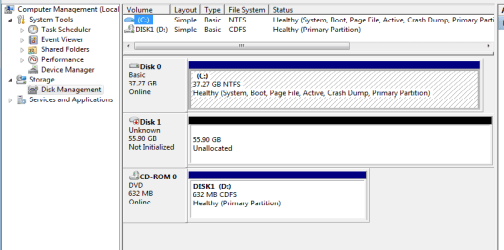
I assume the drive in question is the middle one with 55.80 unallocated?

Is it brand new and never before formatted?

What happens when you right click in that space and attempt to make a volume?

Post another screen shot of what you see when you try to make a volume (partition).

I am a bit puzzled why you would see anything about logical disk manager, MBR, or GPT.
 

My Computer

Computer type
PC/Desktop
Computer Manufacturer/Model Number
Ignatz Special; 4 speed manual gearbox; factory air conditioning; one of one
OS
Windows 7 Home Premium SP1, 64-bit
CPU
Intel Skylake i5-6600K, not overclocked
Motherboard
AsRock Z170M Extreme 4, micro ATX
Memory
8 GB HyperX DDR4-2666 (2 x 4 GB)
Graphics Card(s)
none; graphics are integrated on CPU
Sound Card
onboard: Realtek ALC1150; external: USB Behringer UF0-202
Monitor(s) Displays
Dell S2340M 23 inch IPS
Screen Resolution
1600 x 900
Hard Drives
System: Crucial MX100 series SSD, 128 GB;
Data: Samsung Spinpoint 103SJ, 1 TB;
Backup: WD Caviar Green WD30EZRX-00D8PB0, 3 TB
PSU
Rosewill SilentNight 500 watt fanless, semi-modular
Case
Antec Solo II
Cooling
Noctua NH-U12S; Noctua F12 intake, Noctua S12A exhaust
Keyboard
Microsoft 200 6JH-00001 USB
Mouse
Dell or Microsoft optical wired; USB
Antivirus
Microsoft Security Essentials and Malwarebytes Premium
Browser
Pale Moon
Other Info
All fans PWM; speeds at idle: CPU circa 500 rpm; intake circa 600 rpm; exhaust circa 600 rpm; CPU temps 27 idle and 47 C load in a warm room (27 C/81 F) when running Intel Extreme Tuning Utility stress test.
Yes the middle one showing 55gb unallocated space. That's the new ssd I just installed. Like I said in my original post I hadn't formatted it yet and checked to see if it showed up in disk management. It did and that was when I got a dialog to say it needs to be intialized for the logical disk manager to access it. That dialog showed 2 options - MBR or GPT (see screenshot below):

ssd message.png

Also, when I right click that space all I get is two options: properties and help, the rest are greyed out.
 

My Computer

Computer type
PC/Desktop
OS
Microsoft Windows 7 Home Premium 32-bit 7601 Multiprocessor Free Service Pack 1
CPU
Intel(R) Core(TM) i5-4670K CPU @ 3.40GHz
Motherboard
Gigabyte Technology Co., Ltd. Z87M-D3H
Memory
4.00 GB
Graphics Card(s)
Intel(R) HD Graphics 4600
Sound Card
High Definition Audio Device
Screen Resolution
1024 x 768 x 32 bits (4294967296 colors) @ 60 Hz
Hard Drives
(1) OCZ-AGIL OCZ-AGILITY3 SCSI Disk Device (2) ST950056 ST95005620AS SCSI Disk Device
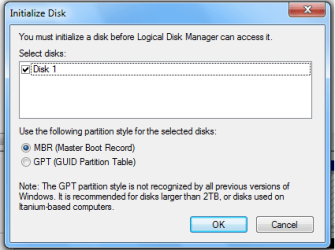
Guess I'll bite the bullet and initialize ssd with the mbr and see what happens after that. Hope it doesn't damage ssd or anything.
 

My Computer

Computer type
PC/Desktop
OS
Microsoft Windows 7 Home Premium 32-bit 7601 Multiprocessor Free Service Pack 1
CPU
Intel(R) Core(TM) i5-4670K CPU @ 3.40GHz
Motherboard
Gigabyte Technology Co., Ltd. Z87M-D3H
Memory
4.00 GB
Graphics Card(s)
Intel(R) HD Graphics 4600
Sound Card
High Definition Audio Device
Screen Resolution
1024 x 768 x 32 bits (4294967296 colors) @ 60 Hz
Hard Drives
(1) OCZ-AGIL OCZ-AGILITY3 SCSI Disk Device (2) ST950056 ST95005620AS SCSI Disk Device
What you saw is perfectly normal - this would happen everytime you install a brandnew, never-used drive. There's nothing in sector 0 of the disk, no partition info, no signature, nothing. Windows needs to write either an MBR (with an empty partition table) there or, as you found out, a GPT.

MBR and GPT are simply two different (incompatible) partition schemes, each with their advantages and limits. MBR disks for example can only support up to 4 primary partitions (or 3 primary and 1 extended) and a total disk size of 2TB.

The MBR is the preferred one for general usage, so you did just fine. You could have let the Windows 7 install DVD take care of this, but as you still have no actual partitions on the SSD you're good to go. The installer will set them up.
 

My Computer

Computer type
PC/Desktop
Computer Manufacturer/Model Number
Custom-built
OS
Windows 7 Professional SP1 32-bit
CPU
Intel Core 2 Duo E6600 2.4GHz
Motherboard
Asus PL5D2
Memory
4GB DDR2-667 (4x1GB in dual-channel config)
Graphics Card(s)
nVidia GeForce 9800 GT
Sound Card
Creative X-Fi XtremeMusic
Monitor(s) Displays
Acer P236H
Screen Resolution
1920x1200 (DVI)
Hard Drives
OCZ SSD Vertex Plus 60GB SATA (Firmware 3.55), 64MB cache
Hitachi HD321KJ SATA, 320GB, 7200rpm, 16MB cache
PSU
Antec TruePower 2.0
Case
Cooler Master Centurion
Cooling
Too many fans
Keyboard
Standard
Mouse
Microsoft wireless optical mouse
Internet Speed
AT&T U-verse (18mbit/sec)
Antivirus
Microsoft Security Essentials
Browser
Firefox
Other Info
Other devices:
Compaq CQ-60 laptop
Google Nexus 7 (2012) tablet
Nvidia SHIELD tablet (US/LTE)
Hardkernel ODROID-XU single-board computer (Samsung Exynos 5420)
Run these commands in elevated Command prompt.

Diskpart
List disk

Select disk n (where n is the number that was given for your SSD in List disk)
Create partition primary align=1024
Active (assuming you want to install an OS)
Exit
 

My Computer

Computer Manufacturer/Model Number
HP, Dell, Gateway, Toshiba - 4 laptops and 2 desktops
OS
Vista, Windows7, Mint Mate, Zorin, Windows 8
CPU
from 1.6GHz Duo to i7
Monitor(s) Displays
2x HP w2207
Hard Drives
5x HDD, 7x SSD, 12x Externals
Keyboard
with trackball - no mices
Mouse
Trackball mice
Internet Speed
DSL 6000
whs, he can do these steps but there's no need to - and if there's one single active partition then the setup DVD won't create the 100MB boot partition.

Question is whether the OP prefers a Windows system in a single partition or with the separate boot partition? Functionally, it doesn't matter though.
 

My Computer

Computer type
PC/Desktop
Computer Manufacturer/Model Number
Custom-built
OS
Windows 7 Professional SP1 32-bit
CPU
Intel Core 2 Duo E6600 2.4GHz
Motherboard
Asus PL5D2
Memory
4GB DDR2-667 (4x1GB in dual-channel config)
Graphics Card(s)
nVidia GeForce 9800 GT
Sound Card
Creative X-Fi XtremeMusic
Monitor(s) Displays
Acer P236H
Screen Resolution
1920x1200 (DVI)
Hard Drives
OCZ SSD Vertex Plus 60GB SATA (Firmware 3.55), 64MB cache
Hitachi HD321KJ SATA, 320GB, 7200rpm, 16MB cache
PSU
Antec TruePower 2.0
Case
Cooler Master Centurion
Cooling
Too many fans
Keyboard
Standard
Mouse
Microsoft wireless optical mouse
Internet Speed
AT&T U-verse (18mbit/sec)
Antivirus
Microsoft Security Essentials
Browser
Firefox
Other Info
Other devices:
Compaq CQ-60 laptop
Google Nexus 7 (2012) tablet
Nvidia SHIELD tablet (US/LTE)
Hardkernel ODROID-XU single-board computer (Samsung Exynos 5420)
Undertand. Not having the 100MB active partition may be an advantage. Lots of people run into trouble with that. Plus many do not understand the concept anyhow. And it is just one more thing to image.

He can, of course, initialize the SSD in Disk Management and let the installer do the rest. His choice.
 

My Computer

Computer Manufacturer/Model Number
HP, Dell, Gateway, Toshiba - 4 laptops and 2 desktops
OS
Vista, Windows7, Mint Mate, Zorin, Windows 8
CPU
from 1.6GHz Duo to i7
Monitor(s) Displays
2x HP w2207
Hard Drives
5x HDD, 7x SSD, 12x Externals
Keyboard
with trackball - no mices
Mouse
Trackball mice
Internet Speed
DSL 6000
Run these commands in elevated Command prompt.

Diskpart
List disk

Select disk n (where n is the number that was given for your SSD in List disk)
Create partition primary align=1024
Active (assuming you want to install an OS)
Exit
I hate to keep bugging you guys but I want to get it right... New SSD.

1. Do I go to Disk Managment first to initalize the SSD then Diskpart to align?
2. Will I need to use the format option in diskpart while I'm doing the align=1024?
3. And when do I need to do the 100mb partition,OR is it necessary to have?
 

My Computer

Computer Manufacturer/Model Number
home built
OS
Windows 7 Professional x64
CPU
AMD Athlon 64 X2 6000 3.1GHz
Motherboard
Asus M3A78-EM
Memory
G.SKILL 4GB (2 x 2GB) 240-Pin DDR2 SDRAM DDR2 800 (PC2 6400)
Graphics Card(s)
ATI Radeon HD4350 512mb
Sound Card
on board
Monitor(s) Displays
Samsung SyncMaster 206bw
Screen Resolution
1680x1050
Hard Drives
Seagate 250gb
WD 160gb
WD 250gb USB
Maxtor 40gb (backup)
PSU
Thermaltake PurePower 500watt
Case
Apevia
Cooling
2x120 case fans
Keyboard
wireless Logitech
Mouse
wireless Logitech
Internet Speed
DSL (best I can do in the boonies)
Other Info
Lord make my word sweet, in case I have to eat them later...
1. That you have to check. It may already be initialized.

2. Yes, absolutely. I have no idea why that does not show in your quote because it is in my original tutorial. It goes after the Create command and is: Format fs=ntfs quick

3. Copy the bootmgr to C and then you can forget about the 100MB partition. But that you have to do before you make the image of C.

http://www.sevenforums.com/tutorials/209885-bootmgr-move-c-easybcd.html
 

My Computer

Computer Manufacturer/Model Number
HP, Dell, Gateway, Toshiba - 4 laptops and 2 desktops
OS
Vista, Windows7, Mint Mate, Zorin, Windows 8
CPU
from 1.6GHz Duo to i7
Monitor(s) Displays
2x HP w2207
Hard Drives
5x HDD, 7x SSD, 12x Externals
Keyboard
with trackball - no mices
Mouse
Trackball mice
Internet Speed
DSL 6000
Back
Top