

- Local time
- 4:04 PM
- Messages
- 89
SSD Dilemma – Worth repartitioning???
Just bought an Intel X25-M 169GB and maybe took the wrong advise on partitioning it. I wanted to over-provision by 10% (15GB) for leveling, TRIM, mapping, endurance, etc. I was told by someone not to over-provision for risk of mis-alignment or controller problems, and instead to merely clean install W7 and let 7 format and align by itself. So I clean-installed W7 and all my numerous applications, updates, and tweaks.
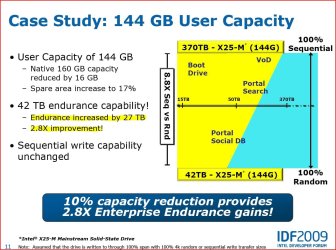
Later I listened to a lecture by Intel’s Chief Engineer of the NAND Solutions Group at the IDF2009 conference. He stated with extreme confidence that partitioning ~144GB of the 150GB usable and leaving 5% (~7GB) unallocated – would not only improve performance but would also extend the life expectancy (endurance) by nearly three times: from 15TB to 42TB of endurance – 2.8 times improvement!
Now… Is it worth the time and risk of applying an SE (secure erase) to clean it, then reformat to a 144GB partition, and then clean install W7 again and let it do the quick-format to the 144GB user area – leaving 7GB unallocated. Intel recommended doing this 144-partition format on a NEW, BARE, UNWRITTEN drive – which mine is no longer. I hate messing around with SE wipes and the unknown issues that might arise when it is presently healthy and doing sequential READS @ 260MB/s. But knowing it could last 3 times longer is enticing.
How safe and reliable is SE? And what do the seasoned experienced owners of X25-M drives think? Any comments are appreciated.
garuda
Just bought an Intel X25-M 169GB and maybe took the wrong advise on partitioning it. I wanted to over-provision by 10% (15GB) for leveling, TRIM, mapping, endurance, etc. I was told by someone not to over-provision for risk of mis-alignment or controller problems, and instead to merely clean install W7 and let 7 format and align by itself. So I clean-installed W7 and all my numerous applications, updates, and tweaks.
Later I listened to a lecture by Intel’s Chief Engineer of the NAND Solutions Group at the IDF2009 conference. He stated with extreme confidence that partitioning ~144GB of the 150GB usable and leaving 5% (~7GB) unallocated – would not only improve performance but would also extend the life expectancy (endurance) by nearly three times: from 15TB to 42TB of endurance – 2.8 times improvement!
Now… Is it worth the time and risk of applying an SE (secure erase) to clean it, then reformat to a 144GB partition, and then clean install W7 again and let it do the quick-format to the 144GB user area – leaving 7GB unallocated. Intel recommended doing this 144-partition format on a NEW, BARE, UNWRITTEN drive – which mine is no longer. I hate messing around with SE wipes and the unknown issues that might arise when it is presently healthy and doing sequential READS @ 260MB/s. But knowing it could last 3 times longer is enticing.
How safe and reliable is SE? And what do the seasoned experienced owners of X25-M drives think? Any comments are appreciated.
garuda
Attachments


My Computer
At a glance
Windows 7 Ultimate x642x - Xeon E5-2687W128GB Kingston - (2ea kits – 4x16GB)Gigabyte GTX-680 & EVGA GTX-Titan
- Computer type
- PC/Desktop
- Computer Manufacturer/Model Number
- Homemade with cube tower
- OS
- Windows 7 Ultimate x64
- CPU
- 2x - Xeon E5-2687W
- Motherboard
- ASUS Z9PE-D8 WS
- Memory
- 128GB Kingston - (2ea kits – 4x16GB)
- Graphics Card(s)
- Gigabyte GTX-680 & EVGA GTX-Titan
- Sound Card
- Realtek ALC898 8-chan audio
- Monitor(s) Displays
- 2ea - Samsung T260HD 25.5-Inch LCD HDTV / Monitors
- Screen Resolution
- 1920x1200
- Hard Drives
- 8 ea. Crucial & Samsung EVO 2TB SSDs; misc 4ea. 8TB external Seagate spinners.
- PSU
- Corsair AX-1200
- Case
- Lian-Li cube custom
- Cooling
- 2x Dynatron R-17 - CPU Air sinks (160watts TDP)
- Keyboard
- HP slimline wireless
- Mouse
- Microsoft ARC
- Internet Speed
- Faster than a speeding bullet.
- Antivirus
- Norton Security 360 - 2020


