
Solved SSD drive full with no apparent reason.

Saddari

New member
Local time
8:16 AM
Messages
2
Hi, the drive that I got my windows and main programs appears to be full with no apparent reason. I tried using the "Disk Cleanup" tools and basically all hd-related tools in IOBit's advanced systemcare -software.

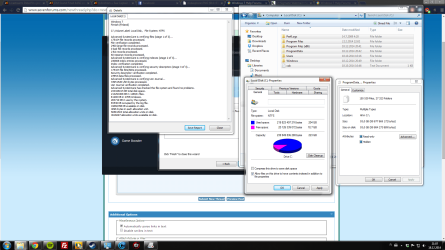
Here's a screenshot of the relevant info:
Screenshot 2014-12-18 21.07.25.png

The "Disk doctor" in IoBit's software seems to detect ~25000 more files than right-clicking the contents of C: and clicking on properties.

What could this be ? Sorry if there are similar postings, tried looking for a short while and failed to find.

Thank you,
Saddari
 
Last edited by a moderator:

My Computer

Computer type
PC/Desktop
Computer Manufacturer/Model Number
Custom built
OS
Windows 7 Professional 64bit
Motherboard
F2A78M-HD2 AMD A78
Graphics Card(s)
GTX 750 Ti
Hard Drives
SSD 250GB, 1TB HD
Antivirus
Avast free
Browser
Chrome

My Computer

Computer type
PC/Desktop
Computer Manufacturer/Model Number
Self built custom
OS
64-bit Windows 11 Pro for Workstations
CPU
Intel i7-8700K OC'd to 5 GHz
Motherboard
ASUS ROG Maximus XI Formula Z390
Memory
64 GB (4x16GB) G.SKILL TridentZ RGB DDR4 3600 MHz
Graphics Card(s)
ASUS ROG-STRIX-GTX1080TI-O11G-GAMING
Sound Card
Integrated
Monitor(s) Displays
2 x Samsung Odyssey G7 27"
Screen Resolution
2560x1440
Hard Drives
1TB Samsung 990 PRO M.2,
4TB Samsung 990 PRO PRO M.2,
TerraMaster F8 SSD Plus NAS
PSU
Seasonic Prime Titanium 850W
Case
Thermaltake Core P3
Cooling
Corsair Hydro H115i
Keyboard
Logitech wireless K800
Mouse
Logitech MX Master 4
Internet Speed
2 Gb/s Download and 100 Mb/s Upload
Antivirus
Malwarebyte Anti-Malware Premium
Browser
Google Chrome
Other Info
Logitech Z625 speaker system,
Logitech BRIO 4K Pro webcam,
HP Color LaserJet Pro MFP M477fdn,
APC SMART-UPS RT 1000 XL - SURT1000XLI,
Galaxy S23 Plus phone
I see one problem for sure; Advanced System Care by IObit.
IObit programs has screwed up many of systems.
In my opinion the only thing to do is a Clean Install or you will be spending all your time fixing one problem after another. Plus it will make sure A.S.C. is not calling home to China.

This Tutorial by Brink is what I recommend.

http://www.sevenforums.com/tutorials/1649-clean-install-windows-7-a.html
 

My Computer

Computer type
PC/Desktop
Computer Manufacturer/Model Number
Home made Desktop
OS
Windows 10 Pro. 64/ version 1709 Windows 7 Pro/64
CPU
Intel i7-6800K @ 4.3
Motherboard
ASUS X-99 Deluxe II
Memory
Corsair Platinum 16 gig @2400
Graphics Card(s)
EVGA GTX 1070 OC
Monitor(s) Displays
Asus 27" LED LCD/VE278Q
Screen Resolution
1920-1080 or 1280-720 HDMI
Hard Drives
INTEL SSD 730-240 Gb Sata 3.0/
PSU
EVGA Platium 1200W
Case
Phanteks Luxe Tempered Glass 8 fans/ one radiator
Cooling
XSPC/ Water Cooled CPU
Keyboard
Das 4 Professional
Mouse
Logitech M705/MX Anywhere 2-S
Internet Speed
100 mbits
Antivirus
Microsoft Security Essentials/ Malwarebytes Premium 3.0/ SAS
Browser
I.E. 11 default/Firefox/ ISP Time Warner Cable/Spectrum
Other Info
LG BluRay Burner/
Sound system-KLipsch-THX/
Icy Dock ssd Hot Swap bays.
If you run this program, you will see all the files on your SSD - and the big chunks are easy to identify.

That however will not include the restore points. To ID those, you have to run this command:

vssadmin list shadowstorage
 

My Computer

Computer Manufacturer/Model Number
HP, Dell, Gateway, Toshiba - 4 laptops and 2 desktops
OS
Vista, Windows7, Mint Mate, Zorin, Windows 8
CPU
from 1.6GHz Duo to i7
Monitor(s) Displays
2x HP w2207
Hard Drives
5x HDD, 7x SSD, 12x Externals
Keyboard
with trackball - no mices
Mouse
Trackball mice
Internet Speed
DSL 6000
Hello Saddari!

I support all other recommendations given here and would also add to use your Antivirus software and thoroughly check that SSD, there may be a virus eating up space.
Also, see you programs, is any taking too much space and creating temp files?
Third option is to see if your drive is creating System restore points. Remove all but the last restore point.Then go into Restore settings and check the amount of hard drive space that's allowed to be used for restore points. Normal setting is to use about 5% of space.

Hope this helps too!
Good luck!

CK_WD
 

My Computer

Computer type
PC/Desktop
OS
Windows 7 Home Premium x64
Thank you all so much for the quick replies. I actually felt like an idiot after posting this, since I did after all find similar threads from earlier.

Great step-by-step tutorial Brink ! Love it !

With the help of that I managed to pinpoint the issue. The problem was the System Protection being allowed to eat over 100GB's of the SSD. I dropped it down to 10% suggested in the tutorial, but might drop it even further down to 5% if that's sufficient (Thanks CK_WD). Thanks for the other suggestions as well, I ended up cleaning up quite a bit of junk ..even though the install of the OS was done less than 2 months ago.

On another note:
After installing the IObit's software A.S.C. I was actually really happy with the product. Is it really something I should avoid ? I liked couple of the tools it had, such as the first "Driver detective" that I've come across that allowed installing drivers straight through the software without paying + other tools like smart uninstall and smart defrag seemed useful.

Again, thanks for the help. I'll buy any of you a quality ale should you ever end up in Leeds !
 

My Computer

Computer type
PC/Desktop
Computer Manufacturer/Model Number
Custom built
OS
Windows 7 Professional 64bit
Motherboard
F2A78M-HD2 AMD A78
Graphics Card(s)
GTX 750 Ti
Hard Drives
SSD 250GB, 1TB HD
Antivirus
Avast free
Browser
Chrome
Hey Saddari!

It's great you managed to free up space on your SSD! Glad we could help, hope you don't have any more issues! :)

Cheers!

CK_WD

P.S.: Love the idea about the ale.
 

My Computer

Computer type
PC/Desktop
OS
Windows 7 Home Premium x64
Great news Saddari. I'm glad we could help. :)

It's up to you about IObit. If you're happy with it and use it carefully, then there's no reason not to keep using it. It's just that it can be easy to cause issues with it. Not to mention what Layback Bear posted above.
 

My Computer

Computer type
PC/Desktop
Computer Manufacturer/Model Number
Self built custom
OS
64-bit Windows 11 Pro for Workstations
CPU
Intel i7-8700K OC'd to 5 GHz
Motherboard
ASUS ROG Maximus XI Formula Z390
Memory
64 GB (4x16GB) G.SKILL TridentZ RGB DDR4 3600 MHz
Graphics Card(s)
ASUS ROG-STRIX-GTX1080TI-O11G-GAMING
Sound Card
Integrated
Monitor(s) Displays
2 x Samsung Odyssey G7 27"
Screen Resolution
2560x1440
Hard Drives
1TB Samsung 990 PRO M.2,
4TB Samsung 990 PRO PRO M.2,
TerraMaster F8 SSD Plus NAS
PSU
Seasonic Prime Titanium 850W
Case
Thermaltake Core P3
Cooling
Corsair Hydro H115i
Keyboard
Logitech wireless K800
Mouse
Logitech MX Master 4
Internet Speed
2 Gb/s Download and 100 Mb/s Upload
Antivirus
Malwarebyte Anti-Malware Premium
Browser
Google Chrome
Other Info
Logitech Z625 speaker system,
Logitech BRIO 4K Pro webcam,
HP Color LaserJet Pro MFP M477fdn,
APC SMART-UPS RT 1000 XL - SURT1000XLI,
Galaxy S23 Plus phone
Back
Top