SSD for games

yk7

New member
Member
Local time
5:07 PM
Messages
93
I heard somewhere that if the OS isn't also on an SSD, the game's performance won't be any faster if that's all on the SSD. Is that true?
 

My Computer

OS
Windows 7 Home Premium 64bit
CPU
Intel Core i5-3570K Ivy Bridge 3.4GHz
Motherboard
GIGABYTE GA-Z77X-UD3H ATX Intel Motherboard
Memory
Corsair Vengeance 16GB (2 x 8GB) DDR3-1600
Graphics Card(s)
Gigabyte Radeon HD 7970 GHz Edition 3GB
Sound Card
Creative SB Audigy SE 7.1 PCI and Creative SB X-Fi HD USB
Monitor(s) Displays
ASUS VS Series VS247H-P Black 23.6" (x3)
Screen Resolution
1920x1080
Hard Drives
Seagate 1TB ST1000DM003 and Samsung 840 Pro 128GB SSD
PSU
Corsair Enthusiast 650W 80 PLUS Bronze
Case
Fractal Design Define R4 (Black Pearl) ATX Mid Tower
Cooling
Cooler Master Hyper 212 EVO
Keyboard
Das Keyboard Model S Professional
Mouse
Steelseries Sensei
Internet Speed
Average 3mb/s
Antivirus
Avast IS + Malwarebytes PRO
Browser
Firefox
The OS always needs to be on the SSD........games, well, you probably won't notice any difference, except maybe how quickly the game launches. It will do absolutely nothing for gameplay, or FPS.
 

My Computer

Computer type
PC/Desktop
Computer Manufacturer/Model Number
Custom Built
OS
Windows 7 Professional 64bit SP1
CPU
Intel Core i5-3570K @ 4.5GHz
Motherboard
Asus Sabertooth Z77
Memory
Corsair Vengeance 16GB (4x4) @1866MHz CL 9-9-9-24 1T
Graphics Card(s)
EVGA GTX 750 Ti FTW
Sound Card
Onboard Audio
Monitor(s) Displays
Dell S2309W
Screen Resolution
1920x1080
Hard Drives
Samsung 830 128GB SSD - OS
(4) Seagate 5TB HDD
(1) Seagate 2TB HDD
PSU
Seasonic X750 80+ Gold Full Modular
Case
Antec Eleven Hundred Super Mid Tower
Cooling
Intel Liquid Cooler
Keyboard
Max Nighthawk X8 Mechanical keyboard
Mouse
Mionix Naos 7000
Internet Speed
50 Mbps Down / 10 Mbps Up
Antivirus
Microsoft Security Essentials/Malwarebytes Anti-Malware
Browser
Chrome/Firefox
Other Info
Klipsch ProMedia 2.1's
Asus RT-N66R Wireless Router

My Computer

OS
Windows 7 Home Premium 64bit
CPU
Intel Core i5-3570K Ivy Bridge 3.4GHz
Motherboard
GIGABYTE GA-Z77X-UD3H ATX Intel Motherboard
Memory
Corsair Vengeance 16GB (2 x 8GB) DDR3-1600
Graphics Card(s)
Gigabyte Radeon HD 7970 GHz Edition 3GB
Sound Card
Creative SB Audigy SE 7.1 PCI and Creative SB X-Fi HD USB
Monitor(s) Displays
ASUS VS Series VS247H-P Black 23.6" (x3)
Screen Resolution
1920x1080
Hard Drives
Seagate 1TB ST1000DM003 and Samsung 840 Pro 128GB SSD
PSU
Corsair Enthusiast 650W 80 PLUS Bronze
Case
Fractal Design Define R4 (Black Pearl) ATX Mid Tower
Cooling
Cooler Master Hyper 212 EVO
Keyboard
Das Keyboard Model S Professional
Mouse
Steelseries Sensei
Internet Speed
Average 3mb/s
Antivirus
Avast IS + Malwarebytes PRO
Browser
Firefox
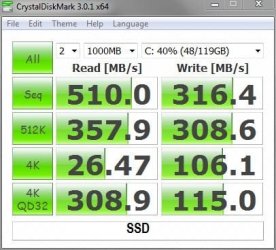
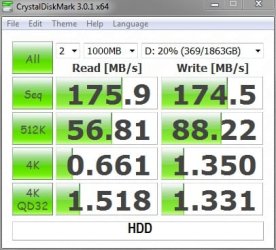
Exponentially faster Random 4k Read/Write speeds, substantially lower access times.

Samsung 830.JPGSeagate Barracuda.jpg
 

My Computer

Computer type
PC/Desktop
Computer Manufacturer/Model Number
Custom Built
OS
Windows 7 Professional 64bit SP1
CPU
Intel Core i5-3570K @ 4.5GHz
Motherboard
Asus Sabertooth Z77
Memory
Corsair Vengeance 16GB (4x4) @1866MHz CL 9-9-9-24 1T
Graphics Card(s)
EVGA GTX 750 Ti FTW
Sound Card
Onboard Audio
Monitor(s) Displays
Dell S2309W
Screen Resolution
1920x1080
Hard Drives
Samsung 830 128GB SSD - OS
(4) Seagate 5TB HDD
(1) Seagate 2TB HDD
PSU
Seasonic X750 80+ Gold Full Modular
Case
Antec Eleven Hundred Super Mid Tower
Cooling
Intel Liquid Cooler
Keyboard
Max Nighthawk X8 Mechanical keyboard
Mouse
Mionix Naos 7000
Internet Speed
50 Mbps Down / 10 Mbps Up
Antivirus
Microsoft Security Essentials/Malwarebytes Anti-Malware
Browser
Chrome/Firefox
Other Info
Klipsch ProMedia 2.1's
Asus RT-N66R Wireless Router
I know what an SSD does. I just want to know if the load times of games will improve if that is all that's on the SSD, not the OS too.
 

My Computer

OS
Windows 7 Home Premium 64bit
CPU
Intel Core i5-3570K Ivy Bridge 3.4GHz
Motherboard
GIGABYTE GA-Z77X-UD3H ATX Intel Motherboard
Memory
Corsair Vengeance 16GB (2 x 8GB) DDR3-1600
Graphics Card(s)
Gigabyte Radeon HD 7970 GHz Edition 3GB
Sound Card
Creative SB Audigy SE 7.1 PCI and Creative SB X-Fi HD USB
Monitor(s) Displays
ASUS VS Series VS247H-P Black 23.6" (x3)
Screen Resolution
1920x1080
Hard Drives
Seagate 1TB ST1000DM003 and Samsung 840 Pro 128GB SSD
PSU
Corsair Enthusiast 650W 80 PLUS Bronze
Case
Fractal Design Define R4 (Black Pearl) ATX Mid Tower
Cooling
Cooler Master Hyper 212 EVO
Keyboard
Das Keyboard Model S Professional
Mouse
Steelseries Sensei
Internet Speed
Average 3mb/s
Antivirus
Avast IS + Malwarebytes PRO
Browser
Firefox
I have no experience with that particular situation....but experience with an SSD, I can tell you it there was a difference, it would be hard for you to see it.
 

My Computer

Computer type
PC/Desktop
Computer Manufacturer/Model Number
Custom Built
OS
Windows 7 Professional 64bit SP1
CPU
Intel Core i5-3570K @ 4.5GHz
Motherboard
Asus Sabertooth Z77
Memory
Corsair Vengeance 16GB (4x4) @1866MHz CL 9-9-9-24 1T
Graphics Card(s)
EVGA GTX 750 Ti FTW
Sound Card
Onboard Audio
Monitor(s) Displays
Dell S2309W
Screen Resolution
1920x1080
Hard Drives
Samsung 830 128GB SSD - OS
(4) Seagate 5TB HDD
(1) Seagate 2TB HDD
PSU
Seasonic X750 80+ Gold Full Modular
Case
Antec Eleven Hundred Super Mid Tower
Cooling
Intel Liquid Cooler
Keyboard
Max Nighthawk X8 Mechanical keyboard
Mouse
Mionix Naos 7000
Internet Speed
50 Mbps Down / 10 Mbps Up
Antivirus
Microsoft Security Essentials/Malwarebytes Anti-Malware
Browser
Chrome/Firefox
Other Info
Klipsch ProMedia 2.1's
Asus RT-N66R Wireless Router
"Why not" should be the question. The most crucial piece of software on the computer is the OS, so why wouldn't you put that on the fastest drive available?
 

My Computer

OS
Windows 7 Ultimate x64 SP1
CPU
Intel Core i7-2600
Motherboard
Gigabyte GA-P67A-UD3P-B3
Memory
12 GB Patriot Extreme DDR3-1333
Graphics Card(s)
Nvidia GTX 470
Monitor(s) Displays
Dell UltraSharp 2209WA
Hard Drives
OCZ Agility3 240 GB, WD5001AALS, WD7501AALS
PSU
OCZ ModStream 700W
Case
CoolerMaster HAF 912 Advanced
Cooling
CoolerMaster Hyper 212 Plus
I know what an SSD does. I just want to know if the load times of games will improve if that is all that's on the SSD, not the OS too.

Yes your game loading times will be faster, game performance will be the same. And as it's been stated you need to put the OS on the SSD.
 

My Computer

Computer type
PC/Desktop
Computer Manufacturer/Model Number
Dude Build
OS
Windows 10 Pro X64
CPU
Intel(R) Core(TM) i5-3570K CPU OC@ 4.5GHZ Turbo
Motherboard
MSI Z77A-G45 Gaming
Memory
8.00 GB DDR3 1600Mhz
Graphics Card(s)
MSI Gaming X GTX 1070
Sound Card
Realtek High Definition
Monitor(s) Displays
Dell S23O9W, HP L1710
Screen Resolution
DELL-1920 x 1080 HP-1280 x1024
Hard Drives
Crucial m4 256 SSD, WD 7200RPM 500GB WD 1TB
PSU
Seasonic X650 GOLD
Case
Zalman Z12
Cooling
Antec Kuhler 920
Keyboard
Logitech
Mouse
MSI DS100 Interceptor
Internet Speed
50 down and 5 up
Antivirus
MSE
Browser
Chrome, IE 11
Other Info
Logitech X-620 Speakers
The answer to your "why" OS needs to be on the SSD is that, putting the OS on the SSD will make it startup and shutdown a lot faster, will also improve the responsiveness of the OS to a great extent.

You can use the remaining space on your SSD to put your pagefile on it (this helps to speeds things up a lot - be it games, applications or the OS itself), install most frequently used applications like web browsers, mail clients, etc. and also your some of your most frequently played games. This way would be the most effective use of an SSD.
 

My Computer

Computer type
PC/Desktop
OS
Windows 7 Home Premium x64
Installed a few of my games on the SSD, and the performance is incredible! Things load at least 75% faster now.

Also I didn't end up installing the OS on the SSD. I couldn't care less about fast shutdown and start up times.
 

My Computer

OS
Windows 7 Home Premium 64bit
CPU
Intel Core i5-3570K Ivy Bridge 3.4GHz
Motherboard
GIGABYTE GA-Z77X-UD3H ATX Intel Motherboard
Memory
Corsair Vengeance 16GB (2 x 8GB) DDR3-1600
Graphics Card(s)
Gigabyte Radeon HD 7970 GHz Edition 3GB
Sound Card
Creative SB Audigy SE 7.1 PCI and Creative SB X-Fi HD USB
Monitor(s) Displays
ASUS VS Series VS247H-P Black 23.6" (x3)
Screen Resolution
1920x1080
Hard Drives
Seagate 1TB ST1000DM003 and Samsung 840 Pro 128GB SSD
PSU
Corsair Enthusiast 650W 80 PLUS Bronze
Case
Fractal Design Define R4 (Black Pearl) ATX Mid Tower
Cooling
Cooler Master Hyper 212 EVO
Keyboard
Das Keyboard Model S Professional
Mouse
Steelseries Sensei
Internet Speed
Average 3mb/s
Antivirus
Avast IS + Malwarebytes PRO
Browser
Firefox
That is probably the least important thing an SSD will do. The most important is how fast your programs and applications will open, and how responsive Windows in general will be.
 

My Computer

Computer type
PC/Desktop
Computer Manufacturer/Model Number
Custom Built
OS
Windows 7 Professional 64bit SP1
CPU
Intel Core i5-3570K @ 4.5GHz
Motherboard
Asus Sabertooth Z77
Memory
Corsair Vengeance 16GB (4x4) @1866MHz CL 9-9-9-24 1T
Graphics Card(s)
EVGA GTX 750 Ti FTW
Sound Card
Onboard Audio
Monitor(s) Displays
Dell S2309W
Screen Resolution
1920x1080
Hard Drives
Samsung 830 128GB SSD - OS
(4) Seagate 5TB HDD
(1) Seagate 2TB HDD
PSU
Seasonic X750 80+ Gold Full Modular
Case
Antec Eleven Hundred Super Mid Tower
Cooling
Intel Liquid Cooler
Keyboard
Max Nighthawk X8 Mechanical keyboard
Mouse
Mionix Naos 7000
Internet Speed
50 Mbps Down / 10 Mbps Up
Antivirus
Microsoft Security Essentials/Malwarebytes Anti-Malware
Browser
Chrome/Firefox
Other Info
Klipsch ProMedia 2.1's
Asus RT-N66R Wireless Router
games have some of the longest loading times of any application you'll use. having games on your SSD is a great idea. the problem usually comes down to having enough space. the argument that games won't play any better on SSD is just downright silly. if you think about it applications like office and Photoshop won't run any faster either once they're open. so if you have space on your SSD I'd put your games there
 

My Computer

Computer Manufacturer/Model Number
Self-Built in July 2009
OS
Windows 7 Ultimate x64
CPU
Intel Q9550 2.83Ghz OC'd to 3.40Ghz
Motherboard
Gigabyte GA-EP45-UD3R rev. 1.1, F12 BIOS
Memory
8GB G.Skill PI DDR2-800, 4-4-4-12 timings
Graphics Card(s)
EVGA 1280MB Nvidia GeForce GTX570
Sound Card
Realtek ALC899A 8 channel onboard audio
Monitor(s) Displays
23" Acer x233H
Screen Resolution
1920x1080
Hard Drives
Intel X25-M 80GB Gen 2 SSD
Western Digital 1TB Caviar Black, 32MB cache. WD1001FALS
PSU
Corsair 620HX modular
Case
Antec P182
Cooling
stock
Keyboard
ABS M1 Mechanical
Mouse
Logitech G9 Laser Mouse
Internet Speed
15/2 cable modem
Other Info
Windows and Linux enthusiast. Logitech G35 Headset.
I have what few games I play on my SSD, but I also have Windows on it too. Windows will benefit more from an SSD than games.....but if you have the room there's not really a reason not to put them on there.
 

My Computer

Computer type
PC/Desktop
Computer Manufacturer/Model Number
Custom Built
OS
Windows 7 Professional 64bit SP1
CPU
Intel Core i5-3570K @ 4.5GHz
Motherboard
Asus Sabertooth Z77
Memory
Corsair Vengeance 16GB (4x4) @1866MHz CL 9-9-9-24 1T
Graphics Card(s)
EVGA GTX 750 Ti FTW
Sound Card
Onboard Audio
Monitor(s) Displays
Dell S2309W
Screen Resolution
1920x1080
Hard Drives
Samsung 830 128GB SSD - OS
(4) Seagate 5TB HDD
(1) Seagate 2TB HDD
PSU
Seasonic X750 80+ Gold Full Modular
Case
Antec Eleven Hundred Super Mid Tower
Cooling
Intel Liquid Cooler
Keyboard
Max Nighthawk X8 Mechanical keyboard
Mouse
Mionix Naos 7000
Internet Speed
50 Mbps Down / 10 Mbps Up
Antivirus
Microsoft Security Essentials/Malwarebytes Anti-Malware
Browser
Chrome/Firefox
Other Info
Klipsch ProMedia 2.1's
Asus RT-N66R Wireless Router
Installed a few of my games on the SSD, and the performance is incredible! Things load at least 75% faster now.

Also I didn't end up installing the OS on the SSD. I couldn't care less about fast shutdown and start up times.

Good to know! ;)

Although installing OS on the SSD is highly recommended, the decision is obviously yours. It not only speeds up start up/shutdown, but makes Windows a LOT faster to use. If you still dont want your OS on the SSD, you should at least put the pagefile on the SSD.
 

My Computer

Computer type
PC/Desktop
OS
Windows 7 Home Premium x64
I have 2 computers. Both run the OS from the SSD. Both have the exact games installed. One has them installed on an SSD, the other has them installed on a mechanical hard drive. The games on the SSD load a lot faster than on the other computer. But, the game play is the same for either one. Due to the fact that you use the OS more than games, it makes more sense to have the OS and programs on the SSD. Everything is more responsive and opens almost immediately. If you have room on the SSD or a spare SSD, load your games on there for sure. But, if you do not have the room for both, it is much more important to have the OS and programs on the SSD.
 

My Computers

System One System Two

  • Computer type
    PC/Desktop
    Computer Manufacturer/Model Number
    ALWAYS UNDER CONSTRUCTION
    OS
    Windows 11 Pro
    CPU
    Ryzen 9 5900X
    Motherboard
    Asus X570 Crosshair Viii Hero
    Memory
    32GB G Skill DDR4-3600
    Graphics Card(s)
    EVGA RTX 3080 FTW 3 Ultra
    Sound Card
    On Board/Sennheiser PC37X Headset
    Monitor(s) Displays
    3 X Asus 27"
    Screen Resolution
    2560x1440
    Hard Drives
    2 X 1 TB NVME drives
    PSU
    EVGA 850
    Case
    Phanteks Eclipse P400A
    Cooling
    EVGA 280 AIO
    Keyboard
    Logitech G510s/ Logitech G13
    Mouse
    Logitech G502
    Internet Speed
    24/1
    Antivirus
    ESET/MBAM Pro/SAS Pro
    Browser
    Chrome/ Firefox/ Edge
  • Computer type
    Laptop
    System Manufacturer/Model Number
    Dell 16 Plus
    OS
    Windows 11 Pro
    CPU
    Intel Ultra 9 288V
    Memory
    32 GB LPDDR5X 8533
    Monitor(s) Displays
    16" Mini-LED HDR600 Touch 90 Hz
    Screen Resolution
    2560X1600
    Hard Drives
    1 TB NVME
I have 2 computers. Both run the OS from the SSD. Both have the exact games installed. One has them installed on an SSD, the other has them installed on a mechanical hard drive. The games on the SSD load a lot faster than on the other computer. But, the game play is the same for either one. Due to the fact that you use the OS more than games, it makes more sense to have the OS and programs on the SSD. Everything is more responsive and opens almost immediately. If you have room on the SSD or a spare SSD, load your games on there for sure. But, if you do not have the room for both, it is much more important to have the OS and programs on the SSD.

This is great advice people!
 

My Computer

Computer type
PC/Desktop
Computer Manufacturer/Model Number
Custom Built
OS
Windows 7 Professional 64bit SP1
CPU
Intel Core i5-3570K @ 4.5GHz
Motherboard
Asus Sabertooth Z77
Memory
Corsair Vengeance 16GB (4x4) @1866MHz CL 9-9-9-24 1T
Graphics Card(s)
EVGA GTX 750 Ti FTW
Sound Card
Onboard Audio
Monitor(s) Displays
Dell S2309W
Screen Resolution
1920x1080
Hard Drives
Samsung 830 128GB SSD - OS
(4) Seagate 5TB HDD
(1) Seagate 2TB HDD
PSU
Seasonic X750 80+ Gold Full Modular
Case
Antec Eleven Hundred Super Mid Tower
Cooling
Intel Liquid Cooler
Keyboard
Max Nighthawk X8 Mechanical keyboard
Mouse
Mionix Naos 7000
Internet Speed
50 Mbps Down / 10 Mbps Up
Antivirus
Microsoft Security Essentials/Malwarebytes Anti-Malware
Browser
Chrome/Firefox
Other Info
Klipsch ProMedia 2.1's
Asus RT-N66R Wireless Router
Installed a few of my games on the SSD, and the performance is incredible! Things load at least 75% faster now.

Also I didn't end up installing the OS on the SSD. I couldn't care less about fast shutdown and start up times.

Good to know! ;)

Although installing OS on the SSD is highly recommended, the decision is obviously yours. It not only speeds up start up/shutdown, but makes Windows a LOT faster to use. If you still dont want your OS on the SSD, you should at least put the pagefile on the SSD.

What is the pagefile and how do I put it on the SSD?
 

My Computer

OS
Windows 7 Home Premium 64bit
CPU
Intel Core i5-3570K Ivy Bridge 3.4GHz
Motherboard
GIGABYTE GA-Z77X-UD3H ATX Intel Motherboard
Memory
Corsair Vengeance 16GB (2 x 8GB) DDR3-1600
Graphics Card(s)
Gigabyte Radeon HD 7970 GHz Edition 3GB
Sound Card
Creative SB Audigy SE 7.1 PCI and Creative SB X-Fi HD USB
Monitor(s) Displays
ASUS VS Series VS247H-P Black 23.6" (x3)
Screen Resolution
1920x1080
Hard Drives
Seagate 1TB ST1000DM003 and Samsung 840 Pro 128GB SSD
PSU
Corsair Enthusiast 650W 80 PLUS Bronze
Case
Fractal Design Define R4 (Black Pearl) ATX Mid Tower
Cooling
Cooler Master Hyper 212 EVO
Keyboard
Das Keyboard Model S Professional
Mouse
Steelseries Sensei
Internet Speed
Average 3mb/s
Antivirus
Avast IS + Malwarebytes PRO
Browser
Firefox
games have some of the longest loading times of any application you'll use. having games on your SSD is a great idea. the problem usually comes down to having enough space. the argument that games won't play any better on SSD is just downright silly. if you think about it applications like office and Photoshop won't run any faster either once they're open. so if you have space on your SSD I'd put your games there

Hi there
Agree absolutely.
With Photoshop for example I get Better response (By far) on an 8GB acer laptop fitted with a decent Samsung SSD and a "lowly" i3 processor than on a 16GB desktop machine with an AMD QUAD PHENOM processor and using a spinner.

(I'm in the process of changing that desktop around to use at least 3 SSD's now the price has dropped even for the 250 GB models and just keep one or two SATA spinners for Data).

For pretty well most people the BEST thing you can do to improve any sort of computer performance is to use SSD's instead of spinners. (Always assuming you have more than the bare minimum of RAM).

However I do have to add a caveat on games -- while loading the game is obviously far quicker with an SSD some of the modern high performance graphics cards offload a lot of the processing to the GPU rather than the computer OS itself so it could be that after the game has loaded the performance might not be as great as expected.

I'm not knowledgeable enough to comment further on this - perhaps someone with more experience on how these new GPU's work could post -- however the consensus seems to be that games do perform better when an SSD is installed.

For everything else you will certainly notice an improvement immediately.

Cheers
jimbo
 

My Computer

Computer type
PC/Desktop
Computer Manufacturer/Model Number
Custom built, several laptops HP/ASUS
OS
Linux CENTOS 7 / various Windows OS'es and servers
CPU
Intel i7 Intel i5
Memory
8GB, 16GB
Graphics Card(s)
On Motherboard
Sound Card
Realtek HD audio
Monitor(s) Displays
Apple Cinema display, Samsung LCD
Screen Resolution
1920 X 1080
Hard Drives
4 X 1TB SATA
Mouse
Toshiba wireless laser
Internet Speed
> 20MB up
Games will launch faster, and will load maps and things stored on the drive faster, but in-game performance does not benefit from being on an SSD.
 

My Computer

Computer type
PC/Desktop
Computer Manufacturer/Model Number
Custom Built
OS
Windows 7 Professional 64bit SP1
CPU
Intel Core i5-3570K @ 4.5GHz
Motherboard
Asus Sabertooth Z77
Memory
Corsair Vengeance 16GB (4x4) @1866MHz CL 9-9-9-24 1T
Graphics Card(s)
EVGA GTX 750 Ti FTW
Sound Card
Onboard Audio
Monitor(s) Displays
Dell S2309W
Screen Resolution
1920x1080
Hard Drives
Samsung 830 128GB SSD - OS
(4) Seagate 5TB HDD
(1) Seagate 2TB HDD
PSU
Seasonic X750 80+ Gold Full Modular
Case
Antec Eleven Hundred Super Mid Tower
Cooling
Intel Liquid Cooler
Keyboard
Max Nighthawk X8 Mechanical keyboard
Mouse
Mionix Naos 7000
Internet Speed
50 Mbps Down / 10 Mbps Up
Antivirus
Microsoft Security Essentials/Malwarebytes Anti-Malware
Browser
Chrome/Firefox
Other Info
Klipsch ProMedia 2.1's
Asus RT-N66R Wireless Router
Installed a few of my games on the SSD, and the performance is incredible! Things load at least 75% faster now.

Also I didn't end up installing the OS on the SSD. I couldn't care less about fast shutdown and start up times.

Good to know! ;)

Although installing OS on the SSD is highly recommended, the decision is obviously yours. It not only speeds up start up/shutdown, but makes Windows a LOT faster to use. If you still dont want your OS on the SSD, you should at least put the pagefile on the SSD.

What is the pagefile and how do I put it on the SSD?

Pagefile is the virtual RAM on your hard disk that is accessed very often in Windows so its access needs to be pretty fast for smoother experience.

Here's how:

1. Click Start
2. Right click "Computer" and click "Properties"
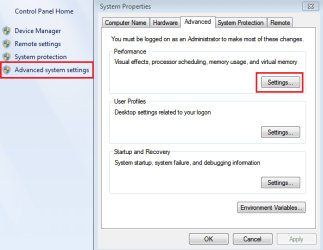
3. Click "Advanced system settings" and click Settings as I show below:

Capture.PNG

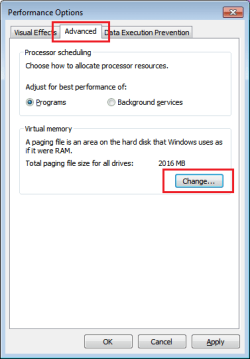
4. Now click "Advanced" tab and click "change" as shown:

Untitled.png

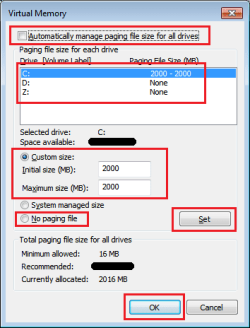
5. Now uncheck "Automatically manage paging file..." and select your SSD drive from the list.
6. Now choose "Custom" and enter the value shown infront of "Recommended" at the bottom in both fields.
7. Now click "Set".

3.png

   Note
Make sure no other drive other than the SSD has a paging file on it (Incase there is, select the drive and click "No paging file" and then click SET.

8. Click OK.
9. Restart to take effect.
 

My Computer

Computer type
PC/Desktop
OS
Windows 7 Home Premium x64
Back
Top