Ssd + hdd dual boot (on separate drives)

DUNKY

New member
Local time
1:53 PM
Messages
14
SSD + HDD DUAL BOOT (ON SEPARATE DRIVES)


Is it possible to set up a system for dual boot function using two separate drives (in the same system) if one is an SSD and the other a HDD ?

:geek:
 

My Computer My Computer

At a glance

Windows 7 Ultimate x64
OS
Windows 7 Ultimate x64
Certainly is :)
 

My Computer My Computer

At a glance

8 Pro x64i7 3770K 4.6GHz16GB G.Skill Trident X 2666mhzx2 EVGA 780 Ti Superclocked SLI
Computer type
PC/Desktop
Computer Manufacturer/Model Number
Systems by SmartEyeball
OS
8 Pro x64
CPU
i7 3770K 4.6GHz
Motherboard
ASUS P8Z77 WS
Memory
16GB G.Skill Trident X 2666mhz
Graphics Card(s)
x2 EVGA 780 Ti Superclocked SLI
Sound Card
SB X-FI Surround 5.1 PRO USB / ATH-AD900 Headphones
Monitor(s) Displays
x3 Dell U2410 / 58" Samsung
Screen Resolution
5760*1200/ 1920*1200
Hard Drives
2x Intel 520 240GB (RAID 0) * 2x WD Caviar Blacks 2TB (RAID 0) * 2TB WD Caviar Black * Sony Optirac DVD
PSU
Silverstone Strider Evolution 1200W
Case
Thermaltake Level 10 GT Snow Edition
Cooling
Noctua NH-D14
Keyboard
Topre Realforce // Ducky Shine MX Black // Filco Ninja TKL
Mouse
Thermaltake Theron (Highly Recommended) + Razer Imperator
Antivirus
MSE
Browser
IE, FF, WaterFox
Other Info
GT Extreme V2 Sim Racing Cockpit + 40" LCD and K/B Mouse stand ▼
Fanatec CSR Elite Wheel + Clubsport V1 Pedals + CSR shifter/7G-H ▼Saitek X52 Pro ▼ TrackIR 5 Pro
Buttkicker v2 Seat Rumbler with Dedicated 5.1 and Sub Woofer attached to frame ▼
=
Bloody Big Grin
I'm rather newbie to this . . .can you point me towards a tutorial that will show me how to do this successfully ?


:geek:
 

My Computer My Computer

At a glance

Windows 7 Ultimate x64
OS
Windows 7 Ultimate x64
Yep. I'm not promoting this software, but I've used it as a substitute for the command prompt based bcdedit: it's EasyBCD. If you want your Main OS in SSD, install your windows to your SSD. The boot information (MBR) will be stored in the SSD. Then, install your secondary OS in the HDD. This will store the MBR for your secondary OS in the HDD. If your boot priority in the BIOS is SSD first, you won't be able to boot to your secondary OS without adding the secondary OS MBR from your HDD to your SSD. EasyBCD will allow to do this task without risks.

Just do a google search on how to use EasyBCD and you should be dual booting without issues.
 

My Computer My Computer

At a glance

Windows 7 Professional x64 SP1Intel® Pentium® 4 @ 2.26 GHz, Intel Core i7-2...512MB Dual channel DDR SDRAM @ 400MHz 2.5-3-3...Intel 82865G, Nvidia GeForce 520M Graphics
Computer type
Laptop
Computer Manufacturer/Model Number
Dell Optiplex SX270, Lenovo Z470
OS
Windows 7 Professional x64 SP1
CPU
Intel® Pentium® 4 @ 2.26 GHz, Intel Core i7-2670QM @ 2.20 GH
Motherboard
Dell, Lenovo
Memory
512MB Dual channel DDR SDRAM @ 400MHz 2.5-3-3-7, 8 GB DDR3
Graphics Card(s)
Intel 82865G, Nvidia GeForce 520M Graphics
Sound Card
SoundMax Integrated Audio, Integrated HD Audio
Monitor(s) Displays
LG W1952
Screen Resolution
1440x900, 1366 x 768
Hard Drives
40 GB 2.5" IDE 4200 RPM HDD, 500 GB 5400 RPM Sata 1.5 + 32 GB SSD
PSU
Dell 145 Watt, Lenovo 120 Watt Power Adapter
Case
Optiplex SX270 Small Form Factor, Laptop
Cooling
Dell Proprietary Air Cooling, Stock laptop cooling
Keyboard
Dell SK-8125 USB Keyboard
Mouse
Dell PS/2 2 button ball mouse with wheel scroll
Internet Speed
300 Mbit down / 20 Mbps up Time Warner Cable
Antivirus
MSE, Malwarebytes Scanner
Browser
Internet (Aizawa) Explorer 11
Other Info
Running Windows Server 2012 Datacenter on a virtual machine to run Metro Apps.
So is this just a matter of installing the software and the OS on each SSD + HDD ?

it doesnt seem to be as complicated as i first thought but i still have reservations in regards to how to proceed with confidence.

@theveterans@ is there a concise step by step tutorial that you can refer me to?


thanks :geek:
 

My Computer My Computer

At a glance

Windows 7 Ultimate x64
OS
Windows 7 Ultimate x64
I have never performed a dual boot 2 different Operating systems (e.g. Windows 7 + Ubuntu). I have only done Windows 7 and previous versions of windows. But here's the quick tutorial of how to clean install Windows 7: http://www.sevenforums.com/tutorials/1649-clean-install-windows-7-a.html

BTW, if you're doing an installation of multiple Windows versions, install them in this order: old version first then the most recent.

Here's the tutorial on how to dual boot XP and Windows 7: http://www.sevenforums.com/tutorials/8057-dual-boot-installation-windows-7-xp.html

If you doing Linux + Windows dual boot. I suggest to install Ubuntu (use Google to find this out as I have no experience with Linux whatsoever) on the HDD first. Like I said above this creates the boot information for Linux on the HDD. Then install Windows 7 on the SSD by following the clean install tutorial link that I provided. If you set your BIOS to boot to the SSD first, you will only be able to boot to Windows 7. Then install EasyBCD. You can find EasyBCD using Google search.

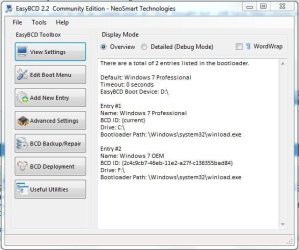
On the EasyBCD menu, you will see only the Windows 7 entry. (Below is my dual boot setup: Windows 7 pro on the SSD and Windows 7 Home Premium OEM on the HDD)
Capture0.JPG
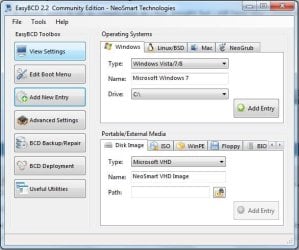
Now go to the "add new entry" then add the Ubuntu/Linux by selecting the correct drive letter for the HDD.
Capture1.JPG
Finally restart your PC and you should see 2 entries in the boot manager. Hope you get your dual boot set up properly :).
 

My Computer My Computer

At a glance

Windows 7 Professional x64 SP1Intel® Pentium® 4 @ 2.26 GHz, Intel Core i7-2...512MB Dual channel DDR SDRAM @ 400MHz 2.5-3-3...Intel 82865G, Nvidia GeForce 520M Graphics
Computer type
Laptop
Computer Manufacturer/Model Number
Dell Optiplex SX270, Lenovo Z470
OS
Windows 7 Professional x64 SP1
CPU
Intel® Pentium® 4 @ 2.26 GHz, Intel Core i7-2670QM @ 2.20 GH
Motherboard
Dell, Lenovo
Memory
512MB Dual channel DDR SDRAM @ 400MHz 2.5-3-3-7, 8 GB DDR3
Graphics Card(s)
Intel 82865G, Nvidia GeForce 520M Graphics
Sound Card
SoundMax Integrated Audio, Integrated HD Audio
Monitor(s) Displays
LG W1952
Screen Resolution
1440x900, 1366 x 768
Hard Drives
40 GB 2.5" IDE 4200 RPM HDD, 500 GB 5400 RPM Sata 1.5 + 32 GB SSD
PSU
Dell 145 Watt, Lenovo 120 Watt Power Adapter
Case
Optiplex SX270 Small Form Factor, Laptop
Cooling
Dell Proprietary Air Cooling, Stock laptop cooling
Keyboard
Dell SK-8125 USB Keyboard
Mouse
Dell PS/2 2 button ball mouse with wheel scroll
Internet Speed
300 Mbit down / 20 Mbps up Time Warner Cable
Antivirus
MSE, Malwarebytes Scanner
Browser
Internet (Aizawa) Explorer 11
Other Info
Running Windows Server 2012 Datacenter on a virtual machine to run Metro Apps.
Just done it myself with 2 drives using easybcd. Installed it on both drives, open it in windows and it's fairly self explanatory. Works a treat!
Download link from the website wouldn't work for some reason, but plenty of copies out there on cnet etc
 

My Computer My Computer

At a glance

Windows 7 64bit ultimate, xp pro 32bit, win 8...AMD phenom black 3.2ghz8gb corsair ddr3Onboard
OS
Windows 7 64bit ultimate, xp pro 32bit, win 8 pro 32bit
CPU
AMD phenom black 3.2ghz
Motherboard
Gigabyte
Memory
8gb corsair ddr3
Graphics Card(s)
Onboard
Sound Card
External Alesis Multimix
Monitor(s) Displays
LG
Hard Drives
2 x 1tb Western Digital sata6
Internet Speed
60mb
Glad you got your dual boot working.
 

My Computer My Computer

At a glance

Windows 7 Professional x64 SP1Intel® Pentium® 4 @ 2.26 GHz, Intel Core i7-2...512MB Dual channel DDR SDRAM @ 400MHz 2.5-3-3...Intel 82865G, Nvidia GeForce 520M Graphics
Computer type
Laptop
Computer Manufacturer/Model Number
Dell Optiplex SX270, Lenovo Z470
OS
Windows 7 Professional x64 SP1
CPU
Intel® Pentium® 4 @ 2.26 GHz, Intel Core i7-2670QM @ 2.20 GH
Motherboard
Dell, Lenovo
Memory
512MB Dual channel DDR SDRAM @ 400MHz 2.5-3-3-7, 8 GB DDR3
Graphics Card(s)
Intel 82865G, Nvidia GeForce 520M Graphics
Sound Card
SoundMax Integrated Audio, Integrated HD Audio
Monitor(s) Displays
LG W1952
Screen Resolution
1440x900, 1366 x 768
Hard Drives
40 GB 2.5" IDE 4200 RPM HDD, 500 GB 5400 RPM Sata 1.5 + 32 GB SSD
PSU
Dell 145 Watt, Lenovo 120 Watt Power Adapter
Case
Optiplex SX270 Small Form Factor, Laptop
Cooling
Dell Proprietary Air Cooling, Stock laptop cooling
Keyboard
Dell SK-8125 USB Keyboard
Mouse
Dell PS/2 2 button ball mouse with wheel scroll
Internet Speed
300 Mbit down / 20 Mbps up Time Warner Cable
Antivirus
MSE, Malwarebytes Scanner
Browser
Internet (Aizawa) Explorer 11
Other Info
Running Windows Server 2012 Datacenter on a virtual machine to run Metro Apps.
Thanks theveterans

I'll give it a shot.

:geek:
 

My Computer My Computer

At a glance

Windows 7 Ultimate x64
OS
Windows 7 Ultimate x64
Back
Top