Hi,
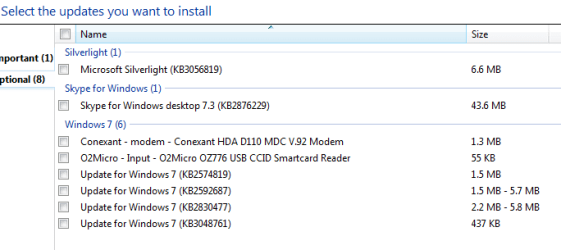
Oh shoot I also have the box Uncheck to Give me recommended updates the same as Important ones,
That way all Recommended updates are listed in the Optional section not in the Important section,
Most recommended updates should be reviewed by the individual to see if they apply to their environment
Same goes for Optional updates,
I'm not sure what you mean on the last part could you explain a bit more ?
Hi,
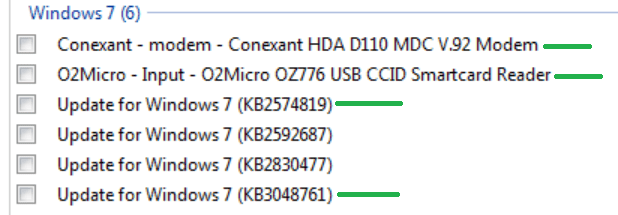
How would an old person like me know whether to install a specific Recommended and optional update apart from the ones for W10 upgrading.
I normally allow install updates automatically.
Coming to dell drivers order... Notebook, Chipset, Video, Audio, etc is that order fine after W7 and Office updates?
Thanks.
My Computers
-
At a glance
W7 Pro 32bitIntel(R) Core(TM)2 CPU T7200 @ 2.00GHz4.00 GBNVIDIA GTX 7980 512 MB- Computer type
- Laptop
- Computer Manufacturer/Model Number
- Dell
- OS
- W7 Pro 32bit
- CPU
- Intel(R) Core(TM)2 CPU T7200 @ 2.00GHz
- Motherboard
- Dell Inc. 0CF456
- Memory
- 4.00 GB
- Graphics Card(s)
- NVIDIA GTX 7980 512 MB
- Sound Card
- (1) HD Pro Webcam C910 (2) Bluetooth Stereo Audio (3) Si
- Hard Drives
- SSD
- Browser
- Brave
-
At a glance
W10 Procore i7 11th gen, 11700, 2.5-4.9 GHZ32 GBB, 2 X16 GB @2933 MHz.NVIDIA GeForce RTX 3070 8GB GDDR6- Computer type
- PC/Desktop
- System Manufacturer/Model Number
- Dell XPS Special Edition 8940
- OS
- W10 Pro
- CPU
- core i7 11th gen, 11700, 2.5-4.9 GHZ
- Memory
- 32 GBB, 2 X16 GB @2933 MHz.
- Graphics Card(s)
- NVIDIA GeForce RTX 3070 8GB GDDR6
- Monitor(s) Displays
- Dell UltraSharp 32 4K monitor.
- Hard Drives
- 1. 1TB M.2 PCIe NVMe SSD.
2. 1TB 7200 rpm 3.5" SATA Hard Drive.
- PSU
- 500W.
- Case
- Mineral White Bezel Chassis.