SSD Performance Confusing

goosegas

New member
Member
Local time
12:00 PM
Messages
32
I recently installed a Crucial M4 128GB SSD into my pc.

I connected to a SATA lll 6.0 Gb/s port on my motherboard.

This drive exists along side my HDD, which is now Drive "F", with the SSD being drive "C". I did not clone or transfer anything to the SSD, installing a fresh copy of Windows 7 Home Premium 64 bit from my CD.

I went through all the optimization steps spelled out by the experts both here and on other sites.

I have the SSD selected as the boot drive, but to my disappointment WIndows7 64 bit loads slower than my HDD. I would like to find out why, but I can live with that as long as the drive performance is what it should be.

I attempted to set AHCI in the BIOS, before installing the OS, but each time I selected it, I would get a blue screen which wouldn't leave until I restarted the computer. As soon as I switched the setting over to IDE, the pc booted but as I said, slower than my HDD.

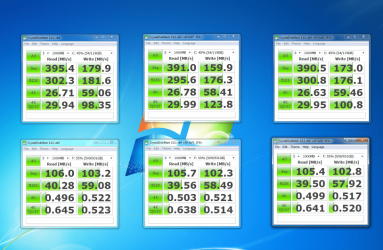
I have attached a screenshot of a result using Crystal Disk Mark.

The top row are the results of the SSD, while the bottom row is the results of my HDD. Although the results are considerably better than the HDD, I have been told that these numbers should be much better and the boot time should be very quick.

Any help would be greatly appreciated

Rick

I have also included my computer specs below:

Case: Coolermaster HAF-X
MB: Gigabyte Z68AP-D3
Processor: Intel Core i7-2700k @ 3.50GHz
Video Card: Zotac NVIDIA GeForce GTX 570
Memory: Corsair Vengeance 8 GB (2 x4 GB) 1600MHz
Hard Disk 1: Crucial M4 128 GB SATA lll 6.0 Gb/s
Hard Disk 2: Western Digital 1 TB 7200 RPM
PSU: Coolermaster Silent Pro 850W
Monitor: Hanns-G 27.5" (11920 x 1200)
 

Attachments
  • ssdtest.png
    ssdtest.png
    101.9 KB · Views: 22

My Computer

Computer Manufacturer/Model Number
Custom Build
OS
Windows 7 Home Premium 64 bit
CPU
Intel Core i7-2700K @ 3.50 GHz
Motherboard
Gigabyte Z68AP-D3
Memory
Corsair Vengeance 8 GB (2 x 4 GB) 1600 MHz
Graphics Card(s)
NVIDIA GeForce GTX 570
Sound Card
On Motherboard 7.1
Monitor(s) Displays
Hanns-G 27.5 Inch 1920 x 1200 LCD Monitor
Hard Drives
Seagate Barracuda 1TB 7200 RPM 32MB Cache SATA 6.0Gb/s 3.5" Internal Hard Drive

Crucial M4 128 GB SATA lll SSD
PSU
Coolermaster 850W Silent Pro
Case
Coolermaster HAF X Gaming Case
Cooling
Asetek 570LC Liquid Cooling System with 120 MM Radiator w PP
Keyboard
Logitech G15 Gaming Keyboard
Mouse
Razer Imperator 5600 DPI Gaming Mouse
Internet Speed
75 Gbps Download / 35 Gbps Upload (FIOS Quantum)
See if this tutorial helps you to http://www.sevenforums.com/tutorials/61869-ahci-enable-windows-7-vista.html. You should see a performance increase after enabling AHCI. There should be no blue screens if you follow the tutorial exactly. For your drive, those numbers should be some higher, but I would refrain from running tests for a few days. Too many tests close together can hurt performance. I don't know what 'tweeks' you did, but very few are necessary. Windows will do most of what is needed. I would guess when you changed bios to AHCI you still had your other OS installed, and is why you got the blue screens. Once you change over you should see an improvement. You should have seen a significant improvement already.

EDIT: and if you have the drive connected to a Marvel port, switch it to an Intel controlled sata 3 port (usually port 0-1)
 

My Computers

System One System Two

  • Computer type
    PC/Desktop
    Computer Manufacturer/Model Number
    ALWAYS UNDER CONSTRUCTION
    OS
    Windows 11 Pro
    CPU
    Ryzen 9 5900X
    Motherboard
    Asus X570 Crosshair Viii Hero
    Memory
    32GB G Skill DDR4-3600
    Graphics Card(s)
    EVGA RTX 3080 FTW 3 Ultra
    Sound Card
    On Board/Sennheiser PC37X Headset
    Monitor(s) Displays
    3 X Asus 27"
    Screen Resolution
    2560x1440
    Hard Drives
    2 X 1 TB NVME drives
    PSU
    EVGA 850
    Case
    Phanteks Eclipse P400A
    Cooling
    EVGA 280 AIO
    Keyboard
    Logitech G510s/ Logitech G13
    Mouse
    Logitech G502
    Internet Speed
    24/1
    Antivirus
    ESET/MBAM Pro/SAS Pro
    Browser
    Chrome/ Firefox/ Edge
  • Computer type
    Laptop
    System Manufacturer/Model Number
    Dell 16 Plus
    OS
    Windows 11 Pro
    CPU
    Intel Ultra 9 288V
    Memory
    32 GB LPDDR5X 8533
    Monitor(s) Displays
    16" Mini-LED HDR600 Touch 90 Hz
    Screen Resolution
    2560X1600
    Hard Drives
    1 TB NVME
Thanks for the info.

I have no yet tried what is contained in the tutorial, and I am not optomistic it will work.

I say this because I had my HDD disconnected the entire time from connecting the SSD to doing all the tweaks. The HDD was not reconnected until everything, including the OS install on the SSD was complete.

I am not quite sure why the tutorial wants me to make registry changes and then go back to the BIOS where the change was rejected several times.

I guess it can't hurt to try. I think I better re-enable system restore and create a restore point before I try this.

Any other thoughts would be greatly appreciated.

Rick
 

My Computer

Computer Manufacturer/Model Number
Custom Build
OS
Windows 7 Home Premium 64 bit
CPU
Intel Core i7-2700K @ 3.50 GHz
Motherboard
Gigabyte Z68AP-D3
Memory
Corsair Vengeance 8 GB (2 x 4 GB) 1600 MHz
Graphics Card(s)
NVIDIA GeForce GTX 570
Sound Card
On Motherboard 7.1
Monitor(s) Displays
Hanns-G 27.5 Inch 1920 x 1200 LCD Monitor
Hard Drives
Seagate Barracuda 1TB 7200 RPM 32MB Cache SATA 6.0Gb/s 3.5" Internal Hard Drive

Crucial M4 128 GB SATA lll SSD
PSU
Coolermaster 850W Silent Pro
Case
Coolermaster HAF X Gaming Case
Cooling
Asetek 570LC Liquid Cooling System with 120 MM Radiator w PP
Keyboard
Logitech G15 Gaming Keyboard
Mouse
Razer Imperator 5600 DPI Gaming Mouse
Internet Speed
75 Gbps Download / 35 Gbps Upload (FIOS Quantum)
First thing is read your manual and see how to put your system into AHCI mode. I'm not familar with Gigabyte boards. The reason it blue screened is because the OS did not have AHCI drivers in it. The reason for the registry changes is so when you make the change in bios it will force the OS to load the AHCI drivers. once you see it downloading drivers it will finish and ask you to reboot. You will then be in AHCI mode. You should have system restore enabled anyway. It can save you a lot of trouble at times..

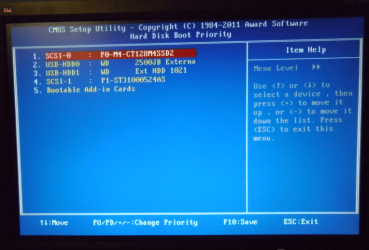
EDIT: also make sure your bios is set for the SSD to be the 1st hard drive to boot.
 

My Computers

System One System Two

  • Computer type
    PC/Desktop
    Computer Manufacturer/Model Number
    ALWAYS UNDER CONSTRUCTION
    OS
    Windows 11 Pro
    CPU
    Ryzen 9 5900X
    Motherboard
    Asus X570 Crosshair Viii Hero
    Memory
    32GB G Skill DDR4-3600
    Graphics Card(s)
    EVGA RTX 3080 FTW 3 Ultra
    Sound Card
    On Board/Sennheiser PC37X Headset
    Monitor(s) Displays
    3 X Asus 27"
    Screen Resolution
    2560x1440
    Hard Drives
    2 X 1 TB NVME drives
    PSU
    EVGA 850
    Case
    Phanteks Eclipse P400A
    Cooling
    EVGA 280 AIO
    Keyboard
    Logitech G510s/ Logitech G13
    Mouse
    Logitech G502
    Internet Speed
    24/1
    Antivirus
    ESET/MBAM Pro/SAS Pro
    Browser
    Chrome/ Firefox/ Edge
  • Computer type
    Laptop
    System Manufacturer/Model Number
    Dell 16 Plus
    OS
    Windows 11 Pro
    CPU
    Intel Ultra 9 288V
    Memory
    32 GB LPDDR5X 8533
    Monitor(s) Displays
    16" Mini-LED HDR600 Touch 90 Hz
    Screen Resolution
    2560X1600
    Hard Drives
    1 TB NVME
Okay, well I was able to get the BIOS to accept AHCI without a blue screen.

Unfortunately the boot time from BIOS screen to loaded desktop is 2.5 minutes. This is still a good 45 seconds slower than my HDD.

The ports are Intel controlled SATA lll 6.0 slots.

I did not run any additional r/w tests as you suggested and I am mostly working on the boot time now.

If I could get the boot time to be anything quicker than my HDD I would accept that, and then we can try to find out why the speeds posted earlier are still not where they need to be.

I am not sure if this means anything to you, but I noticed after changing the registry value and then restarting the pc in AHCI, there were two driver searches that just kept searching and never loaded. they were ata 1 and ata 2. I did receive the message to restart to complete the process, but I gave it about 5 minutes to see if it found those 2 drivers. I went to those two drivers in my device manager and asked it to search for the best driver (internet) and I was told that I had the best driver and the devices were working properly.

When I restarted the pc, I didn't get any errors or blue screens, or even another driver search....just two and a half minutes of waiting.

Any other thoughts would be great,

Rick
 

My Computer

Computer Manufacturer/Model Number
Custom Build
OS
Windows 7 Home Premium 64 bit
CPU
Intel Core i7-2700K @ 3.50 GHz
Motherboard
Gigabyte Z68AP-D3
Memory
Corsair Vengeance 8 GB (2 x 4 GB) 1600 MHz
Graphics Card(s)
NVIDIA GeForce GTX 570
Sound Card
On Motherboard 7.1
Monitor(s) Displays
Hanns-G 27.5 Inch 1920 x 1200 LCD Monitor
Hard Drives
Seagate Barracuda 1TB 7200 RPM 32MB Cache SATA 6.0Gb/s 3.5" Internal Hard Drive

Crucial M4 128 GB SATA lll SSD
PSU
Coolermaster 850W Silent Pro
Case
Coolermaster HAF X Gaming Case
Cooling
Asetek 570LC Liquid Cooling System with 120 MM Radiator w PP
Keyboard
Logitech G15 Gaming Keyboard
Mouse
Razer Imperator 5600 DPI Gaming Mouse
Internet Speed
75 Gbps Download / 35 Gbps Upload (FIOS Quantum)
OK for starters. Click the start button, typein the search box cmd, on the cmd entry that appears, right click it and select run as administrator, you will have to provide admin permission.
Type diskpart -press enter and wait for the computer to reply 'diskpatrt'
Type list disk and press enter
it will give you a list of all drives you have installed each with a number. Look for the number of your SSD.
type select disk # (# being the number of your SSD) and press enter it will say disk # is the selected disk
Type list partition and press enter
it will give you info on the partition. The one we are intrested in is under offset. That is your alignment.

This is what it will look like. I probably have more disks than you, but the SSD was disk 0 in this example. tell me what the offset is.

alignment.PNG
 

My Computers

System One System Two

  • Computer type
    PC/Desktop
    Computer Manufacturer/Model Number
    ALWAYS UNDER CONSTRUCTION
    OS
    Windows 11 Pro
    CPU
    Ryzen 9 5900X
    Motherboard
    Asus X570 Crosshair Viii Hero
    Memory
    32GB G Skill DDR4-3600
    Graphics Card(s)
    EVGA RTX 3080 FTW 3 Ultra
    Sound Card
    On Board/Sennheiser PC37X Headset
    Monitor(s) Displays
    3 X Asus 27"
    Screen Resolution
    2560x1440
    Hard Drives
    2 X 1 TB NVME drives
    PSU
    EVGA 850
    Case
    Phanteks Eclipse P400A
    Cooling
    EVGA 280 AIO
    Keyboard
    Logitech G510s/ Logitech G13
    Mouse
    Logitech G502
    Internet Speed
    24/1
    Antivirus
    ESET/MBAM Pro/SAS Pro
    Browser
    Chrome/ Firefox/ Edge
  • Computer type
    Laptop
    System Manufacturer/Model Number
    Dell 16 Plus
    OS
    Windows 11 Pro
    CPU
    Intel Ultra 9 288V
    Memory
    32 GB LPDDR5X 8533
    Monitor(s) Displays
    16" Mini-LED HDR600 Touch 90 Hz
    Screen Resolution
    2560X1600
    Hard Drives
    1 TB NVME
View attachment partitions.txtThanks for all the help guys. Although we still aren't there yet, I think progress...I really appreciate it.

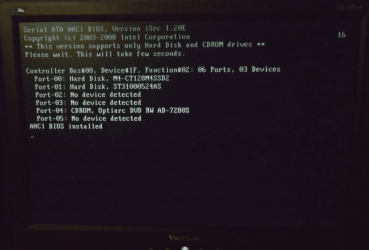
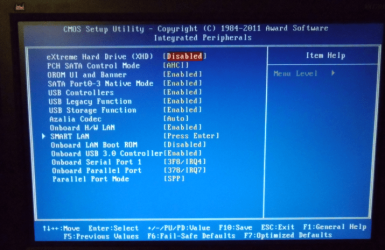
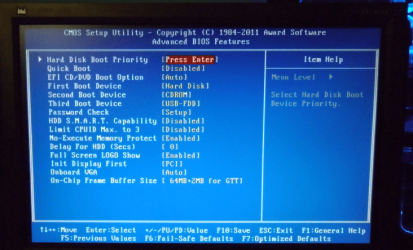
I am attaching screenshots off several BIOS screens and I have attached a file with the results of the partition question posed by essenbe.

I hope these help and by all means ask away if you need anything else....I am just thankful there are guys out there like you willing to help.

Sorry the text document of the partitions isn't below, I think it is gonna be embedded within this text.

Rick
 

Attachments

  • Loadingscreen.png
    Loadingscreen.png
    108.2 KB · Views: 10
  • INTPERIF.png
    INTPERIF.png
    148.7 KB · Views: 9
  • CMOSADVBIOS.png
    CMOSADVBIOS.png
    152.2 KB · Views: 7
  • BOOTPRIORITY.png
    BOOTPRIORITY.png
    165 KB · Views: 8

My Computer

Computer Manufacturer/Model Number
Custom Build
OS
Windows 7 Home Premium 64 bit
CPU
Intel Core i7-2700K @ 3.50 GHz
Motherboard
Gigabyte Z68AP-D3
Memory
Corsair Vengeance 8 GB (2 x 4 GB) 1600 MHz
Graphics Card(s)
NVIDIA GeForce GTX 570
Sound Card
On Motherboard 7.1
Monitor(s) Displays
Hanns-G 27.5 Inch 1920 x 1200 LCD Monitor
Hard Drives
Seagate Barracuda 1TB 7200 RPM 32MB Cache SATA 6.0Gb/s 3.5" Internal Hard Drive

Crucial M4 128 GB SATA lll SSD
PSU
Coolermaster 850W Silent Pro
Case
Coolermaster HAF X Gaming Case
Cooling
Asetek 570LC Liquid Cooling System with 120 MM Radiator w PP
Keyboard
Logitech G15 Gaming Keyboard
Mouse
Razer Imperator 5600 DPI Gaming Mouse
Internet Speed
75 Gbps Download / 35 Gbps Upload (FIOS Quantum)
Your alignment is as it should be.
Under Computer in the start menu, is the SSD listed as drive C\?
 

My Computer

Computer type
PC/Desktop
Computer Manufacturer/Model Number
Home Built Desktop By DataTech
OS
Windows 7 Ultimate X64 SP1
CPU
Intel i5-2550K, Differing ~4.4-4.8GHz No built in GPU
Motherboard
ASUS P8Z68-V PRO/GEN3
Memory
16GB G.Skill Sniper 1866MHz @ 2133MHz 2x8GB
Graphics Card(s)
ASUS GTX650TIB-DC2OC-2GD5, (650TI Boost)
Sound Card
Onboard Realtek 5-1
Monitor(s) Displays
Samsung P2570HD
Screen Resolution
1920x1080
Hard Drives
Samsung 840 Pro 256GB SSD for OS, 500GB Seagate Constellation (Enterprise drive) for Data
PSU
Corsair HX650W
Case
Inwin Dragon Rider
Cooling
Hyper 212 EVO w/two Noctua fans, push-pull, @1300 RPM
Keyboard
E-Z Eyes, bright yellow keys with large characters
Mouse
steelseries SENSEI Laser Pro Gaming
Internet Speed
48-51Mbs Mbs down, 11 Mbs up Xfinity Cable
Antivirus
Norton Internet Security 2013
Browser
IE 10, Opera, Pale Moon if needed
Other Info
4 case fans, LG BluRay-RE, ASUS DVD-RW, Mr. Fusion power supply, 1.21 gigawatts.
yes it is
 

My Computer

Computer Manufacturer/Model Number
Custom Build
OS
Windows 7 Home Premium 64 bit
CPU
Intel Core i7-2700K @ 3.50 GHz
Motherboard
Gigabyte Z68AP-D3
Memory
Corsair Vengeance 8 GB (2 x 4 GB) 1600 MHz
Graphics Card(s)
NVIDIA GeForce GTX 570
Sound Card
On Motherboard 7.1
Monitor(s) Displays
Hanns-G 27.5 Inch 1920 x 1200 LCD Monitor
Hard Drives
Seagate Barracuda 1TB 7200 RPM 32MB Cache SATA 6.0Gb/s 3.5" Internal Hard Drive

Crucial M4 128 GB SATA lll SSD
PSU
Coolermaster 850W Silent Pro
Case
Coolermaster HAF X Gaming Case
Cooling
Asetek 570LC Liquid Cooling System with 120 MM Radiator w PP
Keyboard
Logitech G15 Gaming Keyboard
Mouse
Razer Imperator 5600 DPI Gaming Mouse
Internet Speed
75 Gbps Download / 35 Gbps Upload (FIOS Quantum)
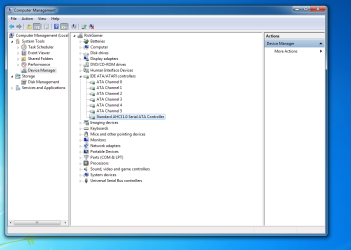
goosegas, download As SSD and open it up. You don't need to run the test, just open it, make sure your SSD is selected and post a screenshot for us. Also, go to device manager, expand IDE ATA/Atapi controllers and post a scrreenshot of that. We'll try to sort this out.
 

My Computers

System One System Two

  • Computer type
    PC/Desktop
    Computer Manufacturer/Model Number
    ALWAYS UNDER CONSTRUCTION
    OS
    Windows 11 Pro
    CPU
    Ryzen 9 5900X
    Motherboard
    Asus X570 Crosshair Viii Hero
    Memory
    32GB G Skill DDR4-3600
    Graphics Card(s)
    EVGA RTX 3080 FTW 3 Ultra
    Sound Card
    On Board/Sennheiser PC37X Headset
    Monitor(s) Displays
    3 X Asus 27"
    Screen Resolution
    2560x1440
    Hard Drives
    2 X 1 TB NVME drives
    PSU
    EVGA 850
    Case
    Phanteks Eclipse P400A
    Cooling
    EVGA 280 AIO
    Keyboard
    Logitech G510s/ Logitech G13
    Mouse
    Logitech G502
    Internet Speed
    24/1
    Antivirus
    ESET/MBAM Pro/SAS Pro
    Browser
    Chrome/ Firefox/ Edge
  • Computer type
    Laptop
    System Manufacturer/Model Number
    Dell 16 Plus
    OS
    Windows 11 Pro
    CPU
    Intel Ultra 9 288V
    Memory
    32 GB LPDDR5X 8533
    Monitor(s) Displays
    16" Mini-LED HDR600 Touch 90 Hz
    Screen Resolution
    2560X1600
    Hard Drives
    1 TB NVME
Thank You...here is what you requested
 

Attachments

  • ASSSD.png
    ASSSD.png
    87.1 KB · Views: 23
  • IDEATAATAPI.png
    IDEATAATAPI.png
    59.9 KB · Views: 19

My Computer

Computer Manufacturer/Model Number
Custom Build
OS
Windows 7 Home Premium 64 bit
CPU
Intel Core i7-2700K @ 3.50 GHz
Motherboard
Gigabyte Z68AP-D3
Memory
Corsair Vengeance 8 GB (2 x 4 GB) 1600 MHz
Graphics Card(s)
NVIDIA GeForce GTX 570
Sound Card
On Motherboard 7.1
Monitor(s) Displays
Hanns-G 27.5 Inch 1920 x 1200 LCD Monitor
Hard Drives
Seagate Barracuda 1TB 7200 RPM 32MB Cache SATA 6.0Gb/s 3.5" Internal Hard Drive

Crucial M4 128 GB SATA lll SSD
PSU
Coolermaster 850W Silent Pro
Case
Coolermaster HAF X Gaming Case
Cooling
Asetek 570LC Liquid Cooling System with 120 MM Radiator w PP
Keyboard
Logitech G15 Gaming Keyboard
Mouse
Razer Imperator 5600 DPI Gaming Mouse
Internet Speed
75 Gbps Download / 35 Gbps Upload (FIOS Quantum)
What do you have on your 1TB hard drive? Have you moved your user folders from the C drive to the 1TB drive?
I'm beginning to be at a loss here. One thing I noticed about your bios is smart on your hard drive is disabled, enable it. It can give you warning if a hard drive is developing problems. Download Data Lifeguard for DOS, the zip file contains an ISO file, extract the ISO or download the ISO version (Zip file will be faster download) burn it to a CD, the instructions are on the download page. Boot into the CD and select your Western Digital and run the tests. If you do not have your user files moved, shut down the computer, disconnect the western Digital and start the computer. You may have to restart a couple of times. See if you see a difference. You can do that even if you have moved your libraries, but windows won't like it because it can't find some files. You will get error messages, but it should be fine, I've done it several times. Also, right click computer, select manage, in the left column select disk management expand the window and adjust the columns so both the top and bottom are visible. Post a screenshot. There are several things here. They are in no particular order. Do them in any order you like. from everything I have seen so far, there seems to be no problem, I am just looking for what's wrong. Even the tests you have shown are a little below what they should be, but you should be much much faster than the boot times you talked about. I have 2 of the same drives as you. When you boot up, when you see the 1st loading windows message, start timing it from there. That is the first time your hard drive comes into play, the rest is your motherboard bios POST process.

If any of that is unclear, don't hesitate to ask. I or someone else will be happy to explain why or how.
 

My Computers

System One System Two

  • Computer type
    PC/Desktop
    Computer Manufacturer/Model Number
    ALWAYS UNDER CONSTRUCTION
    OS
    Windows 11 Pro
    CPU
    Ryzen 9 5900X
    Motherboard
    Asus X570 Crosshair Viii Hero
    Memory
    32GB G Skill DDR4-3600
    Graphics Card(s)
    EVGA RTX 3080 FTW 3 Ultra
    Sound Card
    On Board/Sennheiser PC37X Headset
    Monitor(s) Displays
    3 X Asus 27"
    Screen Resolution
    2560x1440
    Hard Drives
    2 X 1 TB NVME drives
    PSU
    EVGA 850
    Case
    Phanteks Eclipse P400A
    Cooling
    EVGA 280 AIO
    Keyboard
    Logitech G510s/ Logitech G13
    Mouse
    Logitech G502
    Internet Speed
    24/1
    Antivirus
    ESET/MBAM Pro/SAS Pro
    Browser
    Chrome/ Firefox/ Edge
  • Computer type
    Laptop
    System Manufacturer/Model Number
    Dell 16 Plus
    OS
    Windows 11 Pro
    CPU
    Intel Ultra 9 288V
    Memory
    32 GB LPDDR5X 8533
    Monitor(s) Displays
    16" Mini-LED HDR600 Touch 90 Hz
    Screen Resolution
    2560X1600
    Hard Drives
    1 TB NVME
I didn't add, remove, or change anything on my HDD, which was the C Drive and has now been designated as the F Drive.

I apologize, but I never updated my system specs after getting this computer. I have updated them just now. The HDD is not a WD but is actually a Seagate Barracuda ST31000524AS 1TB 7200 RPM 32MB Cache SATA 6.0Gb/s 3.5" Internal Hard Drive.

I would imagine that downloading and running the WD utility would make no sense at this point. Is there a utility for Seagate that might accomplish the same thing?

I have attached a screenshot of the disk management screen that you requested.

I set the SMART feature in the BIOS but I didn't see any difference in boot speed and I didn't receive any messages either.

Disconnecting and reconnecting the HDD had some interesting results. I disconnected the data cable, and restarted the computer from being completely off. It took 45 seconds to be at my desktop. I said this must mean something but what? So, I restarted the computer with the HDD still disconnected and it actually took 10 seconds longer than when it was started cold. I reconnected the HDD and started from cold. It only took 45 seconds to be at a loaded desktop. I was beginning to like what I was seeing. Unfortunately, the next time and three times after, when I restarted the computer, it took up to 3 minutes to get to the desktop.

The delay seems to be split between the BIOS screen, which flew by when the computer booted in 45 seconds but the longest delay by far is at the Starting Windows screen. It says starting windows for almost two minutes before the windows logo appears.

Thanks for your help

Rick (Goosegas)
 

Attachments

  • diskmanagement.png
    diskmanagement.png
    46.5 KB · Views: 13

My Computer

Computer Manufacturer/Model Number
Custom Build
OS
Windows 7 Home Premium 64 bit
CPU
Intel Core i7-2700K @ 3.50 GHz
Motherboard
Gigabyte Z68AP-D3
Memory
Corsair Vengeance 8 GB (2 x 4 GB) 1600 MHz
Graphics Card(s)
NVIDIA GeForce GTX 570
Sound Card
On Motherboard 7.1
Monitor(s) Displays
Hanns-G 27.5 Inch 1920 x 1200 LCD Monitor
Hard Drives
Seagate Barracuda 1TB 7200 RPM 32MB Cache SATA 6.0Gb/s 3.5" Internal Hard Drive

Crucial M4 128 GB SATA lll SSD
PSU
Coolermaster 850W Silent Pro
Case
Coolermaster HAF X Gaming Case
Cooling
Asetek 570LC Liquid Cooling System with 120 MM Radiator w PP
Keyboard
Logitech G15 Gaming Keyboard
Mouse
Razer Imperator 5600 DPI Gaming Mouse
Internet Speed
75 Gbps Download / 35 Gbps Upload (FIOS Quantum)
Seagate's program is called sea Tools. Seatools for Windows is a program you install, Seatools for dos should be an iso that you burn to a CD and boot from the CD. The dos program will give you the best test as it tests the disk when not in use. It sounds to me that the problem is with your Seagate drive. Whether it is the drive itself or whether it is the OS on the drive I don't know. But, if I understand you correctly, you boot like you are supposed to if the Seagate isn't connected. That says it is an issue with the Seagate drive. If you have another hard drive, try to use that and see if the results are the same. I am also assuming that the firmware on your SSD is up to date. Have you installed IRST? If not, you may try to download it from gigabyte for your motherboard. It is Intels Raid driver but also contains their AHCI driver IaStor. That is the driver I use. And don't worry, you do not have to run raid by installing the IRST. It is just the way to get the Intel AHCI driver. you said when you changed from IDE to AHCI some of the drivers didn't seem to load. Installing IaStor may resolve that issue if it is the problem. Let us know how the tests come out.
 

My Computers

System One System Two

  • Computer type
    PC/Desktop
    Computer Manufacturer/Model Number
    ALWAYS UNDER CONSTRUCTION
    OS
    Windows 11 Pro
    CPU
    Ryzen 9 5900X
    Motherboard
    Asus X570 Crosshair Viii Hero
    Memory
    32GB G Skill DDR4-3600
    Graphics Card(s)
    EVGA RTX 3080 FTW 3 Ultra
    Sound Card
    On Board/Sennheiser PC37X Headset
    Monitor(s) Displays
    3 X Asus 27"
    Screen Resolution
    2560x1440
    Hard Drives
    2 X 1 TB NVME drives
    PSU
    EVGA 850
    Case
    Phanteks Eclipse P400A
    Cooling
    EVGA 280 AIO
    Keyboard
    Logitech G510s/ Logitech G13
    Mouse
    Logitech G502
    Internet Speed
    24/1
    Antivirus
    ESET/MBAM Pro/SAS Pro
    Browser
    Chrome/ Firefox/ Edge
  • Computer type
    Laptop
    System Manufacturer/Model Number
    Dell 16 Plus
    OS
    Windows 11 Pro
    CPU
    Intel Ultra 9 288V
    Memory
    32 GB LPDDR5X 8533
    Monitor(s) Displays
    16" Mini-LED HDR600 Touch 90 Hz
    Screen Resolution
    2560X1600
    Hard Drives
    1 TB NVME
Actually, I was only able to boot quickly one time when the Seagate was disconnected. The second time while disconnected was slow.

After reconnecting, the first was fast and the second was slow...so I am confused.

I am not saying that the problem is not with the Seagate, although the SSD did boot fast once while the Seagate was connected.

I will try the Sea Tools and see what that shows.

I wasn't able to locate a download for the driver you suggested below:

Have you installed IRST? If not, you may try to download it from gigabyte for your motherboard. It is Intels Raid driver but also contains their AHCI driver IaStor

It seems worth a try along with the sea tools.

If you have a link to the proper driver that would be great.

Thanks Again!!
 

My Computer

Computer Manufacturer/Model Number
Custom Build
OS
Windows 7 Home Premium 64 bit
CPU
Intel Core i7-2700K @ 3.50 GHz
Motherboard
Gigabyte Z68AP-D3
Memory
Corsair Vengeance 8 GB (2 x 4 GB) 1600 MHz
Graphics Card(s)
NVIDIA GeForce GTX 570
Sound Card
On Motherboard 7.1
Monitor(s) Displays
Hanns-G 27.5 Inch 1920 x 1200 LCD Monitor
Hard Drives
Seagate Barracuda 1TB 7200 RPM 32MB Cache SATA 6.0Gb/s 3.5" Internal Hard Drive

Crucial M4 128 GB SATA lll SSD
PSU
Coolermaster 850W Silent Pro
Case
Coolermaster HAF X Gaming Case
Cooling
Asetek 570LC Liquid Cooling System with 120 MM Radiator w PP
Keyboard
Logitech G15 Gaming Keyboard
Mouse
Razer Imperator 5600 DPI Gaming Mouse
Internet Speed
75 Gbps Download / 35 Gbps Upload (FIOS Quantum)
Go here and select your motherboard version. It should be under drivers then sata drivers. It's Intel rapid storage technology.
 

My Computers

System One System Two

  • Computer type
    PC/Desktop
    Computer Manufacturer/Model Number
    ALWAYS UNDER CONSTRUCTION
    OS
    Windows 11 Pro
    CPU
    Ryzen 9 5900X
    Motherboard
    Asus X570 Crosshair Viii Hero
    Memory
    32GB G Skill DDR4-3600
    Graphics Card(s)
    EVGA RTX 3080 FTW 3 Ultra
    Sound Card
    On Board/Sennheiser PC37X Headset
    Monitor(s) Displays
    3 X Asus 27"
    Screen Resolution
    2560x1440
    Hard Drives
    2 X 1 TB NVME drives
    PSU
    EVGA 850
    Case
    Phanteks Eclipse P400A
    Cooling
    EVGA 280 AIO
    Keyboard
    Logitech G510s/ Logitech G13
    Mouse
    Logitech G502
    Internet Speed
    24/1
    Antivirus
    ESET/MBAM Pro/SAS Pro
    Browser
    Chrome/ Firefox/ Edge
  • Computer type
    Laptop
    System Manufacturer/Model Number
    Dell 16 Plus
    OS
    Windows 11 Pro
    CPU
    Intel Ultra 9 288V
    Memory
    32 GB LPDDR5X 8533
    Monitor(s) Displays
    16" Mini-LED HDR600 Touch 90 Hz
    Screen Resolution
    2560X1600
    Hard Drives
    1 TB NVME
Something doesn't look right in your AS SSD screenshot for the alignment of the drive. It should read as 1024K, I believe.
 

My Computer

OS
Windows 7 Ultimate x64 SP1
CPU
Intel Core i7-2600
Motherboard
Gigabyte GA-P67A-UD3P-B3
Memory
12 GB Patriot Extreme DDR3-1333
Graphics Card(s)
Nvidia GTX 470
Monitor(s) Displays
Dell UltraSharp 2209WA
Hard Drives
OCZ Agility3 240 GB, WD5001AALS, WD7501AALS
PSU
OCZ ModStream 700W
Case
CoolerMaster HAF 912 Advanced
Cooling
CoolerMaster Hyper 212 Plus
Something doesn't look right in your AS SSD screenshot for the alignment of the drive. It should read as 1024K, I believe.

Deacon, it should read 1024 if you have no system reserved, if you do have the 100MB partition it reads as his does.
 

My Computers

System One System Two

  • Computer type
    PC/Desktop
    Computer Manufacturer/Model Number
    ALWAYS UNDER CONSTRUCTION
    OS
    Windows 11 Pro
    CPU
    Ryzen 9 5900X
    Motherboard
    Asus X570 Crosshair Viii Hero
    Memory
    32GB G Skill DDR4-3600
    Graphics Card(s)
    EVGA RTX 3080 FTW 3 Ultra
    Sound Card
    On Board/Sennheiser PC37X Headset
    Monitor(s) Displays
    3 X Asus 27"
    Screen Resolution
    2560x1440
    Hard Drives
    2 X 1 TB NVME drives
    PSU
    EVGA 850
    Case
    Phanteks Eclipse P400A
    Cooling
    EVGA 280 AIO
    Keyboard
    Logitech G510s/ Logitech G13
    Mouse
    Logitech G502
    Internet Speed
    24/1
    Antivirus
    ESET/MBAM Pro/SAS Pro
    Browser
    Chrome/ Firefox/ Edge
  • Computer type
    Laptop
    System Manufacturer/Model Number
    Dell 16 Plus
    OS
    Windows 11 Pro
    CPU
    Intel Ultra 9 288V
    Memory
    32 GB LPDDR5X 8533
    Monitor(s) Displays
    16" Mini-LED HDR600 Touch 90 Hz
    Screen Resolution
    2560X1600
    Hard Drives
    1 TB NVME
Deacon, it should read 1024 if you have no system reserved, if you do have the 100MB partition it reads as his does.
Good to know! I install without the 100 MB partition, so mine always read 1024K. Thanks.
 

My Computer

OS
Windows 7 Ultimate x64 SP1
CPU
Intel Core i7-2600
Motherboard
Gigabyte GA-P67A-UD3P-B3
Memory
12 GB Patriot Extreme DDR3-1333
Graphics Card(s)
Nvidia GTX 470
Monitor(s) Displays
Dell UltraSharp 2209WA
Hard Drives
OCZ Agility3 240 GB, WD5001AALS, WD7501AALS
PSU
OCZ ModStream 700W
Case
CoolerMaster HAF 912 Advanced
Cooling
CoolerMaster Hyper 212 Plus
I haven't completed the Sea Tools test yet, or installing the drivers you suggested, but since it was a quick and harmless task, I decided to try something someone suggested which was to unplug both of my WD External Drives.

I disconnected them and on startup, my computer reached the desktop in 33 seconds. I clicked on restart and the computer reached the desktop in 30 seconds.

I do not believe that this is the entire issue, or should it be a problem to have Disks connected via USB. Also, since I leave my computer on all the time, I would rather settle for the 2.5 minutes boot time than to have to keep plugging and unplugging my externals.

Lastly, the performance of the drive is decent (SSD), but as you stated it should be better.

I will do the Sea tools and driver install this evening and see if that helps both with and without the External Drives connected. Let me know what you thinks.

Thank You!!!
 

My Computer

Computer Manufacturer/Model Number
Custom Build
OS
Windows 7 Home Premium 64 bit
CPU
Intel Core i7-2700K @ 3.50 GHz
Motherboard
Gigabyte Z68AP-D3
Memory
Corsair Vengeance 8 GB (2 x 4 GB) 1600 MHz
Graphics Card(s)
NVIDIA GeForce GTX 570
Sound Card
On Motherboard 7.1
Monitor(s) Displays
Hanns-G 27.5 Inch 1920 x 1200 LCD Monitor
Hard Drives
Seagate Barracuda 1TB 7200 RPM 32MB Cache SATA 6.0Gb/s 3.5" Internal Hard Drive

Crucial M4 128 GB SATA lll SSD
PSU
Coolermaster 850W Silent Pro
Case
Coolermaster HAF X Gaming Case
Cooling
Asetek 570LC Liquid Cooling System with 120 MM Radiator w PP
Keyboard
Logitech G15 Gaming Keyboard
Mouse
Razer Imperator 5600 DPI Gaming Mouse
Internet Speed
75 Gbps Download / 35 Gbps Upload (FIOS Quantum)
Back
Top