SSD Performance

Paes

New member
Local time
11:33 PM
Messages
10
Hi all,

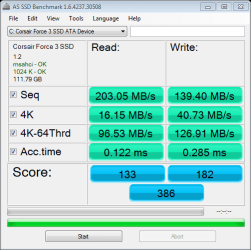
I am a bit of a noob and I am looking for some help with understanding whether or not I have my system configured for optimal performance of my SSD drive. The performance I am currently getting seems quite low.

Below are what I understand to be the relevant components involved:

OS: Windows x64 Ultimate SP1
Drive: Corsair Force 3
MoBo: ASUS P6TD DELUXE
Sata Controller: SATA 6 Gbps PCI Express SATA Controller Card (PEXSAT32)

I have attached a screenshot of the performance I am getting. I am not convinced that the the SataIII controller is providing the throughput that is to be expected, but I am not sure how to evaluate its performance.

Any thoughts/suggestions would be highly appreciated :)
 

Attachments

  • as-ssd-bench Corsair Force 3  8.12.2011 10-08-51 PM.png
    as-ssd-bench Corsair Force 3 8.12.2011 10-08-51 PM.png
    13.1 KB · Views: 15

My Computer

OS
Microsoft Windows 7 Ultimate 64-bit 7601 Multiprocessor Free Service Pack 1
CPU
Intel(R) Core(TM) i7 CPU 920 @ 2.67GHz
Motherboard
ASUSTeK Computer INC. P6TD DELUXE
Memory
6.00 GB
Graphics Card(s)
ATI Radeon HD 5700 Series
Hard Drives
(1) Corsair Force 3 SSD ATA Device
(2) WDC WD1001FALS-00E8B0 ATA Device
(3) WDC WD1001FALS-00E8B0 ATA Device
It's doing twice as good as mine I do have lots of stuff running but my score was 200 and your doing double than that.
 

Attachments

  • as-ssd-bench INTEL SSDSA2M080 8.13.2011 2-12-21 PM.png
    as-ssd-bench INTEL SSDSA2M080 8.13.2011 2-12-21 PM.png
    12.7 KB · Views: 11

My Computer

Computer Manufacturer/Model Number
Alienware
OS
Windows 7 Ultimate x64
CPU
I7
Motherboard
GA-X58-USB3
Memory
6 x 1.5V DDR3 DIMM sockets supporting up to 24 GB of system
Graphics Card(s)
GeForce GTX 580
Sound Card
Realtek ALC892 codec 2/4/5.1/7.1-channel
Monitor(s) Displays
NEC Display Solutions E321 Black 32"
Screen Resolution
1366 x 768
Hard Drives
OCZ Colossus LT Series OCZSSD2-1CLSLT1T 3.5" 1TB SATA II MLC Internal Solid State Drive
PSU
XFX Black Edition XPS-850W-BES 850W ATX12V
Case
Antec
Cooling
Zalman
Keyboard
Microsoft
Mouse
Microsoft
It's doing twice as good as mine I do have lots of stuff running but my score was 200 and your doing double than that.

Thanks for the reply. What kind of hardware are you working with? Are you using the same type of drive? What about your controller? Is it an onboard SATA3, or an expansion card?

The comparison to your performance becomes more relevant if we are comparing apples to apples. :)
 

My Computer

OS
Microsoft Windows 7 Ultimate 64-bit 7601 Multiprocessor Free Service Pack 1
CPU
Intel(R) Core(TM) i7 CPU 920 @ 2.67GHz
Motherboard
ASUSTeK Computer INC. P6TD DELUXE
Memory
6.00 GB
Graphics Card(s)
ATI Radeon HD 5700 Series
Hard Drives
(1) Corsair Force 3 SSD ATA Device
(2) WDC WD1001FALS-00E8B0 ATA Device
(3) WDC WD1001FALS-00E8B0 ATA Device
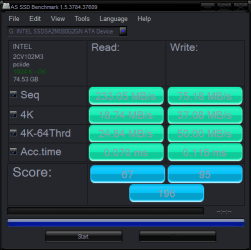
Is it an onboard SATA3? Yes it is and not ahci mode only ide..:)
 

My Computer

Computer Manufacturer/Model Number
Alienware
OS
Windows 7 Ultimate x64
CPU
I7
Motherboard
GA-X58-USB3
Memory
6 x 1.5V DDR3 DIMM sockets supporting up to 24 GB of system
Graphics Card(s)
GeForce GTX 580
Sound Card
Realtek ALC892 codec 2/4/5.1/7.1-channel
Monitor(s) Displays
NEC Display Solutions E321 Black 32"
Screen Resolution
1366 x 768
Hard Drives
OCZ Colossus LT Series OCZSSD2-1CLSLT1T 3.5" 1TB SATA II MLC Internal Solid State Drive
PSU
XFX Black Edition XPS-850W-BES 850W ATX12V
Case
Antec
Cooling
Zalman
Keyboard
Microsoft
Mouse
Microsoft
I believe that if you have AHCI enabled, Windows 7 will detect the drive as an SSD and configure itself accordingly. I know it did on my Intel chipsets, but after loading the Intel Rapid Storage Driver in Windows, I saw a performance boost.

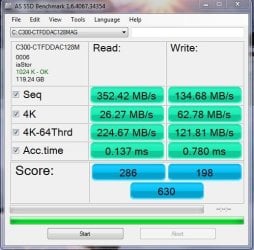
Given your newish chipset for your mobo, have you tried running the SSD off the mobo's controllers? I see that the msachi drive is being used, which was fine and stable, but I was able to increase me perfomance by installing the driver I mentioned above. If you do give your onboard SATA controller a shot, try that.

EDIT: Found a screen grab of my current RealSSD, which is one gen earlier than your drive, I believe. Notice the driver listed as iaStor.
 

Attachments

  • 128SSD.jpg
    128SSD.jpg
    51.3 KB · Views: 11

My Computer

OS
Windows 7 Ultimate x64 SP1
CPU
Intel Core i7-2600
Motherboard
Gigabyte GA-P67A-UD3P-B3
Memory
12 GB Patriot Extreme DDR3-1333
Graphics Card(s)
Nvidia GTX 470
Monitor(s) Displays
Dell UltraSharp 2209WA
Hard Drives
OCZ Agility3 240 GB, WD5001AALS, WD7501AALS
PSU
OCZ ModStream 700W
Case
CoolerMaster HAF 912 Advanced
Cooling
CoolerMaster Hyper 212 Plus
Thanks for the reply DeaconFrost. I plugged my drive into my onboard SATA2 controller and tested without the iaStor driver. My score was 337, so about 50 lower than what I got using the Marvell SATA3 card. I then installed the iaStor driver and tested, and my score was 317. I am not sure why.

I am amazed that your score is double mine, but I assume you are using a onboard SATA3 controller? I have the feeling that the root cause of my performance issue is the expectation that my SATA3 card should perform as well as an onboard SATA3 port.
 
Last edited:

My Computer

OS
Microsoft Windows 7 Ultimate 64-bit 7601 Multiprocessor Free Service Pack 1
CPU
Intel(R) Core(TM) i7 CPU 920 @ 2.67GHz
Motherboard
ASUSTeK Computer INC. P6TD DELUXE
Memory
6.00 GB
Graphics Card(s)
ATI Radeon HD 5700 Series
Hard Drives
(1) Corsair Force 3 SSD ATA Device
(2) WDC WD1001FALS-00E8B0 ATA Device
(3) WDC WD1001FALS-00E8B0 ATA Device
That's certainly possible. I know my SSD is connected to one of my two SATA 6.0 Gbps ports, so I should be getting the best possible speed with it.
 

My Computer

OS
Windows 7 Ultimate x64 SP1
CPU
Intel Core i7-2600
Motherboard
Gigabyte GA-P67A-UD3P-B3
Memory
12 GB Patriot Extreme DDR3-1333
Graphics Card(s)
Nvidia GTX 470
Monitor(s) Displays
Dell UltraSharp 2209WA
Hard Drives
OCZ Agility3 240 GB, WD5001AALS, WD7501AALS
PSU
OCZ ModStream 700W
Case
CoolerMaster HAF 912 Advanced
Cooling
CoolerMaster Hyper 212 Plus
Update: I plugged the drive back into the SATA3 card and tested, and this time performance was significantly worse than the onboard SATA2 controller. I tested twice to make sure it wasn't a fluke. Then I plugged the drive back into my onboard SATA2, and the performance jumped by almost 40 points.

It looks like buying a SATA3 controller with hopes of legitimate SATA3 speeds is a waste of time and money. I am returning the card and purchasing a new motherboard. Thanks to everyone for the help.
 

My Computer

OS
Microsoft Windows 7 Ultimate 64-bit 7601 Multiprocessor Free Service Pack 1
CPU
Intel(R) Core(TM) i7 CPU 920 @ 2.67GHz
Motherboard
ASUSTeK Computer INC. P6TD DELUXE
Memory
6.00 GB
Graphics Card(s)
ATI Radeon HD 5700 Series
Hard Drives
(1) Corsair Force 3 SSD ATA Device
(2) WDC WD1001FALS-00E8B0 ATA Device
(3) WDC WD1001FALS-00E8B0 ATA Device
It could just be a poor SATA3 controller, issues with the motherboard bus and a SATA PCI card, etc - your best bet is probably to get a motherboard with (good) onboard SATA3 ports, which it sounds like you're going to do anyway :).
 

My Computer

Computer type
PC/Desktop
Computer Manufacturer/Model Number
Custom
OS
Windows 10 Pro x64
CPU
Intel Core i7 4790K @ 4.5GHz
Motherboard
Asus Maximus Hero VII
Memory
32GB DDR3
Graphics Card(s)
Nvidia GeForce GTX970
Sound Card
Realtek HD Audio
Screen Resolution
1920x1200
Hard Drives
1x Samsung 250GB SSD
4x WD RE 2TB (RAIDZ)
PSU
Corsair AX760i
Case
Fractal Design Define R4
Cooling
Noctua NH-D15
Thanks for the reply DeaconFrost. I plugged my drive into my onboard SATA2 controller and tested without the iaStor driver. My score was 337, so about 50 lower than what I got using the Marvell SATA3 card. I then installed the iaStor driver and tested, and my score was 317. I am not sure why.

I am amazed that your score is double mine, but I assume you are using a onboard SATA3 controller? I have the feeling that the root cause of my performance issue is the expectation that my SATA3 card should perform as well as an onboard SATA3 port.

The RealSSD uses synchronous NAND, the Force 3 uses asynchronous and is slower. I would expect a little better read speed on your Marvel controller though.

If you are going by the published performance of the Force 3 and comparing it to AS-SSD results - you are comparing apples to oranges. The sandforce controller compresses data on the fly and will show much higher results with data that is compressible. The published performance numbers for sandforce controllers are usually based on the ATTO benchmark, whose data is 100% compressible (all zeros) hence show inflated numbers that are not real-world. AS-SSD uses nearly completely incompressible data (random bits) which is closer to the real world.

I get better performance from my Intel SATA2 controller and iastor than with my MB's MArvel SATA3 chipset. Though the AS-SSD measurements are higher for the Marvel, the PC boots faster with the Intel controller and has some better write speeds with the Intel.

The sequential speeds aren't as important as the random and access times, which look good on your SSD.
 

My Computer

Computer type
PC/Desktop
Computer Manufacturer/Model Number
Home built (GeneO industries)/Model 4
OS
Windows 10 Pro. EFI boot partition, full EFI boot
CPU
i7 4770k 4.4GHz (44-44-43-43 turbo) @ 1.248V
Motherboard
ASUS Maximus VI Hero
Memory
16GB (8GBx2) @2200 MHz G.skill Sniper 10-11-10-30-1, 1.6V
Graphics Card(s)
MSI GTX 970 Gaming 4G
Sound Card
Onboard SupremeFX Audio
Monitor(s) Displays
NEC Spectraview 2490WUXi-SV
Screen Resolution
1920 x 1200
Hard Drives
Samsung 850 Pro 256GB (OS), Samsung 2x 128GB 840 Pro SSD in RAID0, 3x WD Blue 6Gb/s 1TB RAID0, WD 2TB Black external USB 3.0, 2TB WD20EARS Green external USB 3.0, 2x 500GB Seagate and 1 750 GB external USB, 1x 350GB external USB3
PSU
Seasonic X-850 (2012 KM3 model)
Case
Fractal Design Define R4
Cooling
NH-D14, NF-F12, NF-A15; NF-P14, NF-P12,NF-A14, S12A PWM
Keyboard
Cooler Master Storm Quickfire Rapid - Brown
Mouse
Logitech G602
Internet Speed
126.4 Mb/s down, 24.3 Mb/s up
Other Info
USB 3.0 x8 , SATA III x8, eSATA, USB 2.0 x6. Samsung DVD R/W drive.

WEI: CPU 7.8, Memory 7.9, Graphics 7.9, Disk 7.9
Back
Top