SSD Problems?

cjb4

New member
Member
Local time
9:33 PM
Messages
30
I have a Lenovo x201 running windows 7 64-bit SP1 with 8GB DDR3 Ram with a 256 GB Crucial C300 SSD installed. I did a clean install back in December and upgraded the firmware on the SSD to Crucial's version 06. I also performed many of lightninggltd's tweaks (disabled superfetch, boottrace, prefetcher, etc) after I installed. (thanks lightningltd!). Everything was running fine until recently. I have begun to get random shutdowns and freezes while idle. Each time it happens I have to use the power switch to re boot and each time I need to restart 2 or three times before it will recognize the HD and boot.
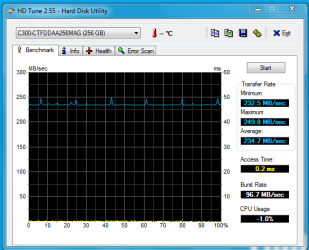
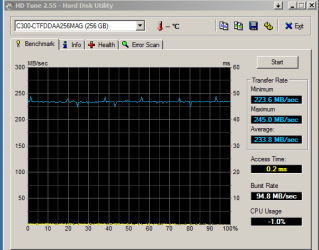
Performance is still great with the SSD. December and April shots below:

HD Tune: C300-CTFDDAA256MAG Benchmark

Transfer Rate Minimum : 234.1 MB/sec
Transfer Rate Maximum : 257.3 MB/sec
Transfer Rate Average : 236.6 MB/sec
Access Time : 0.2 ms
Burst Rate : 98.7 MB/sec
CPU Usage : -1.0%

Any ideas on what might be going on? Is there a good utility to test the health of my SSD?
 

Attachments
  • December 2010.PNG
    December 2010.PNG
    9.8 KB · Views: 4
  • April2011.PNG
    April2011.PNG
    13.7 KB · Views: 5

My Computer

Computer type
PC/Desktop
Computer Manufacturer/Model Number
Custom Built
OS
Windows 10 Pro 64-bit Build 17134
CPU
Intel(R) Core(TM) i7-6850K CPU @ 3.60GHz
Motherboard
ASUS STRIX X99 GAMING Bios 1801
Memory
G.Skill TridentZ Series 32GB (4 x 8GB) DDR4-3200 Memory
Graphics Card(s)
NVIDIA GeForce GTX 1080
Sound Card
USB Audio Device
Monitor(s) Displays
HP Omen 32"
Screen Resolution
2560 x 1440
Hard Drives
Samsung 950 PRO 512GB M.2-2280 Solid State Drive
Samsung 960 Pro 1.0TB M.2-2280 Solid State Drive
HGST Deskstar NAS 3.5-Inch 3TB HDD
PSU
EVGA SuperNOVA P2 850W 80+ Platinum Certified Fully-Modular
Case
Phanteks Enthoo EVOLV ATX ATX Mid Tower Case
Cooling
Corsair H115i 104.7 CFM Liquid CPU Cooler
Keyboard
Microsoft 4000
Mouse
LogitecK M-U0007
Internet Speed
250 Mbps
Antivirus
Webroot
Browser
Chrome
Change the Cable see if that helps
 

My Computer

Computer Manufacturer/Model Number
MSI
OS
Ultimate 7
CPU
1055T @ 3.7
Motherboard
MSI
Memory
16g Corsair
Graphics Card(s)
HD5770
Sound Card
Onboard
Monitor(s) Displays
FLat 23
Hard Drives
SSD 64g Kingston
500 Gig Western
PSU
850 Thermaltake

My Computer

Computer type
PC/Desktop
Computer Manufacturer/Model Number
Custom Build
OS
Windows 7 Home Premium 64 bit SP1
CPU
Intel i7 4790k
Motherboard
MSI Z97-G55 SLI
Memory
16 GB Corsair 2400 MHz DDR3
Graphics Card(s)
Visiontek Radeon R9 285
Sound Card
None
Monitor(s) Displays
Gateway FHX2402L
Screen Resolution
1920 X 1080
Hard Drives
Samsung 840 EVO 500GB
PSU
Corsair 750 TX
Case
Fractal Design
Cooling
Stock fans
Keyboard
Logitech K800
Mouse
Logitech M510
Internet Speed
60.88 Mbps download 10.47 Mbps upload (Speedtest.net)
Antivirus
Norton
Browser
Opera
Other Info
First Computer used: A Commodore Pet of course
Love using Manjaro KDE Linux 64 bit and Windows 7/10 64 bit
I don't think that this is a specific SSD problem. There could be a cable problem as suggested, but most likely you are victim of all your tweaking - some of which is obviously counterproductive. I run 5 SSDs in 5 systems (some since 2 years) and never had any problem. The only "tweak" I did was to shut off defrag and delete the hiberfile. I would suggest you reinstall your system (save your data first as far as it is on the SSD) and refrain from any tweaking.
 

My Computer

Computer Manufacturer/Model Number
HP, Dell, Gateway, Toshiba - 4 laptops and 2 desktops
OS
Vista, Windows7, Mint Mate, Zorin, Windows 8
CPU
from 1.6GHz Duo to i7
Monitor(s) Displays
2x HP w2207
Hard Drives
5x HDD, 7x SSD, 12x Externals
Keyboard
with trackball - no mices
Mouse
Trackball mice
Internet Speed
DSL 6000
Why would you ever disable superfetch? That's counter-productive, and stripping away one of Windows 7's greatest advantages. As WHS said, shut off automatic defrag is about the only real important tweak, and to make sure the alignment is correct and TRIM is enabled.
 

My Computer

OS
Windows 7 Ultimate x64 SP1
CPU
Intel Core i7-2600
Motherboard
Gigabyte GA-P67A-UD3P-B3
Memory
12 GB Patriot Extreme DDR3-1333
Graphics Card(s)
Nvidia GTX 470
Monitor(s) Displays
Dell UltraSharp 2209WA
Hard Drives
OCZ Agility3 240 GB, WD5001AALS, WD7501AALS
PSU
OCZ ModStream 700W
Case
CoolerMaster HAF 912 Advanced
Cooling
CoolerMaster Hyper 212 Plus
I don't think that this is a specific SSD problem. There could be a cable problem as suggested, but most likely you are victim of all your tweaking - some of which is obviously counterproductive. I run 5 SSDs in 5 systems (some since 2 years) and never had any problem. The only "tweak" I did was to shut off defrag and delete the hiberfile. I would suggest you reinstall your system (save your data first as far as it is on the SSD) and refrain from any tweaking.

Why would you ever disable superfetch? That's counter-productive, and stripping away one of Windows 7's greatest advantages. As WHS said, shut off automatic defrag is about the only real important tweak, and to make sure the alignment is correct and TRIM is enabled.

+1

Agree that you may be a victim of all those tweaks.

BTW I thought Windows "automatically" disabled Defrag on SSD drives. I know I saw that on OCZ's site, and it was true in my case (Defrag turned off automatically). At any rate if it doesn't, yeah turn it off.
 

My Computer

Computer type
PC/Desktop
Computer Manufacturer/Model Number
Custom built by me.
OS
Windows 10 Pro
CPU
Intel Core i7-4770K (3.5Ghz)
Motherboard
Gigabyte G1 Sniper 5 (F10 Bios)
Memory
32 gig Corsair Dominator Platinum (4x8Gig)
Graphics Card(s)
Sapphire Tri-X R9 Fury
Sound Card
Soundblaster ZXR
Monitor(s) Displays
NEC PA242W 24" LCD Monitor
Screen Resolution
1920 x 1200
Hard Drives
Primary - Samsung 850 Pro (512gig), Samsung 840 Pro (256gig), 2TB WD Caviar Black.
PSU
EVGA Supernova 1000 G2
Case
Cooler Master HAF X
Cooling
Corsair H100i with Corsair Air Series SP120 Quiet Fans
Keyboard
Logitech Wireless Wave
Mouse
Logitech Performance MX
Internet Speed
High Speed Cable
Antivirus
Norton Security
Browser
IE11
Other Info
Memory Timings - 1866MHz @ 9-9-9-27-1T @ 1.5 volts
Thanks for the suggestions.
On replacing the cable, not possible on the laptop
Tested the memory using several different utilities-no errors
You may be right on the tweaking but not sure which it might be. As I understand the rationale for disabling superfetch you want to minimize unnecessary writes to the SSD. Pre-loading is not needed on a fast read SSD, same with boottrace, prefetcher, etc.
I had to actively turn off defrag since mine was an aftermarket install.
I can try reversing all of them and see it the problem persists. It is a very intermittent problem. For example there has been no freeze since I first posted this and the x201 has been mostly inactive.
 

My Computer

Computer type
PC/Desktop
Computer Manufacturer/Model Number
Custom Built
OS
Windows 10 Pro 64-bit Build 17134
CPU
Intel(R) Core(TM) i7-6850K CPU @ 3.60GHz
Motherboard
ASUS STRIX X99 GAMING Bios 1801
Memory
G.Skill TridentZ Series 32GB (4 x 8GB) DDR4-3200 Memory
Graphics Card(s)
NVIDIA GeForce GTX 1080
Sound Card
USB Audio Device
Monitor(s) Displays
HP Omen 32"
Screen Resolution
2560 x 1440
Hard Drives
Samsung 950 PRO 512GB M.2-2280 Solid State Drive
Samsung 960 Pro 1.0TB M.2-2280 Solid State Drive
HGST Deskstar NAS 3.5-Inch 3TB HDD
PSU
EVGA SuperNOVA P2 850W 80+ Platinum Certified Fully-Modular
Case
Phanteks Enthoo EVOLV ATX ATX Mid Tower Case
Cooling
Corsair H115i 104.7 CFM Liquid CPU Cooler
Keyboard
Microsoft 4000
Mouse
LogitecK M-U0007
Internet Speed
250 Mbps
Antivirus
Webroot
Browser
Chrome
BTW I thought Windows "automatically" disabled Defrag on SSD drives

Yes it does, but I always check it.

As I understand the rationale for disabling superfetch you want to minimize unnecessary writes to the SSD.
That is true if you want the SSD to last 100 years. But I bet, in 4 years you have a new one. And a few more writes will not hurt it in that timeframe.

And turning the tweaks off now, may not get you back to the original state. But that has to be looked at one by one.
 

My Computer

Computer Manufacturer/Model Number
HP, Dell, Gateway, Toshiba - 4 laptops and 2 desktops
OS
Vista, Windows7, Mint Mate, Zorin, Windows 8
CPU
from 1.6GHz Duo to i7
Monitor(s) Displays
2x HP w2207
Hard Drives
5x HDD, 7x SSD, 12x Externals
Keyboard
with trackball - no mices
Mouse
Trackball mice
Internet Speed
DSL 6000
Superfetch/Pre-Fetch actualy writes very little to the drive. The large majority are reads. It really is insignificant and will not hurt the drive, nor will it cause accelerated wear.

I agree with the others. Too much tweaking is bad.
I too just disable the built in defrag & Hiberfile and leave it alone. (Other than turn Superfetch back On)
Honestly .. everything runs smoother and faster this way. Or at least my system seems to.

I wish I could find the article about this .. Intel themselves said you could write 100GB to one of thier SSDs and it would still last 5yrs.
Granted we are not talking about a Intel Drive here, but I would excpect similar results from most modern SSDs.
 

My Computer

Computer Manufacturer/Model Number
Custom (Self Build)
OS
Windows 7 Home Premium 64bit
CPU
Intel Core i7 2700k
Motherboard
eVGA P67 SLI
Memory
8GB Mushkin Redline Ridgebacks @1866
Graphics Card(s)
EVGA GTX570 SC
Sound Card
XiFi Titanium HD
Monitor(s) Displays
LG W2453V
Screen Resolution
1920x1080
Hard Drives
Intel 320 80GB -- Intel X25-V 40GB --WD Black 1TB x2 -- WD Blue 640GB
PSU
Seasonic x750
Case
Corsair 600T SE White
Cooling
eVGA Superclocked CPU Cooler
Keyboard
Saitek Cyborg
Antivirus
Kaspersky
Browser
IE
Other Info
LG BD/DVD
This drive (a 1st Gen Intel) has been up and runing for 3320 hours and 2049GBs have been written to it. And the health is still excellent.
 

Attachments

  • 2011-04-19_1150.png
    2011-04-19_1150.png
    28.6 KB · Views: 32

My Computer

Computer Manufacturer/Model Number
HP, Dell, Gateway, Toshiba - 4 laptops and 2 desktops
OS
Vista, Windows7, Mint Mate, Zorin, Windows 8
CPU
from 1.6GHz Duo to i7
Monitor(s) Displays
2x HP w2207
Hard Drives
5x HDD, 7x SSD, 12x Externals
Keyboard
with trackball - no mices
Mouse
Trackball mice
Internet Speed
DSL 6000
@whs - Where'd you get that program? Me wants one - Link? :)
 

My Computer

Computer type
PC/Desktop
Computer Manufacturer/Model Number
Custom built by me.
OS
Windows 10 Pro
CPU
Intel Core i7-4770K (3.5Ghz)
Motherboard
Gigabyte G1 Sniper 5 (F10 Bios)
Memory
32 gig Corsair Dominator Platinum (4x8Gig)
Graphics Card(s)
Sapphire Tri-X R9 Fury
Sound Card
Soundblaster ZXR
Monitor(s) Displays
NEC PA242W 24" LCD Monitor
Screen Resolution
1920 x 1200
Hard Drives
Primary - Samsung 850 Pro (512gig), Samsung 840 Pro (256gig), 2TB WD Caviar Black.
PSU
EVGA Supernova 1000 G2
Case
Cooler Master HAF X
Cooling
Corsair H100i with Corsair Air Series SP120 Quiet Fans
Keyboard
Logitech Wireless Wave
Mouse
Logitech Performance MX
Internet Speed
High Speed Cable
Antivirus
Norton Security
Browser
IE11
Other Info
Memory Timings - 1866MHz @ 9-9-9-27-1T @ 1.5 volts

My Computer

OS
Windows 7 Ultimate x64 SP1
CPU
Intel Core i7-2600
Motherboard
Gigabyte GA-P67A-UD3P-B3
Memory
12 GB Patriot Extreme DDR3-1333
Graphics Card(s)
Nvidia GTX 470
Monitor(s) Displays
Dell UltraSharp 2209WA
Hard Drives
OCZ Agility3 240 GB, WD5001AALS, WD7501AALS
PSU
OCZ ModStream 700W
Case
CoolerMaster HAF 912 Advanced
Cooling
CoolerMaster Hyper 212 Plus

My Computer

Computer Manufacturer/Model Number
HP, Dell, Gateway, Toshiba - 4 laptops and 2 desktops
OS
Vista, Windows7, Mint Mate, Zorin, Windows 8
CPU
from 1.6GHz Duo to i7
Monitor(s) Displays
2x HP w2207
Hard Drives
5x HDD, 7x SSD, 12x Externals
Keyboard
with trackball - no mices
Mouse
Trackball mice
Internet Speed
DSL 6000
Got it. Thanks :)
 

My Computer

Computer type
PC/Desktop
Computer Manufacturer/Model Number
Custom built by me.
OS
Windows 10 Pro
CPU
Intel Core i7-4770K (3.5Ghz)
Motherboard
Gigabyte G1 Sniper 5 (F10 Bios)
Memory
32 gig Corsair Dominator Platinum (4x8Gig)
Graphics Card(s)
Sapphire Tri-X R9 Fury
Sound Card
Soundblaster ZXR
Monitor(s) Displays
NEC PA242W 24" LCD Monitor
Screen Resolution
1920 x 1200
Hard Drives
Primary - Samsung 850 Pro (512gig), Samsung 840 Pro (256gig), 2TB WD Caviar Black.
PSU
EVGA Supernova 1000 G2
Case
Cooler Master HAF X
Cooling
Corsair H100i with Corsair Air Series SP120 Quiet Fans
Keyboard
Logitech Wireless Wave
Mouse
Logitech Performance MX
Internet Speed
High Speed Cable
Antivirus
Norton Security
Browser
IE11
Other Info
Memory Timings - 1866MHz @ 9-9-9-27-1T @ 1.5 volts
Funny but after installing my Intel 320 120GB SSD and installing the Intel SSD Tools, and running it, it disabled Superprefetch and whatever.

I was under the assumption you had to disable those 2 things to have Trim enabled.
 

My Computer

Computer Manufacturer/Model Number
Built be Me
OS
Windows 7 Pro x64
CPU
i5 760
Motherboard
Asus P7P55D-E Pro
Memory
16GB
Graphics Card(s)
Nvidia GTS450
Sound Card
On board
Monitor(s) Displays
Dell 2007WFP Dell 1800FP
Screen Resolution
1680x1050 1280x1024
Hard Drives
Seagate 250GB & 750GB
WD 1TB
PSU
Antec 750
Case
In Win
Cooling
Cooler Master Hyper 212+
Keyboard
IBM
Mouse
MS
Trim will work fine with superfetch enabled. If you want to, turn it on. Then open an elevated cmd prompt and enter fsutil behavior query disabledeletenotify. If it returns =1 trim is not enabled, if it returns=0 trim is enabled. That way you can check for yourself.
 

My Computers

System One System Two

  • Computer type
    PC/Desktop
    Computer Manufacturer/Model Number
    ALWAYS UNDER CONSTRUCTION
    OS
    Windows 11 Pro
    CPU
    Ryzen 9 5900X
    Motherboard
    Asus X570 Crosshair Viii Hero
    Memory
    32GB G Skill DDR4-3600
    Graphics Card(s)
    EVGA RTX 3080 FTW 3 Ultra
    Sound Card
    On Board/Sennheiser PC37X Headset
    Monitor(s) Displays
    3 X Asus 27"
    Screen Resolution
    2560x1440
    Hard Drives
    2 X 1 TB NVME drives
    PSU
    EVGA 850
    Case
    Phanteks Eclipse P400A
    Cooling
    EVGA 280 AIO
    Keyboard
    Logitech G510s/ Logitech G13
    Mouse
    Logitech G502
    Internet Speed
    24/1
    Antivirus
    ESET/MBAM Pro/SAS Pro
    Browser
    Chrome/ Firefox/ Edge
  • Computer type
    Laptop
    System Manufacturer/Model Number
    Dell 16 Plus
    OS
    Windows 11 Pro
    CPU
    Intel Ultra 9 288V
    Memory
    32 GB LPDDR5X 8533
    Monitor(s) Displays
    16" Mini-LED HDR600 Touch 90 Hz
    Screen Resolution
    2560X1600
    Hard Drives
    1 TB NVME
  • Like
Reactions: whs
OK, OK, I'm convinced, just following what seemed like good advice at the time.
But back to the intermittent shutdown problem. When I check system health in windows event log there is no evidence of the shutdown or freeze. Is there a good utility for check SSDs. Any other thoughts?
 

My Computer

Computer type
PC/Desktop
Computer Manufacturer/Model Number
Custom Built
OS
Windows 10 Pro 64-bit Build 17134
CPU
Intel(R) Core(TM) i7-6850K CPU @ 3.60GHz
Motherboard
ASUS STRIX X99 GAMING Bios 1801
Memory
G.Skill TridentZ Series 32GB (4 x 8GB) DDR4-3200 Memory
Graphics Card(s)
NVIDIA GeForce GTX 1080
Sound Card
USB Audio Device
Monitor(s) Displays
HP Omen 32"
Screen Resolution
2560 x 1440
Hard Drives
Samsung 950 PRO 512GB M.2-2280 Solid State Drive
Samsung 960 Pro 1.0TB M.2-2280 Solid State Drive
HGST Deskstar NAS 3.5-Inch 3TB HDD
PSU
EVGA SuperNOVA P2 850W 80+ Platinum Certified Fully-Modular
Case
Phanteks Enthoo EVOLV ATX ATX Mid Tower Case
Cooling
Corsair H115i 104.7 CFM Liquid CPU Cooler
Keyboard
Microsoft 4000
Mouse
LogitecK M-U0007
Internet Speed
250 Mbps
Antivirus
Webroot
Browser
Chrome

My Computers

System One System Two

  • Computer type
    PC/Desktop
    Computer Manufacturer/Model Number
    ALWAYS UNDER CONSTRUCTION
    OS
    Windows 11 Pro
    CPU
    Ryzen 9 5900X
    Motherboard
    Asus X570 Crosshair Viii Hero
    Memory
    32GB G Skill DDR4-3600
    Graphics Card(s)
    EVGA RTX 3080 FTW 3 Ultra
    Sound Card
    On Board/Sennheiser PC37X Headset
    Monitor(s) Displays
    3 X Asus 27"
    Screen Resolution
    2560x1440
    Hard Drives
    2 X 1 TB NVME drives
    PSU
    EVGA 850
    Case
    Phanteks Eclipse P400A
    Cooling
    EVGA 280 AIO
    Keyboard
    Logitech G510s/ Logitech G13
    Mouse
    Logitech G502
    Internet Speed
    24/1
    Antivirus
    ESET/MBAM Pro/SAS Pro
    Browser
    Chrome/ Firefox/ Edge
  • Computer type
    Laptop
    System Manufacturer/Model Number
    Dell 16 Plus
    OS
    Windows 11 Pro
    CPU
    Intel Ultra 9 288V
    Memory
    32 GB LPDDR5X 8533
    Monitor(s) Displays
    16" Mini-LED HDR600 Touch 90 Hz
    Screen Resolution
    2560X1600
    Hard Drives
    1 TB NVME
Trim will work fine with superfetch enabled. If you want to, turn it on. Then open an elevated cmd prompt and enter fsutil behavior query disabledeletenotify. If it returns =1 trim is not enabled, if it returns=0 trim is enabled. That way you can check for yourself.

Done that already and got 0. Now how do I re-enable Superprefetch?
Google is my friend.
 

My Computer

Computer Manufacturer/Model Number
Built be Me
OS
Windows 7 Pro x64
CPU
i5 760
Motherboard
Asus P7P55D-E Pro
Memory
16GB
Graphics Card(s)
Nvidia GTS450
Sound Card
On board
Monitor(s) Displays
Dell 2007WFP Dell 1800FP
Screen Resolution
1680x1050 1280x1024
Hard Drives
Seagate 250GB & 750GB
WD 1TB
PSU
Antec 750
Case
In Win
Cooling
Cooler Master Hyper 212+
Keyboard
IBM
Mouse
MS
I believe you can typr regedit in the search box, open regedit, navigate to HKEY_LOCAL_MACHINE\SYSTEM\CurrentControlSet\Contro l\Session Manager\Memory Management\PrefetchPerameters right click EnableSuperfetch, in the right pane right click on it and select modify. If superfetch is disabled there should be a 0 in values. Change it to 3. Then go to to Control Panel select Administrative Tools\Services double click SuperFetch select startup then select enable.

I believe this is the way to do it, however you may want to get some verification on it. there are several threads on in this forum.
 

My Computers

System One System Two

  • Computer type
    PC/Desktop
    Computer Manufacturer/Model Number
    ALWAYS UNDER CONSTRUCTION
    OS
    Windows 11 Pro
    CPU
    Ryzen 9 5900X
    Motherboard
    Asus X570 Crosshair Viii Hero
    Memory
    32GB G Skill DDR4-3600
    Graphics Card(s)
    EVGA RTX 3080 FTW 3 Ultra
    Sound Card
    On Board/Sennheiser PC37X Headset
    Monitor(s) Displays
    3 X Asus 27"
    Screen Resolution
    2560x1440
    Hard Drives
    2 X 1 TB NVME drives
    PSU
    EVGA 850
    Case
    Phanteks Eclipse P400A
    Cooling
    EVGA 280 AIO
    Keyboard
    Logitech G510s/ Logitech G13
    Mouse
    Logitech G502
    Internet Speed
    24/1
    Antivirus
    ESET/MBAM Pro/SAS Pro
    Browser
    Chrome/ Firefox/ Edge
  • Computer type
    Laptop
    System Manufacturer/Model Number
    Dell 16 Plus
    OS
    Windows 11 Pro
    CPU
    Intel Ultra 9 288V
    Memory
    32 GB LPDDR5X 8533
    Monitor(s) Displays
    16" Mini-LED HDR600 Touch 90 Hz
    Screen Resolution
    2560X1600
    Hard Drives
    1 TB NVME
Back
Top