SSD Questions on New Computer

One other question. But do you know how much it cost to have your hard drive taken out and replaced with a ssd?

And the process they are going to do for me, they are just doing a clean install of windows.


What would you say the average price would be for this? Obviously doing the clean install cost a good amount since this takes time. But the hard drive replacement probably doesn't cost that much? I googled this and big name places charge a lot for tasks like this.
 

My Computer My Computer

Computer type
Laptop
OS
Windows 10 Pro
We don`t even know where you live.

Just call the place and get the price over the phone.
 

My Computer My Computer

Computer type
PC/Desktop
Computer Manufacturer/Model Number
Skylake Special #666
OS
Windows 10 Pro x64
CPU
Intel Core i7 6700K
Motherboard
Asus Sabertooth Z170 Mark 1
Memory
GSkill TridentZ RGB 16GB 3600 16-16-16-36
Graphics Card(s)
EVGA GTX 980 Ti SC x2
Sound Card
Realtek High Definition
Monitor(s) Displays
AOC G2460PG
Screen Resolution
1920 x 1080 144Hz
Hard Drives
Samsung 860 Pro 256GB, Seagate Barracuda 4TB x2
PSU
EVGA 1000 P2, EVGA White Custom Braided Cables
Case
Corsair Vengeance C70 Gunmetal Black
Cooling
Corsair H100i v2, Corsair ML120 x2, Thermal Grizzly Kryonaut
Keyboard
Logitech G910 Orion Spectrum
Mouse
Logitech G700s
Internet Speed
Verizon Fios Quantum Gateway 75/75
Antivirus
Windows Defender, Malwarebytes Free 3.8.3
Browser
Chrome
Other Info
Corsair SP120 x4, LG Blu-ray Drive, Durabrand HT-395 100 Watt Dolby Digital Amp, Corsair H2100 Wireless 7.1 Headset
see comments


Of course its because i didnt download anything much. I just downloaded chrome and a few other things like avast. But yes i rather he remove the things Dell put on it.

You should make sure he puts the browser of your choice on it before you get it back.

And that you have a working Internet connection so you can get on the Internet to download whatever you need---Open Office, anti-virus, etc.


Yes i will ask him about the sticker. Im pretty certain hes well aware of all these things though.

There is no sticker.


When you say did i activated the new laptop... im assuming the answer to this is yes. I did type my name on it and all those things. I installed few programs and using windows 10 and used chrome to browse websites. So yes.... i activated the new laptop?

You tell me.

You can run Windows 7 for 30 days without activation. I'm not sure about 10, but you should be able to find out if it is activated.

Type "activate" or "activation" in whatever search box that thing has on it and find out for yourself if Windows is formally activated.

It's not a big deal if it isn't activated, but you should make sure he knows if it is or not.


Well the ssd should be fine i believe. I will ask him if theres a way for him to test my ssd. But last time when i was there, my other ssd from my asus, i asked him hey does it look okay, he said he could tell just by looking at it... its fine.

You can run a benchmark on the SSD after you get it back. There's not a whole lot else you can do. It either works or it doesn't. You need to be sure the SSD is properly aligned, but he should know that and you can find that out when he is done with it.

What are you going to do if you have to reinstall Windows 10 next Wednesday?

Be prepared to be bewildered by Windows 10 differences from 7, particularly the update process. It's supposed to be a barrel of laffs.


My Computer My Computer

Computer type
PC/Desktop
Computer Manufacturer/Model Number
Ignatz Special; 4 speed manual gearbox; factory air conditioning; one of one
OS
Windows 7 Home Premium SP1, 64-bit
CPU
Intel Skylake i5-6600K, not overclocked
Motherboard
AsRock Z170M Extreme 4, micro ATX
Memory
8 GB HyperX DDR4-2666 (2 x 4 GB)
Graphics Card(s)
none; graphics are integrated on CPU
Sound Card
onboard: Realtek ALC1150; external: USB Behringer UF0-202
Monitor(s) Displays
Dell S2340M 23 inch IPS
Screen Resolution
1600 x 900
Hard Drives
System: Crucial MX100 series SSD, 128 GB;
Data: Samsung Spinpoint 103SJ, 1 TB;
Backup: WD Caviar Green WD30EZRX-00D8PB0, 3 TB
PSU
Rosewill SilentNight 500 watt fanless, semi-modular
Case
Antec Solo II
Cooling
Noctua NH-U12S; Noctua F12 intake, Noctua S12A exhaust
Keyboard
Microsoft 200 6JH-00001 USB
Mouse
Dell or Microsoft optical wired; USB
Antivirus
Microsoft Security Essentials and Malwarebytes Premium
Browser
Pale Moon
Other Info
All fans PWM; speeds at idle: CPU circa 500 rpm; intake circa 600 rpm; exhaust circa 600 rpm; CPU temps 27 idle and 47 C load in a warm room (27 C/81 F) when running Intel Extreme Tuning Utility stress test.
Hi yes i know there is no sticker. I wrote that wrong.


I typed in activate. Yes windows 10 is activated. It has the product id. However the product key doesn't show all 25 letters/words though. It only has the last 5. The first 20 are all XXXXX. Do you know if thats an issue?


Well my laptop is working fine for now. But after when the guy replaces the hard drive and does the clean install, i will see how things go. Well yes i know computer problems happen all the time. For now, the laptop seems pretty nice. The volume is amazing.


Yes windows 10 looks much different from 7. I recalled when i first used windows 7, it was much different than what i was used to with XP and wanted to go back to XP.


One other thing. Would it be possible for someone who have access to my hard drive be able to view my browsing history and all those things? Like could i view the last few websites that i went to on my hard drive etc? They were mostly main sites but curious if this is possible. Thus if so, im sure i could do this now? Like is it possible for a person to open chrome and then view sites that i just visited etc?


I will let you know how this goes. Thanks
 

My Computer My Computer

Computer type
Laptop
OS
Windows 10 Pro
see comments

I typed in activate. Yes windows 10 is activated. It has the product id. However the product key doesn't show all 25 letters/words though. It only has the last 5. The first 20 are all XXXXX. Do you know if thats an issue?

The Product ID is NOT the Product Key. I don't know if what you are looking at is the Key or the ID. Regardless, ask the shop to write down your Product Key if they know it.

I'm not sure about Windows 10, but the Product Key could just be a generic set of numbers that Dell used for thousands of PCs--rather than a unique Product Key that is not used anywhere else. Retail keys are unique, but your installation is not retail.

Talk to your guy about how you would re-install Windows 10.


One other thing. Would it be possible for someone who have access to my hard drive be able to view my browsing history and all those things? Like could i view the last few websites that i went to on my hard drive etc?


Yes. That why the cops want your hard drive after they have you in jail for something. Any browser has a "history" of where you've been on the Internet.
 

My Computer My Computer

Computer type
PC/Desktop
Computer Manufacturer/Model Number
Ignatz Special; 4 speed manual gearbox; factory air conditioning; one of one
OS
Windows 7 Home Premium SP1, 64-bit
CPU
Intel Skylake i5-6600K, not overclocked
Motherboard
AsRock Z170M Extreme 4, micro ATX
Memory
8 GB HyperX DDR4-2666 (2 x 4 GB)
Graphics Card(s)
none; graphics are integrated on CPU
Sound Card
onboard: Realtek ALC1150; external: USB Behringer UF0-202
Monitor(s) Displays
Dell S2340M 23 inch IPS
Screen Resolution
1600 x 900
Hard Drives
System: Crucial MX100 series SSD, 128 GB;
Data: Samsung Spinpoint 103SJ, 1 TB;
Backup: WD Caviar Green WD30EZRX-00D8PB0, 3 TB
PSU
Rosewill SilentNight 500 watt fanless, semi-modular
Case
Antec Solo II
Cooling
Noctua NH-U12S; Noctua F12 intake, Noctua S12A exhaust
Keyboard
Microsoft 200 6JH-00001 USB
Mouse
Dell or Microsoft optical wired; USB
Antivirus
Microsoft Security Essentials and Malwarebytes Premium
Browser
Pale Moon
Other Info
All fans PWM; speeds at idle: CPU circa 500 rpm; intake circa 600 rpm; exhaust circa 600 rpm; CPU temps 27 idle and 47 C load in a warm room (27 C/81 F) when running Intel Extreme Tuning Utility stress test.

A word from me :)

glad to see everything went smooth.
In order to prevent anyone from seeing data on your drive you should use an application that can fill the drive with zeros multiple times so no data recovery tools could work.
WD Data Lifeguard Diagnostic has this option.

Captain_WD.
 

My Computer My Computer

Computer type
PC/Desktop
Computer Manufacturer/Model Number
Dell
OS
Windows 7 Professional x64
Hey guys thanks all for all this information. One last question before i go there.


I had thought i deleted a lot of the files in my ssd. The one that is in my enclosure connected to my desktop. Such that deleting documents and other information. However, i had asked on another forum if just pressing delete was good enough for a certain program i want deleted. Thats what i did with tons of files earlier. I was told if you do it that way, it only goes to the recycle bin. That the proper way to delete it was hold Shift and Delete. I did not know this.


Can someone tell me how i can view my recycle bin so i could delete everything permanently? Or restore all the documents and programs I deleted then i will delete all these things correctly by highlighting it and Shift + Delete? Because just pressing delete and send to recycle bin doesn't really do anything right? I didnt really notice that until when i tried to delete certain documents and it say... only send to recycle bin. Can someone tell me how important is this though? I do want to permanently delete these things. CaptainWD, well i dont think i will try that. I just want to make sure i permanently delete it the right way without a program like that. Im pretty certain this isn't a big deal bringing it to repair shop but i didn not know i was deleting it wrong. Of course if i wanted to delete program on my computer, obviously if its a program, i would remove the program each one. Then any document, send to recycle bin then empty recycle bin. I did not think any of this however with the ssd. Can someone tell me how to do this? This is last thing i have to do before i go to repair shop. Thanks.
 

My Computer My Computer

Computer type
Laptop
OS
Windows 10 Pro
Okay i went to my recycle bin on my desktop. Apparently all the files yesterday that i thought i deleted from the ssd in the enclosure is there. Thus it was sent to the recycle bin. So if i empty the recycle bin on my desktop, does that permanently delete everything such that it is similar to click on programs/files i want to delete in the ssd and pressing Shift+Delete which permanently delete its.


If so, then i will do this and im done and heading to repair shop. I want to make sure i get this part right since i already thought yesterday i had deleted a lot of files from the ssd. But i don't believe this is the case because i read each drive has its own recycle bin? How do i get to this recycle bin with my ssd in the enclosure. I want to delete all these things before i head to repair shop.


Thanks guys.
 

My Computer My Computer

Computer type
Laptop
OS
Windows 10 Pro
Where is the recycle bin in my SSD enclosure?

I have a thread in the hardware and devices forum where i got a lot of help with my questions but i'm trying to get an answer asap as i need to do this before i go to repair shop which i will do so the moment i get this information.


I have an ssd in an old laptop. The old laptop no longer works. I bought a new laptop but it comes with a slow hard drive. I want to put ssd into this new laptop. Im not good with computers and so i will go to repair shop for them to do it. I backed up many files from my ssd which is put in an enclosure case that is connected to my desktop. The thing is i want to delete most of my files, documents on this ssd before i go and bring this to the repair shop along with my laptop. I had thought i deleted many of my files by highlighting those files and pressing delete. I found out recently that someone tells me you didn't delete it because that only sends to recycle bin which i found is true since i tried to delete some other programs/documents earlier. I was told i need to press shift + delete and when i do this, it ask if i want to permanently delete it and i type yes.


My issue is almost all the documents i thought i deleted yesterday was not deleted. Does anyone know where is the recycle bin in my ssd in the enclosure that is connected to my desktop? I did search my desktop recycle bin and apparently all those documents i deleted yesterday is there. I thought could i just delete my recycle bin and everything in my ssd that i thought i deleted is deleted. But i read that each hard drive has its own recycle bin.


How do i access my ssd recycle bin that is connected to enclosure so i could delete everything? Or how do i restore all these things to where it was... then i delete all these documents the right way by shift + delete. Of course this takes more work so i want to empty my recycle bin thats in my ssd.


Can someone tell me how? I have to know this asap as once i know this, i will do it then head to computer repair shop. I'm posting in a new thread here because the other one, i haven't gotten a response back and i have to know this very quickly. Thanks all.
 
Last edited by a moderator:

My Computer My Computer

Computer type
Laptop
OS
Windows 10 Pro
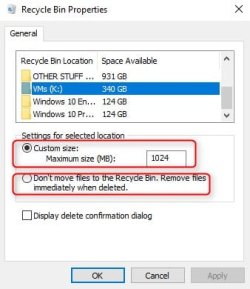
If you could boot up on the old computer you could right click and set the size of the recycle bin, or set everything to permanently delete instead of going to the recycle bin. I am making an assumption that if you set the recycle bin size to 0, everything in there would be deleted. like this

zz1.jpg

If you can't delete the recycle bin you could use the command prompt and use diskpart to delete the partition, then format it. To answer your question, yes, the data could be recovered, but someone would have to want it real bad. It would take a lot of time and effort to do that. Clean the disk, create a new partition, Format the partition then clean it again. It will show as unallocated.

Right click computer, select run as administrator type these commands and press enter after each one

diskpart
list disk
select disk X (where x is the number assigned to the disk. In your case probably number 0)
clean
create partition primary
format fs=ntfs quick
clean (which cleans it again)
exit
exit

It will look like this

x.JPG

Your third, and best option, is do a secure erase. The procedure will depend on the SSD you have. You should be able to find instructions from the manufacturer or from the tool box, if it has one.
 

My Computers My Computers

System One System Two

  • Computer type
    PC/Desktop
    Computer Manufacturer/Model Number
    ALWAYS UNDER CONSTRUCTION
    OS
    Windows 11 Pro
    CPU
    Ryzen 9 5900X
    Motherboard
    Asus X570 Crosshair Viii Hero
    Memory
    32GB G Skill DDR4-3600
    Graphics Card(s)
    EVGA RTX 3080 FTW 3 Ultra
    Sound Card
    On Board/Sennheiser PC37X Headset
    Monitor(s) Displays
    3 X Asus 27"
    Screen Resolution
    2560x1440
    Hard Drives
    2 X 1 TB NVME drives
    PSU
    EVGA 850
    Case
    Phanteks Eclipse P400A
    Cooling
    EVGA 280 AIO
    Keyboard
    Logitech G510s/ Logitech G13
    Mouse
    Logitech G502
    Internet Speed
    24/1
    Antivirus
    ESET/MBAM Pro/SAS Pro
    Browser
    Chrome/ Firefox/ Edge
  • Computer type
    Laptop
    System Manufacturer/Model Number
    Dell 16 Plus
    OS
    Windows 11 Pro
    CPU
    Intel Ultra 9 288V
    Memory
    32 GB LPDDR5X 8533
    Monitor(s) Displays
    16" Mini-LED HDR600 Touch 90 Hz
    Screen Resolution
    2560X1600
    Hard Drives
    1 TB NVME
Be very careful with Diskpart, you could easily erase the wrong disk, if you are a novice I wouldn`t even use Diskpart.

You do not need to get to a recycle bin on another drive, you just delete what you want to delete from C

Meaning you delete something on D E F etc from C

But if there was a recycle bin you wanted to get to on another drive that has windows on it, then click computer, then click on that drive, go to users, your account, then desktop, if you had a recycle bin icon it would show up there.

But I`m sure there`s a quicker way.
 

Attachments

  • Capture.JPG
    Capture.JPG
    152.3 KB · Views: 1

My Computer My Computer

Computer type
PC/Desktop
Computer Manufacturer/Model Number
Skylake Special #666
OS
Windows 10 Pro x64
CPU
Intel Core i7 6700K
Motherboard
Asus Sabertooth Z170 Mark 1
Memory
GSkill TridentZ RGB 16GB 3600 16-16-16-36
Graphics Card(s)
EVGA GTX 980 Ti SC x2
Sound Card
Realtek High Definition
Monitor(s) Displays
AOC G2460PG
Screen Resolution
1920 x 1080 144Hz
Hard Drives
Samsung 860 Pro 256GB, Seagate Barracuda 4TB x2
PSU
EVGA 1000 P2, EVGA White Custom Braided Cables
Case
Corsair Vengeance C70 Gunmetal Black
Cooling
Corsair H100i v2, Corsair ML120 x2, Thermal Grizzly Kryonaut
Keyboard
Logitech G910 Orion Spectrum
Mouse
Logitech G700s
Internet Speed
Verizon Fios Quantum Gateway 75/75
Antivirus
Windows Defender, Malwarebytes Free 3.8.3
Browser
Chrome
Other Info
Corsair SP120 x4, LG Blu-ray Drive, Durabrand HT-395 100 Watt Dolby Digital Amp, Corsair H2100 Wireless 7.1 Headset
Hey guys. Went to the repair shop and this was interesting. I mentioned that i wanted to have the SSD put in and the slower hard drive taken out. The guy told me that I have to have windows 10 installed thus a new copy. I had thought i didn't have to buy a new copy since well this new laptop is windows 10. He did say that if i remove the hard drive, then i don't have windows 10 anymore. I said so does that mean i would have windows 7? I do not recall what he said here. I had said when i asked online, people mentioned to me its not possible to install a copy of windows 7 on the new laptop since its one OP per system.


He had mentioned that i have to have some sort of windows installed because taking out the hard drive and removing it, would remove the OS. This was until he asked me what is the name of the computer system and i told him its a dell xps 15 9550. He then checked this with his computer and was surprised that this computer had 2 different hard drives... ones a 32gb ssd and another is a 1tb hard drive. He said he wasn't aware Dell even did this and said most laptops don't have 2 hard drives which i agree since most laptops its one hard drive. When he noticed that and opened up the laptop, he saw 2 of those drives and said I didn't need to install a new copy of windows 10 because he was removing the 5400 rpm hard drive which does not contain windows 10. Windows 10 is on the 32gb ssd hard drive. Does that make sense or not? He said its so rare to see laptops like this and i agree i don't know many laptops that are like this.


But if i only had 1 hard drive spot there and its the 1tb 5400 rpm, does anyone know if he removes it and put my samsung 250gb ssd... would i need to have a new copy of windows 10 installed? That wouldn't make sense since i already have a copy on the laptop right? That was very strange unless i heard wrong from you guys and mentioned something else? Someone mentioned that yes you might have to buy a new copy of windows 10? Or was it windows 7?


Here is what is strange. A few years back my old asus laptop. It had windows 7. It had a 5400 rpm hard drive. I needed to replace it with an SSD. This SSD was brand new i bought. I asked a friend of mine if he knows how to replace hard drive with SSD and said its very simple. He opened up my asus laptop pretty easily and put the new SSD in. I then recalled powering it up. I believe when i do this and the SSD is new... that I did NOT have to enter my name and all that information after putting in the SSD? It was a few years back but i just don't recall i had to do that.


Also after he replaced my hard drive with my SSD, we checked the my computer and it showed like 115gb free out of 232gb on the ssd hard drive. I asked could he delete everything off since everything in there i already saved to my external hard drive? But most importantly i want to have everything cleared so i could have this hard drive empty? He did this by plugging a cd rom device and did a few things. At first he thought it didn't work then he plugged something else in. He then said he have to open my laptop again to do this until he checked the my computer and all of those files were deleted. So i have like 230gb free out of 232gb on the SSD. On the 32gb ssd, i believe theres like 3gb free since most of it uses windows 10 right?


Does anyone know what method he used here when wiping my SSD? Im pretty sure he used a program that did this. He went to the partition section i believe and did this. Well he did but then maybe went to something else and thought it didn't work but it did. Is this the clean install method, image/clone method or is it the just erase SSD method?


What confuses me a lot was he mentioned if i didn't have 2 hard drives on this dell laptop, then him putting the ssd in would require me to install a fresh copy of windows 10.
 

My Computer My Computer

Computer type
Laptop
OS
Windows 10 Pro
see comments

Hey guys. Went to the repair shop and this was interesting. I mentioned that i wanted to have the SSD put in and the slower hard drive taken out. The guy told me that I have to have windows 10 installed thus a new copy.

Phooey.

Why would you trust this guy?

Did you misunderstand him?

Does he think that if the hard drive in the new Dell quit after a week that you would have to buy Windows again?

Apparently he does...........if that is what he said.


people mentioned to me its not possible to install a copy of windows 7 on the new laptop since its one OP per system.


Nobody here said that. You can buy Windows 7 and install it on any PC you want.


He had mentioned that i have to have some sort of windows installed because taking out the hard drive and removing it, would remove the OS.


Taking out the hard drive removes the hard drive.

No more.

No less.

Either you don't understand what he said, or he's lying, or he is hopeless.


When he noticed that and opened up the laptop, he saw 2 of those drives

Did you personally see 2 hard drives--one you could hold in your left hand and another you could hold in your right hand?

Or did you see one piece of hardware containing "two drives"?

Or are you relying on what he said he saw and you may not know what he actually meant?

There is some chance this laptop does in fact have 2 totally separate and discrete hard drives, but we haven't seen any evidence yet.


and said I didn't need to install a new copy of windows 10 because he was removing the 5400 rpm hard drive which does not contain windows 10. Windows 10 is on the 32gb ssd hard drive. Does that make sense or not?

It doesn't make any difference. You don't need a new copy of Windows 10 regardless of whether the Dell has 1, 2, or 13 hard drives.

He said its so rare to see laptops like this and i agree i don't know many laptops that are like this.

What does he think is rare:

1: a laptop with 2 discrete and totally separate hard drives, each with a separate drive bay?

or

2: a laptop that has a hybrid drive with a spinning portion and a so-called "SSD"portion?

We don't know which of those you have.

As far as I know, neither is "rare". Possibly uncommon.


But if i only had 1 hard drive spot there and its the 1tb 5400 rpm, does anyone know if he removes it and put my samsung 250gb ssd... would i need to have a new copy of windows 10 installed?

What have we already told you? It doesn't matter if the new Dell has 1, 2, or leventy leven hard drives.

That wouldn't make sense since i already have a copy on the laptop right?

You are correct.


Someone mentioned that yes you might have to buy a new copy of windows 10? Or was it windows 7?

Windows 7.


So i have like 230gb free out of 232gb on the SSD. On the 32gb ssd, i believe theres like 3gb free since most of it uses windows 10 right?


Huh???


Why didn't you totally replace whatever hard drives were in the new Dell with your old SSD. And not use this 32 GB thing at all?

Why do you need to use this 32 GB thing, whatever it is, at all?

Did you leave the store with the original Dell hard drive in one hand and the laptop in the other? Or is the original Dell hard drive(s) still inside the new laptop?

Your Windows installation will likely grow to more than 32 GB

How much free space do you see on the so-called C drive?


Does anyone know what method he used here when wiping my SSD?

Did you ask him?

Is this the clean install method, image/clone method or is it the just erase SSD method?

Why not ask him?

What confuses me a lot was he mentioned if i didn't have 2 hard drives on this dell laptop, then him putting the ssd in would require me to install a fresh copy of windows 10.

Repeat: Phooey. If by "fresh" you mean "pay for a new copy".


It's not clear to me what you walked into the shop with.

It's not clear to me what he did.

It's not clear to me what you told him you wanted.

It's not clear to me what you walked out of the shop with.

Did he TOTALLY remove any piece of hardware from that machine and where is that piece right now?

 

My Computer My Computer

Computer type
PC/Desktop
Computer Manufacturer/Model Number
Ignatz Special; 4 speed manual gearbox; factory air conditioning; one of one
OS
Windows 7 Home Premium SP1, 64-bit
CPU
Intel Skylake i5-6600K, not overclocked
Motherboard
AsRock Z170M Extreme 4, micro ATX
Memory
8 GB HyperX DDR4-2666 (2 x 4 GB)
Graphics Card(s)
none; graphics are integrated on CPU
Sound Card
onboard: Realtek ALC1150; external: USB Behringer UF0-202
Monitor(s) Displays
Dell S2340M 23 inch IPS
Screen Resolution
1600 x 900
Hard Drives
System: Crucial MX100 series SSD, 128 GB;
Data: Samsung Spinpoint 103SJ, 1 TB;
Backup: WD Caviar Green WD30EZRX-00D8PB0, 3 TB
PSU
Rosewill SilentNight 500 watt fanless, semi-modular
Case
Antec Solo II
Cooling
Noctua NH-U12S; Noctua F12 intake, Noctua S12A exhaust
Keyboard
Microsoft 200 6JH-00001 USB
Mouse
Dell or Microsoft optical wired; USB
Antivirus
Microsoft Security Essentials and Malwarebytes Premium
Browser
Pale Moon
Other Info
All fans PWM; speeds at idle: CPU circa 500 rpm; intake circa 600 rpm; exhaust circa 600 rpm; CPU temps 27 idle and 47 C load in a warm room (27 C/81 F) when running Intel Extreme Tuning Utility stress test.
see comments

Hey guys. Went to the repair shop and this was interesting. I mentioned that i wanted to have the SSD put in and the slower hard drive taken out. The guy told me that I have to have windows 10 installed thus a new copy.

Phooey.

Why would you trust this guy?

Did you misunderstand him?

Does he think that if the hard drive in the new Dell quit after a week that you would have to buy Windows again?

Apparently he does...........if that is what he said.


people mentioned to me its not possible to install a copy of windows 7 on the new laptop since its one OP per system.


Nobody here said that. You can buy Windows 7 and install it on any PC you want.


He had mentioned that i have to have some sort of windows installed because taking out the hard drive and removing it, would remove the OS.


Taking out the hard drive removes the hard drive.

No more.

No less.

Either you don't understand what he said, or he's lying, or he is hopeless.


When he noticed that and opened up the laptop, he saw 2 of those drives

Did you personally see 2 hard drives--one you could hold in your left hand and another you could hold in your right hand?

Or did you see one piece of hardware containing "two drives"?

Or are you relying on what he said he saw and you may not know what he actually meant?

There is some chance this laptop does in fact have 2 totally separate and discrete hard drives, but we haven't seen any evidence yet.


and said I didn't need to install a new copy of windows 10 because he was removing the 5400 rpm hard drive which does not contain windows 10. Windows 10 is on the 32gb ssd hard drive. Does that make sense or not?

It doesn't make any difference. You don't need a new copy of Windows 10 regardless of whether the Dell has 1, 2, or 13 hard drives.

He said its so rare to see laptops like this and i agree i don't know many laptops that are like this.

What does he think is rare:

1: a laptop with 2 discrete and totally separate hard drives, each with a separate drive bay?

or

2: a laptop that has a hybrid drive with a spinning portion and a so-called "SSD"portion?

We don't know which of those you have.

As far as I know, neither is "rare". Possibly uncommon.


But if i only had 1 hard drive spot there and its the 1tb 5400 rpm, does anyone know if he removes it and put my samsung 250gb ssd... would i need to have a new copy of windows 10 installed?

What have we already told you? It doesn't matter if the new Dell has 1, 2, or leventy leven hard drives.

That wouldn't make sense since i already have a copy on the laptop right?

You are correct.


Someone mentioned that yes you might have to buy a new copy of windows 10? Or was it windows 7?

Windows 7.


So i have like 230gb free out of 232gb on the SSD. On the 32gb ssd, i believe theres like 3gb free since most of it uses windows 10 right?


Huh???


Why didn't you totally replace whatever hard drives were in the new Dell with your old SSD. And not use this 32 GB thing at all?

Why do you need to use this 32 GB thing, whatever it is, at all?

Did you leave the store with the original Dell hard drive in one hand and the laptop in the other? Or is the original Dell hard drive(s) still inside the new laptop?

Your Windows installation will likely grow to more than 32 GB

How much free space do you see on the so-called C drive?


Does anyone know what method he used here when wiping my SSD?

Did you ask him?

Is this the clean install method, image/clone method or is it the just erase SSD method?

Why not ask him?

What confuses me a lot was he mentioned if i didn't have 2 hard drives on this dell laptop, then him putting the ssd in would require me to install a fresh copy of windows 10.

Repeat: Phooey. If by "fresh" you mean "pay for a new copy".


It's not clear to me what you walked into the shop with.

It's not clear to me what he did.

It's not clear to me what you told him you wanted.

It's not clear to me what you walked out of the shop with.

Did he TOTALLY remove any piece of hardware from that machine and where is that piece right now?


Im pretty sure the guy didn't understand that there were 2 hard drives there... which is why he said this.

I dont think i misunderstood him. Im pretty sure it was because he thought only 1 hard drive there. But if that was the case, then im not sure why he suggested this.


XPS 15 9550 High Performance Laptop | Dell


Looks like the 2nd option... 1tb 5400 rpm and 32gb ssd. I seen how the inside looked. It looks like 2 hard drives i believe.


Well he said this was pretty uncommon i believe. Because im sure most laptops he looks at doesn't contain 2 drives like this.


So i have like 230gb free out of 232gb on the SSD. On the 32gb ssd, i believe theres like 3gb free since most of it uses windows 10 right?


Huh???


Why didn't you totally replace whatever hard drives were in the new Dell with your old SSD. And not use this 32 GB thing at all?

Why do you need to use this 32 GB thing, whatever it is, at all?

Did you leave the store with the original Dell hard drive in one hand and the laptop in the other? Or is the original Dell hard drive(s) still inside the new laptop?

Your Windows installation will likely grow to more than 32 GB

How much free space do you see on the so-called C drive?


The windows 10 is stored in the 32gb ssd.

The original 1tb Dell hard drive he took it out and i have that with me. The 250gb samsung ssd is in the laptop. The 32gb ssd that is in the laptop is still there. He did not take that out.

The 32gb ssd, theres around under 30gb used so basically 2gb free. The 250gb samsung ssd... shows 232gb total and 230gb free.
 

My Computer My Computer

Computer type
Laptop
OS
Windows 10 Pro
see comments

Im pretty sure the guy didn't understand that there were 2 hard drives there... which is why he said this.

If he did not figure that out within 5 minutes of looking at it, he is not competent. I have no idea what he saw or what he did or what or when he believed anything.

I dont think i misunderstood him. Im pretty sure it was because he thought only 1 hard drive there. But if that was the case, then im not sure why he suggested this.


XPS 15 9550 High Performance Laptop | Dell

that link does not work for me.


So i have like 230gb free out of 232gb on the SSD. On the 32gb ssd, i believe theres like 3gb free since most of it uses windows 10 right?

The windows 10 is stored in the 32gb ssd.


The original 1tb Dell hard drive he took it out and i have that with me. The 250gb samsung ssd is in the laptop. The 32gb ssd that is in the laptop is still there. He did not take that out.

I'll take your word for this for the moment subject to new information: The machine originally had 2 separate drives. A 32 GB SSD still in the machine and a 1 TB drive that you have totally removed.

Why would you want to have Windows on a 32 GB SSD with only 3 GB of free space---when you have a separate SSD with NOTHING on it that you could use??? Your 32 GB SSD is nearly full.

I have no idea why you didn't tell him to clone or image or clean install Windows 10 to the 250 GB SSD.

You've got a bum installation if what you say is true---a very very small SSD that's nearly full and a big SSD that is empty.

Windows 10 should be on the big SSD.

Unless of course you are wrong.

What makes you think that this machine now has 2 SSDs in it?? Rather than one 250 GB SSD with a small partition containing Windows 10 and a larger partition that is nearly empty?


Post a screen shot of Windows Disk Management.
 

My Computer My Computer

Computer type
PC/Desktop
Computer Manufacturer/Model Number
Ignatz Special; 4 speed manual gearbox; factory air conditioning; one of one
OS
Windows 7 Home Premium SP1, 64-bit
CPU
Intel Skylake i5-6600K, not overclocked
Motherboard
AsRock Z170M Extreme 4, micro ATX
Memory
8 GB HyperX DDR4-2666 (2 x 4 GB)
Graphics Card(s)
none; graphics are integrated on CPU
Sound Card
onboard: Realtek ALC1150; external: USB Behringer UF0-202
Monitor(s) Displays
Dell S2340M 23 inch IPS
Screen Resolution
1600 x 900
Hard Drives
System: Crucial MX100 series SSD, 128 GB;
Data: Samsung Spinpoint 103SJ, 1 TB;
Backup: WD Caviar Green WD30EZRX-00D8PB0, 3 TB
PSU
Rosewill SilentNight 500 watt fanless, semi-modular
Case
Antec Solo II
Cooling
Noctua NH-U12S; Noctua F12 intake, Noctua S12A exhaust
Keyboard
Microsoft 200 6JH-00001 USB
Mouse
Dell or Microsoft optical wired; USB
Antivirus
Microsoft Security Essentials and Malwarebytes Premium
Browser
Pale Moon
Other Info
All fans PWM; speeds at idle: CPU circa 500 rpm; intake circa 600 rpm; exhaust circa 600 rpm; CPU temps 27 idle and 47 C load in a warm room (27 C/81 F) when running Intel Extreme Tuning Utility stress test.
You DO NOT have to buy Windows 10, the PC came with Windows 10.

Don`t let anyone con you.

It would be nice if you could post a Disk Management shot before you take it in.


If the OS is indeed on the 32 GB, then you can simply swap the 1 TB hard drive with the new SSD.

I`ll tell you this, you are gonna loose a lot of storage space, but you will also be loosing all the heat that the hard drive makes.

You`ll be going from 931 GB to 232 GB, but you could always use the 1 TB in an external caddy as mentioned earlier.

You only need to use Disk Management to format the new ssd, nothing else.
 
Last edited:

My Computer My Computer

Computer type
PC/Desktop
Computer Manufacturer/Model Number
Skylake Special #666
OS
Windows 10 Pro x64
CPU
Intel Core i7 6700K
Motherboard
Asus Sabertooth Z170 Mark 1
Memory
GSkill TridentZ RGB 16GB 3600 16-16-16-36
Graphics Card(s)
EVGA GTX 980 Ti SC x2
Sound Card
Realtek High Definition
Monitor(s) Displays
AOC G2460PG
Screen Resolution
1920 x 1080 144Hz
Hard Drives
Samsung 860 Pro 256GB, Seagate Barracuda 4TB x2
PSU
EVGA 1000 P2, EVGA White Custom Braided Cables
Case
Corsair Vengeance C70 Gunmetal Black
Cooling
Corsair H100i v2, Corsair ML120 x2, Thermal Grizzly Kryonaut
Keyboard
Logitech G910 Orion Spectrum
Mouse
Logitech G700s
Internet Speed
Verizon Fios Quantum Gateway 75/75
Antivirus
Windows Defender, Malwarebytes Free 3.8.3
Browser
Chrome
Other Info
Corsair SP120 x4, LG Blu-ray Drive, Durabrand HT-395 100 Watt Dolby Digital Amp, Corsair H2100 Wireless 7.1 Headset
Yes i know computer came with windows 10. I might have said something wrong which may be the reason he said i need to buy a copy of 10 but im pretty sure i mentioned i want to swap the hard drive with the ssd hard drive.


I also have a bit of an issue here.


I downloaded a few videos online. So there previously was about 2gb free out of 28.7gb on the OS C Drive. In the New volume D drive, theres 230gb free of 232gb. Thats the SSD.


Well i downloaded a good amount of things and i got a message that my hard drive was getting low in space and it ask me to choose between manage storage or cancel. I clicked cancel. As the videos continued to download, it stopped. As of now it shows 3.67mb free of 28.7gb free on the OS C drive. So basically it stopped because theres not enough storage right? Im downloading some 80mb videos with youtube video downloader. So how do i go to the New Volume D drive now since anything i download, i have to download it to the D drive since im out of space on the C drive? I assume i have to get to the manage hard drive part and can someone tell me how do i do this?


Yes the OS is on the 32gb drive 100 percent. He confirmed it. And yes he swapped the 1tb hard drive with the 250gb samsung SSD. He asked me why i wanted to do this since i would be going from 1tb to 250gb but i told him is because SSD is very important and I don't need 1tb of space. What do you mean losing all the heat that hard drive makese?


Well he had wiped everything in the ssd already after he put the ssd in. Yes i believe it was disk management.
 

My Computer My Computer

Computer type
Laptop
OS
Windows 10 Pro
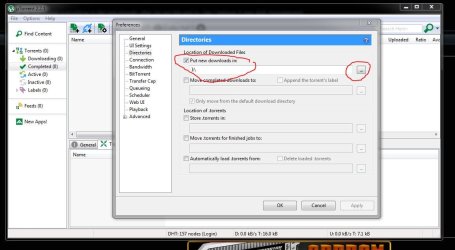
You need to direct your downloads to the SSD, you do not want to store anything at all on the 32 GB accept for windows updates and your programs.

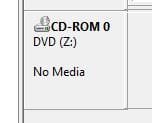
Here is an example of how I changed the location of my movie downloads when I use utorrent, you usually get a pop up asking you where you want to save your downloads, by default they will go in your downloads folder, you want to change that to your ssd, whatever letter it is now, you should label the new ssd D, you can easily change it in Disk Mangement. If the laptop has a cd or dvd drive, I always change it to the last letter of the alphabet Z :)
 

Attachments

  • Capture.JPG
    Capture.JPG
    82.6 KB · Views: 0
  • Capture1.JPG
    Capture1.JPG
    9.6 KB · Views: 8

My Computer My Computer

Computer type
PC/Desktop
Computer Manufacturer/Model Number
Skylake Special #666
OS
Windows 10 Pro x64
CPU
Intel Core i7 6700K
Motherboard
Asus Sabertooth Z170 Mark 1
Memory
GSkill TridentZ RGB 16GB 3600 16-16-16-36
Graphics Card(s)
EVGA GTX 980 Ti SC x2
Sound Card
Realtek High Definition
Monitor(s) Displays
AOC G2460PG
Screen Resolution
1920 x 1080 144Hz
Hard Drives
Samsung 860 Pro 256GB, Seagate Barracuda 4TB x2
PSU
EVGA 1000 P2, EVGA White Custom Braided Cables
Case
Corsair Vengeance C70 Gunmetal Black
Cooling
Corsair H100i v2, Corsair ML120 x2, Thermal Grizzly Kryonaut
Keyboard
Logitech G910 Orion Spectrum
Mouse
Logitech G700s
Internet Speed
Verizon Fios Quantum Gateway 75/75
Antivirus
Windows Defender, Malwarebytes Free 3.8.3
Browser
Chrome
Other Info
Corsair SP120 x4, LG Blu-ray Drive, Durabrand HT-395 100 Watt Dolby Digital Amp, Corsair H2100 Wireless 7.1 Headset
see comments

Im pretty sure the guy didn't understand that there were 2 hard drives there... which is why he said this.

If he did not figure that out within 5 minutes of looking at it, he is not competent. I have no idea what he saw or what he did or what or when he believed anything.

I dont think i misunderstood him. Im pretty sure it was because he thought only 1 hard drive there. But if that was the case, then im not sure why he suggested this.


XPS 15 9550 High Performance Laptop | Dell

that link does not work for me.


So i have like 230gb free out of 232gb on the SSD. On the 32gb ssd, i believe theres like 3gb free since most of it uses windows 10 right?

The windows 10 is stored in the 32gb ssd.


The original 1tb Dell hard drive he took it out and i have that with me. The 250gb samsung ssd is in the laptop. The 32gb ssd that is in the laptop is still there. He did not take that out.

I'll take your word for this for the moment subject to new information: The machine originally had 2 separate drives. A 32 GB SSD still in the machine and a 1 TB drive that you have totally removed.

Why would you want to have Windows on a 32 GB SSD with only 3 GB of free space---when you have a separate SSD with NOTHING on it that you could use??? Your 32 GB SSD is nearly full.

I have no idea why you didn't tell him to clone or image or clean install Windows 10 to the 250 GB SSD.

You've got a bum installation if what you say is true---a very very small SSD that's nearly full and a big SSD that is empty.

Windows 10 should be on the big SSD.

Unless of course you are wrong.

What makes you think that this machine now has 2 SSDs in it?? Rather than one 250 GB SSD with a small partition containing Windows 10 and a larger partition that is nearly empty?


Post a screen shot of Windows Disk Management.


He did not open the laptop up first. I had described that i wanted ssd put in and the 1tb hard drive taken out.


Specs are


6th Generation Intel® Core™ i5-6300HQ Quad Core
Windows 10 Home
8GB
1TB 5400RPM Hard Drive + 32GB Solid State Drive


I'll take your word for this for the moment subject to new information: The machine originally had 2 separate drives. A 32 GB SSD still in the machine and a 1 TB drive that you have totally removed.

Why would you want to have Windows on a 32 GB SSD with only 3 GB of free space---when you have a separate SSD with NOTHING on it that you could use??? Your 32 GB SSD is nearly full.

I have no idea why you didn't tell him to clone or image or clean install Windows 10 to the 250 GB SSD.

You've got a bum installation if what you say is true---a very very small SSD that's nearly full and a big SSD that is empty.

Windows 10 should be on the big SSD.

Unless of course you are wrong.

What makes you think that this machine now has 2 SSDs in it?? Rather than one 250 GB SSD with a small partition containing Windows 10 and a larger partition that is nearly empty?


Post a screen shot of Windows Disk Management.


Okay im very frustrated now. I downloaded a bunch of videos and now my OS C drive is nearly full. Its 3.67mb free of 28.7gb and its asking me to manage storage because im running out of space. I cant even finish downloading it. The other hard drive is called New Volume D Drive. That has 230gb free of 232gb.


Okay what you say makes a lot of sense. I had thought well once the OS C drive gets full, then anything i download would go into the new volume D drive. But thats not how it works?
 

My Computer My Computer

Computer type
Laptop
OS
Windows 10 Pro

My Computers My Computers

System One System Two

  • Computer type
    PC/Desktop
    Computer Manufacturer/Model Number
    ALWAYS UNDER CONSTRUCTION
    OS
    Windows 11 Pro
    CPU
    Ryzen 9 5900X
    Motherboard
    Asus X570 Crosshair Viii Hero
    Memory
    32GB G Skill DDR4-3600
    Graphics Card(s)
    EVGA RTX 3080 FTW 3 Ultra
    Sound Card
    On Board/Sennheiser PC37X Headset
    Monitor(s) Displays
    3 X Asus 27"
    Screen Resolution
    2560x1440
    Hard Drives
    2 X 1 TB NVME drives
    PSU
    EVGA 850
    Case
    Phanteks Eclipse P400A
    Cooling
    EVGA 280 AIO
    Keyboard
    Logitech G510s/ Logitech G13
    Mouse
    Logitech G502
    Internet Speed
    24/1
    Antivirus
    ESET/MBAM Pro/SAS Pro
    Browser
    Chrome/ Firefox/ Edge
  • Computer type
    Laptop
    System Manufacturer/Model Number
    Dell 16 Plus
    OS
    Windows 11 Pro
    CPU
    Intel Ultra 9 288V
    Memory
    32 GB LPDDR5X 8533
    Monitor(s) Displays
    16" Mini-LED HDR600 Touch 90 Hz
    Screen Resolution
    2560X1600
    Hard Drives
    1 TB NVME
Back
Top