
Solved SSL certificate problem when accessing facebok

anonops

New member
Local time
1:31 PM
Messages
3
the title says it all..when i try to open facebook...i got this message:
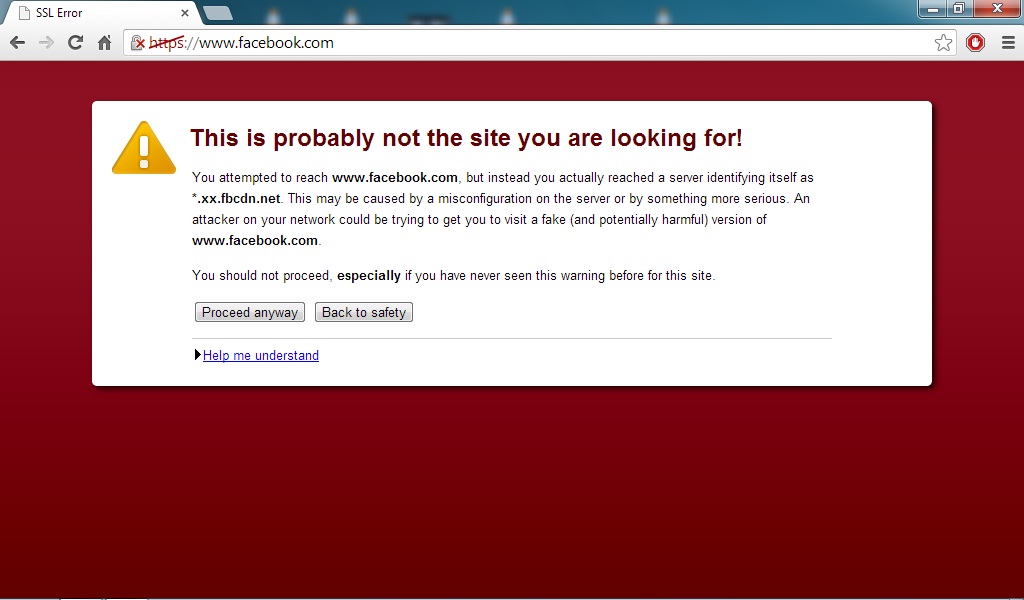

nz132IX.jpg


my date and time is right...i already add the facebook webpage in trusted site in the internet option...but i still got that error...can someone help me? :cry:

p.s maybe i post in wrong section before..sorry about that
 

My Computer

Computer type
PC/Desktop
Computer Manufacturer/Model Number
Custom Build
OS
Window 7 Ultimate 64-bit SP1
CPU
AMD FX-Series 8 Core FX 8350 4.0GHz
Motherboard
ASUS AMD Crosshair V Formula-Z
Memory
Corsair Vengeance 8 GB DDR3
Graphics Card(s)
Asus HD7790 OC DirectCU II 1GB GDDR5 128BIT
Hard Drives
Western Digital 1TB
PSU
CORSAIR AX650 650W
Case
Thermaltake Level 10 GT Snow White Edition
Cooling
ARMAGGENDDON GIGAFREEZE WATER LIQUID CPU COOLER
72 views and no one can help me...please...im really need your help
 

My Computer

Computer type
PC/Desktop
Computer Manufacturer/Model Number
Custom Build
OS
Window 7 Ultimate 64-bit SP1
CPU
AMD FX-Series 8 Core FX 8350 4.0GHz
Motherboard
ASUS AMD Crosshair V Formula-Z
Memory
Corsair Vengeance 8 GB DDR3
Graphics Card(s)
Asus HD7790 OC DirectCU II 1GB GDDR5 128BIT
Hard Drives
Western Digital 1TB
PSU
CORSAIR AX650 650W
Case
Thermaltake Level 10 GT Snow White Edition
Cooling
ARMAGGENDDON GIGAFREEZE WATER LIQUID CPU COOLER
Looks like you have a browser hijacker or dns redirector, in other words you have a spyware or virus infection.
 

My Computer

Computer type
PC/Desktop
Computer Manufacturer/Model Number
Dell
OS
Win 7 x64
CPU
Core I5
Welcome to Seven Forums anonops.

sphotos-a.xx.Fbcdn.net is associated with Facebook Ireland, and is one of the Facebook photo servers

sphotos-a.xx.Fbcdn.net - Fbcdn | Site Information

Try this, instructions from one of our Security MVPs Jacee. It will also serve your purpose:

Copy and paste these lines in Note pad

@Echo on
pushd\windows\system32\drivers\etc
attrib -h -s -r hosts
echo 127.0.0.1 localhost>HOSTS
attrib +r +h +s hosts
popd
ipconfig /release
ipconfig /renew
ipconfig /flushdns
netsh winsock reset all
netsh int ip reset all
shutdown -r -t 1
del %0


Save as flush.bat to your desktop

Right click the .bat file and choose to Run as administrator

Your computer will reboot itself

Try to log in again.

You can also download and run AdwCleaner as a precaution

AdwCleaner Download

Choose the Download Now @Bleeping Computer link

How To Use AdwCleaner [Manual] | malwareremovalguides

Post the log file here if you are unsure.

http://www.sevenforums.com/tutorials/9733-screenshots-files-upload-post-seven-forums.html

A Guy
 

My Computer

Computer type
PC/Desktop
OS
Windows 10 Home x64
CPU
INTEL Core i5-750 Quad-Core 3.37GHz
Motherboard
ASUS P7P55D
Memory
HyperX Fury Black Series 8GB (2 x 4GB) 1866Mhz
Graphics Card(s)
EVGA GeForce GTX 750 Superclocked 1GB 128-Bit GDDR5
Monitor(s) Displays
LG 32MA68HY 32" IPS
Screen Resolution
1920 x 1080
Hard Drives
Samsung 840 Evo 120GB, SEAGATE 500GB Barracuda® 7200.12, SATA 3 Gb/s, 7200 RPM, 16MB cache
PSU
ANTEC TruePower New TP-550, 80 PLUS, 550W
Case
ANTEC Three Hundred Illusion
Cooling
COOLER MASTER Hyper 212 Plus, 4 x 120mm 1 x 140mm Noctua's
Internet Speed
85 + Mbps
Antivirus
Avast
Browser
Vivaldi
Welcome to Seven Forums anonops.

sphotos-a.xx.Fbcdn.net is associated with Facebook Ireland, and is one of the Facebook photo servers

sphotos-a.xx.Fbcdn.net - Fbcdn | Site Information

Try this, instructions from one of our Security MVPs Jacee. It will also serve your purpose:

Copy and paste these lines in Note pad

@Echo on
pushd\windows\system32\drivers\etc
attrib -h -s -r hosts
echo 127.0.0.1 localhost>HOSTS
attrib +r +h +s hosts
popd
ipconfig /release
ipconfig /renew
ipconfig /flushdns
netsh winsock reset all
netsh int ip reset all
shutdown -r -t 1
del %0


Save as flush.bat to your desktop

Right click the .bat file and choose to Run as administrator

Your computer will reboot itself

Try to log in again.

You can also download and run AdwCleaner as a precaution

AdwCleaner Download

Choose the Download Now @Bleeping Computer link

How To Use AdwCleaner [Manual] | malwareremovalguides

Post the log file here if you are unsure.

http://www.sevenforums.com/tutorials/9733-screenshots-files-upload-post-seven-forums.html

A Guy


thanks a lot man...i can open facebook now...i use the notepad solution :D
 

My Computer

Computer type
PC/Desktop
Computer Manufacturer/Model Number
Custom Build
OS
Window 7 Ultimate 64-bit SP1
CPU
AMD FX-Series 8 Core FX 8350 4.0GHz
Motherboard
ASUS AMD Crosshair V Formula-Z
Memory
Corsair Vengeance 8 GB DDR3
Graphics Card(s)
Asus HD7790 OC DirectCU II 1GB GDDR5 128BIT
Hard Drives
Western Digital 1TB
PSU
CORSAIR AX650 650W
Case
Thermaltake Level 10 GT Snow White Edition
Cooling
ARMAGGENDDON GIGAFREEZE WATER LIQUID CPU COOLER
Great, glad to hear it. It was a DNS issue. The browser was seeing the picture site instead of what it expected. It's good they try and protect you. It could have been a real redirection virus as suggested. A Guy
 

My Computer

Computer type
PC/Desktop
OS
Windows 10 Home x64
CPU
INTEL Core i5-750 Quad-Core 3.37GHz
Motherboard
ASUS P7P55D
Memory
HyperX Fury Black Series 8GB (2 x 4GB) 1866Mhz
Graphics Card(s)
EVGA GeForce GTX 750 Superclocked 1GB 128-Bit GDDR5
Monitor(s) Displays
LG 32MA68HY 32" IPS
Screen Resolution
1920 x 1080
Hard Drives
Samsung 840 Evo 120GB, SEAGATE 500GB Barracuda® 7200.12, SATA 3 Gb/s, 7200 RPM, 16MB cache
PSU
ANTEC TruePower New TP-550, 80 PLUS, 550W
Case
ANTEC Three Hundred Illusion
Cooling
COOLER MASTER Hyper 212 Plus, 4 x 120mm 1 x 140mm Noctua's
Internet Speed
85 + Mbps
Antivirus
Avast
Browser
Vivaldi
Back
Top