Start Menu All Programs - Add or Delete Shortcuts

How to Add or Delete Start Menu All Programs Shortcuts in Windows 7


   Information
This will show you how to add or delete shortcuts in the All Programs area of the Start Menu for the Current User or All Users in Windows 7.
   Note
It appears that the context menu items for the Start Menu to open the Start Menu folders has been ommitted in the Windows 7 beta for now. Instead of adding and removing shortcuts directly out of the Start Menu, you could manually navigate to the two Start Menu folder locations.

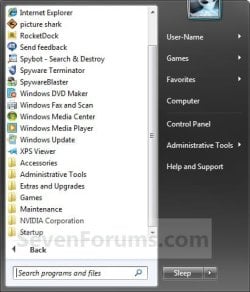
EXAMPLE: Start Menu All Programs
NOTE: All Programs is the right screenshot. You would click on All Programs (left screenshot) to open it.
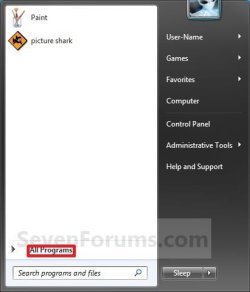
Start_Menu_All_Programs-1.jpgStart_Menu_All_Programs-2.jpg


OPTION ONE

Start Menu for Only Current Logged On User
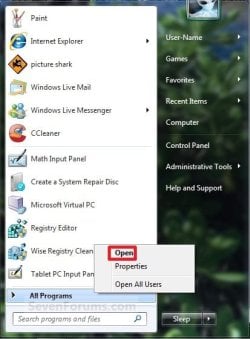
1. Open the Start Menu. A) Right click on All Programs and click on Open. (See screenshot below) Start_Menu_Open.jpg
B) Go to step 4.
OR

2. Open the Start Menu. A) In the search box, type shell:start menu and press Enter. (See screenshot below) Start_Menu_Current.jpg
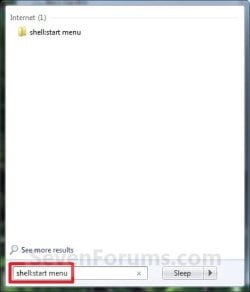
B) Open the Programs folder.

C) Go to step 4.
OR
3. Open Folder Options. A) Dot Show hidden files, folders, or drives., and click on apply. (See screenshot below) Folder_Options_Unhide.jpg
B) Open Windows Explorer and navigate to the location below. (See screenshot below step 6)

Code:
C:\Users\(user name)\AppData\Roaming\Microsoft\Windows\Start Menu\Programs
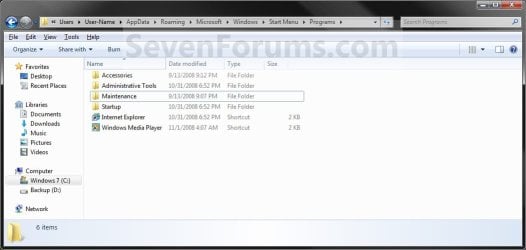
4. You can now Copy and Paste shortcuts, Drag and Drop shortcuts, and create New Folders that you want in the Start Menu in this window below. Current_User_Start_Menu.jpg
5. If you did step 3, then in Folder Options again, dot Don't show hidden files, folders, or drives and click on OK. (See screenshot below step 3)


OPTION TWO

Start Menu Shared by All Users
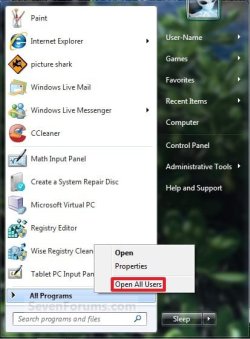
1. Open the Start Menu. A) Right click on All Programs and click on Open All Users. (See screenshot below) Start_Menu_Open_All_Users.jpg
B) Go to step 3.
OR

2. Open the Start Menu. A) In the search box, type shell:common start menu and press Enter.

B) Go to step 3.
OR

3. Open Folder Options. A) Dot Show hidden files, folders, or drives, and click on Apply. (See screenshot below) Folder_Options_Unhide.jpg
B) Open Windows Explorer and navigate to the location below. (See screenshot below step 5)

Code:
C:\ProgramData\Microsoft\Windows\Start Menu\Programs
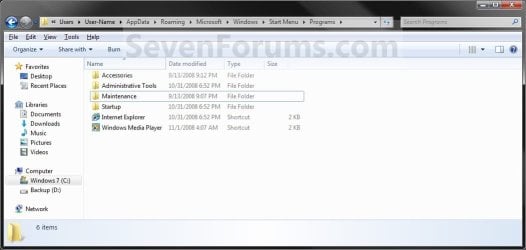
4. You can now Copy and Paste shortcuts, Drag and Drop shortcuts, and create New Folders that you want in the Start Menu in this window below. All_Users_Start_Menu.jpg
5. If you did step 3, then in Folder Options again, dot Don't show hidden files, folders, or drives and click on OK. (See screenshot below step 3)
That's it,
Shawn


Last edited:
Great tut

I've tried to create a folder in the Start Menu>Programs folder and it will allow me to create it but not allow me to change the name from "New Folder."

I get the message "The action can't be completed because the folder or a file in it is open in another program". There is no file in the folder.

Any help is greatly appreciated.

intwtl
 

My Computer

OS
Windows 7
Hello Intwtl, and welcome to Seven Forums.

Give this a try to see if it may be able to help you fix this.

New Folder - Vista Forums

Hope this helps,
Shawn
 

My Computer

Computer type
PC/Desktop
Computer Manufacturer/Model Number
Self built custom
OS
64-bit Windows 11 Pro for Workstations
CPU
Intel i7-8700K OC'd to 5 GHz
Motherboard
ASUS ROG Maximus XI Formula Z390
Memory
64 GB (4x16GB) G.SKILL TridentZ RGB DDR4 3600 MHz
Graphics Card(s)
ASUS ROG-STRIX-GTX1080TI-O11G-GAMING
Sound Card
Integrated
Monitor(s) Displays
2 x Samsung Odyssey G7 27"
Screen Resolution
2560x1440
Hard Drives
1TB Samsung 990 PRO M.2,
4TB Samsung 990 PRO PRO M.2,
TerraMaster F8 SSD Plus NAS
PSU
Seasonic Prime Titanium 850W
Case
Thermaltake Core P3
Cooling
Corsair Hydro H115i
Keyboard
Logitech wireless K800
Mouse
Logitech MX Master 4
Internet Speed
2 Gb/s Download and 100 Mb/s Upload
Antivirus
Malwarebyte Anti-Malware Premium
Browser
Google Chrome
Other Info
Logitech Z625 speaker system,
Logitech BRIO 4K Pro webcam,
HP Color LaserJet Pro MFP M477fdn,
APC SMART-UPS RT 1000 XL - SURT1000XLI,
Galaxy S23 Plus phone
Hi Shawn,

I tried the fix and it didn't work on my installation.

I finally booted into safe mode and was able to rename the folder that way. Not the ideal situation but certainly workable for editing the menus.

Thanks much. This forum is invaluable.
 

My Computer

OS
Windows 7
Intwtl,

I'm happy to hear that you got it sorted. You might send feedback to MS about it to see if they can get it fixed in a new version of W7.
 

My Computer

Computer type
PC/Desktop
Computer Manufacturer/Model Number
Self built custom
OS
64-bit Windows 11 Pro for Workstations
CPU
Intel i7-8700K OC'd to 5 GHz
Motherboard
ASUS ROG Maximus XI Formula Z390
Memory
64 GB (4x16GB) G.SKILL TridentZ RGB DDR4 3600 MHz
Graphics Card(s)
ASUS ROG-STRIX-GTX1080TI-O11G-GAMING
Sound Card
Integrated
Monitor(s) Displays
2 x Samsung Odyssey G7 27"
Screen Resolution
2560x1440
Hard Drives
1TB Samsung 990 PRO M.2,
4TB Samsung 990 PRO PRO M.2,
TerraMaster F8 SSD Plus NAS
PSU
Seasonic Prime Titanium 850W
Case
Thermaltake Core P3
Cooling
Corsair Hydro H115i
Keyboard
Logitech wireless K800
Mouse
Logitech MX Master 4
Internet Speed
2 Gb/s Download and 100 Mb/s Upload
Antivirus
Malwarebyte Anti-Malware Premium
Browser
Google Chrome
Other Info
Logitech Z625 speaker system,
Logitech BRIO 4K Pro webcam,
HP Color LaserJet Pro MFP M477fdn,
APC SMART-UPS RT 1000 XL - SURT1000XLI,
Galaxy S23 Plus phone
FYI, I also encountered the same error message trying to create a new start menu folder. Thought maybe I missed something since I have almost zero experience with Vista (my wife has it on her new notebook and it's in another language to boot). Glad to see it wasn't just me. :)

P.S.
Yep, I've sent MS feedback regarding this issue.
 

My Computer

OS
Windows 7 x64 Beta / Windows XP SP3
CPU
Core2 Duo E8400 o/c 3.4GHz
Motherboard
Gigabyte X38-DQ6
Memory
4GB OCZ Platinum 2
Graphics Card(s)
eVGA 8800GT SE 512MB
Sound Card
Sound Blaster X-Fi
Add or Delete Shortcuts.. what worked for me

This is my first post, so.. hi peeps!

Im running the Windows 7 64 bit as my sole operating system. I ran into the quirk you mentioned above, and puttered about and found the easiest solution. Simply go into user accounts, disable the UAC, then make your changes, folders, renaming, moving, etc, changes to start menu, send to, whatever. When finished, go back to the user accounts and re-enable the UAC. It worked nicely for me and I hope it works for you too.

Teri
 
Last edited:

My Computer

OS
windows 7
Customize space above 'All Programs'

Is there a way to specify your own shortcuts for the space above 'All Programs'? By default it is recently used links, but how can I customize it to put my own in there?
 

My Computer

OS
Windows 7 (7000)

My Computer

Computer type
PC/Desktop
Computer Manufacturer/Model Number
Self built custom
OS
64-bit Windows 11 Pro for Workstations
CPU
Intel i7-8700K OC'd to 5 GHz
Motherboard
ASUS ROG Maximus XI Formula Z390
Memory
64 GB (4x16GB) G.SKILL TridentZ RGB DDR4 3600 MHz
Graphics Card(s)
ASUS ROG-STRIX-GTX1080TI-O11G-GAMING
Sound Card
Integrated
Monitor(s) Displays
2 x Samsung Odyssey G7 27"
Screen Resolution
2560x1440
Hard Drives
1TB Samsung 990 PRO M.2,
4TB Samsung 990 PRO PRO M.2,
TerraMaster F8 SSD Plus NAS
PSU
Seasonic Prime Titanium 850W
Case
Thermaltake Core P3
Cooling
Corsair Hydro H115i
Keyboard
Logitech wireless K800
Mouse
Logitech MX Master 4
Internet Speed
2 Gb/s Download and 100 Mb/s Upload
Antivirus
Malwarebyte Anti-Malware Premium
Browser
Google Chrome
Other Info
Logitech Z625 speaker system,
Logitech BRIO 4K Pro webcam,
HP Color LaserJet Pro MFP M477fdn,
APC SMART-UPS RT 1000 XL - SURT1000XLI,
Galaxy S23 Plus phone
A) Right click on All Programs and click on Open All Users. (See screenshot below)
Great tip ! Ive had to use a shortcut to start menu in my documents folder so i could edit folders & add shortcuts
This way is so much easier
 

My Computer

OS
Windows 7 Ultimate build7232 x64
CPU
PhenomII 940 BE
Motherboard
DFI DK 790FX M2RS
Memory
2x2GB Corsair XMS2
Graphics Card(s)
Nvidia 8600GT
Monitor(s) Displays
SONY TFT
Hard Drives
2x WD 500GB AAK
1 TB WD Elements -USB
1 500GB WD Elements -USB
PSU
ANTEC 550W Earthwatts
Case
Antec 900 Gamers
Keyboard
Microsoft Wireless 6000v3
Mouse
Microsoft Laser Mouse 5000
Internet Speed
16 MB
Great Tip

Thanks for this tutorial. I did not know about the Shift key action as most shortcuts on the All Programs Menu provide the "Pin To..." option.

Good job!
 

My Computer

OS
Windows 7
You're welcome Radrick, and welcome to Seven Forums. :)
 

My Computer

Computer type
PC/Desktop
Computer Manufacturer/Model Number
Self built custom
OS
64-bit Windows 11 Pro for Workstations
CPU
Intel i7-8700K OC'd to 5 GHz
Motherboard
ASUS ROG Maximus XI Formula Z390
Memory
64 GB (4x16GB) G.SKILL TridentZ RGB DDR4 3600 MHz
Graphics Card(s)
ASUS ROG-STRIX-GTX1080TI-O11G-GAMING
Sound Card
Integrated
Monitor(s) Displays
2 x Samsung Odyssey G7 27"
Screen Resolution
2560x1440
Hard Drives
1TB Samsung 990 PRO M.2,
4TB Samsung 990 PRO PRO M.2,
TerraMaster F8 SSD Plus NAS
PSU
Seasonic Prime Titanium 850W
Case
Thermaltake Core P3
Cooling
Corsair Hydro H115i
Keyboard
Logitech wireless K800
Mouse
Logitech MX Master 4
Internet Speed
2 Gb/s Download and 100 Mb/s Upload
Antivirus
Malwarebyte Anti-Malware Premium
Browser
Google Chrome
Other Info
Logitech Z625 speaker system,
Logitech BRIO 4K Pro webcam,
HP Color LaserJet Pro MFP M477fdn,
APC SMART-UPS RT 1000 XL - SURT1000XLI,
Galaxy S23 Plus phone
First post here as well.
I upgraded from Vista 64 Ultimate to Windows 7 64 Ultimate.
In Vista, my start menu had folders that I designated: Programming, Entertainment, financial, etc. In each folder I placed a group of shortcuts.

When I followed through with the directions, I saw my folders in the ...\Microsoft\Windows\Start Menu.

I have to click on ALL Programs and then they are there with a LOT of other stuff.
Is there any way to get ONLY those folders to show by default and not have to click on ALL PROGRAMS?

Thanks...
Jer
 

My Computer

OS
Windows 7 Ultimate
Hello Jer, and welcome to Seven Forums.

Well, I suppose that you could pin the two folders below to the taskbar or Start Menu, and use them as a shortcut instead.

C:\Users\(user-name)\AppData\Roaming\Microsoft\Windows\Start Menu\Programs

C:\ProgramData\Microsoft\Windows\Start Menu\Programs

Hope this helps,
Shawn
 

My Computer

Computer type
PC/Desktop
Computer Manufacturer/Model Number
Self built custom
OS
64-bit Windows 11 Pro for Workstations
CPU
Intel i7-8700K OC'd to 5 GHz
Motherboard
ASUS ROG Maximus XI Formula Z390
Memory
64 GB (4x16GB) G.SKILL TridentZ RGB DDR4 3600 MHz
Graphics Card(s)
ASUS ROG-STRIX-GTX1080TI-O11G-GAMING
Sound Card
Integrated
Monitor(s) Displays
2 x Samsung Odyssey G7 27"
Screen Resolution
2560x1440
Hard Drives
1TB Samsung 990 PRO M.2,
4TB Samsung 990 PRO PRO M.2,
TerraMaster F8 SSD Plus NAS
PSU
Seasonic Prime Titanium 850W
Case
Thermaltake Core P3
Cooling
Corsair Hydro H115i
Keyboard
Logitech wireless K800
Mouse
Logitech MX Master 4
Internet Speed
2 Gb/s Download and 100 Mb/s Upload
Antivirus
Malwarebyte Anti-Malware Premium
Browser
Google Chrome
Other Info
Logitech Z625 speaker system,
Logitech BRIO 4K Pro webcam,
HP Color LaserJet Pro MFP M477fdn,
APC SMART-UPS RT 1000 XL - SURT1000XLI,
Galaxy S23 Plus phone
no way to create folders that operate like the ones on the right side and expand?
 

My Computer

OS
Windows 7 Ultimate
Not by default, but you could use the free program Vista Start Menu to do this though.
 

My Computer

Computer type
PC/Desktop
Computer Manufacturer/Model Number
Self built custom
OS
64-bit Windows 11 Pro for Workstations
CPU
Intel i7-8700K OC'd to 5 GHz
Motherboard
ASUS ROG Maximus XI Formula Z390
Memory
64 GB (4x16GB) G.SKILL TridentZ RGB DDR4 3600 MHz
Graphics Card(s)
ASUS ROG-STRIX-GTX1080TI-O11G-GAMING
Sound Card
Integrated
Monitor(s) Displays
2 x Samsung Odyssey G7 27"
Screen Resolution
2560x1440
Hard Drives
1TB Samsung 990 PRO M.2,
4TB Samsung 990 PRO PRO M.2,
TerraMaster F8 SSD Plus NAS
PSU
Seasonic Prime Titanium 850W
Case
Thermaltake Core P3
Cooling
Corsair Hydro H115i
Keyboard
Logitech wireless K800
Mouse
Logitech MX Master 4
Internet Speed
2 Gb/s Download and 100 Mb/s Upload
Antivirus
Malwarebyte Anti-Malware Premium
Browser
Google Chrome
Other Info
Logitech Z625 speaker system,
Logitech BRIO 4K Pro webcam,
HP Color LaserJet Pro MFP M477fdn,
APC SMART-UPS RT 1000 XL - SURT1000XLI,
Galaxy S23 Plus phone
Start Menu All Programs

I think I love you!

I called Microsoft about help with this problem and the 'tech' moved a folder from the "Program Files" onto the Start menu programs.

I said "you just moved the entire program onto the start menu, now it is no longer in "Program Files".

So he/she put it back and right-clicked on it and 'copied' and went to 'paste' it into the Start Menu programs.

I said "stop! I dont want to copy my program folders to the start menu programs."

He/She asked 'what do you want then?'. I said I wanted shortcuts. He/she said "well you didnt say that".

This 'tech' had no clue what the purpose of the Start Menu is and how it works. He/she messed up my computer and I had to do a system restore. Good thing I stopped this person when I did.

Hopefully, with this information, I will be able to do it right.

Thank You!
 

My Computer

OS
Windows 7
You're welcome Pcbins, and welcome to Seven Forums.

That's pretty scary that they were going to move your program files like that and render your programs to not be able to run afterwards. :eek:

Yeah, you can just right click on the EXE's of the programs and create a shortcut of them to then move the shortcut to the Start Menu using the tutorial.
 

My Computer

Computer type
PC/Desktop
Computer Manufacturer/Model Number
Self built custom
OS
64-bit Windows 11 Pro for Workstations
CPU
Intel i7-8700K OC'd to 5 GHz
Motherboard
ASUS ROG Maximus XI Formula Z390
Memory
64 GB (4x16GB) G.SKILL TridentZ RGB DDR4 3600 MHz
Graphics Card(s)
ASUS ROG-STRIX-GTX1080TI-O11G-GAMING
Sound Card
Integrated
Monitor(s) Displays
2 x Samsung Odyssey G7 27"
Screen Resolution
2560x1440
Hard Drives
1TB Samsung 990 PRO M.2,
4TB Samsung 990 PRO PRO M.2,
TerraMaster F8 SSD Plus NAS
PSU
Seasonic Prime Titanium 850W
Case
Thermaltake Core P3
Cooling
Corsair Hydro H115i
Keyboard
Logitech wireless K800
Mouse
Logitech MX Master 4
Internet Speed
2 Gb/s Download and 100 Mb/s Upload
Antivirus
Malwarebyte Anti-Malware Premium
Browser
Google Chrome
Other Info
Logitech Z625 speaker system,
Logitech BRIO 4K Pro webcam,
HP Color LaserJet Pro MFP M477fdn,
APC SMART-UPS RT 1000 XL - SURT1000XLI,
Galaxy S23 Plus phone
Thank you again

I finally got my "All Programs" the way I want it.
Its so organized even a MS Tech could find stuff in it!
ROFL

Thanks Again!:thumbsup:
 

My Computer

OS
Windows 7
ROFLMAO, you're welcome Pcbins. :)
 

My Computer

Computer type
PC/Desktop
Computer Manufacturer/Model Number
Self built custom
OS
64-bit Windows 11 Pro for Workstations
CPU
Intel i7-8700K OC'd to 5 GHz
Motherboard
ASUS ROG Maximus XI Formula Z390
Memory
64 GB (4x16GB) G.SKILL TridentZ RGB DDR4 3600 MHz
Graphics Card(s)
ASUS ROG-STRIX-GTX1080TI-O11G-GAMING
Sound Card
Integrated
Monitor(s) Displays
2 x Samsung Odyssey G7 27"
Screen Resolution
2560x1440
Hard Drives
1TB Samsung 990 PRO M.2,
4TB Samsung 990 PRO PRO M.2,
TerraMaster F8 SSD Plus NAS
PSU
Seasonic Prime Titanium 850W
Case
Thermaltake Core P3
Cooling
Corsair Hydro H115i
Keyboard
Logitech wireless K800
Mouse
Logitech MX Master 4
Internet Speed
2 Gb/s Download and 100 Mb/s Upload
Antivirus
Malwarebyte Anti-Malware Premium
Browser
Google Chrome
Other Info
Logitech Z625 speaker system,
Logitech BRIO 4K Pro webcam,
HP Color LaserJet Pro MFP M477fdn,
APC SMART-UPS RT 1000 XL - SURT1000XLI,
Galaxy S23 Plus phone
Back
Top